 XI Wiki


I know not many people visit the OFs but they are compiling a chart too like we are. Someone linked me to it last night.
https://docs.google.com/spreadsheet/...=sharing#gid=0
- Navigation
Results 341 to 360 of 1287
-
2013-02-25 02:29 #341Nidhogg

- Join Date
- Dec 2005
- Posts
- 3,503
- BG Level
- 7
- FFXIV Character
- Xenor Vernix
- FFXIV Server
- Ragnarok

-
2013-02-25 03:20 #342Hay guyz, I was Shinebox but now I'm not!
- Join Date
- Jan 2006
- Posts
- 3,197
- BG Level
- 7
- FFXIV Character
- Don Katsu
- FFXIV Server
- Sargatanas
- FFXI Server
- Shiva

 I really like the fact that they seperated it by GPU. This game seems to depend on it more than FFXI did
 Originally Posted by Sephiroth

Now I know my score should double when I go from 4850 512MB to a 7850 2GB (Processor Phenom x4 II 955 3.2GHz)
-
2013-02-25 05:19 #343F5 Like A Boss.
- Join Date
- Sep 2005
- Posts
- 7,396
- BG Level
- 8
- FFXIV Character
- Kuroki Kaze
- FFXIV Server
- Sargatanas
- FFXI Server
- Quetzalcoatl
- WoW Realm
- Twisting Nether
Dang no one with a 7850 has gotten higher than 5900 lol
-
2013-02-25 09:17 #344Mr. Bananagrabber
Sweaty Dick Punching Enthusiast
- Join Date
- Dec 2005
- Posts
- 54,971
- BG Level
- 10
- FFXI Server
- Asura

Gave it a spin on the desktop I finished yesterday. Ran it off my HDD instead of the SDD, gonna move it to the other drive when I get home from work.
i5-3570
GTX 680
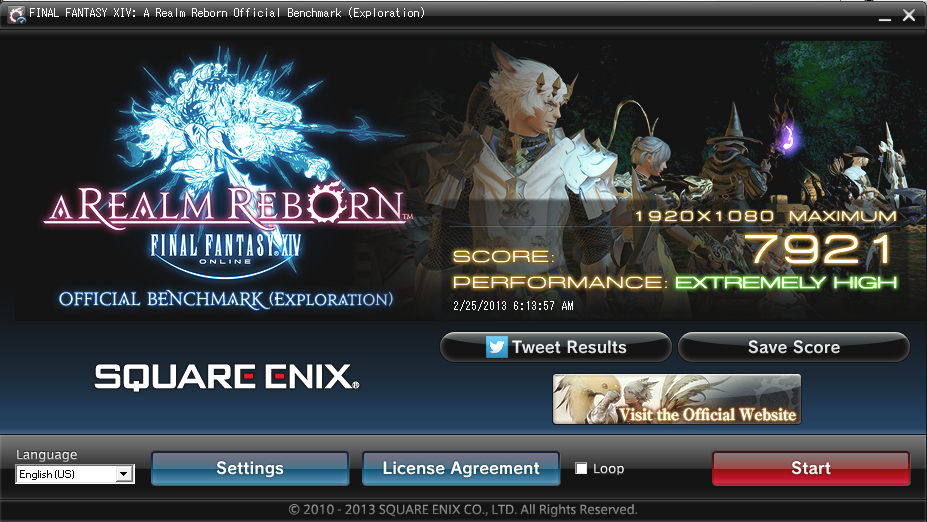
Edit: stock clocks on everything ATM, haven't gotten around to ocing anything yet.
-
2013-02-25 11:14 #345The Tower
- Join Date
- Apr 2005
- Posts
- 2,160
- BG Level
- 7
- FFXIV Character
- Stromgarde Siren
- FFXIV Server
- Gilgamesh
- FFXI Server
- Siren

You sound like you have a card that OC's pretty well Kuro, you might want to try this if you're that bent on hitting 6k. It moves the upper limits on OC'ing.
http://forums.overclockers.co.uk/sho...php?t=18431335
-
2013-02-25 11:20 #346F5 Like A Boss.
- Join Date
- Sep 2005
- Posts
- 7,396
- BG Level
- 8
- FFXIV Character
- Kuroki Kaze
- FFXIV Server
- Sargatanas
- FFXI Server
- Quetzalcoatl
- WoW Realm
- Twisting Nether
I'll give that a shot when I'm at home. Thanks. XD
-
2013-02-25 15:03 #347

Sweaty Dick Punching Enthusiast
- Join Date
- Mar 2006
- Posts
- 7,968
- BG Level
- 8
- FFXI Server
- Ragnarok
If anybody is wondering what a 9000 score equates to:
20-35fps in town, 15-40 outside town in clusterfucks of people fighting squirrels. 60 if you face a wall though!
-
2013-02-25 15:17 #348VuittonGuest
yay first day of beta
-
2013-02-25 18:58 #349Relic Horn
- Join Date
- Mar 2012
- Posts
- 3,133
- BG Level
- 7
- FFXI Server
- Titan
Dammit this sucks, it should not be running this badly on maximum settings. Anyone able to to see a possible problem to raise my score? Especially the framerate.
FINAL FANTASY XIV: A Realm Reborn Official Benchmark (Exploration)
Tested on:2/25/2013 4:53:42 PM
Score:4964
Average Framerate:40.442
Performance:High
-Easily capable of running the game. Should perform well, even at higher resolutions.
Screen Size: 1920x1080
Graphics Presets: Maximum
General
-Improve overall graphic quality. : Enabled
-Disable rendering of objects when not visible. (Occlusion Culling) : Disabled
-Use low-detail models on distant objects to increase performance. (LOD) : Disabled
-Cache LOD data only when necessary. (LOD Streaming) : Disabled
-Smooth edges. (Anti-aliasing) : Enabled
-Increase transparent lighting quality. : Enabled
-Grass Quality : High
Shadows
-Use low-detail models on shadows to increase performance. (LOD) : Disabled
-Display : All
-Shadow Resolution : High: 2048 pixels
-Shadow Cascading : High
-Shadow Softening : High
Texture Detail
-Texture Filtering : High
-Anisotropic Filtering : High
Effects
-Naturally darken the edges of the screen. (Limb Darkening) : Enabled
-Blur the graphics around an object in motion. (Radial Blur) : Enabled
-Effects While in Motion : Display All
-Screen Space Ambient Occlusion : High
-Glare : Normal
Cinematic Cutscenes
-Enable depth of field. : Enabled
System:
Windows 7 Ultimate 64-bit (6.1, Build 7600) (7600.win7_gdr.120830-0334)
AMD Phenom(tm) II X6 1055T Processor
14335.180MB
AMD Radeon HD 6900 Series(VRAM 748 MB) 8.17.0010.1172
Benchmark results do not provide any guarantee FINAL FANTASY XIV: A Realm Reborn will run on your system.
FINAL FANTASY XIV: A Realm Reborn Official Website http://na.finalfantasyxiv.com
(C) 2010-2013 SQUARE ENIX CO., LTD. All Rights Reserved.
Tweet
http://sqex.to/ffxiv_bench_na #FFXIV Score:4964 1920x1080 Maximum AMD Phenom(tm) II X6 1055T Processor AMD Radeon HD 6900 Series
-
2013-02-25 23:30 #350Hay guyz, I was Shinebox but now I'm not!
- Join Date
- Jan 2006
- Posts
- 3,197
- BG Level
- 7
- FFXIV Character
- Don Katsu
- FFXIV Server
- Sargatanas
- FFXI Server
- Shiva
Update your video card drivers?
-
2013-02-26 00:42 #351Relic Horn
- Join Date
- Mar 2012
- Posts
- 3,133
- BG Level
- 7
- FFXI Server
- Titan
Everything is updated, not sure what else to do besides spending money and buying new hardware. Which is not something i feel like doing at this time. Originally Posted by Shinebox
-
2013-02-26 02:31 #352The Real Cookiemonster
- Join Date
- Jan 2007
- Posts
- 1,842
- BG Level
- 6
- FFXIV Character
- Dark Depravity
- FFXIV Server
- Sargatanas

Meh, unspecified delays on the Titan I ordered, testing the benchmark will have to wait :/
-
2013-02-26 14:25 #353Sea Torques
- Join Date
- Nov 2010
- Posts
- 717
- BG Level
- 5
- FFXIV Character
- Alkimi Asura
- FFXIV Server
- Ragnarok
- FFXI Server
- Asura
Not sure. From your specs it looks like it should be a lot higher anyway, considering I got close to that on a 3 year old PC with an i5 processor and 5800 series card. Originally Posted by myreality
-
2013-02-26 14:38 #354The Tower
- Join Date
- Apr 2005
- Posts
- 2,160
- BG Level
- 7
- FFXIV Character
- Stromgarde Siren
- FFXIV Server
- Gilgamesh
- FFXI Server
- Siren
Mooshy also wrote that he was having much lower than expected performance on an AMD Quad Core. There haven't been many results posted from AMD CPU users but the ones I have seen have all been posting very subpar numbers.
-
2013-02-26 15:30 #355I like turtles.
- Join Date
- Mar 2007
- Posts
- 294
- BG Level
- 4
- FFXIV Character
- Nadrojj Rolyatt
- FFXIV Server
- Balmung
- FFXI Server
- Unicorn
I'm having a strange issue. Running the game/benchmark on max is powering down my entire machine. I recently upgraded to a gtx660 and a new power supply. Setting it down to high settings the game runs fine but after about five minutes on max my machine just turns off. It's not over clocked, it's not over heating, seems strange the actual machine would power down and not just the game, the only time it's happening is when the machine runs the game. I took apart the case checked all the connections, cleaned all the fans, updated all the drivers everything seems right. Setting it down to high settings i can play for hours on end. I'm fine with playing it on high, I was just hoping to pinpoint the cause of the issue as I hope it doesn't start doing it on other settings.
Any thoughts?
-
2013-02-26 15:31 #356filthy liars!
- Join Date
- Jan 2006
- Posts
- 1,116
- BG Level
- 6
- FFXIV Character
- Deuce Angaar
- FFXIV Server
- Balmung
- FFXI Server
- Diabolos
Is it shutting off completely or is it blue screening and then shutting down?
-
2013-02-26 15:37 #357I like turtles.
- Join Date
- Mar 2007
- Posts
- 294
- BG Level
- 4
- FFXIV Character
- Nadrojj Rolyatt
- FFXIV Server
- Balmung
- FFXI Server
- Unicorn
Shutting off completely. No blue screen. After I took it apart I noticed that the surge protector that it was plugged into was pulled half out of the wall and was like wow I'm an idiot shit just wasn't plugged in. I started back up and played for 3 hours straight. Logged for a bit to take a shower got back in game and after five minutes it powered down completely again. So the surge protector couldn't have been it.
-
2013-02-26 15:49 #358filthy liars!
- Join Date
- Jan 2006
- Posts
- 1,116
- BG Level
- 6
- FFXIV Character
- Deuce Angaar
- FFXIV Server
- Balmung
- FFXI Server
- Diabolos
If it isn't blue screening then it might be an issue with your Power Supply. I know in your above post you said it was new, but sometimes they can start to go bad pretty early. If you have a spare PSU I would try using that assuming it can handle the new GFX card. What is the PSU model and brand by the way?
-
2013-02-26 15:53 #359the whitest knight u' know
- Join Date
- May 2006
- Posts
- 15,485
- BG Level
- 9
- FFXIV Character
- Miya Kai
- FFXIV Server
- Excalibur
Every single time I've had an issue with my system powering down unexpectedly or not powering on consistently, it was the power supply. Buy a hefty Corsair and kiss those problems goodbye.
-
2013-02-26 16:07 #360I like turtles.
- Join Date
- Mar 2007
- Posts
- 294
- BG Level
- 4
- FFXIV Character
- Nadrojj Rolyatt
- FFXIV Server
- Balmung
- FFXI Server
- Unicorn
This is what I recently picked up like two weeks ago:
http://www.newegg.com/Product/Produc...82E16817148041
I'll look into a new one. Thanks for the feed back guys.

