 XI Wiki


After finding out my new/old headsets weren't working with my PC I tried to figure out why, now for some reason the sound isn't playing. The computer says the speakers are working but they're not.
Things I've tried:
Uninstalling/Reinstalling drivers
Updating Drivers
Unplugging/plugging the cable back in
System Restore
Plugging the HD Audio cable in/out of the motherboard
Setting speakers as default
Any other ideas on what could be causing this?
- Navigation
Results 1 to 13 of 13
-
2010-12-15 06:24 #1Falcom is better than SE. Change my mind.

- Join Date
- Jun 2006
- Posts
- 17,291
- BG Level
- 9

Onboard sound detects speakers, but no sound from speakers
-
2010-12-15 07:16 #2Sandworm Swallows
- Join Date
- Jul 2008
- Posts
- 7,147
- BG Level
- 8
try this if you have WinXP (not sure if it works in vista/7 but maybe):
Run>type in services.msc>when the dialog box pops up under Services(local) scroll down to Windows Audio and make sure its status is 'Started', if it's not you'll have to start it manually, it should fix it. This happens every once in a while to my PC, I am not sure what causes it, but sometimes I have to start the sound manually this way.
-
2010-12-15 08:33 #3Falcom is better than SE. Change my mind.
- Join Date
- Jun 2006
- Posts
- 17,291
- BG Level
- 9
I was forcred to format/reinstall on this computer, triied my speakers, and then tried my brother's speakers to and to no avail. Does this mean my sound card is fried? ><
EDIT: Plugged my headphones in, they're on and the PC detects them as well, but no sound.
-
2010-12-15 08:50 #4Sandworm Swallows
- Join Date
- Jul 2008
- Posts
- 7,147
- BG Level
- 8
...did you try what I suggested? If so and the service was started then it might be fried. Although there might be a simpler explanation that you haven't tried yet.
-
2010-12-15 08:52 #5Falcom is better than SE. Change my mind.
- Join Date
- Jun 2006
- Posts
- 17,291
- BG Level
- 9
Just found the run command and they're both set on Started.
However if the sound card is fried, would that effect the front ports for headphones?
-
2010-12-15 08:59 #6Sandworm Swallows
- Join Date
- Jul 2008
- Posts
- 7,147
- BG Level
- 8
Yes, since all sound goes through your soundcard, if it's fried then you have no sound period. I don't know how your PC is set up but when I installed the parts to my PC I had to manually hook up the front port stuff to the motherboard, if yours isn't hooked up in front (it probably should be if you didn't put together your computer yourself) of course it wouldn't work... So, if all the cords are plugged in right, power is being supplied properly and software is all working , the only other problem could be the hardware I'd say. Are you sure nothing is checked as muted in the volume control panel?
-
2010-12-15 09:02 #7Falcom is better than SE. Change my mind.
- Join Date
- Jun 2006
- Posts
- 17,291
- BG Level
- 9
Well I'm going to take a look at the motherboard and pray to god something just fell loose.
EDIT: Everything seems fine. So I don't know what to think.
-
2010-12-15 09:13 #8My Little Ixion
- Join Date
- Aug 2007
- Posts
- 8,016
- BG Level
- 8
- FFXIV Character
- Olorin Bustyoas
- FFXIV Server
- Sargatanas
- FFXI Server
- Ramuh

Open up your A/V control panel to the Audio tab
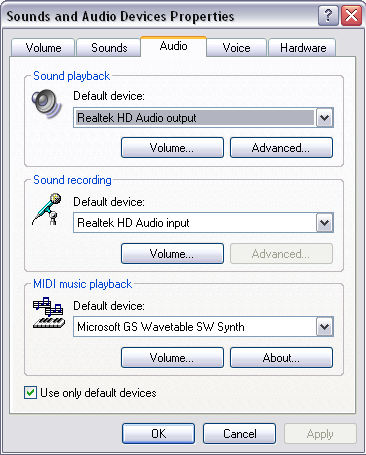 and make sure the playback device is set to use the correct device.
Here you'll see it's set to use the motherboard's built-in HD audio (usually Realtek or VIA). If you're using a separate sound card (or USB Audio) make sure it's selected for both playback and recording.
-
2010-12-15 09:22 #9Falcom is better than SE. Change my mind.
- Join Date
- Jun 2006
- Posts
- 17,291
- BG Level
- 9
Only device I have in my playback options is the speakers, and got that set to my default.
EDIT: The sound bars in the mixer react when I play MP3s
EDIT 2: Also if it is the motherboard will I have to buy thermal paste when I get my replacement for the CPU/Heatsink?
-
2010-12-15 18:09 #10Falcom is better than SE. Change my mind.
- Join Date
- Jun 2006
- Posts
- 17,291
- BG Level
- 9
Okay after getting off the phone w/ my brother he claims my soundcard is fine since it's intergrated to my motherboard (something I should have mentioned) since if it was only the motherboard I'd have more issues than just no sound. He believes the issue is my soundcard is picking up 2 devices (ATI High Definition Audio Device and Realtek High Definition Audio) or something is corrupted and I should do a full format of my HDD and start from scratch.
So would it be true my motherboard would have more issues than just sound if it was broken? Since I do have software to fully wipe my HDD if needed.
EDIT: Have speakers installed in both the front and back audio ports, and still nothing.
-
2010-12-16 11:58 #11Relic Shield
- Join Date
- Jul 2006
- Posts
- 1,664
- BG Level
- 6
- FFXI Server
- Sylph
why don't you just buy something like this?
http://www.google.com/products/catal...d=0CH0Q8wIwAw#
Or you could try your card in a different PC - bring it to a computer store and see if the card still works or not. Narrow down the list of what the problem could be.
-
2010-12-16 14:56 #12My Little Ixion
- Join Date
- Aug 2007
- Posts
- 8,016
- BG Level
- 8
- FFXIV Character
- Olorin Bustyoas
- FFXIV Server
- Sargatanas
- FFXI Server
- Ramuh
That might be it.. Try disabling the HDMI audio thing in your device manager and/or uninstall those drivers and see if that works. Originally Posted by Corrderio

-
2010-12-17 06:33 #13Falcom is better than SE. Change my mind.
- Join Date
- Jun 2006
- Posts
- 17,291
- BG Level
- 9
Well neither seemed to work. So I sent the motherboard back for a replacement.
Thanks for the help guys, but after trying what my brother suggested (Except going to Best Buy to have them "fix" it) decided that was the best course of action. Hopefully the new motherboard will fix my headset issues I had. if not I'll just make another thread on it since I really need to those.


Similar Threads
-
Building a PC for FFXIV with No Experience!
By briankym27 in forum TechReplies: 7Last Post: 2010-09-29, 18:36 -
No Sound When Using HDMI
By Knightmare in forum TechReplies: 4Last Post: 2010-01-24, 02:07 -
No sound effects in FFXi
By Deband in forum TechReplies: 4Last Post: 2009-09-18, 15:50 -
no sound ?
By Agi in forum TechReplies: 0Last Post: 2009-07-13, 11:15 -
No sound in ffxi
By Silenka in forum TechReplies: 9Last Post: 2009-03-12, 13:41 -
No Sound on Firefox or Internet Explorer
By Ryushii in forum TechReplies: 0Last Post: 2008-03-08, 17:53