XI Wiki


My video card is overheating, crashing, and causing a system reboot ever since the update. Constantly. Otherwise, I've been running the game since CE release at high resolution without any issues what-so-ever.
I have a warranty on my Vcard, but before I pay to UPS it back to Cyberpower for a replacement (tech support chalked it up as a faulty/overheating/failing Vcard) -- I'd like to know if anyone else is having video issues. If others are, I'll hold off. If I'm alone in these problems, than it didn't have anything to do with the update. I should note, I've updated to the latest DirectX drivers and my VCard drivers are also current.
Anyone
- Navigation
Results 1 to 20 of 30
-
2010-12-16 18:12 #1Bagel

- Join Date
- Nov 2004
- Posts
- 1,393
- BG Level
- 6
- FFXI Server
- Bahamut
- WoW Realm
- Drenden

Anyone else having graphics issues post-update?
-
2010-12-16 18:22 #2Cerberus
- Join Date
- Apr 2010
- Posts
- 473
- BG Level
- 4
- FFXIV Character
- Sunnlona Iyrnlohwyn
- FFXIV Server
- Excalibur

Not sure what model card you have but I am running an ATI 6870(Catalyst 10.10) and haven't had any problems since the update.
-
2010-12-16 18:48 #3Bagel
- Join Date
- Nov 2004
- Posts
- 1,393
- BG Level
- 6
- FFXI Server
- Bahamut
- WoW Realm
- Drenden
ATI Radeon HD 5700. I have a thermal display installed in my case, and the VGA temp sky rockets during FFXIV, from an avg temp of 32 C, to 41 C almost instantly, then forces a reboot shortly after the game gets very choppy. It's always ran absolutely smoothly prior to the update, which is why I have to consider that as a factor. It is certainly possible that my vcard itself is just a dud, I only got it in September when I ordered this rig from Cyberpower PC. They've offered to replace it, but I'd rather boot strap my way through easier fixes. I just dusted it. Currently 25 C at normal operation. If I ran the game, it'll go up to 40 degrees.
If noone else is experiencing any issues, I'll just go buy a temporary video card from Best Buy or wherever and return it after they UPS my replacement back to me. Was hoping it wasn't my card, to save myself the 30% restocking fee/UPS shipping charge.
-
2010-12-16 19:05 #4Relic Weapons
- Join Date
- Aug 2008
- Posts
- 325
- BG Level
- 4
 40 is ok, mine goes up to 100 before crashing, any VGA can take at least 60-80C.
 Originally Posted by Jerseyprophet

update your drivers, if doesnt work, reinstall windows (format)...
-
2010-12-16 19:07 #5Cerberus
- Join Date
- Apr 2010
- Posts
- 473
- BG Level
- 4
- FFXIV Character
- Sunnlona Iyrnlohwyn
- FFXIV Server
- Excalibur
It definitely doesn't sound like heat is your issue, my card idles at 41C and jumps to about 60C under load. I would run a stress test on the card and see if it crashes as well, it could be the vram. Also, what version of Catalyst drivers are you running because people have reported issues with 10.12 and this game. Lastly, SE has mentioned there is an issue with sound output set to > 48khz causing crashing atm.
* If you are experiencing issues with starting the client, please adjust your "Sample Rate" to a rate lower than 48kHz through the following method:
Control Panel > Sound > Speakers > Properties > Advanced
-
2010-12-16 22:49 #6Bagel
- Join Date
- Jan 2005
- Posts
- 1,410
- BG Level
- 6
- FFXIV Character
- Rui Seiken
- FFXIV Server
- Jenova
- FFXI Server
- Bahamut
changing the sound didn't work for me. at first, i was getting these lovely issues after the update on my laptop (desktop works fine)
Spoiler: show
so then i rolled drivers back, and game works fine, but i lose the ability to switch graphics on the fly without plugging in my system, so i downloaded the drivers from acer's website and updated which gave me the ability to switch cards back, but then the game just crashes before i even get to the login screen.
-
2010-12-17 03:53 #7A. Body
- Join Date
- May 2008
- Posts
- 4,167
- BG Level
- 7
- FFXIV Character
- Minerva Kissaki
- FFXIV Server
- Gilgamesh
- FFXI Server
- Leviathan
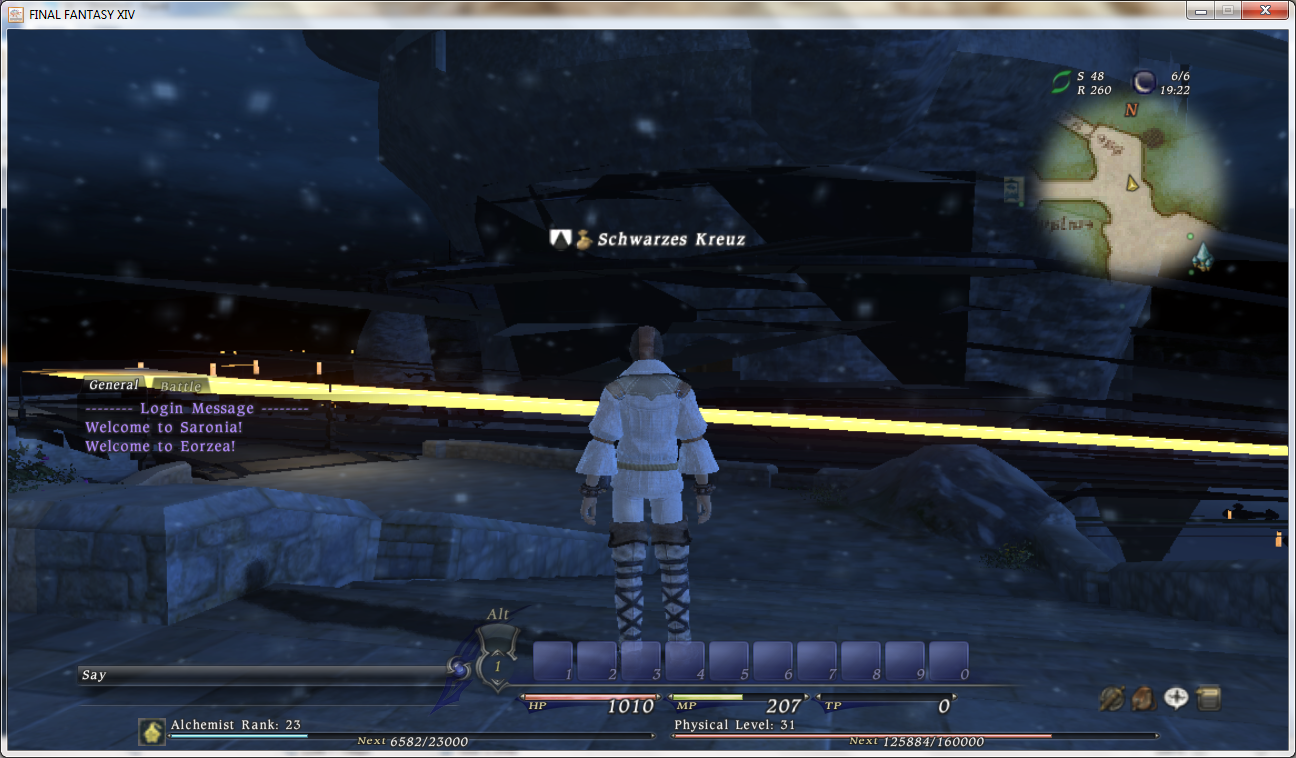
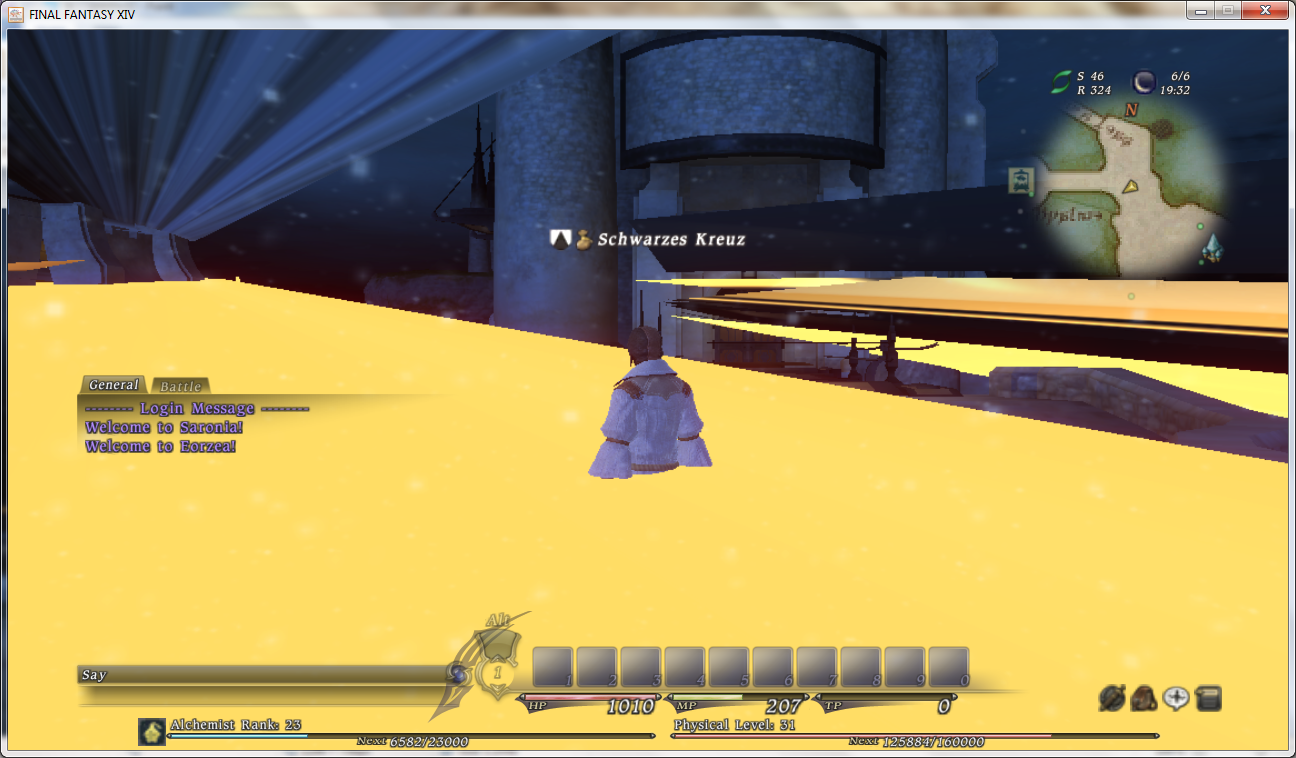
Only happens in LL. Only way i can fix it is zoning into the market wards a few times. Finally fixes the textures. This has been happening since oct.
http://i3.photobucket.com/albums/y97...FF14/cassi.jpg
http://i3.photobucket.com/albums/y97...x/blackout.jpg
Gotta admit tho it makes Cassi look 100x better
-
2010-12-17 03:53 #8Melee Summoner
- Join Date
- Apr 2008
- Posts
- 24
- BG Level
- 1
I've got a 5750 radeon as well. During load it will max out at 60C, which is fine. I don't have any hard reboots or crashes either D:
-
2010-12-17 08:06 #9Bagel
- Join Date
- Jul 2005
- Posts
- 1,297
- BG Level
- 6
- FFXIV Character
- Trent Reznuh
- FFXIV Server
- Balmung
- FFXI Server
- Sylph


on a 5850 and the game ran MUCH WORSE after this patch until i rolled back to an older catalyst revision. i just skimmed the thread so sorry if you said you did that already but try 10.11 or older and see if it helps. i know many others have said 10.12 is working fine for them though.
-
2010-12-17 08:07 #10Chram

- Join Date
- Nov 2007
- Posts
- 2,622
- BG Level
- 7
I had the water glitch out on the ferry in one spot, it had weird black lines like it had a black square merging with the water surface, similar to those yellow artifacts on that screenshot above me. Never had that issue before update.
-
2010-12-17 12:16 #11Mithra Ero-Sensei
Sex Manthra
- Join Date
- Nov 2005
- Posts
- 10,157
- BG Level
- 9
- FFXIV Character
- Erosensei Gulkeeva
- FFXIV Server
- Gilgamesh
- FFXI Server
- Cerberus
- WoW Realm
- Magtheridon


Its the game itself, if you idle in say... a city with the snow falling, if you look at taskmanager you'll see FFXIVboot.exe or whatever slowly raise in size.
Game starts for me at about 300-400MB, after 4-6 hours (especially in a city now) it will be nearing 800MB-1gb. After about 1.5GB-1.8GB the game crashes/PC crashes (happens much faster in a city, this also depends on graphic settings)
Its always been like that, the longer you leave the game on logged in, it just happens alot faster now because of how graphic intensive the snow/tree's are in towns.
This all depends on your graphic settings also, i run mine on max~
-
2010-12-17 12:51 #12Nidhogg
- Join Date
- Feb 2008
- Posts
- 3,790
- BG Level
- 7
- FFXIV Character
- Tsugaru Mifra
- FFXIV Server
- Hyperion
- FFXI Server
- Ragnarok
Yeah the game has a pretty large memory leak.
-
2010-12-17 13:10 #13AtlasionGuest
What is a memory leak exactly? I've had issues with FFXIV crashing every so often since I got it (other games crash sometimes too, though).
I have a GeForce GTX 460, noticed it crashing a bit more often in cities now. Also a lot more lag.
-
2010-12-17 13:14 #14Chram
- Join Date
- Aug 2007
- Posts
- 2,699
- BG Level
- 7
- FFXIV Character
- Nours Sruon
- FFXIV Server
- Moogle
- FFXI Server
- Fenrir

It is memory not released by an application, slowly growing until it caps the system and crashes in one way or another.
-
2010-12-17 13:55 #15Cerberus
- Join Date
- Apr 2010
- Posts
- 473
- BG Level
- 4
- FFXIV Character
- Sunnlona Iyrnlohwyn
- FFXIV Server
- Excalibur
It isn't so much a memory leak as the game is just a memory sponge. If it were a leak then even when you exited the program you would not get that RAM back. What this game does is just keep sucking up more and more RAM without releasing it. I know that is what everyone is really referring too, just a minor peeve of mine.
-
2010-12-17 13:58 #16Relic Weapons
- Join Date
- Mar 2007
- Posts
- 335
- BG Level
- 4
Me as well, same card. I've been having many annoying performance issues since launch that seem to be getting worse (dropped/skipped frames arrrrrrrrrg). After the recent patch the game has been completely crashing as well which didn't happen before. Originally Posted by Atlasion
-
2010-12-17 15:05 #17Bagel
- Join Date
- Nov 2004
- Posts
- 1,393
- BG Level
- 6
- FFXI Server
- Bahamut
- WoW Realm
- Drenden
Ok. I ran an HD movie on highest resolution all night long while I was asleep (sound/monitor off). The computer was still purring like a kitten in the morning. CPU temp was 33 C, HDD 25, VGA 25. According to my thermal display on the front of the case anyway.
Now, I ran FFXIV. Played smoothly for an hour or two. At times, the game got laggy/skipping - and low and behold, the thermal display showed a steady increase of VGA temp -- 33, 35, 37, 39, 41 - System shut off.
Turned it back on. Everything normal. Played the game for another 30 mins. SAME exact thing. I can set my watch to it.
So I downloaded a stress test. While my display said 41, the software measured my vcard temp at 120 C. So...when it says 41, is it actually 120? And why would a vcard overheating shut off a computer, wouldn't it just restart?
I'm going to BestBuy now to buy a new vcard and test it.
-
2010-12-17 15:07 #18Mithra Ero-Sensei
Sex Manthra
- Join Date
- Nov 2005
- Posts
- 10,157
- BG Level
- 9
- FFXIV Character
- Erosensei Gulkeeva
- FFXIV Server
- Gilgamesh
- FFXI Server
- Cerberus
- WoW Realm
- Magtheridon
The video card won't matter, it is what goes into memory. This all will depend on your graphics settings causing the system to load a ton of stuff, and that stuff just sits there... forever... building up over time. The snow/tree's are "massive amounts of info" and it just keeps building up. Once the game hits its limit (which is nearing 1.8GB) it will either crash, or your system crash.
Lowering graphic settings (aka loading less into memory since your visually seeing less) will slow this inevitable crash from happening. it isn't the video cards fault at all, its pretty much the games for just loading and holding the entire world of eorzea you see in memory.
-
2010-12-17 15:19 #19Bagel
- Join Date
- Nov 2004
- Posts
- 1,393
- BG Level
- 6
- FFXI Server
- Bahamut
- WoW Realm
- Drenden
Originally Posted by Gulkeeva
Gulk, if this fixes my issue and you saved me from the 30% Best Buy restocking fee I will personally send two mithras to your doorstep. I'm gonna try it now. NOTHING else causes my system to crash, and you make sense because it happens after playing for a while.
Edit: But why then would a video card stress test ALSO cause the same problem and shut me down? Wouldn't that indicate a bad video card/MoBo?
Edit 2: Lowered settings from high to standard. The game looks the same to me, but is 100% smoother, faster, less lag. Macros/Map/menu's, etc. are much quicker. But within 10 mins, Vcard went up to 41 C - and right before it was going to crash, I force closed FFXIV. Temp is lowering as we speak, no shut down. Its the game. But it never used to do this. I'm quite frustrated. I don't know what's happening or how to fix this.
-
2010-12-17 17:47 #20Mithra Ero-Sensei
Sex Manthra
- Join Date
- Nov 2005
- Posts
- 10,157
- BG Level
- 9
- FFXIV Character
- Erosensei Gulkeeva
- FFXIV Server
- Gilgamesh
- FFXI Server
- Cerberus
- WoW Realm
- Magtheridon
41C isn't very high, something must be wrong with the video card if its crashing at that temp O_o most video cards handle fine at the 60-65C range