 XI Wiki


The drivers actually never changed. It just happened to crash one time on start-up, doing nothing special in particular (and a normal shutdown with no problems/updates the session before).Originally Posted by Aangeliceus

I end up trying a reformat, and unfortunately the problem persisted through it. I will give the BIOS thing a shot, but I guess at this point it seems rather definite to be a hardware problem.
Thank you though for the help/ideas.
Unfortunately, I was dumb and didn't write down the BSOD error code (was in a rush and thought it might just be a one-time thing).
I did recall it being what looked like an NVIDIA driver though (saw 'nvs' and just hit restart). Of course, the one time I pass it off as nothing and rush it ends up being something.
And yeah, seems it may be the GPU. Thank you though.
- Navigation
Results 2281 to 2300 of 3426
Thread: Random Question Thread: Tech


-
2012-07-31 14:13 #2281Ruke

- Join Date
- Nov 2005
- Posts
- 3,972
- BG Level
- 7

-
2012-07-31 18:37 #2282Yoshi P
- Join Date
- Jun 2007
- Posts
- 5,144
- BG Level
- 8
- FFXIV Character
- Fitz Everleigh
- FFXIV Server
- Excalibur
When my wife goes through the start menu to put her computer to sleep, she keeps getting a blue screen and then it shuts down. I believe the screen says something to the effect of hardware is not properly connected, but it just started showing up a few weeks ago. If she does the sleep mode via her keyboard this doesn't happen. I don't believe it's happening on shutdown or restart either. Any ideas or would I have to have more detail about what the error that's causing the blue screen is?
-
2012-07-31 19:29 #2283
Sweaty Dick Punching Enthusiast
- Join Date
- Jun 2010
- Posts
- 437
- BG Level
- 4
- FFXIV Character
- Billy Bobe
- FFXIV Server
- Gilgamesh
- FFXI Server
- Leviathan
- WoW Realm
- Hyjal
So when I switch the Hard Drive I am currently using into my other PC it blue screens and restarts when windows starts to load.
Works fine again once I pop it back into this PC. What's wrong!?
-
2012-07-31 19:33 #2284listen!
- Join Date
- Apr 2011
- Posts
- 7,234
- BG Level
- 8
- FFXI Server
- Sylph
If you are trying to boot from the hdd, then that would be a driver problem. You can't just swap an hdd into another pc like that. Originally Posted by Bilopdop
-
2012-07-31 21:21 #2285
Sweaty Dick Punching Enthusiast
- Join Date
- Jun 2010
- Posts
- 437
- BG Level
- 4
- FFXIV Character
- Billy Bobe
- FFXIV Server
- Gilgamesh
- FFXI Server
- Leviathan
- WoW Realm
- Hyjal
Oh snap, I hope I didn't do any permanent damage.
What kind of steps do I need to take to swap the HDD? The old one from the other PC doesn't seem to start at all. Just stops at the start up screen.
-
2012-07-31 21:45 #2286listen!
- Join Date
- Apr 2011
- Posts
- 7,234
- BG Level
- 8
- FFXI Server
- Sylph
You didn't. Originally Posted by Bilopdop
You need to reformat, and reinstall windows.What kind of steps do I need to take to swap the HDD? The old one from the other PC doesn't seem to start at all. Just stops at the start up screen.
-
2012-07-31 23:00 #2287Relic Weapons
- Join Date
- Aug 2007
- Posts
- 304
- BG Level
- 4
- FFXI Server
- Sylph
- WoW Realm
- Mannoroth
Had to decide between here and Trade forum, but could anyone give a price-check on old PC parts? intel e8400 (Overclocked to 4ghz for a few months, never taken above 70c), corsair 2x1gb ddr2 800mhz, and gskill 2x2gb ddr2 800mhz. Neither of the ram were overclocked, just the processor.
Thanks for any help on that, I've tried googling around with the e8400, and couldn't really find anything. I know someone recently sold theirs on BG, but another asked the same question and didn't receive a resposne, hah.
-
2012-08-01 14:35 #228829 in magical dog years
- Join Date
- Mar 2008
- Posts
- 2,039
- BG Level
- 7
- FFXIV Character
- Jackson Junior
- FFXIV Server
- Excalibur
I've been looking around for info about this same thing, came up with this blog and seems a reasonable place to start: Originally Posted by Silos
http://audiojunkies.com/forum/blog/4...l-records.html
In fact, my recommendation to someone brand new to all of this and looking to experiment would be to scour thrift stores or pawn shops in search of a Technics SL 1200 direct-drive as their first table (pictured below). These are practically indestructible and when equipped with a nice cartridge can do a respectable job spinning wax. They will have a pitch adjustment with a built in strobe light to ensure proper speed and a no nonsense tone-arm that is a solid performer. A used one should set you back less than 75 bucks. I believe they are still in production and have been for decades. New models are about 500 dollars. When a model has been around that long, it is doing something right. My first "real" turntable was a Technics SL 1200.
Well, if you bought a used turntable from a thrift store or at a flea market, it is a safe bet you will need to buy a new cartridge. I'd recommend a Grado Black cartridge for those just starting out. They can be had for about 40 dollars or so from a variety of on-line dealers. Just Google "Grado Black" in quotations and you will find a source. You will need to determine if you need a P-mount type cartridge, or a standard mount. A standard mount will require small bolts to secure it to the head-shell (the cartridge will come with this hardware) and the P-mount just slides into place. You need to know the type before you order the cartridge. If you have a standard mount, be sure to notice the color of the small electrical leads and where they are plugged into the cartridge so you can put them back on the new cart in the same place. Write this down.
-
2012-08-02 19:16 #2289Ridill
- Join Date
- Feb 2007
- Posts
- 15,673
- BG Level
- 9
Been contemplating a video card upgrade, but I'm entirely out of the loop on what are good deals and worthwhile upgrades.
At the moment I'm using a Nvidia GTX285, which I believe is a PCI-E slot. My computer itself is a few years old, but been running Win7 64bit with 8gb RAM. If at all possible, any replacement should also have a means to feed video to a television via s-video or your standard RCA cable. Would prefer to not go over $150, but if something seems like a really good deal, I'd go up to $200.
-
2012-08-03 07:56 #2290Banned.

- Join Date
- Oct 2007
- Posts
- 533
- BG Level
- 5

Now that Windows 8 has been released to manufacturers and is available on torrent sites already, will I be able to install it now and just pay for a legit code when it is released? I will want pro 64 bit
-
2012-08-03 09:24 #2291Ze NinjaSYXX
- Join Date
- Feb 2007
- Posts
- 11,899
- BG Level
- 9
- FFXIV Character
- Nitsuki Syxx
- FFXIV Server
- Gilgamesh
- FFXI Server
- Ragnarok


Question is... Can you play games on windows 8?
-
2012-08-05 15:16 #2292
SASSAGE KING OF DA WORLD
cheap hawks gay
- Join Date
- Sep 2007
- Posts
- 26,424
- BG Level
- 10
Going to be moving soon and going to need a new cable/internet package, trying do decide between buying my own modem or just renting one. Anyone have any recommendations for Docsis 3.0 modem?
-
2012-08-05 15:28 #2293alsohawks
ALL YOU YOUNG HACKEY
PLAYERS OUT THERE
- Join Date
- Jul 2009
- Posts
- 5,960
- BG Level
- 8
I think the internet has beat-off to the Motorola SB6120 and 6121 for a long time now. I think the 6121 is just a change to the casing so the 6120 might be found for cheaper since it's being phased out.
-
2012-08-05 18:36 #2294BEAHCAT
BOSTON'S FINEST
- Join Date
- Jun 2007
- Posts
- 6,634
- BG Level
- 8
- FFXIV Character
- Mith Lothaire
- FFXIV Server
- Gilgamesh
- FFXI Server
- Phoenix
- WoW Realm
- Cenarius
 I've had http://www.bestbuy.com/site/Motorola...&skuId=2836657 Originally Posted by Callisto
for the past 5 months..... bought it on sale for $70 though. No issues with it at all, was a easy setup.
-
2012-08-06 18:23 #2295Fake Numbers
- Join Date
- Jun 2007
- Posts
- 77
- BG Level
- 2
- FFXI Server
- Bismarck
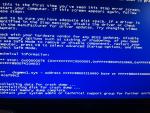
Still having an issue with my PC, although it seems to be only while gaming now.
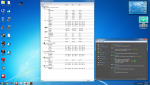
Actually got an error this time (pic below), which I usually don't get. Usually my screen just goes black, then the tower auto-restarts with no warning. I am at a complete loss as to what is wrong. Someone suggested PSU, but I have worries its my video card. I have a ATI Radian 4870 HD X2, runs up to 85C when under load. That seems hot from what I've heard, but I also heard these cards tend to run a bit hot. All other temps seem normal.
Any suggestions would be helpful, was hoping to limit it down to something specific instead of trial and error. Second pic is from me gaming after an hour, if it helps.
-
2012-08-06 22:49 #2296She Shoots For The Stars
- Join Date
- Aug 2009
- Posts
- 1,669
- BG Level
- 6
- FFXIV Character
- Elizara Paksenarrion
- FFXIV Server
- Excalibur
- FFXI Server
- Quetzalcoatl
Zim; two things.
1. Make sure your vid card fan is spinning. Same with your psu fan. (Use ATI's driver thingy to tell with ATI; Speccy can tell you anything else, as well as that.)
2. Pop the case and make sure your computer doesn't have err..grunge/lint and dust bunnies in it. Clean it out if it does with the canned air. (If you have to do that, resist the temptation to get the vaccum! I've read vaccum cleaners used on the inside of a PC can short it out; I wouldn't take the risk if I were you and save the fan for vacuuming off the outside of the case.) I lose more fans to grunge/dust bunnies than you'd believe when I forget to get out the canned air every 6 months or so; I lost a PSU fan to grunge and it was crashing a lot.
I had something similar when my vid card was starting to crap out and my psu fan was going out at the same time. BTW, I did a search on that particular *.sys file; it is very likely your video card crapping out on you/the vid card fan is covered in yuccky stuff/lint and is clogging it, if this just suddenly started. That error is specific to video card lockups/video driver lockups according to MS. Here's the reference..
If that don't solve it I don't know what to say, I'm not that familiar with windows 7, which is what I see you're running.
-
2012-08-06 23:48 #2297Old Merits
- Join Date
- Nov 2009
- Posts
- 1,245
- BG Level
- 6
- FFXI Server
- Shiva
OK, so couple weeks ago I managed to drop my old laptop. It worked fine for several hours afterward, but the next time I booted it gave an error and shut down.
What I'd like to do is hook the hard drive up to my new laptop and pull some files if possible (would like to avoid going to a repair shop)
HP pavilion laptop, windows 7 64 bit
Is this possible? I have an external hard drive if needed, not too sure on all the cables i have around. I can boot the old laptop and pull the error code if that will help more.
Thanks
-
2012-08-06 23:58 #2298alsohawks
ALL YOU YOUNG HACKEY
PLAYERS OUT THERE
- Join Date
- Jul 2009
- Posts
- 5,960
- BG Level
- 8
It depends on how old it is as there are potentially two kinds of connections it could be; PATA or SATA. If you know the specific model or have a service tag it's not hard to find. Then it's just a matter of connecting it to an enclosure, you won't be able to swap the hard drive with your new laptop's and get the files, though, you need to connect the enclosure with the old hard drive to the new laptop and you'll be able to use it just like any other external hard drive.
For just popping hard drives in to do what you're saying, I've used something like this before: http://www.newegg.com/Product/Produc...82E16817153071
It's different from what a normal external hard drive enclosure would look like because it's meant more for popping them in and out than leaving in there to use. That wouldn't be the right type if you have a PATA hard drive in the old laptop, though.
-
2012-08-07 08:04 #2299Old Merits
- Join Date
- Nov 2009
- Posts
- 1,245
- BG Level
- 6
- FFXI Server
- Shiva
Great, thanks for the advice!
-
2012-08-07 08:38 #2300Fake Numbers
- Join Date
- Jun 2007
- Posts
- 77
- BG Level
- 2
- FFXI Server
- Bismarck
Video Card fan is absolutely spinning, and the computer is very clean. Was hoping to limit it down to a specific issue instead of buying and replacing parts. Problem is the error is so random, its hard for me to replicate. Had my pc crash twice within 5 min last night, then work for the next 3 hours. Originally Posted by Elizara
Anyways, thanks for the tips. My friend is sending me an older crappy video card to test out, so hoping I can either pin point it or rule it out.
Also on my second crash, it tried to restart but failed (nothing ever came up). Had to hard shutdown and reboot. Got some alert that BIOS settings couldn't be loaded and it was going to reset to factory settings. I am thinking that is due to the hard reboots while loading or running, but thought I'd throw it out there.


