XI Wiki

No need for lube but keep them dust free as much as possible to minimize the noise
- Navigation
Results 2341 to 2360 of 3426
Thread: Random Question Thread: Tech


-
2012-08-24 19:54 #2341Banned.


- Join Date
- Oct 2006
- Posts
- 10,115
- BG Level
- 9

Re: Random Question Thread: Tech
-
2012-08-24 20:09 #2342Salvage Bans
- Join Date
- Sep 2008
- Posts
- 955
- BG Level
- 5
- FFXI Server
- Ragnarok

I cleaned it like a week ago (normally twice a month). Then a few days ago this grinding noise started, it was still rather dust free from the last cleaning but cleaned it again just to be sure. It hasn't made a sound like this in the 2 years I've had it, even when it was rather dusty
-
2012-08-24 20:36 #2343Banned.
- Join Date
- Oct 2006
- Posts
- 10,115
- BG Level
- 9
One of the fans might be on its way to transistor heaven, or maybe something is stuck inside. You do clean your stuff with compressed air right?
-
2012-08-24 20:54 #2344Salvage Bans
- Join Date
- Sep 2008
- Posts
- 955
- BG Level
- 5
- FFXI Server
- Ragnarok
I do clean it with compressed air. Thinking of just replacing the fan on it. Looks a lot easier than I thought as I can access the screws from the top, doesn't look like I'll need to take the whole cooling unit off. Just need ti find out what fan to replace it with
Edit: Also is it normal for a GPU to run at 70-90% but only get 30-40fps? Possible cpu bottleneck?
-
2012-08-28 10:03 #2345
One of our lab computers uses Raid 1 and recently had a quasi-double HDD failure. For some reason one of the drives won't rebuild and won't boot, but does seem to have all of the data still available and files uncorrupted.
I made a backup of the quasi-working drive and bought 2 new HDDs, but now I'm at a loss for what to do to restore the Raid 1. I formatted one of the new harddrives (NTSF, one partition) and used the .bkf file to restore the files to it from the previous drive. Then when I plugged it in, the computer didn't detect it as a Raid volume. It asked me if I wanted to try and repair it so I said yes, but it didn't work. How do I replace HDDs in a Raid array if I have all the files but can't do a rebuild from a working drive?
Do I use something like this: http://www.miray.de/products/sat.hdclone.html ?
-
2012-08-28 11:43 #2346Salvage Bans
- Join Date
- Jun 2011
- Posts
- 927
- BG Level
- 5
- FFXI Server
- Sylph
I know IE is every ones favorite web browser but what do you guys think is the best/fastest/safest?
-
2012-08-28 12:12 #2347Ruke
- Join Date
- Nov 2005
- Posts
- 3,972
- BG Level
- 7
I'm all about Firefox with AdBlock and NoScript addons, certainly among the safest... though perhaps annoying for some people (especially if not so technically inclined).
-
2012-08-28 12:15 #2348True skill only comes from macro switching all your e-peen gear thru 10 pages
- Join Date
- Sep 2007
- Posts
- 4,740
- BG Level
- 7
- FFXI Server
- Quetzalcoatl
Bestest would be either Firefox or Chrome. Fastest to me has always been Opera although not true for others (this new update for Firefox seems pretty fast). Safest would be Chrome and Firefox (although I think Chrome has a slight advantage). The main four that I suggest are firefox/chrome/IE/Opera. Everything else is just meh. In reality tho it really doesn't matter (to some extent) which browser you use. If you practice safe browsing habits then you'll be fine for the most part.
-
2012-08-28 14:09 #2349Some RAID controllers write special headers to the HDDs to recognize them as "their" drives, so you can't use any form of "low-level" restore like writing an image back to the disk. Boot from a CD/DVD and copy the files from your backup back, but that will probably not work since the bootloader is missing this way... Re-install the OS fresh and then restore backup might work.
 Originally Posted by Byrthnoth

-
2012-08-28 15:24 #2350
FFFFF
-
2012-08-28 18:40 #2351
SASSAGE KING OF DA WORLD
cheap hawks gay
- Join Date
- Sep 2007
- Posts
- 26,424
- BG Level
- 10
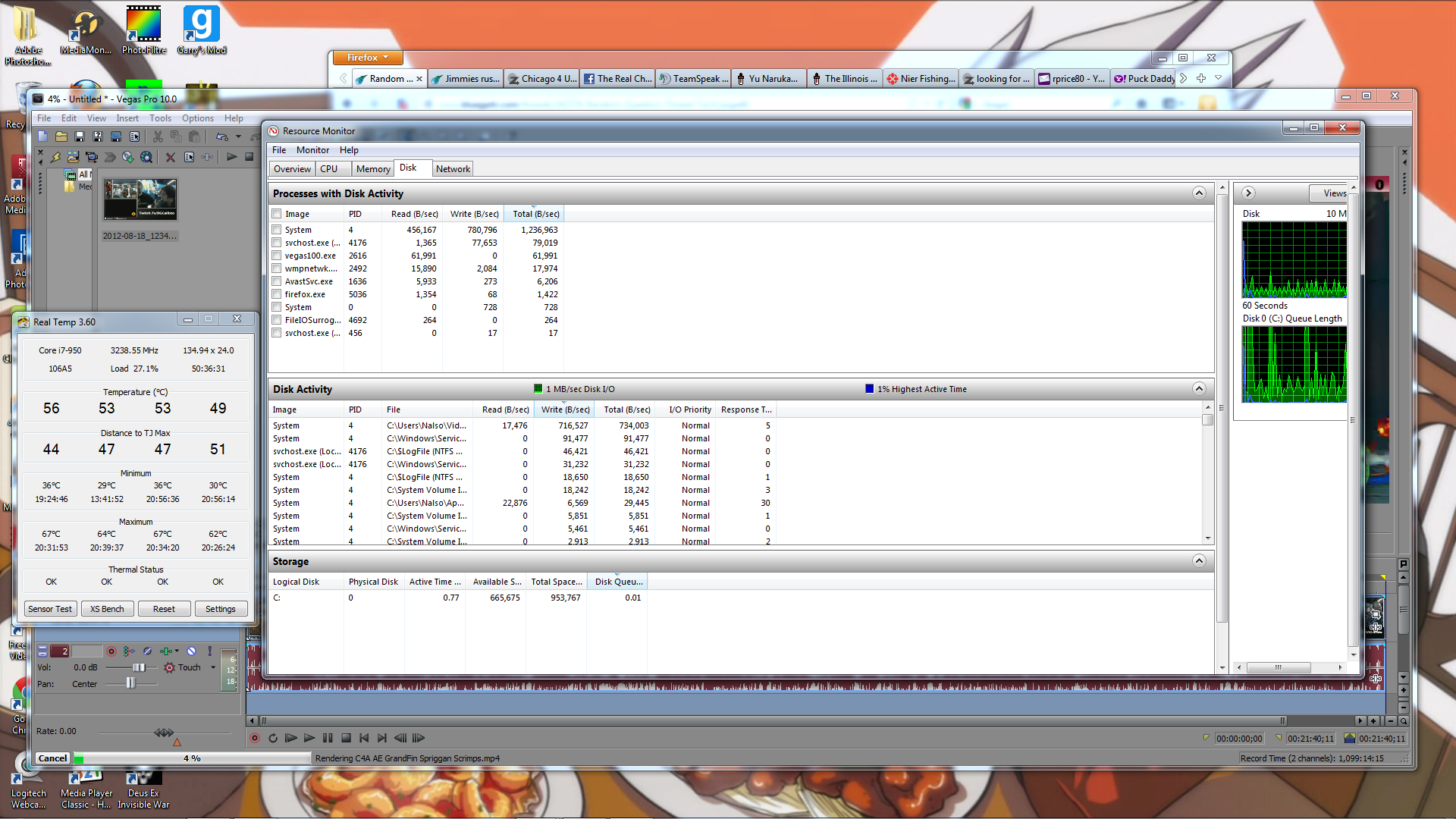
I'm currently in the middle of rendering some video in Vegas, and other parts of my PC are experiencing a noticeable lag, like yt videos hitch, when I scroll up and down the page on Firefox it'll skip for a second, while I'm typing right now the input is displaying kind of staggered...looking at my resource monitor and such, the only part of my system that seems to be remotely stressed is my memory, CPU is at 30% tops, GPU at 5%, RAM at 66%~. Is that something that would actually cause this? Just trying to determine what I need to look into upgrading, I was going to get a new GPU next but this is a little annoying.
-
2012-08-28 19:44 #2352BG's most likeable Québécois
Pens win! Pens Win!!! PENS WIN!!!!!
- Join Date
- Sep 2007
- Posts
- 37,887
- BG Level
- 10

 Safest way is not to go on the web Originally Posted by Aylee
But not the most practical
-
2012-08-28 19:56 #2353listen!
- Join Date
- Apr 2011
- Posts
- 7,234
- BG Level
- 8
- FFXI Server
- Sylph
What's hdd activity look like? 30% cpu usage while rendering video sounds off. Unless you have it set not to, that should generally max out your cpu, unless something else is holding it back. Originally Posted by Callisto
-
2012-08-28 20:39 #2354
SASSAGE KING OF DA WORLD
cheap hawks gay
- Join Date
- Sep 2007
- Posts
- 26,424
- BG Level
- 10
What's the best way to check HDD usage?
-
2012-08-28 20:42 #2355True skill only comes from macro switching all your e-peen gear thru 10 pages
- Join Date
- Sep 2007
- Posts
- 4,740
- BG Level
- 7
- FFXI Server
- Quetzalcoatl
right click task bar > Task Manager > Resource Monitor (performance tab) > Disk tab Originally Posted by Callisto
-
2012-08-28 20:52 #2356
SASSAGE KING OF DA WORLD
cheap hawks gay
- Join Date
- Sep 2007
- Posts
- 26,424
- BG Level
- 10
During rendering:
Spoiler: show
Hardware:
i7-950
6GB Corsair Dominator 1600 Cas8
1TB 7200 Caviar Black
GTX460
video is 768x432 if that matters
-
2012-08-29 10:56 #2357BG's most likeable Québécois
Pens win! Pens Win!!! PENS WIN!!!!!
- Join Date
- Sep 2007
- Posts
- 37,887
- BG Level
- 10
I got a problem with my Ex and i need to send her a email with a REad receipt so she can get her stuff
Problème is when i send one on my GMAIL it doesnt ask me to send a read receipt
She is on Yahoo, is there a way to make sure she receive the options to send me a read receipt?
Thanks
-
2012-08-29 17:42 #2358BG's most likeable Québécois
Pens win! Pens Win!!! PENS WIN!!!!!
- Join Date
- Sep 2007
- Posts
- 37,887
- BG Level
- 10
Random Question Thread: Tech
Also gave me dad an old hp printer that can print color or black
At home was working fine but at my dads it refuse to print in color
Got the official driver from hp and in the settings it says print color and the cartridge are full
Both my system and dads system are windows 7 64bits
Any help?
-
2012-08-30 10:03 #2359A. Body
- Join Date
- Nov 2005
- Posts
- 4,315
- BG Level
- 7
- FFXI Server
- Leviathan

I've usually seen that happen using parallel to USB adapters and stuff. In the device preferences, there's an option for Device Type that you can set to color to force it (pictures here). Usually fixed it for me.
-
2012-08-30 13:27 #2360BG's most likeable Québécois
Pens win! Pens Win!!! PENS WIN!!!!!
- Join Date
- Sep 2007
- Posts
- 37,887
- BG Level
- 10
Found my problem
Guess i iddnt had the exact driver lol