 XI Wiki

K will try that thanks
- Navigation
Results 2481 to 2500 of 3426
Thread: Random Question Thread: Tech


-
2012-10-02 06:59 #2481BG's most likeable Québécois

Pens win! Pens Win!!! PENS WIN!!!!!
- Join Date
- Sep 2007
- Posts
- 37,887
- BG Level
- 10


-
2012-10-06 17:38 #2482BG's most likeable Québécois
Pens win! Pens Win!!! PENS WIN!!!!!
- Join Date
- Sep 2007
- Posts
- 37,887
- BG Level
- 10
Looking fora good and not too pricey HDMI splitter
Have 3 HDMI on my TV atm and they are all full and i will need a 4th slot for the future WII U
-
2012-10-06 21:22 #2483Ridill
- Join Date
- Dec 2006
- Posts
- 9,727
- BG Level
- 8
- FFXI Server
- Asura

What is foreground data when it comes to the droid razr's browser thing? Out of nowhere, the data usage went from 10 mg to 1.5gb in a day and it says it's mostly foreground data?
-
2012-10-06 21:42 #2484Relic Shield
- Join Date
- Jul 2006
- Posts
- 1,857
- BG Level
- 6
Just for an update: Got a new copy of Windows 7 Home Premium 64 bit with SP1 in the mail today, put it on the freshly-formatted USB stick and installed it on this computer without changing anything, and it now installs all the updates with no problems and has yet to give me any hint of instability (Though I'm looking at many hours of FFXI updates before I can verify stability with FFXI). Originally Posted by Weeks

-
2012-10-07 18:00 #2485Sea Torques
- Join Date
- May 2010
- Posts
- 718
- BG Level
- 5
- FFXI Server
- Ragnarok
Random Question Thread: Tech
Not sure if this the right place to ask but I got an iPhone a few months back was wondering what people use iCloud for. I understand what it does but at the moment I don't use it for anything and was just wondering what other people use it for or is it not really worth using?
-
2012-10-08 13:38 #2486E. Body
- Join Date
- Oct 2007
- Posts
- 2,001
- BG Level
- 7
playing with visual styles
found out i couldn't browse folders when saving or opening stuff sometimes. switched back to aero and still had the problem.
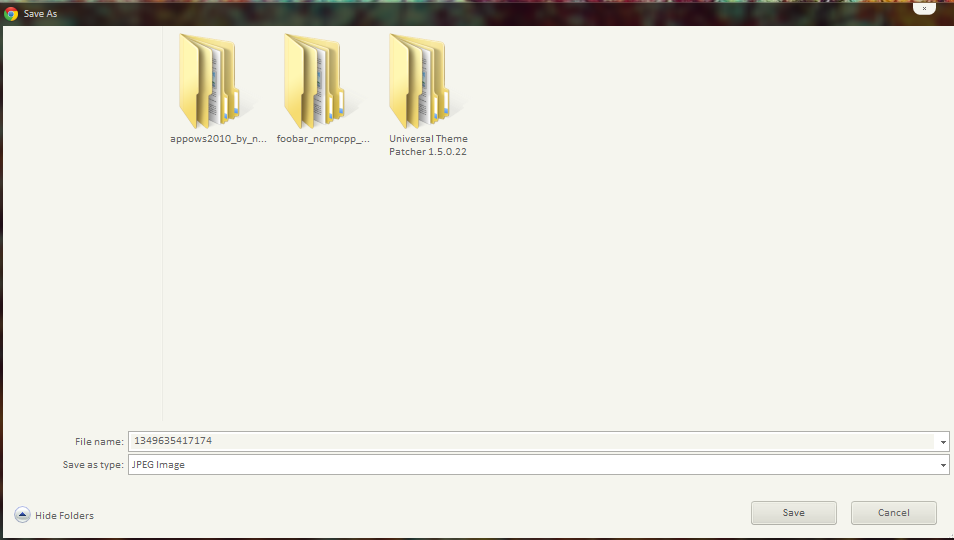
anyone have an idea on what's causing the problem?
-
2012-10-08 14:07 #2487alsohawks
ALL YOU YOUNG HACKEY
PLAYERS OUT THERE
- Join Date
- Jul 2009
- Posts
- 5,960
- BG Level
- 8
Normally that happens sometimes when I've used a patcher that runs in memory instead of actually patching the system files, but that wouldn't be the problem assuming you used Universal Theme Patcher that's listed in the image. Have you tried switching it to Windows 7 Basic or Windows Classic and then back to Aero in the Personalization menu? If that doesn't work then the theme files for Aero might've been deleted or replaced. Did you use any other tools/apps?
-
2012-10-08 14:32 #2488E. Body
- Join Date
- Oct 2007
- Posts
- 2,001
- BG Level
- 7
tried basic and classic, still no go
i think i tried bblean but deleted it not too long after
edit: nvm, got it, had to do run some scan command and then repatch with the universal theme patcher, fixed some other problems too!
-
2012-10-09 10:19 #2489Relic Horn
- Join Date
- Dec 2007
- Posts
- 3,411
- BG Level
- 7
- FFXIV Character
- Purrrfect Lee
- FFXIV Server
- Hyperion
- FFXI Server
- Cerberus

Anyone used Any Video Converter to recode movies recorded by afterburner? It reads the movies as being 30fps (which they are) but it reports the length shorter than it really is. When I play the video in the preview it plays at the right pace but the time slider goes slower than the time really is so it finishes at the end but reports a shorter time. When it encodes the output is the shorter, incorrect length but its the full video, so it plays faster than it should. Any ideas?
-
2012-10-09 22:14 #2490Sea Torques
- Join Date
- May 2010
- Posts
- 718
- BG Level
- 5
- FFXI Server
- Ragnarok
Random Question Thread: Tech
I am looking at getting a new desktop and I know building one can be cheaper etc, but I have never done that nor do I really have time to do so.
So pretty much what would be a good desktop to buy for about $500? Been a while since I bought a new pc is that not enough. I am really just looking to do basic stuff plus play some ffxi but not really any other games.
-
2012-10-10 06:16 #2491Black Belt
- Join Date
- Nov 2006
- Posts
- 5,703
- BG Level
- 8
- FFXIV Character
- Adajer Vonte
- FFXIV Server
- Gilgamesh
- FFXI Server
- Asura
- WoW Realm
- Tichondrius

My optical drive makes this weird noise when i power on my pc. It kinda sounds like it is grinding or trying to spin the disk inside. Does it briefly every power on. Any idea hat it is? (And it is the optical drive. I unplugged it and powered on and didn't hear the noise.) It is a Lite-on iHAS224.
-
2012-10-10 11:27 #2492
Has is started doing it just recently or has it been that way all the time?
It's normal for CD/DVD/BD drives to produce certain noises when you power on your system, they move the lens, rotation motor and the slide it rests on for adjustment and self-test reasons, and probably also to see if there's a disc present.
-
2012-10-10 12:37 #2493Ruke
- Join Date
- Nov 2005
- Posts
- 3,972
- BG Level
- 7
~$500 can definitely build you a decent PC, but it depends a good deal on what you already have. Originally Posted by Gun-it
Do you also need a monitor, speakers, keyboard, mouse, and/or operating system? Those components can easily add up to a large chunk of your $500 budget, which would make it more difficult to fit a decent build into the budget.
A sample build I rushed to put together:
http://pcpartpicker.com/p/jVPg
Almost $500 on the button! (although some mail-in rebates and promotions that expire soon)
But that's a decent enough build that will easily run FFXI, and even some more modern games on decent settings. Others can feel free to adjust it from there, since I rushed a bit, but I think it's a solid setup to start with.
-
2012-10-10 12:46 #2494listen!
- Join Date
- Apr 2011
- Posts
- 7,234
- BG Level
- 8
- FFXI Server
- Sylph
Single channel ram Originally Posted by RKenshin

-
2012-10-10 13:48 #2495Black Belt
- Join Date
- Nov 2006
- Posts
- 5,703
- BG Level
- 8
- FFXIV Character
- Adajer Vonte
- FFXIV Server
- Gilgamesh
- FFXI Server
- Asura
- WoW Realm
- Tichondrius
Yes, there is a disc present. I will try later on without a disc. It is a new drive.
-
2012-10-10 14:13 #2496Old Merits
- Join Date
- Dec 2007
- Posts
- 1,232
- BG Level
- 6
 http://pcpartpicker.com/p/jWel with current gen parts Originally Posted by RKenshin
Could try entering BIOS and changing the boot order as it might be that the PC is trying to boot off the DVD, although it's been a while since I had one in my PC (let alone booted off it) so it might be what Niya said and be doing it regardless of boot order so long a disc is in the drive. Originally Posted by Adajer
-
2012-10-10 15:53 #2497
It's not a matter of whether there is a disc in the drive or not, those initialization noises always come. I haven't put a disc in any of my 2 drives for months and they always scratch/screech/growl around on every boot. Boot order doesn't matter either, they ALWAYS do it ^^
As long as the noise doesn't vary or get louder/quieter on each boot everything should be fine.
-
2012-10-10 16:33 #2498Resident Moogle
- Join Date
- Mar 2007
- Posts
- 13,231
- BG Level
- 9
- FFXI Server
- Asura
What's the recommended software nowadays for making an image of a PC?
-
2012-10-10 17:37 #2499Ruke
- Join Date
- Nov 2005
- Posts
- 3,972
- BG Level
- 7
Could've swore I filtered 1x4 out of my results when searching... my mistake. Originally Posted by hey
^ Much better than the build I first posted. Originally Posted by Jojimbo
-
2012-10-10 19:09 #2500Sea Torques
- Join Date
- May 2010
- Posts
- 718
- BG Level
- 5
- FFXI Server
- Ragnarok
Random Question Thread: Tech
I am not looking to build a pc looking for one already put together like from dell Sony etc. Originally Posted by RKenshin


