XI Wiki


Chucked this ram: http://www.newegg.com/Product/Produc...82E16820147096
into this Mobo: http://www.newegg.com/Product/Produc...82E16813131657
To replace this ram: http://www.newegg.com/Product/Produc...82E16820148419
and now this GPU: http://www.newegg.com/Product/Produc...82E16814102908
isn't getting recognized, on top of that windows claims my onboard GPU, an HD 4250 isn't working properly, but won't tell me why.
Halp!
Edit: ANNNNNND Human Error, I forgot to plug it back into my PSU.
- Navigation
Results 2821 to 2840 of 3426
Thread: Random Question Thread: Tech


-
2013-01-08 01:22 #2821The Spooniest of Bards

- Join Date
- Nov 2009
- Posts
- 1,676
- BG Level
- 6
- FFXIV Character
- Lucian Esperance
- FFXIV Server
- Sargatanas
- FFXI Server
- Shiva

-
2013-01-08 09:07 #2822E. Body
- Join Date
- Jul 2007
- Posts
- 2,288
- BG Level
- 7
- FFXIV Character
- Arximiro Dragonheart
- FFXIV Server
- Sargatanas
- FFXI Server
- Cerberus
Ram Question. So I have this RAM 8GB (Since I had to sell 16GB to buy food recently) http://www.newegg.com/Product/Produc...82E16820145350
When I boot up it runs at 1033. When I bought it I expected 1600, but apparently you have to OC it to get 1600. WHO KNEW
I OCed it when I got it but the voltages were a bit too high for my comfort zone so I decided to just live with 1033.
My question is do you guys know of any RAM I can buy, preferably 3 sticks since I have a triple channel MB, that will run at the speed it says when I put it in. I'm really just looking for 3 sticks of fast RAM that I can put in and go without having to mess with OC. I don't really know what the speed cap is for my MB since it just says 1600mhz +.. Would be nice to know the cap as well.
This is my MB http://www.newegg.com/Product/Produc...82E16813188065
Thanks
-
2013-01-08 09:16 #2823Old Merits
- Join Date
- Dec 2007
- Posts
- 1,232
- BG Level
- 6

None will work at 1600MHz out the box on an X58 board, the rated memory speed for 1366 Socket CPUs is 1066MHz. You will have to OC any RAM to get it to that speed, what do you mean by voltage got too high though? X58 should allow you to independently change memory multipliers so you don't have to touch the CPU and the RAM is rated for 1.5v and shouldn't change. Ideally you should get another 1.5v 1600MHz 4GB stick though so you can get it back into triple channel mode instead of single channel
-
2013-01-08 09:38 #2824Yoshi P
- Join Date
- Aug 2006
- Posts
- 5,139
- BG Level
- 8
- FFXIV Character
- Dead Gye
- FFXIV Server
- Lamia
- FFXI Server
- Ragnarok
Memory speed is not rated on a per socket basis. That's just the default speed that most bios reset to on default.
Ram is not plug n play, and I wouldn't call setting it up overclocking either. You can't just put it in and expect it to set itself up to what it's rated for. Just go into your bios and set its speed to the highest option that's under its rated clock speed. Shouldn't really need to change your BCLK(Base Clock), or any voltage settings.
You could always change the CPU Multiplier and BCLK in such a way that the CPU speed ends up being the same to get different ram speeds if you don't like the ones you're offered.
-
2013-01-08 09:50 #2825E. Body
- Join Date
- Jul 2007
- Posts
- 2,288
- BG Level
- 7
- FFXIV Character
- Arximiro Dragonheart
- FFXIV Server
- Sargatanas
- FFXI Server
- Cerberus
I remember when I had to OC it when I got it I did have to up the voltage a tad to get it to be stable, but that was with the 24 gigs. I asked on these forums then as well and was told that having a .5v gap between the Dram and I think the North Bridge was a safe as you could go. It was pretty close to .5 so I was kind of uncomfortable. Overclocking really isn't my thing, I just like to build computers.
I've never had ram that I had to manually set the timings for.
Edit: This is what the voltages look like now at default. Maybe it was the VTT that wasn't supposed to be more than .5 v gap from the DRAM, I can't remember.

-
2013-01-08 10:10 #2826E. Body
- Join Date
- Jul 2007
- Posts
- 2,288
- BG Level
- 7
- FFXIV Character
- Arximiro Dragonheart
- FFXIV Server
- Sargatanas
- FFXI Server
- Cerberus
This is what it looks like after I set the clocks and frequency, well over 1.5v >< Is that safe?

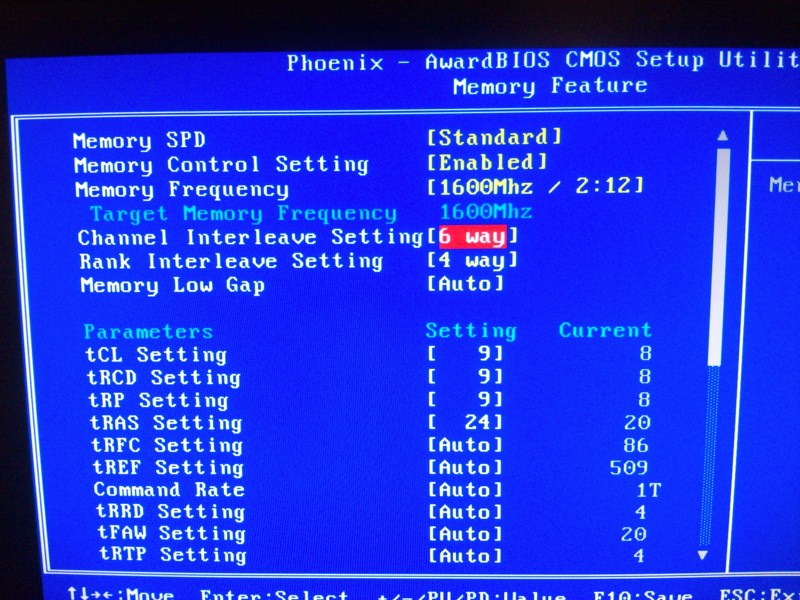
This is what I set in the BIOS; just changed the first 4 timings, and the memory frequency, I have no idea what all the rest of that shit is..
-
2013-01-08 10:13 #2827Old Merits
- Join Date
- Dec 2007
- Posts
- 1,232
- BG Level
- 6
http://ark.intel.com/products/37147/...-GTs-Intel-QPI Originally Posted by Deadgye

They set it to default at 1066MHz on these boards because that's what Intel has stated as the memory speed for the CPUs that use that socket, this means that unless your MB supports overclocking the RAM then that's the fastest RAM will run on the system (for instance not all 7 series MBs allow for RAM overclocking so using 1866MHz RAM on a H77 will result in 1333MHz with SB and 1600MHz with IB)
I couldn't remember either but from some googling it seems like it's VTT that it has to be within 0.5v of Originally Posted by Arximiro
EDIT::
Have you tried using XMP? That should change all the RAM related settings to manufacturers spec (will undo any CPU OCing though). Or at least manually find DRAM voltage and set it to 1.65v, it seems to be on auto I guess and gone up quite a bit too much. Originally Posted by Arximiro
Going to find a pdf for your MBs manual, my BIOS looked different =/
-
2013-01-08 10:16 #2828E. Body
- Join Date
- Jul 2007
- Posts
- 2,288
- BG Level
- 7
- FFXIV Character
- Arximiro Dragonheart
- FFXIV Server
- Sargatanas
- FFXI Server
- Cerberus
Originally Posted by Jojimbo
What confuses me here is that it says on the specs for my MB for RAM speeds 1600+. That would insinuate to me that 1600mhz is the low end of the spectrum and the sky is the limit. If my socket of MB was rated so low I don't understand why they listed it like that. ><
Edit: I'm not sure what XMP is so no never used it. I assume from your post you're saying no that isn't safe, so going to go back into BIOS and turn it back to where it was.. I have no CPU OC either, not really comfortable doing that either. I just wanted my RAM to run at what it says it does, or at least some direction to a brand of RAM that actually does. Seems that isn't an option with my old ass socket however.
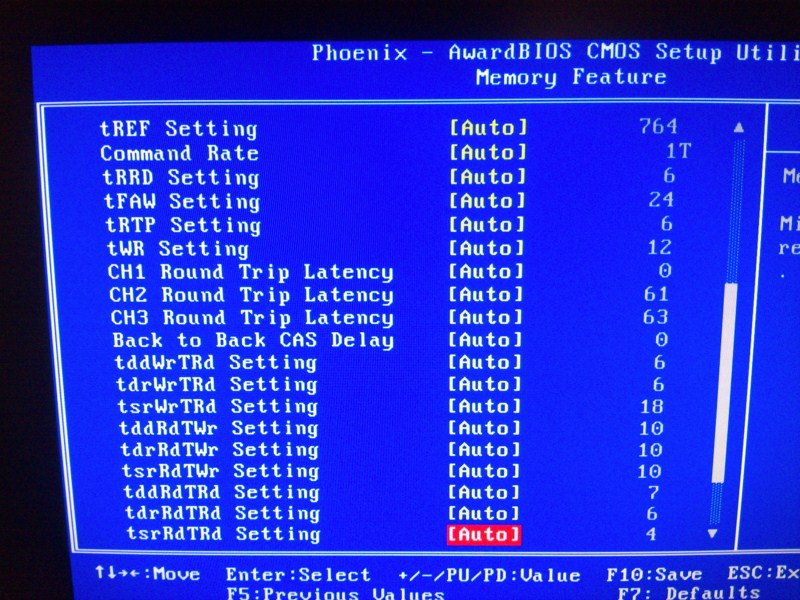
Edit 2: This is what really makes me want to jump off a bridge when it comes to OC, you scroll down and there is all this shit? What the fuck is all this shit? It's 2013, why does shit still have to be this complex..
Spoiler: show
-
2013-01-08 10:34 #2829Old Merits
- Join Date
- Dec 2007
- Posts
- 1,232
- BG Level
- 6
XMP is basically a profile stored on the RAM that tells the MB what settings it is intended to run at, using it will make the MB change the settings to that of the XMP (should be visible in the SPD tab of CPU-Z), it's pretty safe to use. Originally Posted by Arximiro
I have no idea why it says 1600+, could be a newegg thing because in the manual it says 1600MHz is the highest target RAM speed (RAM speed should increase with BCLK OCing, but I can't see any options for changing RAM multiplier like with my X58 MB so I have no idea)
Just ignore all those settings, you only need to worry about the top 4 and the command rate.
-
2013-01-08 10:41 #2830Yoshi P
- Join Date
- Aug 2006
- Posts
- 5,139
- BG Level
- 8
- FFXIV Character
- Dead Gye
- FFXIV Server
- Lamia
- FFXI Server
- Ragnarok
What exactly was that link supposed to prove? "Memory speed that the CPUs use"? That's not how computers work at all. Different chips within the same socket will work at different speeds by default, that alone puts a hole in what you're saying. RAM is basically another level of cache. If the bus on the motherboard was up to it you could technically (probably) run the ram as fast as the cpu. Originally Posted by Jojimbo
It's not overclocking if you're not going past the rated speeds. Running PC12800 RAM at ~1333 or ~1066 is underclocking. Being unable to change memory speeds because your MB can't "overclock" is just getting caught up in marketing terms. It's not because your MB can't overclock, but because your MB can't dynamically change settings.
And yeah just ignore all those complicated settings. You have to do a lot of reading up on ram, overlocking/etc, and functionality if you want to change those. Your dram voltage is also definitely too high, let me see if I can check my settings.
edit: I apparently only changed my DRAM Bus Voltage and my QPI/DRAM Core Voltage. Currently set to 1.64 and 1.3 respectively. (My ram is rated at 1.65v) Running 6x2gb modules at somewhere around ~1400 if I remember correctly with no problems. I needed it to be 1.66 back when I was running 3x2gb at ~1700, but I decided overclocking ram wasn't worth it this past summer.
-
2013-01-08 11:04 #2831Old Merits
- Join Date
- Dec 2007
- Posts
- 1,232
- BG Level
- 6
That link is because 1066MHz is what Intel has stated as the default memory speed for a Bloomfield CPU, like 1333MHz for Sandy Bridge and 1600MHz for Ivy Bridge. This means that when you plug the RAM in it will default to those settings and you have to enter the BIOS to change them yourself (either manually or via XMP), and if your MB doesn't support doing so (like H61/H77/B75 and so on) then you are fucked and it will run at the default settings regardless of what the manufacturer designed the RAM to run at. By MC do you mean Memory Controller? It's been integrated since at least Bloomfield, it's down to the MB chipset whether or not you can change any of the settings. Originally Posted by Deadgye
And over/underclock is just semantics, I've always seen to referred to anything over Intels default setting as overclocking or just changing settings
-
2013-01-08 11:16 #2832Yoshi P
- Join Date
- Aug 2006
- Posts
- 5,139
- BG Level
- 8
- FFXIV Character
- Dead Gye
- FFXIV Server
- Lamia
- FFXI Server
- Ragnarok
Ninja edited my typo on you it seems. :3 But yeah you're right this is just a semantics argument now. It's always been in regards to stock settings, which would be intel's default for their CPU. But for RAM it would be what the ram is rated for, the 'stock settings' by the manufacturer of the ram if you will.
You wouldn't say that the default speed, or stock settings, of a GPU are set by the MB or PCI standard would you? It's set by the manufacturer of the GPU. That's a horrible analogy, but I hope it got my point across.
-
2013-01-08 11:46 #2833E. Body
- Join Date
- Jul 2007
- Posts
- 2,288
- BG Level
- 7
- FFXIV Character
- Arximiro Dragonheart
- FFXIV Server
- Sargatanas
- FFXI Server
- Cerberus
So in closing, basically there is nothing I can do to get this shit to run at 1600 safely since it's already over the rated 1.5v while running at 1033?
-
2013-01-08 11:57 #2834Yoshi P
- Join Date
- Aug 2006
- Posts
- 5,139
- BG Level
- 8
- FFXIV Character
- Dead Gye
- FFXIV Server
- Lamia
- FFXI Server
- Ragnarok
Just because it's running at 1.5v at 1033 doesn't mean it definitely won't work at 1600 at 1.5v. If you set it to 1600 at 1.5v what happens? Do you blue screen immediately with a not enough power error? It sounds like you're raising the voltage before even seeing if it works.
Actually.. looking at your bios pictures.. where are your options for selecting DRAM/QPI voltages?
-
2013-01-08 12:05 #2835A. Body
- Join Date
- Nov 2005
- Posts
- 4,315
- BG Level
- 7
- FFXI Server
- Leviathan
 If the RAM is rated for 1600 at 1.5V, then it should work. I would try the XMP settings and see what those use. They're just alternate SPD settings that tend to actually match what the RAM is rated at. They've worked fine for me with matched sets, not so much with mixed. Originally Posted by Arximiro
-
2013-01-08 12:18 #2836Old Merits
- Join Date
- Dec 2007
- Posts
- 1,232
- BG Level
- 6
It's only going over 1.5v at 1600MHz because you left DRAM Voltage on auto, you need to change it in the Voltage Control (XMP should set the DRAM Voltage itself) Originally Posted by Arximiro
In another part of the BIOS, those pictures are from DRAM timings, in the Freq/Volt Control Memu there should be Memory Feature (the one in the pics), Voltage Control (CPU VCore, VTT, PLL, DRAM, QPI etc) and CPU Features (EIST, Turbo, VT, QPI Link etc) Originally Posted by Deadgye
-
2013-01-08 12:21 #2837E. Body
- Join Date
- Jul 2007
- Posts
- 2,288
- BG Level
- 7
- FFXIV Character
- Arximiro Dragonheart
- FFXIV Server
- Sargatanas
- FFXI Server
- Cerberus
Where is this XMP option and how do I use it? Is it in the BIOS somewhere? Or do I just need to set 1.5 manually
-
2013-01-08 12:26 #2838Old Merits
- Join Date
- Dec 2007
- Posts
- 1,232
- BG Level
- 6
I think it is where is says Memory SPD in the Memory Feature menu
-
2013-01-08 23:46 #2839
SASSAGE KING OF DA WORLD
cheap hawks gay
- Join Date
- Sep 2007
- Posts
- 26,424
- BG Level
- 10
Re: Random Question Thread: Tech
It's an on/off toggle, you shouldn't need to mess with any voltages.
-
2013-01-09 03:11 #2840E. Body
- Join Date
- Jul 2007
- Posts
- 2,288
- BG Level
- 7
- FFXIV Character
- Arximiro Dragonheart
- FFXIV Server
- Sargatanas
- FFXI Server
- Cerberus
I went in there and there was an option for XMP profile 1 and 2, I didn't see any difference between the two so I just chose one. Seems a lot better now, running at 1.54v at 1600. Any idea what the difference is between 1 and 2?