XI Wiki

Random Q for RQT:
Have a small home network. Used to stream video from my hard drive on PC1 to my XBOX360 in my bedroom. One day, 360 randomly stops recognizing my PC on the network. Okay, must be a firewall issue or something. Try every fix under the sun to setup my network sharing properly (even though it already worked before). Nada. Realize roommate has 360 in living room. Connect to network. His can see my PC1. Sooo I don't think it's any of my PC settings that are fucking it up. His desktop in his bedroom can also see my PC. Just my 360 can't for some reason.
Tried resetting 360 network settings. No dice. Also tried setting up Windows Media Center through the 360 and WMC extender with the 8 digit code. That wouldn't work at all.
Only discernable difference is that my 360 is on a wireless dongle, and his is wired. But the connection on mine is fine. I play NHL13 on XBL on the reg with zero connectivity issues whatsoever. Soooo...halp? Love u.
- Navigation
Results 2981 to 3000 of 3426
Thread: Random Question Thread: Tech


-
2013-02-24 00:32 #2981Relic Weapons

- Join Date
- Nov 2010
- Posts
- 351
- BG Level
- 4
- FFXI Server
- Quetzalcoatl

-
2013-02-24 02:19 #2982The Tower
- Join Date
- Apr 2005
- Posts
- 2,160
- BG Level
- 7
- FFXIV Character
- Stromgarde Siren
- FFXIV Server
- Gilgamesh
- FFXI Server
- Siren

Turn off both 360's. Power cycle the router. Turn yours back on. If it's working at this point, it might have something to do with an IP conflict similar to the above problem.
-
2013-02-24 02:35 #2983alsohawks
ALL YOU YOUNG HACKEY
PLAYERS OUT THERE
- Join Date
- Jul 2009
- Posts
- 5,960
- BG Level
- 8
Trying to troubleshoot someone's PC and looking for advice. It boots up incredibly slowly, even just getting to the BIOS. Sits at "Starting Windows" with the windows badge indefinitely. Modern i7 system in a Raid 0 configuration, BIOS lists as Intel Array0.
Loading an Windows installation or recovery disc from DVD or USB is incredibly slow. It will load the usual blue background for install and recovery, but won't display a window for choosing any options unless it's just left for like half an hour and even then nothing once a window displays it's an indefinite busy cursor.
I tried memtest for about half an hour and saw no errors. I'm guessing it's one of the hard drives, but I'm not sure how to check them when in a raid 0 configuration. I tried booting to a linux live distro from USB to check gparted and that was successful, but I didn't get any useful drive health information from it.
Tried the Alienware diagnostic tests it comes with that actually seems pretty extensive. Going off of that, the only thing I've found so far is that one of the two hard drives continually fails it's Drive Self-Test. Is that enough to assume it's dying or should I keep looking at other possible causes? Is that a reasonable conclusion if it can boot live CDs but not any utilities that touch OS information on the hard drives and the memory isn't showing errors?
-
2013-02-24 14:31 #2984Pandemonium
- Join Date
- Feb 2010
- Posts
- 7,742
- BG Level
- 8
- FFXI Server
- Sylph
It should POST fine if it is the hard drive though, since it doesn't access the hard drive until past the BIOS. I would suspect a memory or motherboard issue since it is slow even getting to BIOS.
-
2013-02-24 23:25 #2985alsohawks
ALL YOU YOUNG HACKEY
PLAYERS OUT THERE
- Join Date
- Jul 2009
- Posts
- 5,960
- BG Level
- 8
I'm wondering, I decided to actually time it to see how significant it is. From power on to the BIOS screen finishing loading, it's just over 30 seconds. It's not as bad as the way recovery loads forever, but it seemed overly long so I thought to mention it in the initial post. Would ubuntu live still load and be functional if that were the case? Originally Posted by Buffy

-
2013-03-01 16:58 #2986BEAHCAT
BOSTON'S FINEST
- Join Date
- Jun 2007
- Posts
- 6,634
- BG Level
- 8
- FFXIV Character
- Mith Lothaire
- FFXIV Server
- Gilgamesh
- FFXI Server
- Phoenix
- WoW Realm
- Cenarius
I have not purchased a router in some time, and I know alot of new ones have recently come out.
So i'm looking for a wireless N router/dual band that has good range. Replacing a linsys e2000 router, that does not really have the range require for my girlfriends house.
-
2013-03-03 08:40 #2987Melee Summoner
- Join Date
- Apr 2010
- Posts
- 38
- BG Level
- 1
- FFXIV Character
- Katagai Mitsuaki
- FFXIV Server
- Hyperion
- FFXI Server
- Sylph
Recently bought a SSD in the hopes of upping my ARR benchmark scores and gaming performance in general. Will just having the client on there be enough or do I have no choice but to put my Windows 7 install on there as well? I know I should go ahead and put Windows on there, but I'm lazy and hate having to reinstall Windows and go through the hassle of having to reinstall everything.
And if I go the reinstall-Windows-on-SSD route, is moving/deleting the MBR a pretty easy task? Had this issue last time and never looked into it due to not having the spare time.
-
2013-03-03 08:48 #2988Old Merits
- Join Date
- Dec 2007
- Posts
- 1,232
- BG Level
- 6

I doubt benchmark scores will change a lot if at all, and unless they haven't changed the stupid billion tiny files filesystem they used the effect on actual gameplay will be minimal (if they did keep it then it will help reduce FPS drops when loading areas with lots of people).
How big is the SSD? The point of it is to put OS and commonly used programs on it so they load much much faster, games typically only get loading times decreased although some (like FFXIV v1) had FPS stabilised in areas with lots to load as they got bottlenecked by loading textures, max FPS doesn't change with any game on an SSD though; only average FPS under certain conditions with certain games.
-
2013-03-03 09:30 #2989Melee Summoner
- Join Date
- Apr 2010
- Posts
- 38
- BG Level
- 1
- FFXIV Character
- Katagai Mitsuaki
- FFXIV Server
- Hyperion
- FFXI Server
- Sylph
The SSD is 120gb. I knew it wasn't going to increase my scores greatly, but was hoping it'd at least push me a few hundred points up or so. I can run the benchmark no issue, but was hoping to just inch past the High/Extremely High threshold. I was just hoping to get the faster load times and get out of reinstalling Windows, cause I hate doing it. Originally Posted by Jojimbo
Though I guess not installing the OS on the SSD sorta makes having one pointless, huh.
-
2013-03-03 10:02 #2990Old Merits
- Join Date
- Dec 2007
- Posts
- 1,232
- BG Level
- 6
120GB would be more than enough for OS + Programs + FFXIV as well.
-
2013-03-03 22:45 #2991GATTACA!
Sweaty Dick Punching Enthusiast
- Join Date
- Dec 2009
- Posts
- 25,823
- BG Level
- 10
The battery on my 3 month old Lenovo Thinkpad won't charge above 17%.
Any troubleshooting ideas? I tried different outlets and have let it get to 1% before then recharging but no dice. Only thing I haven't tried is letting it die completely, but it hibernates automatically when it's close to that point so it isn't easy to do.
-
2013-03-03 23:43 #2992Salvage Bans
- Join Date
- Sep 2008
- Posts
- 955
- BG Level
- 5
- FFXI Server
- Ragnarok
Force it to stay on with the lid closed in the power options
-
2013-03-04 00:28 #2993GATTACA!
Sweaty Dick Punching Enthusiast
- Join Date
- Dec 2009
- Posts
- 25,823
- BG Level
- 10
k, is that the only other thing I can try before having to buy a new battery?
-
2013-03-04 06:45 #2994
Most manufacturers offer a tool to "re-calibrate" the battery. That will completely discharge and then re-charge it and probably fix the charging issue. See if Lenovo offers one and try it.
-
2013-03-04 20:15 #2995Pens win! Pens Win!!! PENS WIN!!!!!
- Join Date
- Jul 2008
- Posts
- 8,652
- BG Level
- 8
So I've run into an annoying problem with some new GPUs I got as replacements from NewEgg...here's the scoop. Here's my system specs to get these out of the way:
- Intel i7-2600k@ 3.4
- Corsair 850W PSU
- Asus PZ68V Pro Mobo
- 7970 Radeon Sapphirex2(<--problem)
Got two 7970 Sapphires to crossfire that came in the mail today...uninstalled old drivers completely,installed new video cards..booted up, black screen on monitor. This also happens when I have both cards plugged in and i have the display plugged in to the mobo. If I unplug one of the cards from the mobo, and leave the other with power plugged in...same thing.If I unplug the power from that single video card,the display works fine when plugged into the mobo. If I try to plug in the power to the single card, and plug in the display to that...no display. This happens for both cards. The 7970 uses 2 8 pin connectors which my PSU has (4 6+2 pin connectors total), and I'm sure that 850w should be more than enough to power these in crossfire (it had no problem when i was crossfiring xfx 7970, which i had to return because they were faulty). I've tried reseating, replugging in,etc but to no avail. I'm checking BIOS now to see if anything could have changed...but I haven't done so at all in there.
Anyone have a clue? It's strange that both cards are doing this when they are crossfired, and even solo.
Thanks!
-
2013-03-04 20:27 #2996Pens win! Pens Win!!! PENS WIN!!!!!
- Join Date
- Jul 2008
- Posts
- 8,652
- BG Level
- 8
Just plugged in my old card and it worked fine (8 pin/6 pin)...so its either the cards that I got are faulty, or something is going on when i plug in 2 8 pin into the GPU.
-
2013-03-04 21:03 #2997D. Ring
- Join Date
- Jun 2006
- Posts
- 4,855
- BG Level
- 7
- FFXI Server
- Ragnarok
- WoW Realm
- Nazjatar

odd mouse pad/surface question. I'm currently using a razer sphex and I love how my mouse just glides over it and its flat on my desk. however the adhesive is pretty much gone now a few years later and I'm getting a new desk so looking for any suggestions on things that are comparable or if i should just get a new one.
-
2013-03-07 23:29 #2998CoP Dynamis
- Join Date
- Jun 2010
- Posts
- 252
- BG Level
- 4
- FFXI Server
- Siren
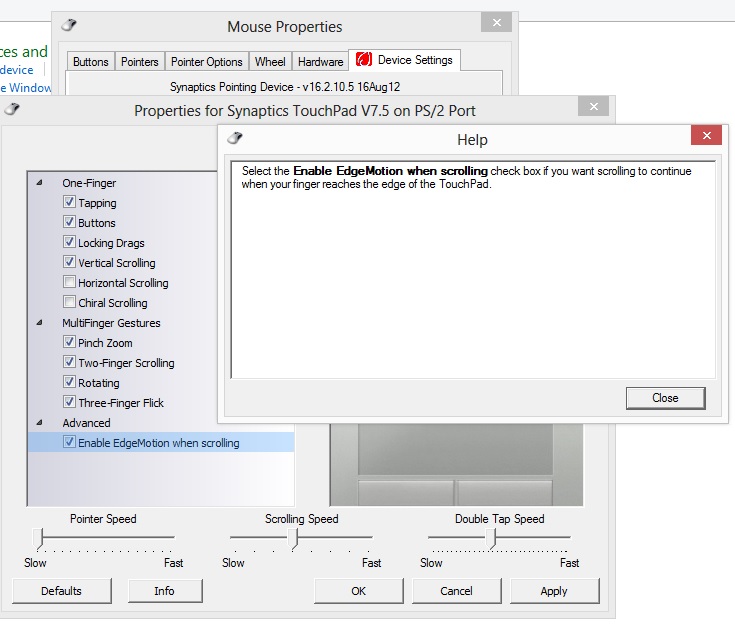
I got a new laptop and the touch pad is killing me. It has this feature called "edge motion." Put nicely by eHow:
I followed the instructions found there, but my device settings are significantly different.The Synaptics "Edge Motion" feature of certain HP and Compaq laptop computers is a piece of software that controls the way your touchpad operates. Instead of stopping your cursor when your finger reaches one of the sides of your touchpad, the cursor will instinctively keep moving in the direction you were going. You can disable the Synaptics Edge Motion functionality of your computer at any time using the Control Panel.
As you can see here, my driver's settings are limited in this respect. The closest thing I have is edge motion for scrolling.
Spoiler: show
Any help? My driver info is the in the pic. It's up to date.
The feature is extremely annoying, I'd love to get rid of it.
EDIT: I would like to expand the question... I also cannot type and use the touchpad at the same time, whenever I type it disables the touchpad. Again, I googled the problem and all solutions simply direct me to the device settings to disable something. However, the device settings are no where near as extensive as most sites are showing. Something along the lines outlined on this page is what what I would expect to see, but it's not what I have. I don't know a whole lot about drivers and stuff, is it possible to install that kind of driver to get those settings somehow?
-
2013-03-08 03:09 #2999
Looks like HP(?) is limiting the options in their synaptics driver.
What you could try is to install the driver synaptics offers on their page, it's also a slightly higher revision number (v16.3.8.8): http://www.synaptics.com/resources/drivers
But keep an external mouse around, it could happen that this driver doesn't work with your laptop.
-
2013-03-10 11:34 #3000Special at 11:30 or w/e
Sweaty Dick Punching Enthusiast
- Join Date
- Feb 2012
- Posts
- 10,263
- BG Level
- 9
- FFXIV Character
- Kalmado Espiritu
- FFXIV Server
- Gilgamesh
- FFXI Server
- Sylph
- Blog Entries
- 4


I'm having an issue where text on webpages are blurry. It will correct itself if I use the scroll wheel on my mouse, but it's very very annoying and seems to be happening frequently. This started happening about a week ago. I haven't made any changes to my pc, settings, etc. I use firefox and W7. Any idea of what's going on?