 XI Wiki

So figured Tech might be best suited for this question:
I'm cancelling Comcast TV (on the phone now) and am looking at getting an antenna to pick up the local channels as the girlfriend watches Ellen/Steve Harvey on the regular.
http://www.insigniaproducts.com/prod...51P680A12.html is my TV, what is the best antenna to get? Looking at possibly an indoor one as I'm renting atm, but will have my own condo in a few months so will consider either. I believe I'll need a receiver as well, so what are my best bets for this? And looking for the cheaper options, obviously.
- Navigation
Results 3381 to 3400 of 3426
Thread: Random Question Thread: Tech


-
2013-07-29 15:51 #3381Relic Shield

- Join Date
- Feb 2012
- Posts
- 1,909
- BG Level
- 6

-
2013-07-29 17:04 #3382Dr. Salami
HERO OF TIME
- Join Date
- Oct 2007
- Posts
- 7,565
- BG Level
- 8
- FFXIV Character
- Selamis Bloodwood
- FFXIV Server
- Coeurl
- FFXI Server
- Unicorn
This happened to me too and no matter what I tried to roll back on, nothing was changed. Ended up being a bad memory stick that I replaced and since then, no problems. Except now, only one of my screen savers work, everything else crashes as soon as it comes on lol. Originally Posted by Moss

-
2013-07-29 18:38 #3383Ridill
- Join Date
- Oct 2006
- Posts
- 10,411
- BG Level
- 9
- FFXI Server
- Gilgamesh
Recently moved and went to set up my pc. Noticed the graphics card and some heat sinks around the cpu were dusty so I removed the gpu, cleaned it, cleaned around the cpu heatsinks and then went to boot...
Neither of my monitors receive a dvi or vga signal regardless of which cord I use in either slot on the gpu. When I boot, I now see two red lights flash on and then go out on the back of the gpu. I have taken out and reset the gpu card and the ram. The pc seems to boot fine otherwise, no hd skips or hiccups like that, just cant get a signal and im worried I fried the gpu somehow.
Radeon Sapphire hd4850
2x gskill 2g ram
corsair 520 w power
asus p5qc motherboard
Intel core 2 duo
windows xp
samsung syncmaster 226bw (main monitor)
asus vw224 secondary
Dont know if this matters, but the pc was without being plugged in for about 3 days, and I cleaned the gpu just yesterday. no problems whatsoever before the move.
-
2013-07-29 22:35 #3384Ridill
- Join Date
- Oct 2006
- Posts
- 10,411
- BG Level
- 9
- FFXI Server
- Gilgamesh
Yeah, it was the same 6pin one I detached before I took the card out.
Just got a screen with red letters saying the power cord was not plugged in and to consult the "getting started guide" but am now unable to replicate the message.
-
2013-07-30 16:18 #3385Hydra
- Join Date
- Nov 2011
- Posts
- 131
- BG Level
- 3
I have a GPU that has been running incredibly hot lately. The past few weeks it would idle at 85°C and hit anywhere from 110-115°C under load while playing the XIV beta at 720p on low settings. I cleaned my case of dust, reapplied thermal paste to the GPU, and made sure my cable management was optimal for airflow but it is still running hot and has become worse the past few days.
Now it idles between 100-103°C and will rise all the way up to 130°C before my PC shuts down. Something as simple as watching a video full screen will cause these high temps.
My questions is do you think my GPU has become defective and needs replacing? I was looking at VGA coolers but due to the high temps the card hits I'm doubtful they will help. My GPU is a 9600GT if it matters.
-
2013-07-30 16:25 #3386Black Belt
- Join Date
- Nov 2006
- Posts
- 5,703
- BG Level
- 8
- FFXIV Character
- Adajer Vonte
- FFXIV Server
- Gilgamesh
- FFXI Server
- Asura
- WoW Realm
- Tichondrius


Your GPU is dead. Nothing should be able to get above 100C w/o shutting off.
PS: How do you type the degree symbol?
-
2013-07-30 16:41 #3387True skill only comes from macro switching all your e-peen gear thru 10 pages
- Join Date
- Sep 2007
- Posts
- 4,740
- BG Level
- 7
- FFXI Server
- Quetzalcoatl
In Windows ALT+248. For Mac Option+number zero
-
2013-07-30 17:04 #3388Hydra
- Join Date
- Nov 2011
- Posts
- 131
- BG Level
- 3
Thanks for the reply. Originally Posted by Adajer
I copy/pasted the degree symbol from its wikipedia page. You can use ALT+ numberpad combo but I don't know it offhand.
-
2013-07-30 18:23 #3389Black Belt
- Join Date
- Nov 2006
- Posts
- 5,703
- BG Level
- 8
- FFXIV Character
- Adajer Vonte
- FFXIV Server
- Gilgamesh
- FFXI Server
- Asura
- WoW Realm
- Tichondrius
I could be wrong, could be PSU related, but it sound like your GPU is dead, considering how old it is.
-
2013-07-30 22:04 #3390Ridill
- Join Date
- Oct 2006
- Posts
- 10,411
- BG Level
- 9
- FFXI Server
- Gilgamesh
So i was able to briefly get my PC working, but after adjusting settings and hooking up my second monitor it went down again. Swapped out the gpu for a cheapo GeForce GT610 and I have zero problems, so im 95% sure it was the video card and not the PSU/Mobo as the culprit. Gonna head over to the PC Build thread and ask for what card to look at now.
-
2013-07-31 15:25 #3391Road Tinnies
Sweaty Dick Punching Enthusiast
- Join Date
- Apr 2008
- Posts
- 1,714
- BG Level
- 6
- FFXI Server
- Sylph

Just picked up the QNIX QX2710 Monitor - http://www.ebay.com/itm/27-QNIX-QX27...-/130868312541
When i start the computer up the monitor comes on, i get to see the POST boot process and then I get the windows loading screen. Once that finishes when it goes to the login screen the monitor turns off as if it is in standby mode as it just has a flashing blue light.
If i start the PC in safe mode this doesnt happen and the monitor stays on just fine (posting from my PC in safemode right now)
Im currently on the latest stable GFX drivers from AMD which are the 13.4 ones. Cant seem to uninstall my drivers to install the new ones because you cannot do that in safe mode. Not really sure what is happening!
Couple of things i should probably point out.
These are the slots i have in the back of my GPU.
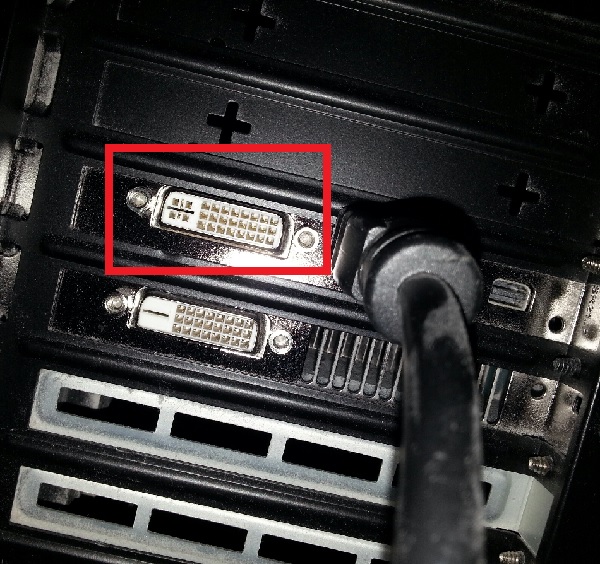
Note the red highlighted box is the slot i currently have the monitor plugged into. It is the only one that i get any signal or connection out of and that is through safe mode as already described.
Which according to my GPU specifications has the following outputs:
DVI Upper Single-link DVI-D + Bottom Dual-link DVI-I
http://www.hisdigital.com/un/product2-576.shtml
This monitor only supports DVI-D Dual Link as per below and as per the sellers instructions.

http://www.ebay.com/itm/27-QNIX-QX27...-/130868312541
By looking at that it seems iv got my cable in the wrong slot but that is the only one i get any connection from? Does my GPU just not work because it doesnt have DVI-D Dual link and only DVI-I Dual link.
So confused with this shit!
Hopefully this info makes things easier to understand. Thanks again for any help!
Thanks!
-
2013-07-31 16:05 #3392Pandemonium
- Join Date
- Feb 2010
- Posts
- 7,742
- BG Level
- 8
- FFXI Server
- Sylph
I'm writing a paper for school, and I'm looking for competitors to wide area networks. Anyone got any ideas?
-
2013-07-31 20:17 #3393Black Belt
- Join Date
- Nov 2006
- Posts
- 5,703
- BG Level
- 8
- FFXIV Character
- Adajer Vonte
- FFXIV Server
- Gilgamesh
- FFXI Server
- Asura
- WoW Realm
- Tichondrius
The DVI connection with the circle is not Dual Link IIRC, or not all with those patterns are actually dual link. You need to make sure the cable you are using actually is a dual link cable, because single link cables can still fit into dual link ports. I use display port for my 2560x1440 screen. I am not sure how well those mini-display port slots work. It looks like you have an hdmi cable plugged in, which doesn't support 2560x1440.
That said, you shouldn't be getting any issues with connectivity to the monitor. It should at least be running in 1080p. I would power down the PC, remove the video card, plug the monitor into a media interface on your motherboard, boot windows, uninstall your graphics drivers, then power down, reinstall your card, plug in a DVI-D Dual link cable into the slot you have in the red square or use a display port cable, power up, and install your drivers fresh. Also, power cycle your monitor.
@Buffy
Do you mean like Cell Phone Providers? ATT, Sprint, Verizon?
-
2013-07-31 21:31 #3394listen!
- Join Date
- Apr 2011
- Posts
- 7,234
- BG Level
- 8
- FFXI Server
- Sylph
Yeah it is, that's exactly what i use. Originally Posted by Adajer
-
2013-08-01 03:39 #3395Pseudo-Elitist
- Join Date
- Mar 2008
- Posts
- 3,518
- BG Level
- 7
- FFXI Server
- Leviathan
How's the failure rate on 4TB drives these days? I was hoping to consolidate some of my media drives but I heard that when you get up to that size drives tend to crap out a lot more, true?
-
2013-08-01 03:47 #3396Road Tinnies
Sweaty Dick Punching Enthusiast
- Join Date
- Apr 2008
- Posts
- 1,714
- BG Level
- 6
- FFXI Server
- Sylph
Thanks. I removed the HDMI cable and restarted the PC and finally got it to connect. Thing is is that it will only worked plugged into the port that i have the red box around in my photo. Pretty sure it shouldnt work with that but ah well. Having horrible backlight bleed with this so going to look for an exchange and hope for a better one! Originally Posted by Adajer
Pretty sure the cable im using is a Dual Link one as it was sent with the monitor. Ill see can i get another to double check!
-
2013-08-01 15:53 #3397Pandemonium
- Join Date
- Feb 2010
- Posts
- 7,742
- BG Level
- 8
- FFXI Server
- Sylph
I mean anything: The assignment is a pick-your-topic from the list provided, and I picked wide area networks. Then, through the course of the paper, the syllabus asks questions. One of the questions is "Conduct a SWOT analysis by analyzing the strengths, weaknesses, application opportunities, and threats from competitors of the chosen topic." Originally Posted by Adajer
So I'm just looking for general competitors to wide area networks in general, then I can do research or make some logical deductions from there. One obvious competitor is Wireless wide area networks, but I'm striking out after that.
-
2013-08-02 09:21 #3398
Sweaty Dick Punching Enthusiast
- Join Date
- Jan 2010
- Posts
- 9,355
- BG Level
- 8
- FFXI Server
- Leviathan
The loading symbol keeps flashing next to my mouse, ever since I installed the ffxiv benchmark. Not sure if the two are related, but how do I make this go away? Shit's annoying
-
2013-08-02 11:12 #3399Member since 2006 and still can't think of a title.

- Join Date
- Oct 2006
- Posts
- 28,818
- BG Level
- 10
- FFXIV Character
- Acanis Lindri
- FFXIV Server
- Midgardsormr
- FFXI Server
- Bismarck
- WoW Realm
- Kil'jaeden

Anyone with thoughts/comments on the MS Surface Pro Tablet? We travel a lot and lugging her 15.6" sony gaming laptop around is a chore, so we want something that still has some power and speed (did not care for the side by side speed tests between the pro and cheaper RT) that I can also use for work when/if I get promoted for connecting into our VPN. We despise apple with every inch of our being so no IPads

-
2013-08-02 16:19 #3400alsohawks
ALL YOU YOUNG HACKEY
PLAYERS OUT THERE
- Join Date
- Jul 2009
- Posts
- 5,960
- BG Level
- 8
Looking to get a desk clamp monitor mount for two monitors, but is there any argument over getting a single clamp with two arms versus two individual mounts? And any advice on what to look for?


