 XI Wiki

http://www.newegg.com/Product/Produc...82E16820145215
Edit: Restarted. I can't see bios version. That screen shows up for a tiny fraction of a section before it vanishes. I tried loading bios but it didn't say version anywhere on that screen.
- Navigation
Results 61 to 78 of 78
Thread: Windows 7 64bit Crashing


-
2011-03-18 18:46 #61The God Damn Kuno

- Join Date
- Dec 2004
- Posts
- 13,360
- BG Level
- 9
- FFXIV Character
- Kuno Sedai
- FFXIV Server
- Gilgamesh
- FFXI Server
- Bahamut

-
2011-03-18 18:54 #62Relic Shield
- Join Date
- Apr 2006
- Posts
- 1,543
- BG Level
- 6
- FFXI Server
- Gilgamesh
spam tab as it comes up and it should show you more info.
looking at that ram, people are saying they have a problem with your motherboard setting the voltage to 1.8.
specs say that ram is 2.1V
I'd try upping it to at least 1.9/2.0 and see if that helps.
-
2011-03-18 18:59 #63The God Damn Kuno
- Join Date
- Dec 2004
- Posts
- 13,360
- BG Level
- 9
- FFXIV Character
- Kuno Sedai
- FFXIV Server
- Gilgamesh
- FFXI Server
- Bahamut
Bios version is f2. How do I update it? I went to the site and downloaded whatever stuff on gigabyte for my mobo but I don't really know what I'm doing. >.>;;
Do I need any fancy pants bios changes for my ram?
-
2011-03-18 19:01 #64Relic Shield
- Join Date
- Apr 2006
- Posts
- 1,543
- BG Level
- 6
- FFXI Server
- Gilgamesh
well, before you do the bios update, lets try upping the voltage to 1.9 in your bios and see if that does the trick.
let me look at the instructions to update your bios and I'll try and walk you through it.
-
2011-03-18 19:03 #65The God Damn Kuno
- Join Date
- Dec 2004
- Posts
- 13,360
- BG Level
- 9
- FFXIV Character
- Kuno Sedai
- FFXIV Server
- Gilgamesh
- FFXI Server
- Bahamut
Will it make my computer explode? And where in the bios do I set that at? I'm not that great with PCs and things I touch end up getting set on fire.
-
2011-03-18 19:13 #66Relic Shield
- Join Date
- Apr 2006
- Posts
- 1,543
- BG Level
- 6
- FFXI Server
- Gilgamesh
pm'd you. The more I poke around online the better I'm feeling that upping the voltage might do the trick.
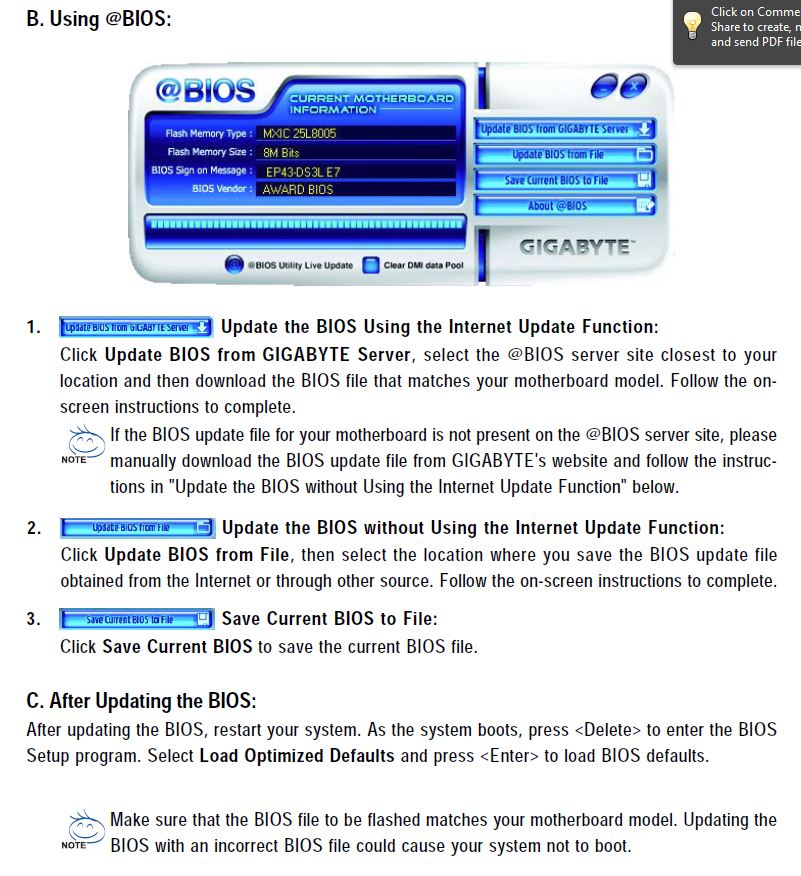
to update the bios easiest is with the "@bios" software on the gigabyte webpage, it'll let you do it in windows and should keep you from messing anything up.
for memory voltage settings you want to look under "MB Intelligent Tweaker(M.I.T.)"
look for the screen that looks like ...

change that 1.800 to 1.900
to update the bios, follow this.
-
2011-03-18 20:01 #67Relic Shield
- Join Date
- Apr 2006
- Posts
- 1,543
- BG Level
- 6
- FFXI Server
- Gilgamesh
here's the other stuff I'd like to see that we talked about.

-
2011-03-20 19:58 #68The God Damn Kuno
- Join Date
- Dec 2004
- Posts
- 13,360
- BG Level
- 9
- FFXIV Character
- Kuno Sedai
- FFXIV Server
- Gilgamesh
- FFXI Server
- Bahamut
Been crashing again. Anyone with the power of SCIENCE that can tell me what these dumps mean? All my crashes today had blue screen so that's a plus, right?
Spoiler: show
-
2011-03-21 00:53 #69TIME OUT MOTHERFUCKER

- Join Date
- Jun 2007
- Posts
- 4,972
- BG Level
- 7
not kuno. PSU info, pls
-
2011-03-21 01:05 #70E. Body
- Join Date
- Nov 2005
- Posts
- 2,385
- BG Level
- 7


Perhaps I can help narrow down this problem. I've been having a very similar issue to this as well for about a year now. Mine isn't nearly as frequent as yours seems to be and it happens at different times altogether but it is the same error where the screen freezes with a loud constant noise and I'm forced for restart with the occasional blue screen error (rare). The difference is mine only happen when I'm watching videos online, most often when I watch things on Livestream, but it can happen during pretty much any video online. I have had it happen maybe two or three times while watching anime downloaded to my hard drive but they were all in the same week when I hadn't updated my Graphics card drivers. I also play SC2 and while I've had the odd crash, it almost never gives me any issues and the crash I get is just an SC2 error rather that sends me back to the desktop. I never have any issues in other games like WoW or TF2. So it's seems like the same thing only it happens in different situations. I haven't done any over clocking or anything. I've done tests on my memory and hard drive and haven't encountered any problems and the only hardware we have somewhat in common are the graphics cards (both Radeon HD series) and Win 7 64 bit. I should mention mine goes in spurts rather than happening constantly. I'll go three weeks without an issue and then get three or four crashes in a two or three day span before it stops for a while again. I'm having similar error reports from who crashed it to you as well so I'm thinking it has to be an issue between the ATI HD series cards and Windows 7 64 bit. Hopefully someone with more computer knowledge than I can make use of this information.
-
2011-03-21 08:29 #71The God Damn Kuno
- Join Date
- Dec 2004
- Posts
- 13,360
- BG Level
- 9
- FFXIV Character
- Kuno Sedai
- FFXIV Server
- Gilgamesh
- FFXI Server
- Bahamut
Sorry I thought I replied to this. Originally Posted by guartz

COOLER MASTER eXtreme Power RP-600-PCAR 600W ATX from factor 12V V2.01 Power Supply
-
2011-03-21 09:54 #72TIME OUT MOTHERFUCKER
- Join Date
- Jun 2007
- Posts
- 4,972
- BG Level
- 7
by all thats holy... hmm
Hey, Not Kuno.
Go to your catalyst control center, choose the overide/overdrive? and set your gpu fan speed manual and crack that fucker up 100%. Run games and see if anything crashes.
-
2011-03-21 10:19 #73The God Damn Kuno
- Join Date
- Dec 2004
- Posts
- 13,360
- BG Level
- 9
- FFXIV Character
- Kuno Sedai
- FFXIV Server
- Gilgamesh
- FFXI Server
- Bahamut
That's not gonna make my pc explode is it? D:
Also is something wrong with my PSU? >.>
-
2011-03-21 10:23 #74TIME OUT MOTHERFUCKER
- Join Date
- Jun 2007
- Posts
- 4,972
- BG Level
- 7
psu is fine. The fan is just gonna spin faster, therefore louder. but keep your gpu cooler. Working on the overheat theory here atm.
-
2011-03-21 10:40 #75Relic Shield
- Join Date
- Apr 2006
- Posts
- 1,543
- BG Level
- 6
- FFXI Server
- Gilgamesh
The gfx card is new,and it crashes sometimes while not even in a game. Won't hurt to at least test if it's overheating, but I'd be surprised if that's it. A lot of people with her exact ram on newegg said they had stability issues with it at 1066, but would work fine at 800. I'd try that next.
-
2011-03-25 05:38 #76Cerberus
- Join Date
- Sep 2008
- Posts
- 407
- BG Level
- 4
- FFXI Server
- Unicorn
- WoW Realm
- Draenor

I dont know if this is relevant to the topic, but i just got a new computer with windows 7 64bit, and i also kept crashing with bluescreens i found out it was my Graphics cards were getting to hot so i took one out untill i get a longer crossfire cable. Since im only running 1 card now (around 5 days) i havnt had a single crash.
-
2011-03-25 13:27 #77Relic Shield
- Join Date
- Apr 2006
- Posts
- 1,543
- BG Level
- 6
- FFXI Server
- Gilgamesh
I think we got Kuno's issue solved. setting the memory to 800 instead of 1066 seems to have done the trick. she hasn't had a crash since.
-
2011-03-25 13:42 #78The God Damn Kuno
- Join Date
- Dec 2004
- Posts
- 13,360
- BG Level
- 9
- FFXIV Character
- Kuno Sedai
- FFXIV Server
- Gilgamesh
- FFXI Server
- Bahamut
yah so far so good. Gonna lock thread until it explodes.


Similar Threads
-
Windows Explorer Crashing/Restarting
By Ragnell in forum TechReplies: 12Last Post: 2012-02-07, 14:03 -
WHY DOES WINDOWER KEEP CRASHING >(
By Knyghtmayre in forum TechReplies: 2Last Post: 2009-05-18, 18:57 -
windower 3.4 crashing playonline
By Pizza73 in forum TechReplies: 4Last Post: 2008-06-11, 10:02 -
Windows XP VS XP 64bit
By Ratatapa in forum TechReplies: 21Last Post: 2008-05-21, 22:34 -
dual core + vista + windower crash issue
By Leeto in forum TechReplies: 2Last Post: 2007-12-22, 10:36