 XI Wiki


itunes:steamos::ipod:steambox
steamos is to itunes as entry level steambox is to ipod
Apple/Valve wants to pull people away from windows, while still supporting windows
The plans may have changed by now, but originally they had the idea of "good, better, and best" steambox tiers:
good tier is some linux box thats similiar in price of a roku box, also functionality netflix, hulu, gaikai etc
better is a linux box with discrete gpu, can play its own games.
best is a standard windows pc with full access to the steam library.
Gabe's stated goal is for Valve/Steam to not be dependent on windows.
- Navigation
Results 61 to 80 of 116
-
2013-09-24 13:58 #61Nidhogg

- Join Date
- Apr 2006
- Posts
- 3,562
- BG Level
- 7

-
2013-09-25 12:00 #62okay guy I guess

- Join Date
- Nov 2010
- Posts
- 24,439
- BG Level
- 10

http://store.steampowered.com/livingroom/SteamMachines/
A powerful new category of living-room hardware is on the horizon.
Join the hardware beta now.
Choose the model right for you in 2014.
Finally, a multiple choice answer
Entertainment is not a one-size-fits-all world. We want you to be able to choose the hardware that makes sense for you, so we are working with multiple partners to bring a variety of Steam gaming machines to market during 2014, all of them running SteamOS.
But first, Valve’s prototype
While these products are still in development, we need your help. As always, we believe the best way to ensure that the right products are getting made is to let people try them out and then make changes as we go. We have designed a high-performance prototype that’s optimized for gaming, for the living room, and for Steam. Of course, it’s also completely upgradable and open.
This year we’re shipping just 300 of these boxes to Steam users, free of charge, for testing. You can make yourself eligible to get one. How? Read on!
Here’s how to participate
Want to make yourself eligible to participate in the beta? Add yourself to the list of candidates by completing the Eligibility Quest on Steam. Sound hard? It’s not.
THE HARDWARE BETA ELIGIBILITY QUEST:
Before October 25, log in to Steam and then visit your quest page to track your current status towards beta test eligibility
1. Join the Steam Universe community group
2. Agree to the Steam Hardware Beta Terms and Conditions
3. Make 10 Steam friends (if you haven't already)
4. Create a public Steam Community profile (if you haven't already)
5. Play a game using a gamepad in Big Picture mode
You can complete the steps in any order. Once you’ve completed all of the steps, you’ll be awarded a special badge, and you’ll officially be among the pool of people from whom we’ll choose beta participants / hardware recipients.
On October 25th, the list will be locked. So complete the quest before then!
Your help is critical to our design process. Your feedback will shape both the new OS version of Steam and the new category of gaming machines that will run it.
Questions!
When can I buy one?!
Beginning in 2014, there will be multiple SteamOS machines to choose from, made by different manufacturers.
I’m pretty happy with my PC Gaming setup, do I have to buy a new piece of hardware now?
No. Everything that we’ve been doing on Steam for the last 10 years will continue to move forward.
If you guys are delivering an OS to hardware manufacturers, why is Valve also making its own box?
We're conducting a beta of the overall Steam living-room experience, so we needed to build prototype hardware on which to run tests. At Valve we always rely on real-world testing as part of our design process. The specific machine we're testing is designed for users who want the most control possible over their hardware. Other boxes will optimize for size, price, quietness, or other factors.
How will you choose the 300 beta participants?
A small number of users (30 or less) will be chosen based on their past community contributions and beta participation. The remainder will be chosen at random from the eligible pool.
Should I create lots of Steam accounts to increase my chances of getting selected?
No, that won’t work.
What are the specs of the Valve prototype?
We'll tell you more about it soon. Remember, there will ultimately be several boxes to choose from, with an array of specifications, price, and performance.
Where’s a picture of it? How big is it?
We promise we'll tell you more about it soon.
When will the prototypes ship?
This year.
Will beta testers be allowed to share info about their experience and post pictures and opinions online?
Yes, that really is the whole point. The input from testers should come in many forms: bug reports, forum posts, concept art, 3D prints, haikus, and also very publicly stated opinions.
Will I be able to build my own box to run SteamOS?
Yes.
Can I hack this box? Run another OS? Change the hardware? Install my own software? Use it to build a robot?
Sure.
Can I download the OS to try it out?
You will be able to download it (including the source code, if you're into that) but not yet.
If I’m not in the beta, how can I help and contribute feedback?
The Steam Universe Group is where feedback is being collected. Most areas of the group will remain open for participation by all Steam users. Some may be limited to beta participants only, but there will be plenty of ways to contribute feedback for everyone.
What games will be available during the beta?
The nearly 3,000 games on Steam. Hundreds already running natively on the SteamOS, with more to come. The rest will work seamlessly via in-home streaming.
What is SteamOS? What’s included?
Here's a link to what we said earlier about SteamOS. We'll have more details to tell you, soon.
Am I going to be using a mouse and a keyboard in the living-room?
If you want. But Steam and SteamOS work well with gamepads, too. Stay tuned, though - we have some more to say very soon on the topic of input.
-
2013-09-25 12:04 #63Sandworm Swallows
- Join Date
- Dec 2006
- Posts
- 7,328
- BG Level
- 8

Soooooooooooooooooooooooooooooooo... this is a Linux PC? Anything else?
-
2013-09-27 12:02 #64okay guy I guess
- Join Date
- Nov 2010
- Posts
- 24,439
- BG Level
- 10
http://store.steampowered.com/living...eamController/
A new way to play your entire Steam library from the sofa.
Join the Steam hardware beta and help us shape a new generation of gaming.
A different kind of gamepad
We set out with a singular goal: bring the Steam experience, in its entirety, into the living-room. We knew how to build the user interface, we knew how to build a machine, and even an operating system. But that still left input — our biggest missing link. We realized early on that our goals required a new kind of input technology — one that could bridge the gap from the desk to the living room without compromises. So we spent a year experimenting with new approaches to input and we now believe we’ve arrived at something worth sharing and testing with you.
Complete catalog
The Steam Controller is designed to work with all the games on Steam: past, present, and future. Even the older titles in the catalog and the ones which were not built with controller support. (We’ve fooled those older games into thinking they’re being played with a keyboard and mouse, but we’ve designed a gamepad that’s nothing like either one of those devices.) We think you’ll agree that we’re onto something with the Steam Controller, and now we want your help with the design process.
Superior performance
Traditional gamepads force us to accept compromises. We’ve made it a goal to improve upon the resolution and fidelity of input that’s possible with those devices. The Steam controller offers a new and, we believe, vastly superior control scheme, all while enabling you to play from the comfort of your sofa. Built with high-precision input technologies and focused on low-latency performance, the Steam controller is just what the living-room ordered.

Dual trackpads
The most prominent elements of the Steam controller are its two circular trackpads. Driven by the player’s thumbs, each one has a high-resolution trackpad as its base. It is also clickable, allowing the entire surface to act as a button. The trackpads allow far higher fidelity input than has previously been possible with traditional handheld controllers. Steam gamers, who are used to the input associated with PCs, will appreciate that the Steam Controller’s resolution approaches that of a desktop mouse.
Whole genres of games that were previously only playable with a keyboard and mouse are now accessible from the sofa. RTS games. Casual, cursor-driven games. Strategy games. 4x space exploration games. A huge variety of indie games. Simulation titles. And of course, Euro Truck Simulator 2.
In addition, games like first-person shooters that are designed around precise aiming within a large visual field now benefit from the trackpads’ high resolution and absolute position control.
Haptics
Trackpads, by their nature, are less physical than thumbsticks. By themselves, they are “light touch” devices and don’t offer the kind of visceral feedback that players get from pushing joysticks around. As we investigated trackpad-based input devices, it became clear through testing that we had to find ways to add more physicality to the experience. It also became clear that “rumble”, as it has been traditionally implemented (a lopsided weight spun around a single axis), was not going to be enough. Not even close.
The Steam Controller is built around a new generation of super-precise haptic feedback, employing dual linear resonant actuators. These small, strong, weighted electro-magnets are attached to each of the dual trackpads. They are capable of delivering a wide range of force and vibration, allowing precise control over frequency, amplitude, and direction of movement.
This haptic capability provides a vital channel of information to the player - delivering in-game information about speed, boundaries, thresholds, textures, action confirmations, or any other events about which game designers want players to be aware. It is a higher-bandwidth haptic information channel than exists in any other consumer product that we know of. As a parlour trick they can even play audio waveforms and function as speakers.
Touch Screen
In the center of the controller is another touch-enabled surface, this one backed by a high-resolution screen. This surface, too, is critical to achieving the controller’s primary goal - supporting all games in the Steam catalog. The screen allows an infinite number of discrete actions to be made available to the player, without requiring an infinite number of physical buttons.
The whole screen itself is also clickable, like a large single button. So actions are not invoked by a simple touch, they instead require a click. This allows a player to touch the screen, browse available actions, and only then commit to the one they want. Players can swipe through pages of actions in games where that’s appropriate. When programmed by game developers using our API, the touch screen can work as a scrolling menu, a radial dial, provide secondary info like a map or use other custom input modes we haven’t thought of yet.
In order to avoid forcing players to divide their attention between screens, a critical feature of the Steam Controller comes from its deep integration with Steam. When a player touches the controller screen, its display is overlayed on top of the game they’re playing, allowing the player to leave their attention squarely on the action, where it belongs.
Buttons
Every button and input zone has been placed based on frequency of use, precision required and ergonomic comfort. There are a total of sixteen buttons on the Steam Controller. Half of them are accessible to the player without requiring thumbs to be lifted from the trackpads, including two on the back. All controls and buttons have been placed symmetrically, making left or right handedness switchable via a software config checkbox.
Shared configurations
In order to support the full catalog of existing Steam games (none of which were built with the Steam Controller in mind), we have built in a legacy mode that allows the controller to present itself as a keyboard and mouse. The Steam Community can use the configuration tool to create and share bindings for their favorite games. Players can choose from a list of the most popular configurations.
Openness
The Steam Controller was designed from the ground up to be hackable. Just as the Steam Community and Workshop contributors currently deliver tremendous value via additions to software products on Steam, we believe that they will meaningfully contribute to the design of the Steam Controller. We plan to make tools available that will enable users to participate in all aspects of the experience, from industrial design to electrical engineering. We can’t wait to see what you come up with.
-
2013-09-27 13:16 #65Mr. Bananagrabber
Sweaty Dick Punching Enthusiast
- Join Date
- Dec 2005
- Posts
- 56,040
- BG Level
- 10
- FFXI Server
- Asura

Nope.
-
2013-09-27 13:29 #66RNGesus
Sweaty Dick Punching Enthusiast
- Join Date
- Jan 2005
- Posts
- 43,997
- BG Level
- 10
- FFXIV Character
- Lenette Valkyr
- FFXIV Server
- Gilgamesh
Gut reaction, but I'm actually interested to see how those play. Originally Posted by Krandor

-
2013-09-27 13:36 #67okay guy I guess
- Join Date
- Nov 2010
- Posts
- 24,439
- BG Level
- 10
^pretty much, it looks really weird to me, but I want to at least try it before passing judgment on it
-
2013-09-27 13:48 #68Resident Moogle
- Join Date
- Mar 2007
- Posts
- 13,229
- BG Level
- 9
- FFXI Server
- Asura
Also my reaction. No proper face buttons for your typical games, and I prefer analog sticks vs. sliding my thumbs. Originally Posted by Krandor
On that note, curious to see if devs use the right tracking circle to emulate an analog stick (slide and hold), or make it emulate a mouse, in which case, a lot of thumb shifting required.
-
2013-09-27 13:54 #69The Fucking Voice of Actually
- Join Date
- Nov 2007
- Posts
- 11,082
- BG Level
- 9
- FFXIV Character
- Cantih Hacos
- FFXIV Server
- Gilgamesh
- FFXI Server
- Bahamut
- Blog Entries
- 6
I'm curious about how the haptics will perform.
If it's really got a wide range of feels, that'd be interesting. (Imagine if in a horror game, they could make it feel like the pads tried to grab your thumbs. Though that's likely generations beyond what the thing can do.)
I do think like a keyboard, they might consider adding some faint tactile marks at the compass points of the pads, where the dpad and buttons would be.
-
2013-09-27 14:27 #70The Shitlord
- Join Date
- Feb 2008
- Posts
- 11,560
- BG Level
- 9
- FFXIV Character
- Kharo Hadakkus
- FFXIV Server
- Hyperion
- FFXI Server
- Sylph
- WoW Realm
- Rivendare
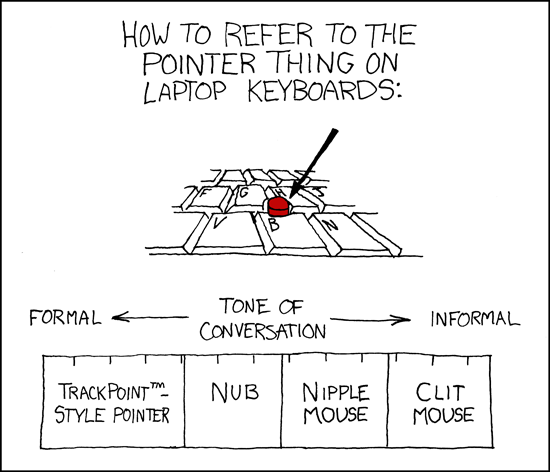
aye me too. i hate trackpads. always preferred the thumbstick mouse that IBM used to do, but for some reason everyone stopped using it. makes using modern laptops a pain, imo. but... ive never seen anything like this controller, so maybe it will pull it off. Originally Posted by Qalbert
-
2013-09-27 15:18 #71The Fucking Voice of Actually
- Join Date
- Nov 2007
- Posts
- 11,082
- BG Level
- 9
- FFXIV Character
- Cantih Hacos
- FFXIV Server
- Gilgamesh
- FFXI Server
- Bahamut
- Blog Entries
- 6
Originally Posted by BaneTheBrawler
-
2013-09-27 17:57 #72The Shitlord
- Join Date
- Feb 2008
- Posts
- 11,560
- BG Level
- 9
- FFXIV Character
- Kharo Hadakkus
- FFXIV Server
- Hyperion
- FFXI Server
- Sylph
- WoW Realm
- Rivendare
yes, that. lol.
-
2013-09-27 18:06 #73Mr. Bananagrabber
Sweaty Dick Punching Enthusiast
- Join Date
- Dec 2005
- Posts
- 56,040
- BG Level
- 10
- FFXI Server
- Asura
I usually preferred nub.
-
2013-09-27 18:44 #74okay guy I guess
- Join Date
- Nov 2010
- Posts
- 24,439
- BG Level
- 10
doesn't seem to be one on my keyboard, or at least I can't seem to find it
-
2013-09-27 18:57 #75blax n gunz
- Join Date
- May 2005
- Posts
- 11,141
- BG Level
- 9

http://www.gamasutra.com/view/news/2..._they_said.php
Tabar said the configuration map for the controller allows you to do "pretty much anything." For example, developers can slice up a pad into quarters, each one representing a different input, or even into eight radial sections, again, each section representing whatever you want, mapping to key combinations, or to the mouse.
The most prominent, and for some developers and players off-putting feature of the controller are those circular trackpads. But developers who we spoke with essentially said to drop your expectations of what a trackpad is capable (or not capable) of.
"These are not like laptop trackpads," Tabar said. "Everyone is like, 'Oh we're replacing thumbsticks with trackpads, oh shit.' [laughs] But this is not at all like a laptop trackpad. It just feels good. It's a challenge to verbally describe it.neat stuff going on in there.Remo said the controller has a tiny speaker in it that offers audio feedback – a subtle "tick" sound that increases and decreases in speed (he compared it to the Wheel of Fortune wheel's sound), depending on how you use the track pad. If you "fling" your thumb across the trackpad – if it's mapped to the mouse – the ticking increases in speed, and slows down as the virtual momentum of your action slows.
"It sounds like there's actually a mechanical device in there, which really makes it feel mechanical, but not in a clunky way," Remo said. "It just feels really high-tech and precise. … I can't stand trackpads on laptops, and this felt really good to me. There was almost no learning curve as far as accuracy goes."
-
2013-09-27 19:03 #76Resident Moogle
- Join Date
- Mar 2007
- Posts
- 13,229
- BG Level
- 9
- FFXI Server
- Asura
So basically, they reinvented Xpadder.
Will have to see what the price on the thing is. Lack of a proper d-pad or face buttons just doesn't sit well with me if I want to play some old shit on it.
-
2013-09-27 19:20 #77RNGesus
Sweaty Dick Punching Enthusiast
- Join Date
- Jan 2005
- Posts
- 43,997
- BG Level
- 10
- FFXIV Character
- Lenette Valkyr
- FFXIV Server
- Gilgamesh
More so than the slider shit I'm afraid my fingers are gonna be confused as fuck by the placement of the XYBA buttons.
-
2013-09-27 19:38 #78The Fucking Voice of Actually
- Join Date
- Nov 2007
- Posts
- 11,082
- BG Level
- 9
- FFXIV Character
- Cantih Hacos
- FFXIV Server
- Gilgamesh
- FFXI Server
- Bahamut
- Blog Entries
- 6
So... Originally Posted by Qalbert
You're saying...
You can't find the clit.
Basically.
-
2013-09-27 19:47 #79Sandworm Swallows
- Join Date
- Dec 2006
- Posts
- 7,328
- BG Level
- 8
I laughed. Originally Posted by Cantih
-
2013-09-27 19:49 #80okay guy I guess
- Join Date
- Nov 2010
- Posts
- 24,439
- BG Level
- 10


Similar Threads
-
Harmonix Working On Natal Dance Game
By 6souls in forum Gaming DiscussionReplies: 1Last Post: 2010-06-04, 15:31