Page 3 of 3 FirstFirst 1 2 3
Results 41 to 59 of 59
  1. #41
    Banned.

    Join Date
    Oct 2007
    Posts
    533
    BG Level
    5

    I worry it's more power consumption and heat dissipation that limit it.

  2. #42
    True skill only comes from macro switching all your e-peen gear thru 10 pages
    Join Date
    Sep 2007
    Posts
    4,740
    BG Level
    7
    FFXI Server
    Quetzalcoatl

    More on the spec-less specs:

    http://blogs.msdn.com/b/b8/archive/2...ws-rt-pcs.aspx

    Quote Originally Posted by Microsoft

    Collaborating to deliver Windows RT PCs

    Steven Sinofsky
    13 Aug 2012 9:00 AM

    34

    Since RTM on August 1, PC manufacturers have been using the released software to ready new PCs designed for Windows 8. Collectively, we are all very excited by the innovation and creativity that will arrive in market this October. Our engineering collaboration has been better than ever as we work to bring better performance, reliability, and battery life to new PCs designed for Windows 8. We also know many are interested in how we extended this process to a new generation of PCs built on the ARM platform. This post details how we have collaborated on the development of Windows RT and new PCs designed for the operating system. Mike Angiulo, the vice president of our Ecosystem and Planning team, authored this post.
    –Steven

    ______________________________________

    Windows 8 and Windows RT each reached the RTM milestone, and we are hard at work in collaboration with ecosystem partners, including PC manufacturers, Silicon partners, and other component suppliers, to complete high quality Windows RT and Windows 8 PCs that we think you’ll love. We’re very excited about the designs PC manufacturing partners have built on the foundation of Windows 8 and Windows RT.

    The breadth of Windows 8 Intel- and AMD-based designs from our PC manufacturing partners will continue to push the envelope with powerful computing and innovative design. You can expect to see everything from ultra-thin sleek designs with stunning high-resolution displays, to beautifully designed All-In-One PCs with large immersive displays complete with touch, to high-power towers rocking multiple graphics cards and high-performance storage arrays. In addition, this broad range of PCs will provide price and feature combinations that allow every customer to find a PC that fits their needs and lifestyle perfectly.

    We are particularly excited about the new low power x86 Windows 8 PCs that will take advantage of Intel’s SoC platform innovations to provide an always on and always connected experience (known as connected standby). Just recently, Lenovo announced the ThinkPad Tablet 2, which offers an outstanding combination of new features built on the latest Intel ATOM® processor. We’ll cover the benefits of this scenario later in the post.

    Microsoft has worked very hard with this release to provide the tools and support to contribute to new PCs that are more reliable, faster, use fewer system resources, and have improved software loads than comparable Windows 7 PCs. From the newest Ultrabook™ to the most powerful and extensible workstations, Windows 8 PCs are on the way.

    Windows RT begins a new era of ARM-based PCs, where we are working with our Silicon and PC manufacturing partners to bring a whole new set of innovations to market. In an earlier post, Building Windows for the ARM processor architecture, we focused on the detailed engineering work required to create Windows RT. In the remainder of this blog I would like to provide an update on our efforts to collaborate across the ecosystem in bringing new Windows RT PCs to market. But first, let’s briefly recap the key points from the previous post:

    Windows RT shares significant code with Windows 8 and has been developed for and will be sold and supported as a part of the largest computing ecosystem in the world.
    We have achieved our goal of one Windows binary for all Windows RT SoC platforms from NVIDIA, Qualcomm, and Texas Instruments, each of which has developed innovative ARM CPUs that form the basis of a complete system.
    Delivering Windows RT PCs has been about building out a new system for the first time—a completely new ecosystem of PCs providing opportunities for PC makers to bring to life a new generation of PCs with new capabilities, starting with ARM-based processors.
    Windows RT PCs are thin and light in industrial design, and have long battery life and integrated quality. These PCs have all been designed and manufactured expressly for Windows RT.
    PC makers will provide Windows RT PCs as integrated, end-to-end products that include hardware, firmware, and Windows RT software. Windows RT software will not be sold or distributed independent of a new Windows RT PC, just as you would expect from a consumer electronics device that relies on unique and integrated pairings of hardware and software. Over the useful lifetime of the PC, the provided software will be serviced and improved.

    If you are following Windows RT, perhaps you have taken note of the Asus Tablet 600 (Windows RT) announcement or Microsoft’s own Surface RT™ news. Along with Asus, we are excited to share that there will be ARM-based PC designs from Dell, Lenovo, and Samsung running Windows RT.

    You will need to stay tuned for more details; PC manufacturers will be unveiling their products as we approach the Windows 8 and Windows RT launch. What I can say is the spectrum of form factors and peripherals being developed to meet each unique customer’s computing needs is unique in the industry.

    “Dell’s tablet for Windows RT is going to take advantage of the capabilities the new ecosystem offers to help customers do more at work and home. We’re excited to be Microsoft’s strategic partner, and look forward to sharing more soon.”

    - Sam Burd, Vice President, Dell PC Product Group

    The uniqueness of our approach starts with a new way of working across partners to engineer a PC—a collaboration that brings the best of all parties together to deliver end-to-end experiences that are integrated and optimized from the chipset to the experience.

    It’s also worth taking a moment to describe how our collaboration on these PC efforts has been different than in any other Windows release. Our engineering collaboration on these Windows RT PCs has been strong, collaborating with the PC manufacturers, Silicon partners, and Operators to focus on hardware, software and services integration. Each respective partner was committed to sharing early iterations of their products, whether it was a SoC bring-up board, early builds of Windows RT, firmware and drivers, or hundreds of pre-release PC hardware samples (such as the ones featured in earlier demonstrations and videos). Product designs were informed and revised by our collective efforts through development and testing. As a result, all of these Windows RT PCs will have consistent fast and fluid touch interactions, long battery life, connected standby, and are beautiful, thin, and light designs. All of these are designed to make the most of the capabilities of Windows RT.

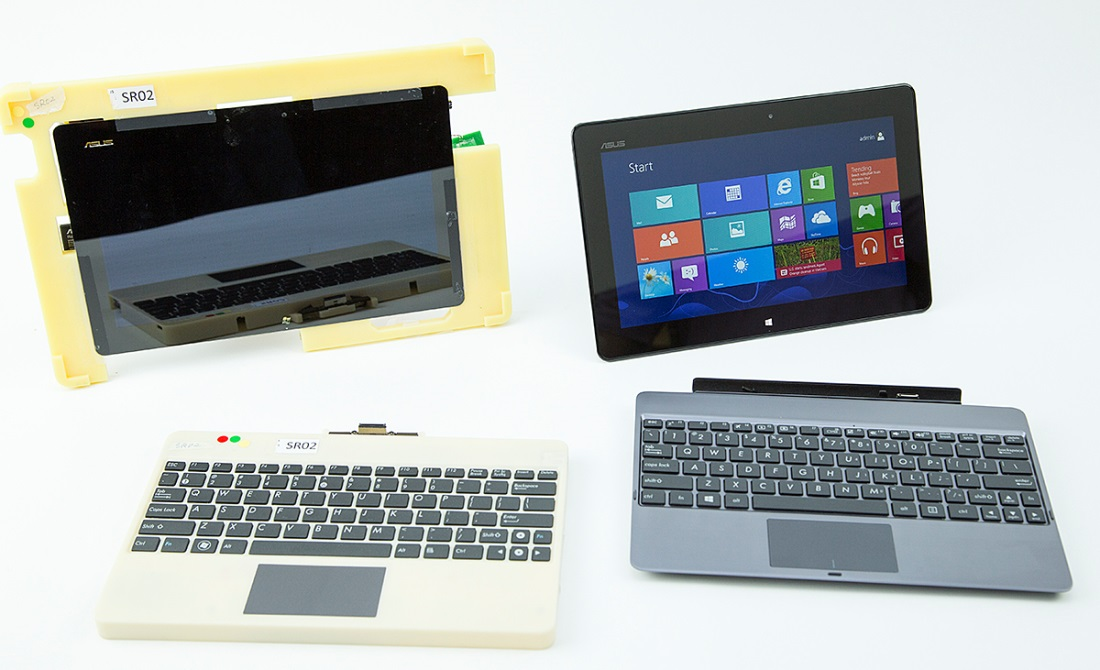
    This is a snapshot of an actual pre-release Windows RT PC, showing a very early engineering prototype and the evolution to its current form.


    Windows helped achieve these goals by focusing on optimizing key scenarios. Taken together, these scenarios drive a new level of mobile experience and performance not possible without new technology and engineering collaboration. So let’s dig into to some of the specifics.

    Connected standby is the scenario of having your PC be always on and always connected in the new connected standby state without excessively draining your battery, so that you have access to your important and up-to-date information whenever you need it. When your Windows RT PC is not in use, it will move into a new low-power mode that allows it to keep your data fresh and current while also not requiring a battery charge for days. And when you need your system, it will turn on in less than a second at the touch of a button, which is a mobile phone experience but in a full PC. Additionally, we focused on an aggressive whole system power modeling scenario that has allowed us to better inform battery capacities to deliver all-day battery life with days of connected standby in thin and light designs.

    The following chart shows some of the measurement ranges we are seeing as we test early production PCs for the connected standby and power scenarios.

    The measurements are based on firmware still undergoing final optimizations, and the just released Windows RT RTM code, and will only improve as the PCs move towards manufacture. To provide context on the significance of the measurement, it is important to understand how the scenario was measured. In this case, the PC was playing back in full screen a local HD video at full resolution with a screen brightness of 200 nits. It was also configured for one email account using the Microsoft network. Finally, these numbers are also influenced by the different PC form factors themselves, which include both tablets and laptops, screen sizes that vary from 10.1” to 11.6”, and battery sizes spanning 25 Whr to 42 Whr.


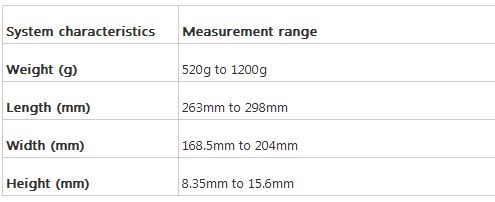
    During development, further power modeling analysis at the component level allowed us to better understand where we needed to invest in design optimizations. For example, typical touch controller solutions were based on multi-chip solutions. By reducing those solutions to single-chip designs, we achieved lower power usage and reduced thermals, which translated to smaller battery sizes and thinner and lighter designs. The table below provides an overview of the typical weight and thicknesses we have been able to achieve with our partners across the different models representing different form factors based on ARM SoCs.


    These single-chip solutions not only reduce power requirements, but they also provide performance optimizations that result in fast and fluid touch usage. The Windows RT PCs that our partners will be delivering for the upcoming launch provide sampling rates of 100Hz per finger. This not only allows for fast and fluid response, but also incredible industry-leading accuracy.

    Our graphics core has also gone through extensive optimization. Besides the optimizations around power-efficient HD video playback, the core Windows RT UI animations achieve 60fps, which was our design goal.

    We didn’t stop at optimizing power, thickness, and weight. We also focused on enabling exciting new scenarios in these Windows RT PCs, such as sharing information intuitively and easily. You will see NFC integration in some of our Windows RT launch PCs that open up fun and interesting things like tap to share. By simply tapping two NFC-enabled Windows RT PCs together, users can easily share photos, URLs, map directions, and anything else that our software partners have designed into their Windows apps. And of course Windows RT natively supports a broad range of device scenarios such as USB mass storage, printing, audio/video peripherals, and more, along with connectivity through WWAN, Wi-Fi, Bluetooth, and USB. These build on the common foundation of Windows 8 and Windows RT, and were previously shown as early as the //BUILD/ conference.

    Windows RT is not just for tablet form factors. Some of our Windows RT PCs come with full keyboard and touchpad solutions, whether removable/dockable or a traditional clamshell. Not only do these solutions provide additional battery capacity, but they also provide a new touchpad experience that incorporates intuitive Windows 8 gestures. By working closely with our touchpad component vendors, we have incorporated native support in firmware to deliver incredibly fast gesture recognition that makes interacting with Windows a breeze. The touch gestures that will be natively supported are described in these two tables:

    Finally, the wealth of hardware components and optimizations is only as rich as the applications that take advantage of them. As an ecosystem, Windows, the PC manufacturers, and the Silicon partners have been engaged with developers around the world to design application experiences that will light up the capabilities of this new PC hardware. We’ve purposely built thousands of reference design hardware systems to develop and test the OS and apps, collectively seeding over 1500 Windows RT reference systems to ISV and IHV companies in preparation for launch. The results are starting to show, as we’ve seen over 90% of the RTM applications in the Windows Store support Windows RT, as well as the Windows Hardware Certification requirements working to ensure every Windows RT PC is indeed compatible with a broad set of peripheral devices such as printers, webcams, and mobile broadband modules.

    Windows RT represents a significant re-imagining of not only Windows, but Windows PCs and how we partner together to engineer them. The deep engineering collaborations from the Silicon and component manufacturers through to our PC partners and Windows engineering team have provided a compelling suite of exciting new Windows PCs that deliver on the promise of fast and fluid, always on and always connected, thin and light, and all-day battery life. We are looking forward to the exciting announcements ahead from Dell, Lenovo, and Samsung.

    --Mike
    tldr:

    Nothing new just some estimated battery HD up times & some sizes


    *Edit

    Also rumor has it that the low end version of the RT model will start @ 199.99

  3. #43
    Campaign
    Join Date
    Jun 2007
    Posts
    6,958
    BG Level
    8

    Definitely interested in this.

  4. #44
    True skill only comes from macro switching all your e-peen gear thru 10 pages
    Join Date
    Sep 2007
    Posts
    4,740
    BG Level
    7
    FFXI Server
    Quetzalcoatl

    Leaked full review on Surface RT


    Quote Originally Posted by PCMag

    By Joel Santo Domingo

    The Microsoft Surface with Windows RT ($699 direct) is Microsoft's first entry into the wild world of tablets. Priced to compete with the Apple iPad , the Surface tablet with 64GB of storage comes with a 10.6-inch, five-point multi-touch screen. As is, it's aimed at users that want to do more than simply consuming media and websites, with innovative keyboard covers that make some of the more expensive Windows 8 tablets' docking solutions look absolutely clunky by comparison. Plus, it has an ace in the hole that makes it feel like a "real computer": The Surface comes with a full copy of Microsoft Office 2013 (Home and Student Edition). The Surface has the same user interface as upcoming Windows 8 laptops and tablets, thanks to Microsoft's Windows RT operating system. However, since the tablet uses Windows RT and a more economical ARM processor, the Surface isn't compatible with the majority of existing software made for Windows 7 and XP. This is the conundrum we find ourselves in while we look at Microsoft's first true computing device.

    Design and Features
    The Surface certainly looks like the prototypical "Post-PC" device: Its tapered and squared off sides make it look more like a prop from the Avengers than one of the rounded tablets on the market right now. The Surface measures roughly 7 by 11 by 0.37 inches (HWD), making it smaller than the Apple MacBook Air 11-inch , but a smidge longer than the current Apple iPad. Our review unit is the $699 top-of-the-line version from Microsoft, which includes a Surface Touch Cover. The Touch Cover resembles an Apple iPad Smart Cover, in that it protects the screen, and also puts it to sleep and wakes its up by closing and opening the cover. It's made of a synthetic material that protects the screen from fingerprints and even small amounts of liquid. The big difference lies in the pressure-sensitive film keyboard on the inside of the Touch Cover. It will make you forget that clunky keyboard on the Atari 400 ever happened. The Touch Cover keyboard is one of the most responsive ones we've ever used and when installed, turns the Surface into the quasi-laptop. (The Type cover is a little thicker, but uses real keyboard keys for more tactile feel when you type.)

    The Touch Cover and Type Cover both latch on the bottom of the Surface with a proprietary magnetic latching mechanism. The latch is both simpler and more intuitive than the latches we've seen on other convertible tablets like the one on the HP ElitePad 900 and Asus Transformer Pad Infinity TF700 . If you hold the bottom of the Surface about a half-inch from the magnetic latch on either cover, the built-in magnets complete the job automatically with a satisfying click. Like in Microsoft's videos, you can hold the Surface by the cover while letting the tablet portion swing in midair, and the latch won't come free. Though the magnetic latch is strong, it takes virtually no effort to remove the cover with a free hand. There's just enough force resisting the act of detaching the cover to make sure you know you really want to detach the cover and are not just tugging on it. This means you can pull the Surface across a table by its cover and still not have it detach, but then pick the combo up and remove the cover quickly with a quicker tug.

    The cover is supplemented by a metal kickstand that spans the back of the Surface. It folds out easel-style, and props the Surface up at a comfortable angle. You can also use the kickstand when you don't have the cover installed, like on the $399 Surface base model. Unfortunately, the kickstand's angle is not adjustable. The Surface leans back at about 22 degrees from vertical (about 68 degrees from horizontal), which is fine for use while you're seated.

    The kickstand swings out easily, but Microsoft molded a finger catch only into the left-hand side of the Surface to help pull out the kickstand. If you try to open the kickstand with your right hand, it will be more difficult as the kickstand rests flush on the back of the tablet. Under the kickstand is a microSDXC card reader, capable of doubling the internal 64GB of storage. The base and midpriced Surface tablets come with 32GB of storage, so you'll have to use the micro SD card slot sooner or later on those models.

    The 720p HD front-facing camera is angled straight out, but the back panel camera (also 720p) is angled up 22 degrees to offset the angling caused by the kickstand. That way, you can capture whatever is behind the Surface when it is propped on a table or other horizontal surface. The angled camera lens also means that you'll have to tilt the tablet a bit if you want to take a handheld picture with the Surface.

    The Surface improves on the iPad (and most Android tablets) by having more I/O ports. A full sized laptop will of course have more ports, but the Surface comes with a full-sized USB 2.0 port, a headphone jack, and a micro HDMI port. Microsoft calls it a "Micro HD" port and sells a Micro HD-to-HDMI port adapter ($39.99 list), as well as a Micro HD-to-VGA adapter ($39.99 list). However, when we hooked up an off the shelf micro-HDMI-to-HDMI cable to the Surface, we were able to hook up to and use a HDMI monitor without any issues. The Surface supports extending Windows RT to the external screen, as well as mirroring the tablet's screen on the external display. This means you can use the Surface in a dual-monitor configuration, just like a desktop or laptop. The USB 2.0 port lets you use external peripherals like scanners, printers, keyboards, mice, and external hard drives. Speaking of mice, we were able to pair the Surface to a Microsoft Wedge Touch mouse and use it. The mouse automatically connected itself via Bluetooth after we woke the Surface from a sleep state or when we turned the mouse itself off then on again.

    Surface for Everyday
    Typing on the Surface while it sits on your lap does work, but only just. The keyboard flap may reach to and over your waistline, which may be awkward. The tablet and cover combo is pretty light, but the fact that the kickstand is effectively supported by the kickstand's two corners means that it digs into the tops of your legs. It's best to use the Surface and its keyboard cover on a flat table or desk.

    Both the Type Cover and the Touch Cover are a little smaller than full size: Measure a standard laptop keyboard (like the one on a Lenovo ThinkPad X1 Carbon) , and it's about 7.5 inches edge-to-edge from Q to P keys. On the Surface Touch Cover and Type Cover, it's about 7.25 inches. You'll get used to the Surface keyboards fairly quickly, but there's a period of adjustment.

    The row of function keys on the top of the keyboard are mapped to functions like Volume, Play/Pause, and the Home/Page Up/Page Down/Delete keys. Four function keys bring up the Charms bar, and functions including Search, Settings, and Share. The function keys are clearly marked with icons for each of the actions. The F1-F12 keys show up on the Type Cover, but not on the Touch Cover. For the Touch Cover, you'll need to hold down the Fn key to access the actual F1-F12 functions on some programs.

    The included Touch Cover features a film keyboard embedded in a neoprene-like material. Since it is only 3.5mm thick, the keyboard on the Touch Cover doesn't have any tactile feedback. The Touch Cover activates the same audible feedback that you would get from the onscreen virtual keyboard, depending on the sound volume on your Surface (mute the sound, and you won't hear any "clicks.") Both covers feature a trackpad with areas marked off for left and right mouse clicks. Both trackpads are multitouch and feature gestures like two finger swipes and tap to left click.

    The Type Cover has a set of physical keys that have an actual (shallow) travel. The Type Cover's tactile feel is a better bet for those who have tried and can't stand how the virtual keyboard feels on their fingertips when typing on a tablet's screen like on the Surface, Sony VAIO Tap 20, or the iPad.

    While the Type Cover has actual tactile feel, the Touch Cover has better responsiveness. At first try, the Type Cover feels just a bit sloppier while typing than the Touch Cover, until you get used to it. Both are better than using the on-screen keyboard, partly because the screen has no "give," but mostly because the on-screen keyboard takes up a lot of space and will obscure on-screen elements like the browser or a Word document. You'll also welcome the fact that the Touch Cover has a softer feel than typing directly on the screen.

    Switching keyboards is simple. The magnetic latches guide the cover into place. It takes only a few seconds to change the covers, and they're so light you could take both with you in a commute bag. The Surface slate weighs 1.48 pounds alone, 1.94 pounds with Touch Cover, 1.95 pounds with Type Cover, 2.20 pounds Touch Cover & AC adapter, and 2.22 pounds Type Cover & AC adapter. Basically, the tablet by itself works best when you're walking around at home; the Touch Cover is comfortable for about half an hour of steady work (or hours of IM and surfing); and the Type Cover (or an external Bluetooth keyboard) is necessary for serious writing (1,000+-word sessions).

    Surface for Work
    The Surface comes with a full version of Microsoft Office 2013 Preview (Home and Student Edition). This means it comes with Microsoft Word, Microsoft Excel, Microsoft PowerPoint, and Microsoft OneNote. Since Outlook isn't included, you'll have to use Windows RT's built-in Mail client (for Microsoft online mail) or Internet Explorer (for everything else). This will only be a problem for enterprise-type businesses, which will have to wait for the Surface Pro, which is reported to ship in January 2013.

    We'll have a full review of Office 2013 on PCMag.com once it goes final, but for the time being Office 2013 Preview does just about everything you'd expect out of the four apps, from document creation, to spreadsheet number crunching, to presentations, and note taking. Word and Excel macros and some higher functions like add-ins are missing from the Office RT version. Technically, the Home and Student edition is licensed for non-business use, so you'll have to ask your IT guys for a licensed business copy of Office for a work-issued Surface or Surface Pro. The same applies to SMB users: you'll need a full copy of Office on any Surface or Surface Pro that you're writing off as a business expenditure. That said, I'm sure Microsoft won't mind if you're editing the occasional document from work on your personal Surface. This version of Office is certainly enough for the elementary- to university-level student to get his or her work done. When Office 2013 is finalized later this year, your copy of Office on the Surface will automatically update to the final version as part of normal Windows updates.

    Microsoft includes SkyDrive cloud-based storage in addition to the on-board 64GB of storage. SkyDrive lets you store up to 100GB online (7GB free), so it can be reached from any online device like a PC, Mac, smartphone, or tablet. That way you can save your documents to the SkyDrive and then bring them up on your workplace PC. SkyDrive speed depends on your network connection, so working from home may be faster than in you workplace, and both will certainly be faster than using a public hotspot. The Surface is "always connected," as long as it is connected to Wi-Fi, so SkyDrive directories and emails update in the background even while the tablet is asleep.

    Entertainment and Apps
    The Windows Store has far, far fewer apps on it than the iTunes Store or Google Play. In fact, we counted fewer than 3,000 apps on the Windows Store for Windows RT, while the iTunes Store clocks in at a staggering 250,000 apps just for the iPad. The apps that are on both platforms run in a similar fashion: Cut the Rope is Cut the Rope, no matter what you're playing it on. At the time of review, Angry Birds wasn't yet available, but classics like Minesweeper and Solitaire are available on the separate Xbox Games Store.

    The Xbox Games tab has a few Windows games on it, but it's mainly a conduit to your Xbox Live account and a store for ordering games for your Xbox 360. We'd love to see some of the classic Xbox and Xbox 360 games appear on the Surface, like Halo or Forza MotorSport.

    YouTube videos looked fine on the Surface, even 720p HD videos. Some 1080p HD videos did stutter a bit, but that's okay, since they're being downscaled to 720p on the Surface's 1,366 by 768 screen anyway. We had some trouble reaching Flash-heavy sites like the video portions of Disney.go.com, but other sites like Starfall.com came up fine.

    We were able to watch a movie via the Windows RT/8 optimized Netflix app after downloading the app from the Windows Store, but we couldn't make Amazon Instant Video play in Internet Explorer (IE). For the time being you're limited to using IE 10 as your only browser on the Surface. The Windows 7/8 version of Chrome and Firefox won't run on the ARM-based Surface, and reports state that Microsoft has blocked other browsers from running on the Surface's Desktop mode. There's hope for bookmark sync utilities and maybe even other browsers that run in the Windows UI (formerly known as Metro), but at launch you'll be able to use Internet Explorer 10 (in desktop mode) or Internet Explorer 10 (in the new Windows UI).

    Playing music and games won't tax your eardrums too hard. The Surface's speakers play very softly, even at 100% volume. However, when we plugged in a pair of headphones, the Surface was able to drive them at an ear-splitting level. Basically this means that the built-in speakers are adequate for a quiet room; in other instances you'll want to use a pair of headphones to listen to music or watch movies.

    Performance
    The ARM architecture meant that our normal Windows-based benchmark rests like PCMark 7 and 3DMark 11 wouldn't run on the Surface. The Surface's 2GB of system memory, 1.3GHz quad-core Nvidia Tegra 3 processor, integrated Tegra 3 graphics, and 64GB SSD are decent components for a tablet. For example, the Nexus 7 uses the Tegra 3 processor to great effect, and so does the Microsoft Surface. On Rightware's Browsermark benchmark test, the Surface performed a bit slower than the New Apple iPad.

    More important is the Surface's battery rundown numbers, which are good. The Surface eked out 7 hours 45 minutes in our video rundown test. That's not bad compared with ultrabooks like the Asus Zenbook Prime UX31A-R5102F , which barely managed to top 6 hours (6:11) on the same test. The iPad's battery rundown was more impressive at 10:54 on the test, but the iPad has a higher-capacity 42.5 WHr battery (compared with the Surface's 31.5 WHr battery). All in all, the Surface is pretty good and certainly powerful enough for day-to-day use.

    Conclusion
    In terms of its hardware and operating system, the Microsoft Surface with Windows RT is a very good product. It's very light, and powerful enough to run a version of Windows, so it's very attractive to Windows early adopters as well as business users who have plans to migrate to Windows 8. It's powerful enough to be a daily carry device for work, always with you on your commute across the state or across the country. It shares some programs and its main interface with Windows 8, which is a boon, provided you get used to using the new Windows UI. Users who haven't yet tried Windows 8 will have to get used to the new way of doing things, but since Microsoft has mandated that all new PCs come with either Windows 8 or Windows RT, you'll have to start using the new UI on new Windows PCs and tablets eventually.

    So should you buy a Microsoft Surface instead of an iPad or Android tablet? If you use Microsoft Office for work or school, then it's a no-brainer: Get a Microsoft Surface (or one of the other upcoming Windows RT tablets). Even though Pages and QuickOffice are pretty good programs, you really can't beat a real copy of Office when your work is on the line. If you use Office programs constantly, the Surface is the tablet and laptop replacement your inner road warrior has been searching for. Discounting Office, the Windows Store's limited selection holds us back from giving the Surface an unequivocal recommendation, since the iTunes Store and the various Android stores have significantly more vast collections of apps. There's no doubt that the most popular apps will be ported over to Windows 8 and Windows RT, but when that will happen is still up in the air. If there's an app you can't possibly live without, then you should check if it's on the Windows Store before plunking down your money for the Surface. It's because of the limited selection in the Windows Store that we can't give the Microsoft Surface the tablet Editor's Choice over the Apple iPad or the Samsung Galaxy Note 10.1 . But we see the potential. If you're a tech pioneer or someone who appreciates well executed design, then you probably have already put the Microsoft Surface on order. In that case, enjoy.


    Pros:

    Comes with a full version of Office 2013 (Home and Student). Good battery life. MicroSDXC slot. USB 2.0 port. Compact. Includes Touch Cover. Touch Cover sleeps and wakes the tablet. Micro-HDMI port. No fans. "Always connected." Dual band Wi-Fi (2.4GHz and 5GHz).

    Cons:

    Kickstand assist only on left face. Only one angle on kickstand. Requires flat surface to use with Touch and Type covers. Speakers are very soft. Few apps on Microsoft's Store. Not compatible with existing Windows 7 and XP programs. Proprietary charger port.

    Bottom Line:

    The Microsoft Surface with Windows RT bridges the distance between tablet and laptop for many users, particularly if you use the Web or Microsoft Office constantly. The Surface has very good hardware and some innovative design, but Microsoft Office RT is the killer app that comes to the Surface and makes it shine.
    http://cc.bingj.com/cache.aspx?q=sur...174bd,b1950dd1

    http://webcache.googleusercontent.co...2411252,00.asp

    http://webcache.googleusercontent.co...2411253,00.asp

    http://webcache.googleusercontent.co...2411254,00.asp

  5. #45
    Groinlonger
    Join Date
    Oct 2006
    Posts
    2,963
    BG Level
    7
    FFXI Server
    Fenrir

    Wonder what happened to the Windows 8 version. Can't seem to find a release date for it, or any information on why it's not being released now.

  6. #46
    Ridill
    Join Date
    Feb 2006
    Posts
    11,977
    BG Level
    9

    Surface by Microsoft. Tablet PC.

    I was hearing that these Windows RT metro apps are incompatible with the Windows Phone 8 metro apps. Why??? It seems to me that they should be designed to be compatible to each other.

    I have Windows 8 RTM installed on my laptop (from MSDN) and I actually don't mind the Metro interface.

  7. #47
    True skill only comes from macro switching all your e-peen gear thru 10 pages
    Join Date
    Sep 2007
    Posts
    4,740
    BG Level
    7
    FFXI Server
    Quetzalcoatl

    Quote Originally Posted by Mojo View Post
    Wonder what happened to the Windows 8 version. Can't seem to find a release date for it, or any information on why it's not being released now.
    The Surface Pro will be out in Jan~Feb. Which to me is the only version that matters.

    Quote Originally Posted by octopus View Post
    I was hearing that these Windows RT metro apps are incompatible with the Windows Phone 8 metro apps. Why??? It seems to me that they should be designed to be compatible to each other.
    Yeah would've been nice.

  8. #48
    True skill only comes from macro switching all your e-peen gear thru 10 pages
    Join Date
    Sep 2007
    Posts
    4,740
    BG Level
    7
    FFXI Server
    Quetzalcoatl

    Surface Pro pricing announced.

    http://blogs.technet.com/b/microsoft...o-pricing.aspx

    Quote Originally Posted by Microsoft
    It’s hard to believe it’s been just over a month since Surface with Windows RT hit the market. The response from Surface customers has been fantastic and exciting to see. In addition to sharing the terrific results that Microsoft is seeing with Windows 8 at a technology conference earlier this week, we also announced that Surface with Windows 8 Pro would be available in January 2013.

    Today, I want to share a bit more detail about the growing Surface family of products and Surface with Windows 8 Pro, specifically around pricing. In January, Surface with Windows 8 Pro will be available in two versions and pricing will start at $899:

    · 64GB standalone version at $899

    · 128GB standalone version at $999

    Both versions will both include a Surface pen with Palm Block technology and include the ability to use a Touch Cover or Type Cover (sold separately).

    Surface with Windows 8 Pro uses the same familiar elegant design principles as Surface with Windows RT including the Dark Titanium VaporMg casing, dual 2x2 MIMO antennas designed specifically for Surface and of course the kickstand.

    However, it also has some differences.

    On the inside, Surface with Windows 8 Pro will come with Intel’s next generation Core i5 processor. This chip will give Surface with Windows 8 Pro a graphics boost for its 10.6” 16:9 ClearType display that runs at a 1920x1080 full HD resolution. Surface with Windows 8 Pro also includes a full-size USB 3.0 port. Its Mini DisplayPort can drive an external display up to 2560X1440 resolution. And, as I mentioned above, Surface with Windows 8 Pro will support Pen input. This is an amazing feature for all you note-takers or document editors out there, especially since it has expanded capacitive and digitizing technology we’re calling Palm Block that will prevent your handwriting from getting interrupted if you accidently place your palm on the screen as you write. This feature is pretty cool, and allows for a great inking experience alongside a great touch experience when needed.

    Surface with Windows 8 Pro will run your current Windows 7 desktop applications – it’s a full PC AND a tablet.

    And all this in a PC that will weigh less than two pounds and be less than 14 millimeters thick.

    We are excited about both Surface with Windows RT and Surface with Windows 8 Pro.

    For more details on Surface with Windows 8 Pro and Surface with Windows RT, you can visit Surface.com, find us on Surface on Facebook. Or follow Surface or me on Twitter for additional updates.

  9. #49
    BG Content
    Join Date
    Oct 2006
    Posts
    15,604
    BG Level
    9
    Blog Entries
    101

    The 128 GB version of Surface Pro has 83 GB of free storage out of the box. The 64GB version of Surface Pro has 23GB of free storage out of the box. Of course, Surface Pro has a USB 3.0 port for connectivity with almost limitless storage options, including external hard drives and USB flash drives. Surface also comes pre-loaded with SkyDrive, allowing you to store up to 7GB of content in the cloud for free. The device also includes a microSDXC card slot that lets you store up to 64GB of additional content to your device. Customers can also free up additional storage space by creating a backup bootable USB and deleting the recovery partition.
    With it about a week away (February 9th), I wonder how many people got turned off by this news yesterday, especially if you were considering the 64 GB version. Personally, I'm still planning to get one (conditional on the final reviews) since I'm planning to use this as a portable device to take to work/conferences and not my main computer. While the space thing isn't ideal, external hard drives are cheap enough that I don't think it's a major issue. That said, I kinda wanna wait till May to see if the Surface is included in Microsoft's annual "buy a computer, get an Xbox" promotion.. The pro version certainly costs more than the base price you had to spend in the past..

  10. #50
    Hyperion Cross
    Join Date
    Jan 2007
    Posts
    8,885
    BG Level
    8
    FFXIV Character
    Kai Bond
    FFXIV Server
    Gilgamesh

    I always wanted some sort of ultrabook/tablet that's not an iPad or some sort of Samsung/other brand product. The Surface Pro is really an attractive option for me as it's basically a full fledged PC that can be a tablet but just not as light.

    Storage wise I don't see much of a problem with it. Now that I know there's a memory card for 64gb more room I don't see much of a problem, however I am surprised at how much space Win8 takes up even after formatting the SSD (128 > 105~110 after format > 83 gb free space ... nearly 20~30 of that is OS??)

    Won't be day 1 for me but if there's a promotion for a free xbox with it or equivalent I might not hesitate.

    Ultimately if it all goes to shit (review and promotion wise) I'll settle for a Dell XPS 12 Duo as that looks mega fine too. Both devices have a high res screen (1080p).

  11. #51
    BG's most likeable Québécois
    Pens win! Pens Win!!! PENS WIN!!!!!

    Join Date
    Sep 2007
    Posts
    37,887
    BG Level
    10

    Wow so thats what 35-40gig of OS?

    How big is the OS installation for Windows 8 on a pc?

  12. #52
    Hyperion Cross
    Join Date
    Jan 2007
    Posts
    8,885
    BG Level
    8
    FFXIV Character
    Kai Bond
    FFXIV Server
    Gilgamesh

    Could be bloatware but otherwise according to Google a fresh 32bit Win8 is 10.6gb and 64bit is is 13gb.

    Considering Surface Pro is essentially a PC with a 64bit CPU then it's at least 13gb, I can only assume the other 17+gb is for some preinstalled stuff like Office, software for writing with pen, and other Microsoft related bloatware.

  13. #53
    BG's most likeable Québécois
    Pens win! Pens Win!!! PENS WIN!!!!!

    Join Date
    Sep 2007
    Posts
    37,887
    BG Level
    10

    Still seems a lot but i guess

  14. #54
    A. Body
    Join Date
    Nov 2005
    Posts
    4,315
    BG Level
    7
    FFXI Server
    Leviathan

    Quote Originally Posted by The Stig View Post
    Could be bloatware but otherwise according to Google a fresh 32bit Win8 is 10.6gb and 64bit is is 13gb.

    Considering Surface Pro is essentially a PC with a 64bit CPU then it's at least 13gb, I can only assume the other 17+gb is for some preinstalled stuff like Office, software for writing with pen, and other Microsoft related bloatware.

    "Formatted" 64GB will be more like 59GB. Then whatever recovery partition (Ars was guesstimating that would be about 8GB), 8's system partition is 350MB or so, then the actual Windows install, plus pagefile, plus hibernate file, which won't be too huge due to the Pro still only having 4GB of RAM, but still, decent chunk. Office 2013 trial likely as well, good for another 2-3GB. Easily -28-30GB right there.

    That still should leave a bit more room than the 23GB quoted for the 64GB model, but all that much.

  15. #55
    BG Content
    Join Date
    Oct 2006
    Posts
    15,604
    BG Level
    9
    Blog Entries
    101

    Reviews started coming out yesterday:
    http://www.engadget.com/2013/02/05/m...ce-pro-review/
    Engadget says it's definitely a good device, but not good enough to make them want to buy it. Big issues are that it straddles the boundary between laptop and tablet a bit too much with battery life and size suffering as a result.

    http://bgr.com/2013/02/05/microsoft-...tm_medium=home
    BGR says it's better than the lower end version in every way and the people who buy will not be disappointed. However, they wonder (fairly given how badly Surface has done so far) how successful it will be given the fact that there are alternative Windows 8 devices out there.

  16. #56
    Ridill
    Join Date
    Feb 2006
    Posts
    11,977
    BG Level
    9

    The battery life is definitely disappointing. It needed to have at least as much battery life as a regular ultrabook.

  17. #57
    Relic Shield
    Join Date
    Apr 2009
    Posts
    1,520
    BG Level
    6
    FFXI Server
    Carbuncle

    I picked one up today, with a bit of effort. I'm in Montreal. My local Futureshop showed as "Information Not Available" when checking online in the wee hours of the morning, and two other locations showed as in stock. Placed a reserve at two locations. First location e-mailed to say they had in stock and was reserved, but I checked my local store first: They didn't even get one. Headed to the first location, then right before I got there, mailed to inform me they had no 128gig, only 64. Went to the second location that also mailed to say they had my reserve, and luckily, they did. They only got a handful of units at all, and by the time I got home, all Futureshop's in my province were showing as no stock.

    Only used it a bit, initial impressions: It's pretty awesome. The weight of it doesn't seem a major issue to me. It definitely feels heavier. I'd say holding it feels about the same as holding a Macbook Air 13", closed, a bit less, even with a Type Cover on. Obviously, it's really fast. Now lag or slow down of any kind, screen feels equal to my eyes to 3rd Gen iPad (Retina). Noticed the Skype livetile in Windows 8 is of super low quality, makes it look shitty next to all the quality icons -_-

    For me, I really didn't feel much of an issue switching between Metro UI (or whatever they're calling it now) and the desktop. Desktop was a bit harder to navigate with touch, but not a big deal at all. My largest concern with it is two fold: It definitely does get warm, and gets warm quickly. Warm though, NOT hot. Pen is nifty, but I'm not an artsy type. Type cover works well, very little to no reduction in my typing speed. I'll give more impressions after I spend a little bit more time with it, but so far, quite content. I'd note, it works fine as a tablet, would NOT be my first choice at all as a consumption device, but hell yes if you want anything more. I'll probably try to grab some less graphically taxing games from Steam later and see how it works out.

  18. #58
    Road Tinnies
    Sweaty Dick Punching Enthusiast

    Join Date
    Apr 2008
    Posts
    1,714
    BG Level
    6
    FFXI Server
    Sylph

    How are you getting on with this? Considering getting one when in the US in April. The RT only launched here in Ireland a few weeks back so god knows when the Pro will release.

    Interesting to read people running the FFXIV ARR Benchmark on it and getting scores of 1500-2000.

    Your thoughts?

  19. #59
    Relic Shield
    Join Date
    Apr 2009
    Posts
    1,520
    BG Level
    6
    FFXI Server
    Carbuncle

    So far, so good. For class and stuff, it tends to last me at least 2 classes worth (so 5 hours, I generally have it on the lowest brightness value for that tho). I was also able to get like 1400 or so on ARR Bench on it, probably a little higher if I play with the settings. Apps are still poop but great for stuff like Word. Gestures are quick to get used to. Haven't installed many games, though you can check Youtube for that, people have been playing a lot of stuff, anything "old" (probably like, 2-3 years old I guess) would run pretty damn flawlessly, and even recent stuff like DmC can run on the lowest settings.

    I wish it's speakers were better, but that's true of EVERY damn laptop and tablet. It's also really nice to have Flash available, and be able to watch ANY stream from Twitch.tv, since iIO/Android apps suck and a large chunk of streams don't work on them. Basically, downside is battery life and heat. Only time it ever got really hot was running the ARR bench at high settings, even that, was still able to hold it in my hands, though one would assume if you're gaming on it, you're probably not holding the device I like it, but it's expensive. If you can't wait, or are REALLY hype for it, go ahead and nab one.

    Some fixes are coming to it, like resolution size between Metro and Desktop (annoying, only need to change desktop resolution when gaming really), and there are some other small issues that will be patched. If you're really hype/looking for a strong machine that can tablet it up as needed, go for it. Otherwise, wait 1 year, cuz I'm damned sure the second model will fix the battery shit, and if they can do anything to knock the weight down JUST a bit and the heat down JUST a bit... That'd be pretty awesome.

    p.s: I use a TypeCover with it most of the time. I've only tried a TouchCover in a store once or twice, and it was passable but I'd never ever chose it over a type cover.

    P.S.S: http://www.penny-arcade.com/2013/02/...ms-surface-pro Gabe reviewed it, and I think it's a pretty realistic and valid review.

Page 3 of 3 FirstFirst 1 2 3

Similar Threads

  1. Replies: 6
    Last Post: 2011-10-18, 09:56
  2. Advice about a tablet PC
    By Cadsuane in forum Tech
    Replies: 6
    Last Post: 2011-04-01, 08:33
  3. Replies: 79
    Last Post: 2010-08-03, 01:50