 XI Wiki


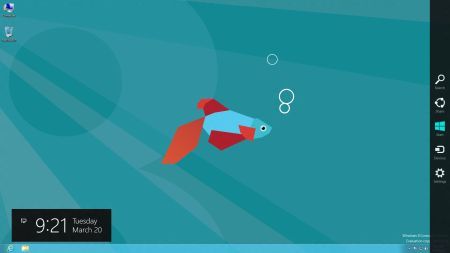
The advertising images for Windows 8 show it as looking like something like this:
http://cdn0.mos.techradar.futurecdn....rtm-380-75.jpg
So it's easy to assume that's what the OS is going to look like.
- Navigation
Results 21 to 40 of 109
-
2012-10-22 14:16 #21Bagel

- Join Date
- Oct 2007
- Posts
- 1,375
- BG Level
- 6

-
2012-10-22 14:25 #22A. Body
- Join Date
- Nov 2005
- Posts
- 4,315
- BG Level
- 7
- FFXI Server
- Leviathan
 That's what the Start screen looks like (replaces the Start menu), and the general look of Windows Runtime applications. Still annoying, but it's not necessarily the full-time environment unless you're using nothing but new apps.
 Originally Posted by Arelian

There's also a Windows 7-esque desktop for running Win32 apps (on not-RT), or doing things like file operations. If you consider how often you actually need to use the Start menu in 7, you could fairly feasibly avoid the Start screen most of the time, and it could pretty much be like 7. Or you can use Start8 (if nothing else) to add a Start button back on.
-
2012-10-22 14:31 #23True skill only comes from macro switching all your e-peen gear thru 10 pages
- Join Date
- Sep 2007
- Posts
- 4,740
- BG Level
- 7
- FFXI Server
- Quetzalcoatl
Well yeah they have to. The desktop view would be a bad idea since it looks like 7 (pop up thingies aside). I won't be needing the new start screen so I won't use it. Originally Posted by Arelian
-
2012-10-24 13:26 #24Relic Weapons
- Join Date
- Nov 2010
- Posts
- 351
- BG Level
- 4
- FFXI Server
- Quetzalcoatl
https://www.youtube.com/watch?v=GVRt5KhRh_M
This has entirely changed my view on how useful 8 could potentially be. I would buy something like this.
-
2012-10-24 23:33 #25Bagel
- Join Date
- Jul 2005
- Posts
- 1,297
- BG Level
- 6
- FFXIV Character
- Trent Reznuh
- FFXIV Server
- Balmung
- FFXI Server
- Sylph

i was pretty anti-Windows 8 for awhile but after messing with it (& very minimally tweaking it) the past couple weeks in my downtime in a VM, it's really not bad at all. once you configure the 'Desktop' (screen with the fighting fish two posts above) you can literally hit the Windows key after bootup and be back at that right away... and that's pretty much Windows 7. hitting the Windows key will toggle back and forth between the start screen and the desktop. also if you enable the Address toolbar (right-click task bar / Toolbars / check off Address), and then move it all the way to the left and as small as it can be, that right there can act as your command prompt, search box, and run box all in one. just pin your most common things, which I did in Win 7 anyway, and I don't really see it being that bad getting around quickly. in fact if you don't know any keyboard shortcuts, shutting down probably takes the longest.
i'm not going to upgrade my main Windows 7 systems to it, but after some practice it definitely wouldn't feel like the end of the world if i was forced to start using a pc that already had it on it.
Server 2012 is pretty damn interesting too once you get used to it, which was another major change. especially if you realize it's kind of designed to be remotely admin'd with the RSAT toolkit.
-
2012-10-25 15:09 #26True skill only comes from macro switching all your e-peen gear thru 10 pages
- Join Date
- Sep 2007
- Posts
- 4,740
- BG Level
- 7
- FFXI Server
- Quetzalcoatl
Webcast: Windows 8 and Microsoft Surface Launch Events:
live stream announced earlier today @ New York 11 AM EST. You can rewind the stream for those that missed it.
-
2012-10-25 15:12 #27Relic Shield
- Join Date
- Apr 2006
- Posts
- 1,543
- BG Level
- 6
- FFXI Server
- Gilgamesh
Nice multi monitor guide for 8. http://blogs.msdn.com/b/b8/archive/2...-monitors.aspx
-
2012-10-25 23:07 #28Yoshi P
- Join Date
- Aug 2006
- Posts
- 5,139
- BG Level
- 8
- FFXIV Character
- Dead Gye
- FFXIV Server
- Lamia
- FFXI Server
- Ragnarok
Seems like they basically integrated DisplayFusion. I'm personally not going to even consider installing it on my desktop unless I'm able to spend a few hours playing around with it elsewhere.
-
2012-10-26 10:26 #29Sea Torques
- Join Date
- Aug 2007
- Posts
- 515
- BG Level
- 5
I didn't see this mentioned earlier. If anyone is planning on buying 8, MS has a better deal than I've seen on Newegg or elsewhere. As long as you own a valid key for XP or higher, you can purchase an upgrade to 8 Pro for $39.99.
http://windows.microsoft.com/en-us/w..._FPP_Null_Null
And add a free Media Center upgrade:
http://windows.microsoft.com/en-US/w.../feature-packs
-
2012-10-26 10:38 #30Daniel Rand
- Join Date
- Feb 2008
- Posts
- 1,142
- BG Level
- 6
- FFXI Server
- Bahamut
Go to https://www.windowsupgradeoffer.com
Use this for the PC information.
*Windows 7 PC purchase information
Date of purchase *10/25.2012
Name of retailer * Best Buy
PC Brand *Dell
PC Model * Z14
Use whatever personal info you want but use a real email, before you confirm the sale you can input the redemption code and get it for $14.99. This has been confirmed to work by 8 people I know along with myself. Enjoy or hate it.
-
2012-10-26 11:22 #31Sea Torques
- Join Date
- Aug 2007
- Posts
- 515
- BG Level
- 5
Re: What's the general consensus here of Windows 8?
Very cool. I should have watched the replies before I purchased it, but I'll pass this info to my brother.
-
2012-10-26 12:12 #32BEAHCAT
BOSTON'S FINEST
- Join Date
- Jun 2007
- Posts
- 6,634
- BG Level
- 8
- FFXIV Character
- Mith Lothaire
- FFXIV Server
- Gilgamesh
- FFXI Server
- Phoenix
- WoW Realm
- Cenarius
 Tried it, and got a code emailed to me right away. However, I can't get a $14.99 pricing only $39.99 Originally Posted by Kainos
-
2012-10-26 14:48 #33Chram
- Join Date
- Jul 2005
- Posts
- 2,581
- BG Level
- 7
- FFXIV Character
- Deejay Zombie
- FFXIV Server
- Excalibur
a friend of mine at work was telling me about windows 8 and the biggest thing that made me go wtf was that steam did not work on it. not sure if its going to work on launch or not, but he was under the impression based on what he read that it wouldn't. can anyone confirm that? anyone else heard anything about windows 8 and steam compatibility?
-
2012-10-26 14:52 #34Daniel Rand
- Join Date
- Feb 2008
- Posts
- 1,142
- BG Level
- 6
- FFXI Server
- Bahamut
I went to windows website and clicked upgrade. Launched a .exe where small window comes to put info. You apply the promo code after entering billing and payment info. Worked for me that way Originally Posted by jmcgarrell
-
2012-10-26 15:24 #35Daniel Rand
- Join Date
- Feb 2008
- Posts
- 1,142
- BG Level
- 6
- FFXI Server
- Bahamut
Windows update just crashed my pc after restart lol.
-
2012-10-26 15:26 #36BEAHCAT
BOSTON'S FINEST
- Join Date
- Jun 2007
- Posts
- 6,634
- BG Level
- 8
- FFXIV Character
- Mith Lothaire
- FFXIV Server
- Gilgamesh
- FFXI Server
- Phoenix
- WoW Realm
- Cenarius
Can't even purchase windows 8.... checkout keeps crashing lol Originally Posted by Kainos
-
2012-10-26 18:01 #37A. Body
- Join Date
- Nov 2005
- Posts
- 4,315
- BG Level
- 7
- FFXI Server
- Leviathan
Reported to work fine. I've only messed with 8 at work though, so I haven't installed Steam. Originally Posted by djzombie
-
2012-10-26 20:17 #38we fuckin' stole it man.
- Join Date
- Mar 2006
- Posts
- 726
- BG Level
- 5
I upgraded with the 14.99 thing today. I'm of mixed feelings. I will admit, everything is really fast, and boot up on my ssd is really fast, but so was my win7. I don't know how i feel about a "microsoft account", considering i have accounts for everything else, and i'm not going to switch email etc. It seems everything in the metro wants to use that account too, and that pisses me off. Steam works, so those wondering, no worries there. As far as drivers go, everything worked straight away except my touchpad.
-
2012-10-26 20:46 #39Mr. Bananagrabber
Sweaty Dick Punching Enthusiast
- Join Date
- Dec 2005
- Posts
- 55,291
- BG Level
- 10
- FFXI Server
- Asura

Can't even install, just getting error messages that provide no helpful information. Love that Microsoft streamlined the process so much that I can't even get anything useful out of the error messages.
-
2012-10-26 23:59 #40Old Merits
- Join Date
- Jun 2008
- Posts
- 1,097
- BG Level
- 6
- FFXIV Character
- Tsuko Stark
- FFXIV Server
- Gilgamesh
I got a free win8 key through my school's msdn alliance. I'm debating if I want to upgrade my main rig. Do I have to do a clean install coming from win7 pro? I don't want to have to reinstall everything after upgrading. Is there any reason why a fresh install would be preferred? The microsoft account/store log in bothers me and /g/ seems to be hating on it, but seems its optional anyway. Win8 appears to perform marginally to significantly better than win7 but still debating on the actual interface. I'd really like to try it out before "upgrading" so I'll probably just sit on this key til something more definitive comes out.

