 XI Wiki

I'm about to have to start recovering my family VHS tapes to digital video. I don't want the tapes to get old and degrade before I have a chance to get them or lose them forever.
I have familiarity with capture cards, but not since HD capture cards came out. Could anyone recommend a good setup for this?
Also any video editing tools for once I get them captured to break apart 'scenes'.
- Navigation
Results 1 to 9 of 9
Thread: Video editing/capture advice


-
2012-11-07 09:41 #1They're just like us

- Join Date
- Jun 2007
- Posts
- 3,816
- BG Level
- 7
- FFXI Server
- Asura

Video editing/capture advice
-
2012-11-07 09:47 #2Banned.

- Join Date
- Oct 2006
- Posts
- 10,115
- BG Level
- 9

Re: Video editing/capture advice
A cheap usb capture card should do the trick for VHS.
More surprised you have a working vhs player XD
-
2012-11-07 10:54 #3They're just like us
- Join Date
- Jun 2007
- Posts
- 3,816
- BG Level
- 7
- FFXI Server
- Asura
I know a cheap one will suffice, but I have a VHS with component outputs. Given that there is going to be loss, I want the best transfer possible. Once the transfers are done the tapes will be going into long term storage, and will likely never be seen again.
I'm more interested in any video editing software. My moms dumb and presses the record on/off button all the time so her videos are all in fragments that I want to string together.
-
2013-01-01 07:00 #4They're just like us
- Join Date
- Jun 2007
- Posts
- 3,816
- BG Level
- 7
- FFXI Server
- Asura
Bump if anyone has suggestions for video software. I'm going to get new hard drives next month and start this project, I'd like to screw around with it some while I still have free time on my days off.
-
2013-01-01 09:04 #5Banned.
- Join Date
- Oct 2006
- Posts
- 10,115
- BG Level
- 9
Re: Video editing/capture advice
Windows movie maker should be enough for quick and dirty video edit.
-
2013-01-02 00:13 #6Remit One (1) Custom Title
- Join Date
- Sep 2007
- Posts
- 2,397
- BG Level
- 7
- FFXIV Character
- Qeomash Pandemonium
- FFXIV Server
- Cactuar
- FFXI Server
- Asura

I've only ever used iMovie and Final Cut; can't give any advice beyond those two. If you're only editing to string together jumbled video like it sounds, iMovie or Windows Movie Maker would probably do just fine.
-
2013-01-02 00:39 #7
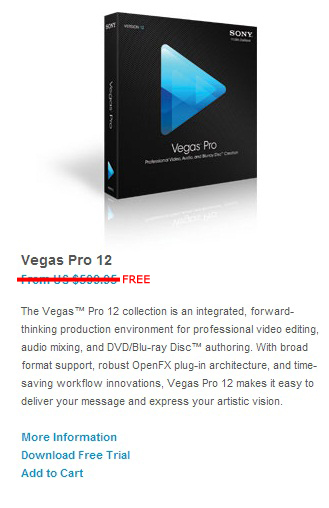

My choice of tools.
-
2013-01-02 02:14 #8They're just like us
- Join Date
- Jun 2007
- Posts
- 3,816
- BG Level
- 7
- FFXI Server
- Asura
What I've been doing is just letting the tape record to a .avi file and then breaking it apart, my problem is that windows movie maker ends up making the new video's be larger in total file size than what I started with and I'm not sure how to fix that. Like, really large.
A lot of tutorials I've looked at are aimed at people who have a basic understanding of specific programs and such, which I do not.
Knowing how to edit to a specific file size without loosing a lot of detail is important to me for this, and I'd rather not learn through trail and error when it takes so long to encode video.
-
2013-01-02 03:09 #9Who's driving? Oh my God Bear is driving! How can that be??
- Join Date
- Sep 2008
- Posts
- 5,882
- BG Level
- 8
- FFXI Server
- Lakshmi
What codecs do you have installed already? I would suggest trying different ones and then export your project in small 10 second clips so you can compare the quality and sizes of each one to determine which is the best fit. If your video was captured at NTSC specs you are looking at around 1-1.5 GB/min of video uncompressed so any compression will be welcome. Currently h.264 is used a lot from what I've seen and it can keep file sizes pretty low (anywhere from 1-2 GB for 120 minutes at 720p depending on audio format). Originally Posted by Apelila

Also as far as the file size being larger than what you started with, what is your capture and export settings in terms of frame size?


Similar Threads
-
Video Editing Software
By Gargoyle in forum TechReplies: 2Last Post: 2010-01-18, 14:37 -
LF: Video Editing Software
By Jotaru in forum TechReplies: 6Last Post: 2009-10-15, 19:38 -
Best reasonably priced video editing software?
By Rockstaru in forum TechReplies: 16Last Post: 2009-03-24, 01:31 -
FFXI video/screen capture program
By SamanosukeShiva in forum TechReplies: 3Last Post: 2009-01-09, 10:49 -
Video editing help
By Apelila in forum TechReplies: 5Last Post: 2008-11-11, 13:44