1. FFXIV Reset Timers
    Last daily reset was 22 hours, 59 minutes ago / Next daily reset is in 1 hours, 0 minutes
    Last weekly reset was 4 days, 15 hours, 59 minutes ago / Next weekly reset is in 1 days, 18 hours, 0 minutes
Page 28 of 65 FirstFirst ... 18 26 27 28 29 30 38 ... LastLast
Results 541 to 560 of 1287
  1. #541
    Bagel
    Join Date
    Mar 2005
    Posts
    1,379
    BG Level
    6
    FFXI Server
    Bahamut

    Got a new rig in anticipation for ARR my last laptop only got like 2k it was an entertainment laptop 240hz 3d was great while I had it but the GT 540m gpu just couldn't cut it for gaming, new laptop is 120hz 3d but much better for gaming.
    Spoiler: show
    FINAL FANTASY XIV: A Realm Reborn Official Benchmark (Exploration)
    Tested on:5/15/2013 8:12:44 PM
    Score:5511
    Average Framerate:45.164
    Performance:Very High
    -Easily capable of running the game. Should perform exceptionally well, even at higher resolutions.

    Screen Size: 1920x1080
    Screen Mode: Full Screen
    Graphics Presets: Maximum
    General
    -Improve overall graphic quality. : Enabled
    -Disable rendering of objects when not visible. (Occlusion Culling) : Disabled
    -Use low-detail models on distant objects to increase performance. (LOD) : Disabled
    -Cache LOD data only when necessary. (LOD Streaming) : Disabled
    -Smooth edges. (Anti-aliasing) : Enabled
    -Increase transparent lighting quality. : Enabled
    -Grass Quality : High
    Shadows
    -Use low-detail models on shadows to increase performance. (LOD) : Disabled
    -Display : All
    -Shadow Resolution : High: 2048 pixels
    -Shadow Cascading : High
    -Shadow Softening : High
    Texture Detail
    -Texture Filtering : High
    -Anisotropic Filtering : High
    Effects
    -Naturally darken the edges of the screen. (Limb Darkening) : Enabled
    -Blur the graphics around an object in motion. (Radial Blur) : Enabled
    -Effects While in Motion : Display All
    -Screen Space Ambient Occlusion : High
    -Glare : Normal
    Cinematic Cutscenes
    -Enable depth of field. : Enabled

    System:
    Windows 7 Home Premium 64-bit (6.1, Build 7601) Service Pack 1 (7601.win7sp1_gdr.130318-1533)
    Intel(R) Core(TM) i7-3820QM CPU @ 2.70GHz
    16334.313MB
    NVIDIA GeForce GTX 680M (VRAM 4042 MB) 9.18.0013.1422

    Benchmark results do not provide any guarantee FINAL FANTASY XIV: A Realm Reborn will run on your system.

    FINAL FANTASY XIV: A Realm Reborn Official Website http://na.finalfantasyxiv.com
    (C) 2010-2013 SQUARE ENIX CO., LTD. All Rights Reserved.

    Tweet
    http://sqex.to/ffxiv_bench_na #FFXIV Score:5511 1920x1080 Maximum Intel(R) Core(TM) i7-3820QM CPU @ 2.70GHz NVIDIA GeForce GTX 680M

  2. #542
    Salvage Bans
    Join Date
    Aug 2006
    Posts
    932
    BG Level
    5
    FFXIV Character
    Mist Monster
    FFXIV Server
    Leviathan
    FFXI Server
    Fenrir

    In case anyone cares.. (sorry if its been done, haven't kept up with the thread)

    Razor Edge Pro (RZ09-00930101-R3U1)

    Spoiler: show

    FINAL FANTASY XIV: A Realm Reborn Official Benchmark (Exploration)
    Tested on:5/24/2013 2:33:40 PM
    Score:2311
    Average Framerate:18.730
    Performance:Standard
    -Capable of running the game on default settings.

    Screen Size: 1366x768
    Screen Mode: Full Screen
    Graphics Presets: Maximum
    General
    -Improve overall graphic quality. : Enabled
    -Disable rendering of objects when not visible. (Occlusion Culling) : Disabled
    -Use low-detail models on distant objects to increase performance. (LOD) : Disabled
    -Cache LOD data only when necessary. (LOD Streaming) : Disabled
    -Smooth edges. (Anti-aliasing) : Enabled
    -Increase transparent lighting quality. : Enabled
    -Grass Quality : High
    Shadows
    -Use low-detail models on shadows to increase performance. (LOD) : Disabled
    -Display : All
    -Shadow Resolution : High: 2048 pixels
    -Shadow Cascading : High
    -Shadow Softening : High
    Texture Detail
    -Texture Filtering : High
    -Anisotropic Filtering : High
    Effects
    -Naturally darken the edges of the screen. (Limb Darkening) : Enabled
    -Blur the graphics around an object in motion. (Radial Blur) : Enabled
    -Effects While in Motion : Display All
    -Screen Space Ambient Occlusion : High
    -Glare : Normal
    Cinematic Cutscenes
    -Enable depth of field. : Enabled

    System:
    Windows 8 64-bit (6.2, Build 9200) (9200.win8_gdr.130410-1505)
    Intel(R) Core(TM) i7-3517U CPU @ 1.90GHz
    8054.426MB
    Intel(R) HD Graphics 4000(VRAM 1664 MB) 9.17.0010.2932

    Benchmark results do not provide any guarantee FINAL FANTASY XIV: A Realm Reborn will run on your system.

    FINAL FANTASY XIV: A Realm Reborn Official Website http://na.finalfantasyxiv.com
    (C) 2010-2013 SQUARE ENIX CO., LTD. All Rights Reserved.

    Tweet
    http://sqex.to/ffxiv_bench_na #FFXIV Score:2311 1366x768 Maximum Intel(R) Core(TM) i7-3517U CPU @ 1.90GHz Intel(R) HD Graphics 4000


    Weird that it identifies the Intel graphics card. I know I picked the nvidia geforce gt 640m le. In fact if you try to run it on the Intel it behaves very badly.

  3. #543
    Dulek
    Guest

    Updated graphics card from 5870 to GTX780.
    Loved the constant "irql_not_less_or_equal" I was having trying to uninstall AMD drivers and install NVidia's.

    Spoiler: show
    FINAL FANTASY XIV: A Realm Reborn Official Benchmark (Exploration)
    Tested on:5/28/2013 6:44:55 PM
    Score:8787
    Average Framerate:76.907
    Performance:Extremely High
    -Easily capable of running the game on the highest settings.

    Screen Size: 1920x1080
    Screen Mode: Full Screen
    Graphics Presets: Maximum
    General
    -Improve overall graphic quality. : Enabled
    -Disable rendering of objects when not visible. (Occlusion Culling) : Disabled
    -Use low-detail models on distant objects to increase performance. (LOD) : Disabled
    -Cache LOD data only when necessary. (LOD Streaming) : Disabled
    -Smooth edges. (Anti-aliasing) : Enabled
    -Increase transparent lighting quality. : Enabled
    -Grass Quality : High
    Shadows
    -Use low-detail models on shadows to increase performance. (LOD) : Disabled
    -Display : All
    -Shadow Resolution : High: 2048 pixels
    -Shadow Cascading : High
    -Shadow Softening : High
    Texture Detail
    -Texture Filtering : High
    -Anisotropic Filtering : High
    Effects
    -Naturally darken the edges of the screen. (Limb Darkening) : Enabled
    -Blur the graphics around an object in motion. (Radial Blur) : Enabled
    -Effects While in Motion : Display All
    -Screen Space Ambient Occlusion : High
    -Glare : Normal
    Cinematic Cutscenes
    -Enable depth of field. : Enabled

    System:
    Windows 8 Pro 64-bit (6.2, Build 9200) (9200.win8_gdr.130410-1505)
    Intel(R) Core(TM) i7-3770K CPU @ 3.50GHz
    6020.195MB
    NVIDIA GeForce GTX 780(VRAM 4095 MB) 9.18.0013.2018

    Benchmark results do not provide any guarantee FINAL FANTASY XIV: A Realm Reborn will run on your system.

    FINAL FANTASY XIV: A Realm Reborn Official Website http://na.finalfantasyxiv.com
    (C) 2010-2013 SQUARE ENIX CO., LTD. All Rights Reserved.

    Tweet
    http://sqex.to/ffxiv_bench_na #FFXIV Score:8787 1920x1080 Maximum Intel(R) Core(TM) i7-3770K CPU @ 3.50GHz NVIDIA GeForce GTX 780


    Another go with changes to CPU and RAM speed.
    Spoiler: show
    FINAL FANTASY XIV: A Realm Reborn Official Benchmark (Exploration)
    Tested on:5/28/2013 6:57:15 PM
    Score:9183
    Average Framerate:80.031
    Performance:Extremely High
    -Easily capable of running the game on the highest settings.

    Screen Size: 1920x1080
    Screen Mode: Full Screen
    Graphics Presets: Maximum
    General
    -Improve overall graphic quality. : Enabled
    -Disable rendering of objects when not visible. (Occlusion Culling) : Disabled
    -Use low-detail models on distant objects to increase performance. (LOD) : Disabled
    -Cache LOD data only when necessary. (LOD Streaming) : Disabled
    -Smooth edges. (Anti-aliasing) : Enabled
    -Increase transparent lighting quality. : Enabled
    -Grass Quality : High
    Shadows
    -Use low-detail models on shadows to increase performance. (LOD) : Disabled
    -Display : All
    -Shadow Resolution : High: 2048 pixels
    -Shadow Cascading : High
    -Shadow Softening : High
    Texture Detail
    -Texture Filtering : High
    -Anisotropic Filtering : High
    Effects
    -Naturally darken the edges of the screen. (Limb Darkening) : Enabled
    -Blur the graphics around an object in motion. (Radial Blur) : Enabled
    -Effects While in Motion : Display All
    -Screen Space Ambient Occlusion : High
    -Glare : Normal
    Cinematic Cutscenes
    -Enable depth of field. : Enabled

    System:
    Windows 8 Pro 64-bit (6.2, Build 9200) (9200.win8_gdr.130410-1505)
    Intel(R) Core(TM) i7-3770K CPU @ 3.50GHz
    6020.195MB
    NVIDIA GeForce GTX 780(VRAM 4095 MB) 9.18.0013.2018

    Benchmark results do not provide any guarantee FINAL FANTASY XIV: A Realm Reborn will run on your system.

    FINAL FANTASY XIV: A Realm Reborn Official Website http://na.finalfantasyxiv.com
    (C) 2010-2013 SQUARE ENIX CO., LTD. All Rights Reserved.

    Tweet
    http://sqex.to/ffxiv_bench_na #FFXIV Score:9183 1920x1080 Maximum Intel(R) Core(TM) i7-3770K CPU @ 3.50GHz NVIDIA GeForce GTX 780


    After format, reinstall of Windows, hyper threading disabled, CPU set to 4.6GHZ.
    Spoiler: show
    FINAL FANTASY XIV: A Realm Reborn Official Benchmark (Exploration)
    Tested on:5/28/2013 7:50:10 PM
    Score:9231
    Average Framerate:80.633
    Performance:Extremely High
    -Easily capable of running the game on the highest settings.
    Screen Size: 1920x1080
    Screen Mode: Full Screen
    Graphics Presets: Maximum
    General
    -Improve overall graphic quality. : Enabled
    -Disable rendering of objects when not visible. (Occlusion Culling) : Disabled
    -Use low-detail models on distant objects to increase performance. (LOD) : Disabled
    -Cache LOD data only when necessary. (LOD Streaming) : Disabled
    -Smooth edges. (Anti-aliasing) : Enabled
    -Increase transparent lighting quality. : Enabled
    -Grass Quality : High
    Shadows
    -Use low-detail models on shadows to increase performance. (LOD) : Disabled
    -Display : All
    -Shadow Resolution : High: 2048 pixels
    -Shadow Cascading : High
    -Shadow Softening : High
    Texture Detail
    -Texture Filtering : High
    -Anisotropic Filtering : High
    Effects
    -Naturally darken the edges of the screen. (Limb Darkening) : Enabled
    -Blur the graphics around an object in motion. (Radial Blur) : Enabled
    -Effects While in Motion : Display All
    -Screen Space Ambient Occlusion : High
    -Glare : Normal
    Cinematic Cutscenes
    -Enable depth of field. : Enabled
    System:
    Windows 8 Pro 64-bit (6.2, Build 9200) (9200.win8_rtm.120725-1247)
    Intel(R) Core(TM) i7-3770K CPU @ 3.50GHz
    6020.195MB
    NVIDIA GeForce GTX 780(VRAM 4095 MB) 9.18.0013.2018
    Benchmark results do not provide any guarantee FINAL FANTASY XIV: A Realm Reborn will run on your system.
    FINAL FANTASY XIV: A Realm Reborn Official Website http://na.finalfantasyxiv.com
    (C) 2010-2013 SQUARE ENIX CO., LTD. All Rights Reserved.
    Tweet
    http://sqex.to/ffxiv_bench_na #FFXIV Score:9231 1920x1080 Maximum Intel(R) Core(TM) i7-3770K CPU @ 3.50GHz NVIDIA GeForce GTX 780


    After upgrading from 1333mhz, 6GB to 2400mhz, 16GB ram.
    Spoiler: show
    FINAL FANTASY XIV: A Realm Reborn Official Benchmark (Exploration)
    Tested on:5/30/2013 4:24:28 PM
    Score:9411
    Average Framerate:81.796
    Performance:Extremely High
    -Easily capable of running the game on the highest settings.

    Screen Size: 1920x1080
    Screen Mode: Full Screen
    Graphics Presets: Maximum
    General
    -Improve overall graphic quality. : Enabled
    -Disable rendering of objects when not visible. (Occlusion Culling) : Disabled
    -Use low-detail models on distant objects to increase performance. (LOD) : Disabled
    -Cache LOD data only when necessary. (LOD Streaming) : Disabled
    -Smooth edges. (Anti-aliasing) : Enabled
    -Increase transparent lighting quality. : Enabled
    -Grass Quality : High
    Shadows
    -Use low-detail models on shadows to increase performance. (LOD) : Disabled
    -Display : All
    -Shadow Resolution : High: 2048 pixels
    -Shadow Cascading : High
    -Shadow Softening : High
    Texture Detail
    -Texture Filtering : High
    -Anisotropic Filtering : High
    Effects
    -Naturally darken the edges of the screen. (Limb Darkening) : Enabled
    -Blur the graphics around an object in motion. (Radial Blur) : Enabled
    -Effects While in Motion : Display All
    -Screen Space Ambient Occlusion : High
    -Glare : Normal
    Cinematic Cutscenes
    -Enable depth of field. : Enabled

    System:
    Windows 8 Pro 64-bit (6.2, Build 9200) (9200.win8_rtm.120725-1247)
    Intel(R) Core(TM) i7-3770K CPU @ 3.50GHz
    16260.195MB
    NVIDIA GeForce GTX 780(VRAM 4095 MB) 9.18.0013.2018

    Benchmark results do not provide any guarantee FINAL FANTASY XIV: A Realm Reborn will run on your system.

    FINAL FANTASY XIV: A Realm Reborn Official Website http://na.finalfantasyxiv.com
    (C) 2010-2013 SQUARE ENIX CO., LTD. All Rights Reserved.

    Tweet
    http://sqex.to/ffxiv_bench_na #FFXIV Score:9411 1920x1080 Maximum Intel(R) Core(TM) i7-3770K CPU @ 3.50GHz NVIDIA GeForce GTX 780

  4. #544
    Cerberus
    Join Date
    Apr 2010
    Posts
    473
    BG Level
    4
    FFXIV Character
    Sunnlona Iyrnlohwyn
    FFXIV Server
    Excalibur

    Quote Originally Posted by Dulek View Post
    Updated graphics card from 5870 to GTX780.
    Loved the constant "irql_not_less_or_equal" I was having trying to uninstall AMD drivers and install NVidia's.
    I get that error when I am trying to uninstall the AMD CAP files and then drivers without a reboot in between. So if I have 2 sets of CAPs installed and a set of drivers I reboot between each uninstall or it throws that error/BSOD.

  5. #545
    Dulek
    Guest

    Quote Originally Posted by Sign View Post
    I get that error when I am trying to uninstall the AMD CAP files and then drivers without a reboot in between. So if I have 2 sets of CAPs installed and a set of drivers I reboot between each uninstall or it throws that error/BSOD.
    Good to know, thank you.
    Sadly, I got too frustrated and end up formatting my drive.

  6. #546
    Bagel
    Join Date
    Mar 2005
    Posts
    1,379
    BG Level
    6
    FFXI Server
    Bahamut

    Just thought Id let anybody with an nvidia card know not to bother with the new driver 320.18 tons of issues with many cards across the board. 314.22 works just fine. I switched from the 314.22 and went even further back to the 307.17 driver and it seemed to do even better.. is nvidia going backwards?

    Benchmarks:
    314.22= 5511
    307.17 = 5748
    307.17 overclock = 6694(Not bad for a laptop)
    Spoiler: show
    FINAL FANTASY XIV: A Realm Reborn Official Benchmark (Exploration)
    Tested on:6/11/2013 8:41:07 PM
    Score:6694
    Average Framerate:55.880
    Performance:Very High
    -Easily capable of running the game. Should perform exceptionally well, even at higher resolutions.

    Screen Size: 1920x1080
    Screen Mode: Borderless Windowed
    Graphics Presets: Maximum
    General
    -Improve overall graphic quality. : Enabled
    -Disable rendering of objects when not visible. (Occlusion Culling) : Disabled
    -Use low-detail models on distant objects to increase performance. (LOD) : Disabled
    -Cache LOD data only when necessary. (LOD Streaming) : Disabled
    -Smooth edges. (Anti-aliasing) : Enabled
    -Increase transparent lighting quality. : Enabled
    -Grass Quality : High
    Shadows
    -Use low-detail models on shadows to increase performance. (LOD) : Disabled
    -Display : All
    -Shadow Resolution : High: 2048 pixels
    -Shadow Cascading : High
    -Shadow Softening : High
    Texture Detail
    -Texture Filtering : High
    -Anisotropic Filtering : High
    Effects
    -Naturally darken the edges of the screen. (Limb Darkening) : Enabled
    -Blur the graphics around an object in motion. (Radial Blur) : Enabled
    -Effects While in Motion : Display All
    -Screen Space Ambient Occlusion : High
    -Glare : Normal
    Cinematic Cutscenes
    -Enable depth of field. : Enabled

    System:
    Windows 7 Professional 64-bit (6.1, Build 7601) Service Pack 1 (7601.win7sp1_gdr.130318-1533)
    Intel(R) Core(TM) i7-3820QM CPU @ 2.70GHz
    32718.313MB
    NVIDIA GeForce GTX 680M (VRAM 4042 MB) 9.18.0013.0717

    Benchmark results do not provide any guarantee FINAL FANTASY XIV: A Realm Reborn will run on your system.

    FINAL FANTASY XIV: A Realm Reborn Official Website http://na.finalfantasyxiv.com
    (C) 2010-2013 SQUARE ENIX CO., LTD. All Rights Reserved.

    Tweet
    http://sqex.to/ffxiv_bench_na #FFXIV Score:6694 1920x1080 Maximum Intel(R) Core(TM) i7-3820QM CPU @ 2.70GHz NVIDIA GeForce GTX 680M


    Is it just me or are the older nvidia drivers outperforming the newer ones? Also has anybody had any positive experiences with the new 320.18 drivers?

  7. #547
    Hello. My name is Inigo Montoya. You killed my father. Prepare to die.
    Join Date
    Sep 2007
    Posts
    1,978
    BG Level
    6
    FFXIV Character
    Claire Farron
    FFXIV Server
    Hyperion
    FFXI Server
    Fenrir

    Quote Originally Posted by Onizuka View Post
    Just thought Id let anybody with an nvidia card know not to bother with the new driver 320.18 tons of issues with many cards across the board. 314.22 works just fine. I switched from the 314.22 and went even further back to the 307.17 driver and it seemed to do even better.. is nvidia going backwards?

    Benchmarks:
    314.22= 5511
    307.17 = 5748
    307.17(overclock)= 6411(Not bad for a laptop)
    Spoiler: show
    FINAL FANTASY XIV: A Realm Reborn Official Benchmark (Exploration)
    Tested on:6/2/2013 2:35:50 AM
    Score:6411
    Average Framerate:53.159
    Performance:Very High
    -Easily capable of running the game. Should perform exceptionally well, even at higher resolutions.

    Screen Size: 1920x1080
    Screen Mode: Full Screen
    Graphics Presets: Maximum
    General
    -Improve overall graphic quality. : Enabled
    -Disable rendering of objects when not visible. (Occlusion Culling) : Disabled
    -Use low-detail models on distant objects to increase performance. (LOD) : Disabled
    -Cache LOD data only when necessary. (LOD Streaming) : Disabled
    -Smooth edges. (Anti-aliasing) : Enabled
    -Increase transparent lighting quality. : Enabled
    -Grass Quality : High
    Shadows
    -Use low-detail models on shadows to increase performance. (LOD) : Disabled
    -Display : All
    -Shadow Resolution : High: 2048 pixels
    -Shadow Cascading : High
    -Shadow Softening : High
    Texture Detail
    -Texture Filtering : High
    -Anisotropic Filtering : High
    Effects
    -Naturally darken the edges of the screen. (Limb Darkening) : Enabled
    -Blur the graphics around an object in motion. (Radial Blur) : Enabled
    -Effects While in Motion : Display All
    -Screen Space Ambient Occlusion : High
    -Glare : Normal
    Cinematic Cutscenes
    -Enable depth of field. : Enabled

    System:
    Windows 7 Professional 64-bit (6.1, Build 7601) Service Pack 1 (7601.win7sp1_gdr.130318-1533)
    Intel(R) Core(TM) i7-3820QM CPU @ 2.70GHz
    32718.313MB
    NVIDIA GeForce GTX 680M (VRAM 4042 MB) 9.18.0013.0717

    Benchmark results do not provide any guarantee FINAL FANTASY XIV: A Realm Reborn will run on your system.

    FINAL FANTASY XIV: A Realm Reborn Official Website http://na.finalfantasyxiv.com
    (C) 2010-2013 SQUARE ENIX CO., LTD. All Rights Reserved.

    Tweet
    http://sqex.to/ffxiv_bench_na #FFXIV Score:6411 1920x1080 Maximum Intel(R) Core(TM) i7-3820QM CPU @ 2.70GHz NVIDIA GeForce GTX 680M


    Is it just me or are the older nvidia drivers outperforming the newer ones? Also has anybody had any positive experiences with the new 320.18 drivers?
    I'm sure nvidia will come out with some game ready drivers once ARR launches, it'll probably only get better from here.

  8. #548

    Sweaty Dick Punching Enthusiast

    Join Date
    Mar 2006
    Posts
    7,979
    BG Level
    8
    FFXI Server
    Ragnarok

    Quote Originally Posted by Onizuka View Post
    Just thought Id let anybody with an nvidia card know not to bother with the new driver 320.18 tons of issues with many cards across the board. 314.22 works just fine. I switched from the 314.22 and went even further back to the 307.17 driver and it seemed to do even better.. is nvidia going backwards?

    Benchmarks:
    314.22= 5511
    307.17 = 5748
    307.17(overclock)= 6411(Not bad for a laptop)
    Spoiler: show
    FINAL FANTASY XIV: A Realm Reborn Official Benchmark (Exploration)
    Tested on:6/2/2013 2:35:50 AM
    Score:6411
    Average Framerate:53.159
    Performance:Very High
    -Easily capable of running the game. Should perform exceptionally well, even at higher resolutions.

    Screen Size: 1920x1080
    Screen Mode: Full Screen
    Graphics Presets: Maximum
    General
    -Improve overall graphic quality. : Enabled
    -Disable rendering of objects when not visible. (Occlusion Culling) : Disabled
    -Use low-detail models on distant objects to increase performance. (LOD) : Disabled
    -Cache LOD data only when necessary. (LOD Streaming) : Disabled
    -Smooth edges. (Anti-aliasing) : Enabled
    -Increase transparent lighting quality. : Enabled
    -Grass Quality : High
    Shadows
    -Use low-detail models on shadows to increase performance. (LOD) : Disabled
    -Display : All
    -Shadow Resolution : High: 2048 pixels
    -Shadow Cascading : High
    -Shadow Softening : High
    Texture Detail
    -Texture Filtering : High
    -Anisotropic Filtering : High
    Effects
    -Naturally darken the edges of the screen. (Limb Darkening) : Enabled
    -Blur the graphics around an object in motion. (Radial Blur) : Enabled
    -Effects While in Motion : Display All
    -Screen Space Ambient Occlusion : High
    -Glare : Normal
    Cinematic Cutscenes
    -Enable depth of field. : Enabled

    System:
    Windows 7 Professional 64-bit (6.1, Build 7601) Service Pack 1 (7601.win7sp1_gdr.130318-1533)
    Intel(R) Core(TM) i7-3820QM CPU @ 2.70GHz
    32718.313MB
    NVIDIA GeForce GTX 680M (VRAM 4042 MB) 9.18.0013.0717

    Benchmark results do not provide any guarantee FINAL FANTASY XIV: A Realm Reborn will run on your system.

    FINAL FANTASY XIV: A Realm Reborn Official Website http://na.finalfantasyxiv.com
    (C) 2010-2013 SQUARE ENIX CO., LTD. All Rights Reserved.

    Tweet
    http://sqex.to/ffxiv_bench_na #FFXIV Score:6411 1920x1080 Maximum Intel(R) Core(TM) i7-3820QM CPU @ 2.70GHz NVIDIA GeForce GTX 680M


    Is it just me or are the older nvidia drivers outperforming the newer ones? Also has anybody had any positive experiences with the new 320.18 drivers?
    320.18 is considerably better in every benchmark I ran, and improves in all of the actual games Ive been playing recently (GW2, Metro Last Light, Tomb Raider, BF3). FFXIVs benchmark being poorly optimized shouldn't really be too much of a surprise.

    For reference sake:

  9. #549
    Impossiblu
    Join Date
    Mar 2010
    Posts
    10,445
    BG Level
    9
    FFXIV Character
    Prothescar Centursa
    FFXIV Server
    Balmung
    FFXI Server
    Valefor

    Apparently the 320.18 drivers manage to brick some types of GPUs, most often 560ti.

    THis thread is full of reported issues with them, really not many positive posts. Some floating around other sites as well. I'm sure they work fine for some people, but with the volume of issues and reports of those issues going around the Internet at the moment, it's a bit of a gamble. I personally like my games without crashes to desktop, texture artifacts, and other graphical artifacts.

  10. #550

    Sweaty Dick Punching Enthusiast

    Join Date
    Mar 2006
    Posts
    7,979
    BG Level
    8
    FFXI Server
    Ragnarok

    Well I can only speak for myself, but I personally have a 780/680/560ti on them without any issues. You can also go here, here, and here to see what the norm is for those threads. Use whatever works for you either way.

    "Bricking" GPUs is absolute nonsense though lol. The only way that is even possible at the driver level is by interrupting fan operation and causing a thermal shutdown.

  11. #551
    Bagel
    Join Date
    Mar 2005
    Posts
    1,379
    BG Level
    6
    FFXI Server
    Bahamut

    Quote Originally Posted by Prothescar View Post
    Apparently the 320.18 drivers manage to brick some types of GPUs, most often 560ti.

    THis thread is full of reported issues with them, really not many positive posts. Some floating around other sites as well. I'm sure they work fine for some people, but with the volume of issues and reports of those issues going around the Internet at the moment, it's a bit of a gamble. I personally like my games without crashes to desktop, texture artifacts, and other graphical artifacts.
    Yea I've posted on that thread a few times myself. 320.18 turns off my display well anybody with gtx680m and 120hz3d display. Lots of issues and complaints, the're quite a few 560ti users as you mentioned. Tons of issues with BF3, pc's freezing, crashing you name it. Hopefully they come out with a fix soon I wouldn't mind a little performance boost like Celeras and his ridiculous benchmark score lol

  12. #552
    Dulek
    Guest

    Quote Originally Posted by Celeras View Post
    320.18 is considerably better in every benchmark I ran, and improves in all of the actual games Ive been playing recently (GW2, Metro Last Light, Tomb Raider, BF3). FFXIVs benchmark being poorly optimized shouldn't really be too much of a surprise.

    For reference sake:
    What build you have?

  13. #553
    Impossiblu
    Join Date
    Mar 2010
    Posts
    10,445
    BG Level
    9
    FFXIV Character
    Prothescar Centursa
    FFXIV Server
    Balmung
    FFXI Server
    Valefor

    Quote Originally Posted by Celeras View Post
    Well I can only speak for myself, but I personally have a 780/680/560ti on them without any issues. You can also go here, here, and here to see what the norm is for those threads. Use whatever works for you either way.

    "Bricking" GPUs is absolute nonsense though lol. The only way that is even possible at the driver level is by interrupting fan operation and causing a thermal shutdown.
    I'm relatively certain that that's what they're doing, most of the reports include abnormal fan behavior (fans not powering on, etc.) and well above recommended temperatures before the crash that causes the GPU to no longer power on. Mostly idiots frying their GPUs by not realizing that their fans aren't working, but still, it's worth noting. Take caution with them, they work for some people but for others they're pretty unfortunate.

    I'm still on 306.97, they've been all around the best driver set for my 670s.

  14. #554
    New Spam Forum
    Join Date
    Dec 2006
    Posts
    176
    BG Level
    3
    FFXI Server
    Lakshmi

    Asus Corsair V MB, AMD 4 Ghz Processor overclocked to 4.51 (can go more if I wanted to), 32 GB DDR3 2400 Ram, AMD Radeon 7970 6 GB GDDR5 Vapor X Graphics

  15. #555
    New Spam Forum
    Join Date
    Dec 2006
    Posts
    176
    BG Level
    3
    FFXI Server
    Lakshmi

    Asus Crosshair V MB, AMD 4 Ghz Processor overclocked to 4.51 (can go more if I wanted to), 32 GB DDR3 2400 Ram, AMD Radeon 7970 6 GB GDDR5 Vapor X Graphics

    Score: 9608

    http://bucket.bluegartr.com/c7253b98...65f6189401.png

  16. #556
    Dulek
    Guest

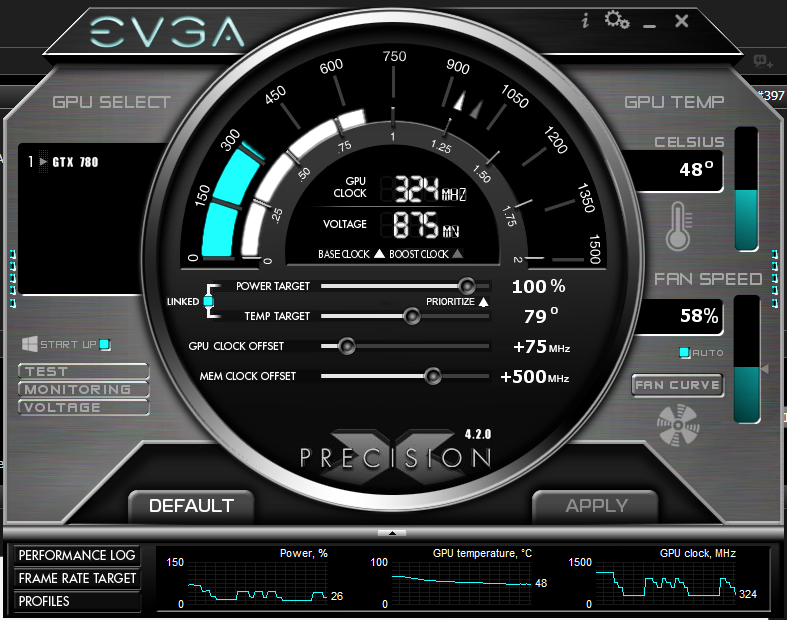
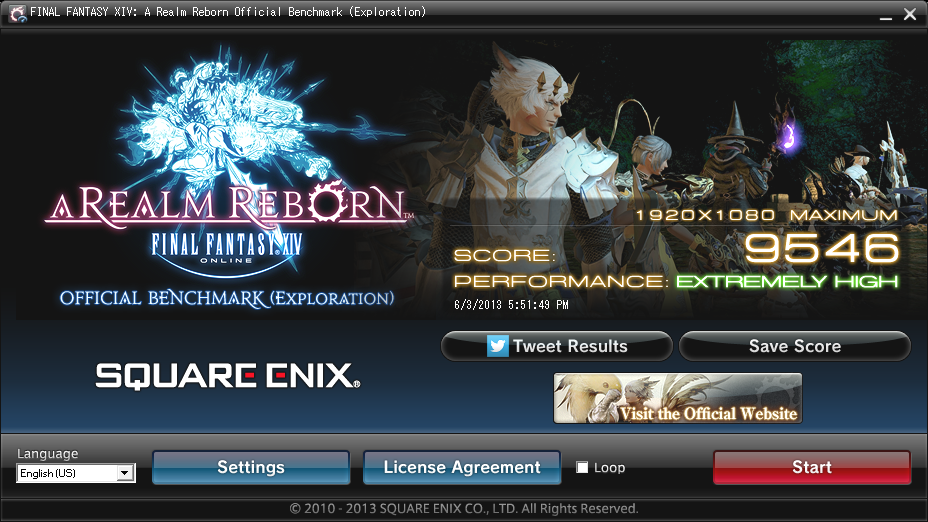
    While no 9608, I'm slowly tweaking my settings for better scores. I'm too afraid though to touch voltage settings. Any advice greatly appreciated.


    Spoiler: show
    FINAL FANTASY XIV: A Realm Reborn Official Benchmark (Exploration)
    Tested on:6/3/2013 5:51:49 PM
    Score:9546
    Average Framerate:83.787
    Performance:Extremely High
    -Easily capable of running the game on the highest settings.

    Screen Size: 1920x1080
    Screen Mode: Full Screen
    Graphics Presets: Maximum
    General
    -Improve overall graphic quality. : Enabled
    -Disable rendering of objects when not visible. (Occlusion Culling) : Disabled
    -Use low-detail models on distant objects to increase performance. (LOD) : Disabled
    -Cache LOD data only when necessary. (LOD Streaming) : Disabled
    -Smooth edges. (Anti-aliasing) : Enabled
    -Increase transparent lighting quality. : Enabled
    -Grass Quality : High
    Shadows
    -Use low-detail models on shadows to increase performance. (LOD) : Disabled
    -Display : All
    -Shadow Resolution : High: 2048 pixels
    -Shadow Cascading : High
    -Shadow Softening : High
    Texture Detail
    -Texture Filtering : High
    -Anisotropic Filtering : High
    Effects
    -Naturally darken the edges of the screen. (Limb Darkening) : Enabled
    -Blur the graphics around an object in motion. (Radial Blur) : Enabled
    -Effects While in Motion : Display All
    -Screen Space Ambient Occlusion : High
    -Glare : Normal
    Cinematic Cutscenes
    -Enable depth of field. : Enabled

    System:
    Windows 8 Pro 64-bit (6.2, Build 9200) (9200.win8_gdr.130410-1505)
    Intel(R) Core(TM) i7-3770K CPU @ 3.50GHz
    16260.012MB
    NVIDIA GeForce GTX 780(VRAM 4095 MB) 9.18.0013.2018

    Benchmark results do not provide any guarantee FINAL FANTASY XIV: A Realm Reborn will run on your system.

    FINAL FANTASY XIV: A Realm Reborn Official Website http://na.finalfantasyxiv.com
    (C) 2010-2013 SQUARE ENIX CO., LTD. All Rights Reserved.

    Tweet
    http://sqex.to/ffxiv_bench_na #FFXIV Score:9546 1920x1080 Maximum Intel(R) Core(TM) i7-3770K CPU @ 3.50GHz NVIDIA GeForce GTX 780

  17. #557
    Melee Summoner
    Join Date
    Nov 2009
    Posts
    37
    BG Level
    1
    FFXI Server
    Siren
    WoW Realm
    Arthas

    asus auto tuned to 4.2 ghz and 770
    Spoiler: show
    FINAL FANTASY XIV: A Realm Reborn Official Benchmark (Exploration)
    Tested on:6/2/2013 5:46:39 PM
    Score:8056
    Average Framerate:68.600
    Performance:Extremely High
    -Easily capable of running the game on the highest settings.

    Screen Size: 1920x1080
    Graphics Presets: Maximum
    General
    -Improve overall graphic quality. : Enabled
    -Disable rendering of objects when not visible. (Occlusion Culling) : Disabled
    -Use low-detail models on distant objects to increase performance. (LOD) : Disabled
    -Cache LOD data only when necessary. (LOD Streaming) : Disabled
    -Smooth edges. (Anti-aliasing) : Enabled
    -Increase transparent lighting quality. : Enabled
    -Grass Quality : High
    Shadows
    -Use low-detail models on shadows to increase performance. (LOD) : Disabled
    -Display : All
    -Shadow Resolution : High: 2048 pixels
    -Shadow Cascading : High
    -Shadow Softening : High
    Texture Detail
    -Texture Filtering : High
    -Anisotropic Filtering : High
    Effects
    -Naturally darken the edges of the screen. (Limb Darkening) : Enabled
    -Blur the graphics around an object in motion. (Radial Blur) : Enabled
    -Effects While in Motion : Display All
    -Screen Space Ambient Occlusion : High
    -Glare : Normal
    Cinematic Cutscenes
    -Enable depth of field. : Enabled

    System:
    Windows 7 Ultimate 64-bit (6.1, Build 7601) Service Pack 1 (7601.win7sp1_gdr.130318-1533)
    Intel(R) Core(TM) i5-3570K CPU @ 3.40GHz
    8136.977MB
    NVIDIA GeForce GTX 770(VRAM 4042 MB) 9.18.0013.2008

    Benchmark results do not provide any guarantee FINAL FANTASY XIV: A Realm Reborn will run on your system.

    FINAL FANTASY XIV: A Realm Reborn Official Website http://na.finalfantasyxiv.com
    (C) 2010-2013 SQUARE ENIX CO., LTD. All Rights Reserved.

    Tweet
    http://sqex.to/ffxiv_bench_na #FFXIV Score:8056 1920x1080 Maximum Intel(R) Core(TM) i5-3570K CPU @ 3.40GHz NVIDIA GeForce GTX 770


    manual overclock to 4.5ghz 770 overclocked to 1228mhz
    Spoiler: show
    FINAL FANTASY XIV: A Realm Reborn Official Benchmark (Exploration)
    Tested on:6/3/2013 7:15:46 PM
    Score:8529
    Average Framerate:73.046
    Performance:Extremely High
    -Easily capable of running the game on the highest settings.

    Screen Size: 1920x1080
    Graphics Presets: Maximum
    General
    -Improve overall graphic quality. : Enabled
    -Disable rendering of objects when not visible. (Occlusion Culling) : Disabled
    -Use low-detail models on distant objects to increase performance. (LOD) : Disabled
    -Cache LOD data only when necessary. (LOD Streaming) : Disabled
    -Smooth edges. (Anti-aliasing) : Enabled
    -Increase transparent lighting quality. : Enabled
    -Grass Quality : High
    Shadows
    -Use low-detail models on shadows to increase performance. (LOD) : Disabled
    -Display : All
    -Shadow Resolution : High: 2048 pixels
    -Shadow Cascading : High
    -Shadow Softening : High
    Texture Detail
    -Texture Filtering : High
    -Anisotropic Filtering : High
    Effects
    -Naturally darken the edges of the screen. (Limb Darkening) : Enabled
    -Blur the graphics around an object in motion. (Radial Blur) : Enabled
    -Effects While in Motion : Display All
    -Screen Space Ambient Occlusion : High
    -Glare : Normal
    Cinematic Cutscenes
    -Enable depth of field. : Enabled

    System:
    Windows 7 Ultimate 64-bit (6.1, Build 7601) Service Pack 1 (7601.win7sp1_gdr.130318-1533)
    Intel(R) Core(TM) i5-3570K CPU @ 3.40GHz
    8136.977MB
    NVIDIA GeForce GTX 770(VRAM 4042 MB) 9.18.0013.2008

    Benchmark results do not provide any guarantee FINAL FANTASY XIV: A Realm Reborn will run on your system.

    FINAL FANTASY XIV: A Realm Reborn Official Website http://na.finalfantasyxiv.com
    (C) 2010-2013 SQUARE ENIX CO., LTD. All Rights Reserved.

    Tweet
    http://sqex.to/ffxiv_bench_na #FFXIV Score:8529 1920x1080 Maximum Intel(R) Core(TM) i5-3570K CPU @ 3.40GHz NVIDIA GeForce GTX 770

  18. #558
    Yoshi P
    Join Date
    Jun 2007
    Posts
    5,144
    BG Level
    8
    FFXIV Character
    Fitz Everleigh
    FFXIV Server
    Excalibur

    Skimmed the thread and did a quick search, but I didn't see anything. My wife is using 560ti and I can't even launch the benchmark for her. It will open to a black screen and then close real quick. I've made sure DirectX is up to date, updated to the latest nvidia drivers (but rolled back to what I just read), and still nothing. Am I missing something obvious that could be causing this?

  19. #559
    New Spam Forum
    Join Date
    Dec 2006
    Posts
    176
    BG Level
    3
    FFXI Server
    Lakshmi

    So i just tweaked the GPU memory by 10 Mhz for shits and giggles, and got a new score of 9724 hahaha. Ill post the results for this one.

    FINAL FANTASY XIV: A Realm Reborn Official Benchmark (Exploration)
    Tested on:6/4/2013 1:28:58 AM
    Score:9724
    Average Framerate:87.405
    Performance:Extremely High
    -Easily capable of running the game on the highest settings.

    Screen Size: 1920x1080
    Screen Mode: Full Screen
    Graphics Presets: Maximum
    General
    -Improve overall graphic quality. : Enabled
    -Disable rendering of objects when not visible. (Occlusion Culling) : Disabled
    -Use low-detail models on distant objects to increase performance. (LOD) : Disabled
    -Cache LOD data only when necessary. (LOD Streaming) : Disabled
    -Smooth edges. (Anti-aliasing) : Enabled
    -Increase transparent lighting quality. : Enabled
    -Grass Quality : High
    Shadows
    -Use low-detail models on shadows to increase performance. (LOD) : Disabled
    -Display : All
    -Shadow Resolution : High: 2048 pixels
    -Shadow Cascading : High
    -Shadow Softening : High
    Texture Detail
    -Texture Filtering : High
    -Anisotropic Filtering : High
    Effects
    -Naturally darken the edges of the screen. (Limb Darkening) : Enabled
    -Blur the graphics around an object in motion. (Radial Blur) : Enabled
    -Effects While in Motion : Display All
    -Screen Space Ambient Occlusion : High
    -Glare : Normal
    Cinematic Cutscenes
    -Enable depth of field. : Enabled

    System:
    Windows 8 Pro 64-bit (6.2, Build 9200) (9200.win8_gdr.130410-1505)
    AMD FX(tm)-8350 Eight-Core Processor
    32666.988MB
    AMD Radeon HD 7900 Series(VRAM 4095 MB) 8.17.0010.1191

    Love this computer

  20. #560
    New Spam Forum
    Join Date
    Dec 2006
    Posts
    176
    BG Level
    3
    FFXI Server
    Lakshmi

Page 28 of 65 FirstFirst ... 18 26 27 28 29 30 38 ... LastLast