 XI Wiki


EVGA GTX 760 (non SC) overclocked to 1100MHz core (1153 boost) = 5415 Maximum settings 1920x1080.Originally Posted by Jamison

CPU is a bit meh, Phenom ii x6 1055T @ 3.2. This is about a 1000 point increase from my old GTX 480.
I love everything about this card. I know I have more room to OC but have not had time to mess with it that much yet. Stays extremely cool and as far as all the complaints about EVGA's ACX cooling being loud, it's barely audible even at 80% fan speed. A considerable gain at $250.
- Navigation
Results 661 to 680 of 1287
-
2013-06-30 14:20 #661SPOONY BeARD

- Join Date
- Jun 2006
- Posts
- 291
- BG Level
- 4
- FFXIV Character
- Dakin Reyes
- FFXIV Server
- Hyperion

-
2013-07-02 12:09 #662Bard-turned-Miner
- Join Date
- Aug 2005
- Posts
- 2,649
- BG Level
- 7
Finally got to doing a 1080 benchmark with the gtx 760. Scored 5856 on max settings. Old CPU is probably keeping that number lower that it could be, and I could probably push some additional overclock on the card. Originally Posted by Jamison
-
2013-07-03 00:53 #663Bagel
- Join Date
- Oct 2006
- Posts
- 1,431
- BG Level
- 6
- FFXIV Character
- Resin Midwater
- FFXIV Server
- Gilgamesh
- WoW Realm
- Arthas


 For sure, your CPU is holding you back. Upgrade that and you'll see your 1080p benchmark jump way up. Originally Posted by Jamison
-
2013-07-03 10:27 #664Bagel
- Join Date
- Oct 2006
- Posts
- 1,431
- BG Level
- 6
- FFXIV Character
- Resin Midwater
- FFXIV Server
- Gilgamesh
- WoW Realm
- Arthas
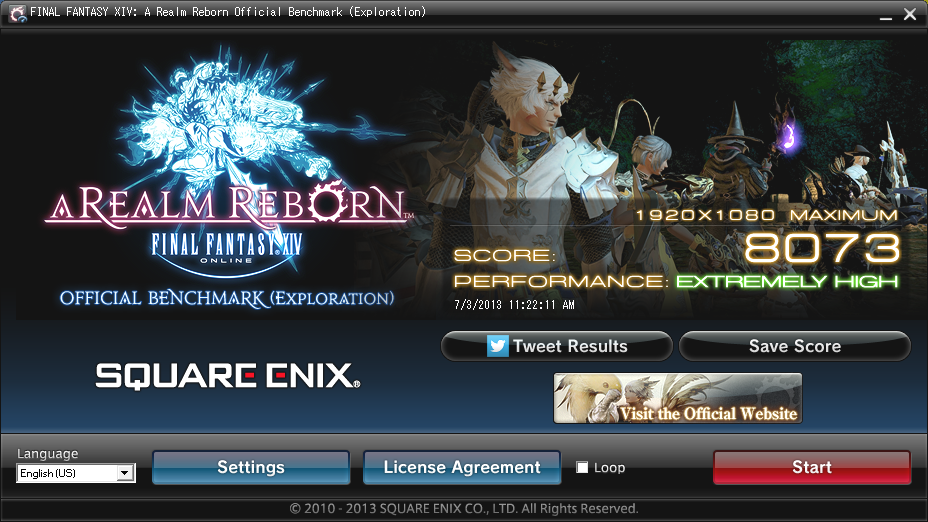
Finally found my max stable overclock on my GTX 660 Ti and broke 8k! This'll have to tide me over until I can convince myself to buy a GTX 780.
-
2013-07-03 15:04 #665Sandworm Swallows
- Join Date
- Jun 2007
- Posts
- 7,127
- BG Level
- 8
Anyone that has windows 8 and is willing to try 8.1 preview, nvdia released a new driver for it that basically upped my score by about 500 points. Was getting around 9500 with my defaulted gtx780 SC (non acx) now im pushing 10k at default settings.
Drivers: 326.01
-
2013-07-05 02:03 #666WASTE OF CURRENCY
I CAN'T I CAN'T I CAN'T
- Join Date
- Feb 2006
- Posts
- 9,065
- BG Level
- 8
- FFXIV Character
- Izzy Izumi
- FFXIV Server
- Sargatanas
- FFXI Server
- Phoenix
- WoW Realm
- Arthas

I'm having this retarded issue with my 770 where the driver will randomly crash while I'm sitting at the desktop doing nothing or while the monitors are off in screensaver mode. It's pissing me off and I can't get any help fixing this damn thing.
-
2013-07-05 08:51 #667Bard-turned-Miner
- Join Date
- Aug 2005
- Posts
- 2,649
- BG Level
- 7
I've had this with the 760 as well, on the latest drivers from the website. Originally Posted by Izzy
-
2013-07-05 09:20 #668It's sooo veiny

Sweaty Dick Punching Enthusiast
- Join Date
- Oct 2008
- Posts
- 2,327
- BG Level
- 7
- FFXIV Character
- Arch Dizzle
- FFXIV Server
- Excalibur
Was planning on upgrading my GPU to a 780 and trying out nvidia for the first time but all the driver issues I keep hearing from you guys make me think I'll just go with a 7970. I've always used amd cards and never had an issue with grabbing the newest beta drivers from them, is this usual for Nvidia drivers?
-
2013-07-05 09:30 #669Bard-turned-Miner
- Join Date
- Aug 2005
- Posts
- 2,649
- BG Level
- 7
I'm only newly on nvidia myself for the first time in ages. From what I've read though this is rather unusual, and nvidia is usually considered to have equal or better drivers than AMD. (Not starting a flame war, it's nothing massive, both companies are pretty solid but nvidia had a slight edge.)
-
2013-07-05 09:36 #670It's sooo veiny
Sweaty Dick Punching Enthusiast
- Join Date
- Oct 2008
- Posts
- 2,327
- BG Level
- 7
- FFXIV Character
- Arch Dizzle
- FFXIV Server
- Excalibur
If thats the case I can wait a little while til they get it worked out my 7870 does just fine atm. What seems to be the best drivers to go with atm?
-
2013-07-05 14:01 #671Black Belt
- Join Date
- Nov 2006
- Posts
- 5,703
- BG Level
- 8
- FFXIV Character
- Adajer Vonte
- FFXIV Server
- Gilgamesh
- FFXI Server
- Asura
- WoW Realm
- Tichondrius
This is not common from Nvidia. I would recommend staying away from any 320.xx drivers but people with 700 series have no choice. The 320.49 has caused my first and only BSOD on my system.
Last year they were churning out new drivers 3-5+ times a month. Since 2013 there have been 11 or so new driver updates.
-
2013-07-07 00:48 #672Sandworm Swallows
- Join Date
- Jun 2007
- Posts
- 7,127
- BG Level
- 8
I used to be amd all the way, I am very happy about what the 780 has been pushing. previously had a 7970, the 780 blows it away. No issues with drivers atm, but I am running with windows 8.1 preview drivers.
-
2013-07-11 00:26 #673Hydra
- Join Date
- Jan 2009
- Posts
- 99
- BG Level
- 2
Just got a EVGA 760 4gb, really happy with the upgrade over the 3+ year old 5850 I have been using. I messed with the settings a little bit, didn't really look into how to push the card but I think it will work just fine.
FINAL FANTASY XIV: A Realm Reborn Official Benchmark (Exploration)
Tested on:7/10/2013 11:24:56 PM
Score:8975
Average Framerate:75.986
Performance:Extremely High
-Easily capable of running the game on the highest settings.
Screen Size: 1920x1080
Screen Mode: Borderless Windowed
Graphics Presets: Custom
General
-Improve overall graphic quality. : Enabled
-Disable rendering of objects when not visible. (Occlusion Culling) : Enabled
-Use low-detail models on distant objects to increase performance. (LOD) : Enabled
-Cache LOD data only when necessary. (LOD Streaming) : Enabled
-Smooth edges. (Anti-aliasing) : Enabled
-Increase transparent lighting quality. : Disabled
-Grass Quality : Normal
Shadows
-Use low-detail models on shadows to increase performance. (LOD) : Disabled
-Display : All
-Shadow Resolution : Mid: 1024 pixels
-Shadow Cascading : High
-Shadow Softening : Low
Texture Detail
-Texture Filtering : High
-Anisotropic Filtering : Low
Effects
-Naturally darken the edges of the screen. (Limb Darkening) : Enabled
-Blur the graphics around an object in motion. (Radial Blur) : Enabled
-Effects While in Motion : Display All
-Screen Space Ambient Occlusion : Low
-Glare : Low
Cinematic Cutscenes
-Enable depth of field. : Enabled
System:
Windows 7 Home Premium 64-bit (6.1, Build 7601) Service Pack 1 (7601.win7sp1_gdr.130318-1533)
Intel(R) Core(TM) i5-2500K CPU @ 3.30GHz
16295.523MB
NVIDIA GeForce GTX 760(VRAM 4095 MB) 9.18.0013.2049
-
2013-07-11 05:58 #674Black Belt
- Join Date
- Nov 2006
- Posts
- 5,703
- BG Level
- 8
- FFXIV Character
- Adajer Vonte
- FFXIV Server
- Gilgamesh
- FFXI Server
- Asura
- WoW Realm
- Tichondrius
Maximum Settings or it doesn't count.
-
2013-07-11 08:11 #675Hydra
- Join Date
- Jan 2009
- Posts
- 99
- BG Level
- 2
Switched to maximum/full screen, did not change anything else.
FINAL FANTASY XIV: A Realm Reborn Official Benchmark (Exploration)
Tested on:7/11/2013 7:09:29 AM
Score:6230
Average Framerate:51.714
Performance:Very High
-Easily capable of running the game. Should perform exceptionally well, even at higher resolutions.
Screen Size: 1920x1080
Screen Mode: Full Screen
Graphics Presets: Maximum
General
-Improve overall graphic quality. : Enabled
-Disable rendering of objects when not visible. (Occlusion Culling) : Disabled
-Use low-detail models on distant objects to increase performance. (LOD) : Disabled
-Cache LOD data only when necessary. (LOD Streaming) : Disabled
-Smooth edges. (Anti-aliasing) : Enabled
-Increase transparent lighting quality. : Enabled
-Grass Quality : High
Shadows
-Use low-detail models on shadows to increase performance. (LOD) : Disabled
-Display : All
-Shadow Resolution : High: 2048 pixels
-Shadow Cascading : High
-Shadow Softening : High
Texture Detail
-Texture Filtering : High
-Anisotropic Filtering : High
Effects
-Naturally darken the edges of the screen. (Limb Darkening) : Enabled
-Blur the graphics around an object in motion. (Radial Blur) : Enabled
-Effects While in Motion : Display All
-Screen Space Ambient Occlusion : High
-Glare : Normal
Cinematic Cutscenes
-Enable depth of field. : Enabled
System:
Windows 7 Home Premium 64-bit (6.1, Build 7601) Service Pack 1 (7601.win7sp1_gdr.130318-1533)
Intel(R) Core(TM) i5-2500K CPU @ 3.30GHz
16295.523MB
NVIDIA GeForce GTX 760(VRAM 4095 MB) 9.18.0013.2049
-
2013-07-11 18:40 #676Puppetmaster
- Join Date
- Sep 2006
- Posts
- 59
- BG Level
- 2
- FFXIV Character
- Spiel Mit'mir
- FFXIV Server
- Excalibur
- FFXI Server
- Lakshmi
FINAL FANTASY XIV: A Realm Reborn Official Benchmark (Exploration)
Tested on:7/11/2013 7:38:01 PM
Score:7074
Average Framerate:58.482
Performance:Extremely High
-Easily capable of running the game on the highest settings.
Screen Size: 1920x1080
Screen Mode: Full Screen
Graphics Presets: Maximum
General
-Improve overall graphic quality. : Enabled
-Disable rendering of objects when not visible. (Occlusion Culling) : Disabled
-Use low-detail models on distant objects to increase performance. (LOD) : Disabled
-Cache LOD data only when necessary. (LOD Streaming) : Disabled
-Smooth edges. (Anti-aliasing) : Enabled
-Increase transparent lighting quality. : Enabled
-Grass Quality : High
Shadows
-Use low-detail models on shadows to increase performance. (LOD) : Disabled
-Display : All
-Shadow Resolution : High: 2048 pixels
-Shadow Cascading : High
-Shadow Softening : High
Texture Detail
-Texture Filtering : High
-Anisotropic Filtering : High
Effects
-Naturally darken the edges of the screen. (Limb Darkening) : Enabled
-Blur the graphics around an object in motion. (Radial Blur) : Enabled
-Effects While in Motion : Display All
-Screen Space Ambient Occlusion : High
-Glare : Normal
Cinematic Cutscenes
-Enable depth of field. : Enabled
System:
Windows 7 Home Premium 64-bit (6.1, Build 7601) Service Pack 1 (7601.win7sp1_gdr.130318-1533)
Intel(R) Core(TM) i5-2500K CPU @ 3.30GHz
8159.141MB
NVIDIA GeForce GTX 670(VRAM 4095 MB) 9.18.0013.2049
Benchmark results do not provide any guarantee FINAL FANTASY XIV: A Realm Reborn will run on your system.
FINAL FANTASY XIV: A Realm Reborn Official Website http://na.finalfantasyxiv.com
(C) 2010-2013 SQUARE ENIX CO., LTD. All Rights Reserved.
-
2013-07-11 19:05 #677Puppetmaster
- Join Date
- Sep 2007
- Posts
- 62
- BG Level
- 2
- FFXIV Character
- Kiki Tsakiki
- FFXIV Server
- Excalibur

Here's another GTX 760 score. I haven't changed any of the out-of-the-box settings yet, very pleased with the improvement over my old computer so far though.
FINAL FANTASY XIV: A Realm Reborn Official Benchmark (Exploration)
Tested on:7/10/2013 10:42:15 PM
Score:6917
Average Framerate:57.552
Performance:Very High
-Easily capable of running the game. Should perform exceptionally well, even at higher resolutions.
Screen Size: 1920x1080
Screen Mode: Full Screen
Graphics Presets: Maximum
General
-Improve overall graphic quality. : Enabled
-Disable rendering of objects when not visible. (Occlusion Culling) : Disabled
-Use low-detail models on distant objects to increase performance. (LOD) : Disabled
-Cache LOD data only when necessary. (LOD Streaming) : Disabled
-Smooth edges. (Anti-aliasing) : Enabled
-Increase transparent lighting quality. : Enabled
-Grass Quality : High
Shadows
-Use low-detail models on shadows to increase performance. (LOD) : Disabled
-Display : All
-Shadow Resolution : High: 2048 pixels
-Shadow Cascading : High
-Shadow Softening : High
Texture Detail
-Texture Filtering : High
-Anisotropic Filtering : High
Effects
-Naturally darken the edges of the screen. (Limb Darkening) : Enabled
-Blur the graphics around an object in motion. (Radial Blur) : Enabled
-Effects While in Motion : Display All
-Screen Space Ambient Occlusion : High
-Glare : Normal
Cinematic Cutscenes
-Enable depth of field. : Enabled
System:
Windows 7 Home Premium 64-bit (6.1, Build 7601) Service Pack 1 (7601.win7sp1_rtm.101119-1850)
Intel(R) Core(TM) i5-4670 CPU @ 3.40GHz
8112.359MB
NVIDIA GeForce GTX 760(VRAM 4042 MB) 9.18.0013.2018
Benchmark results do not provide any guarantee FINAL FANTASY XIV: A Realm Reborn will run on your system.
FINAL FANTASY XIV: A Realm Reborn Official Website http://na.finalfantasyxiv.com
(C) 2010-2013 SQUARE ENIX CO., LTD. All Rights Reserved.
Tweet
http://sqex.to/ffxiv_bench_na #FFXIV Score:6917 1920x1080 Maximum Intel(R) Core(TM) i5-4670 CPU @ 3.40GHz NVIDIA GeForce GTX 760
-
2013-07-11 20:46 #678Bard-turned-Miner
- Join Date
- Aug 2005
- Posts
- 2,649
- BG Level
- 7
For my own self-interest, since this is the card I have, I'll try to keep a semi-accurate list of scores for the 760.
-----------------
Jamison -- EVGA Overclocked (@1072)
Score: 5529 [i7-860] (@1920x1200)
Jamison -- EVGA Overclocked (@1072)
Score: 5856 [i7-860] (@1080p)
Meyor -- EVGA 4GB
Score: 6230 [i5-2500K]
Tsakiki -- EVGA
Score: 6917 [i5-4670]
-
2013-07-12 17:34 #679Crackodactyl
- Join Date
- Jul 2009
- Posts
- 561
- BG Level
- 5
- FFXI Server
- Odin
Does SLI affect this benchmark at all? Dual 780's I can't break 9200.
-
2013-07-12 17:43 #680Black Belt
- Join Date
- Nov 2006
- Posts
- 5,703
- BG Level
- 8
- FFXIV Character
- Adajer Vonte
- FFXIV Server
- Gilgamesh
- FFXI Server
- Asura
- WoW Realm
- Tichondrius
It doesn't support SLI yet.
That said. I just ran it on my 780 and only got an 8300 with a 3770k at stock.
I noticed my GPU usage never went past 70%. Am I bottlenecking my 780? I didn't think a 3770k would bottleneck it, but that must be the case.

