 XI Wiki


Hello. I am making this topic because I am literally at my wit's end trying to get this problem fixed. My cable company is very bad at responding or keeping appointments when they say they will, and I've been having intermittent disconnect issues for almost a month now. I suppose I'm making this thread because I wanted to see if anyone here had suggestions on anything I might have missed.
http://www.speedtest.net/result/2534436572.png
http://www.pingtest.net/result/77669745.png
I live in a university apartment and no one else besides Charter offers cable here. I don't like the school net because it's wireless and unreliable over here (not to mention bad for gaming and p2p restrictive), since I don't live in the dorms. So switching providers is not an option, or I would have done it already.
Issue:
-On January 30th my cable disconnected. I had had it for around a year and a half with no disconnect problems except for when a storm knocked service out. I have a 100 MBPS line that was running from a modem/router combo from my ISP. I think it's odd, reset it, and it comes back. Then my girlfriend tells me she got booted off our network again. Long story short, I have been disconnecting intermittently from January 30th until today. My cable company has been out here 10+ times. I have also spent hours upon hours doing online research and troubleshooting in my apartment trying to figure this thing out. I'll list out some important info.
What makes me disconnect?:
- Whenever someone is on youtube, twitch.tv, loading a ton of pictures from facebook/imgur, torrenting, downloading a file - This is when it seems to disconnect the most. Whenever a large amount of data is being downstreamed. Sometimes under light use with only one person in the house it will take an hour or more to d/c. When it is all 3 of us here it can do it within 5 minutes. I have personally crashed it in 3 minutes by opening a stream and a youtube video while torrenting just to see if I could. The network would go down, and then it would come back up after a few minutes. It kicks everyone off, including me, the only wired user.
Things changed around the 30th:
- Absolutely nothing. No new software, no new modems or equipment, no new devices brought into the house. If there was a change it was possibly a windows update that is unknown to me, or something.
Things I have done:
- Replaced all necessary cables 5+ times.
- Replaced the router/modem combo with a real modem and a router.
- Tried using just a modem. (A new one entirely.)
- Took my computer off the network entirely.
- Did a system restore.
- Run multiple virus and malware scans.
Things my cable company has done:
-Verify the lines in my house are good and proper for my connection.
- Replaced all of the lines minus the ones running through the wall. Though they say can't find any issues with the line in the wall by testing it.
- They tested my electric outlets.
- They replaced the amplifier in the cable box area.
- Replaced all necessary cables and parts in the cable box area. (Below my building near the garage.)
Recently:
- The last tech out here said he's seen previous customers who had to switch routers and modems multiple times before they found something that works. He also told me he knows what Charter uses is shitty, and that if I want something better I shouldn't use theirs. He suggested trying just a modem since I hadn't tried it yet, so I went and exchanged it at the office, but it still boots me. However, when this one boots me it doesn't come back. It just says "Local Area connection has a conflicting IP address.", and I have to run the windows troubleshooting to "resolve" it, then it comes back online. This made me think maybe there was something I missed, since I have almost no other options at this point. I am wondering if a clean wipe of my system will help in some way, but I haven't tried it yet.
As of right now:
- At this point they seem to think it is a problem that their network engineering team needs to handle, and that is something I am having a hard time getting them to do it seems. I've actually had to report them to the BBB to try to get a fire started since they have never called me back when they said they would and no one seems to communicate with each other. I've been told by multiple supervisors that they will contact me because they have been monitoring my connection but no one is ever reachable, even by them. Someone is coming out today as well, but I've pretty much lost hope at this point.
Any help or suggestions appreciated. Thanks.
- Navigation
Results 1 to 10 of 10
-
2013-02-25 17:22 #1Campaign

- Join Date
- Sep 2007
- Posts
- 6,630
- BG Level
- 8
- FFXIV Character
- Sean Kipling
- FFXIV Server
- Midgardsormr

Intermittent Disconnect Issues (Charter Cable)
-
2013-02-25 18:40 #2Campaign
- Join Date
- Sep 2007
- Posts
- 6,630
- BG Level
- 8
- FFXIV Character
- Sean Kipling
- FFXIV Server
- Midgardsormr
I'm not experienced in this. Is it as simple as doing an ipconfig and then manually typing in my ipv4, gateway, and subnet mask manually? What about DNS? Originally Posted by Derock

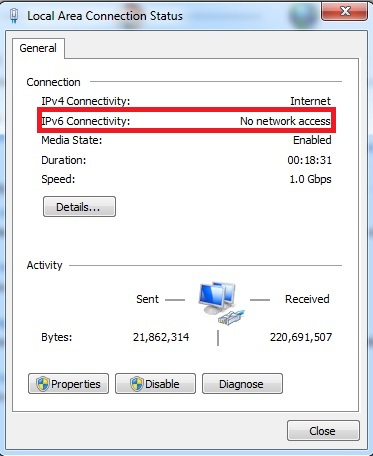
Edit: Just noticed this as well. Is this supposed to be that way?
-
2013-02-25 20:39 #3Pandemonium
- Join Date
- Feb 2010
- Posts
- 7,621
- BG Level
- 8
- FFXI Server
- Sylph
No one uses IPv6 yet, it's the new standard which allows a larger number of IP devices and IP Addresses, you can ignore it.
To set a static IP, on that screen you have on your post, go properties > ipv4 properties > set ip manually > type in an IP you want to try.
If using a linksys router, you can put the same IP in the dmz if you want.
As for NDNS I'm not sure, however I think the secondary one has to be the DNS of your cable company? Getting a bit afield for me.
-
2013-02-26 09:57 #4Banned.

- Join Date
- Aug 2010
- Posts
- 1,775
- BG Level
- 6
My money is on the problem being on your ISP's end, they're just too incompetent or lazy to handle the issue.
I went round and round with a similar situation with my ISP for nearly six months. By the end of it we were pretty sure the problem was the old DSL infrastructure the ISP was trying to phase out so they weren't about to lay new lines in the ground to actually fix the issue, but they sure as hell weren't going to tell us that so we finally caved and upgraded to their new more expensive fiber optic lines.
Instead of the BBB, you might try contacting some local government officials. They can actually do a pretty good job of hounding the ISP for you.
-
2013-02-28 00:34 #5Campaign
- Join Date
- Sep 2007
- Posts
- 6,630
- BG Level
- 8
- FFXIV Character
- Sean Kipling
- FFXIV Server
- Midgardsormr
After spending even more time messing around and talking with someone who actually was able to help me on the phone (and not just give me excuses), I decided the last thing I could do was wipe my PC and see if I had screwed anything up without knowing it.
I still disconnect intermittently. However the good news is that I found out over the summer verizon actually enabled FiOs but it just doesn't show up online when you look for availability for some reason. I had to call 3 times before I got someone who found my apartment as being enabled.
So yeah, at least I can comfortably say it's their fault now and have the peace of mind that I can switch. Still appreciate the feedback though.
-
2013-02-28 12:24 #6Ridill
- Join Date
- Jul 2008
- Posts
- 11,247
- BG Level
- 9
Yeah definitely sounds like the ISP. I had an issue with Time warner up in NY where every night between 12am and 3 am I would get kicked off the internet 3-5 times every 30mins or so. Like everything went down, even the phone and TV since it was all tied in together...of course they wouldn't admit to anything on their end, even after replacing our router 10 times. It's always "Well your connection looks good on our end!
 " bullshit.
-
2013-02-28 13:22 #7jponry
- Join Date
- Jul 2006
- Posts
- 1,391
- BG Level
- 6
- FFXI Server
- Phoenix
Looks like it's time to upgrade your PC, Uryuu, kukuku~
http://dell.com/alienware
-
2013-03-01 10:59 #8Ridill
- Join Date
- Jul 2008
- Posts
- 11,247
- BG Level
- 9
No, bad *slap* Originally Posted by xerodok
-
2013-03-01 13:10 #9Relic Weapons
- Join Date
- Apr 2008
- Posts
- 363
- BG Level
- 4
- FFXI Server
- Sylph
- WoW Realm
- Kirin Tor
Are there no other charter internet subscribers in your university apartment that you could ask if they are experiencing the same?
-
2013-03-02 13:18 #10Campaign
- Join Date
- Sep 2007
- Posts
- 6,630
- BG Level
- 8
- FFXIV Character
- Sean Kipling
- FFXIV Server
- Midgardsormr
When I asked around they were also getting the issue, but once they replaced the amplifier their issues stopped. So it was just me. However, everyone around me had a connection that was like 5down/1up at max, and supposedly mine was a special case since they have very few "Ultra 100" subscribers. Originally Posted by Artemicon


Similar Threads
-
FFXI disconnect issues
By jmc in forum TechReplies: 0Last Post: 2010-05-29, 00:42 -
TV + Cable box issue
By Alishe in forum TechReplies: 3Last Post: 2009-08-10, 19:57 -
Wireless Modem, Connection Cable issues
By Karbuncle in forum TechReplies: 5Last Post: 2008-05-01, 15:54