 XI Wiki


Did Unlimited originally set the cap at 60 by default or was it removed entirely? I dont recall doin anything with any settins for unlimited and like to put it where it was be default
- Navigation
Results 4601 to 4620 of 6124
-
2015-01-17 20:49 #4601Relic Shield

- Join Date
- Jan 2013
- Posts
- 1,868
- BG Level
- 6

-
2015-01-17 21:02 #4602Sea Torques
- Join Date
- Sep 2012
- Posts
- 736
- BG Level
- 5
- FFXI Server
- Leviathan

It defaulted to 60 and had an option to uncap it. Config now also defaults to 60 and has an option to uncap it (by setting FrameRateDivisor to 0).
-
2015-01-17 23:31 #4603Fake Numbers
- Join Date
- Jan 2009
- Posts
- 77
- BG Level
- 2
- FFXI Server
- Bismarck
The new logger addon doesn't seem to be capturing timestamps from the chatlog using the timestamp addon and inserts lots of blank newlines for some reason in the log file. Anything I can do to fix this? settings maybe?
-
2015-01-18 02:57 #4604Sea Torques
- Join Date
- Sep 2012
- Posts
- 736
- BG Level
- 5
- FFXI Server
- Leviathan
That's a really dumb issue, unfortunately, and results from Logger being loaded before Timestamp. I'll have to think about possible ways around it, but I may need to re-enable the Logger plugin. Originally Posted by Indi

Edit: You can temporarily avoid it by loading it in your init.txt file, that way it's loaded after Timestamp.
-
2015-01-18 08:56 #4605CoP Dynamis
- Join Date
- Feb 2010
- Posts
- 261
- BG Level
- 4
- FFXI Server
- Carbuncle

 Thanks, I already converted 3 jobs from XML to LUA using Motenten's templates but modified the luas quite a bit. It took me long time but at least I now have 3 usable jobs again (19 to go!). Originally Posted by NynJa
Now, to find an easy way to use gearcollector with the luas, I read on last pages that you need to export your gear to XML, so I guess I'll try it that way, but an automatic way (if only gearcollector would read directly from the lua! or just make the export itself) would be way better.
Thanks!
-
2015-01-18 09:49 #4606Campaign
- Join Date
- Jul 2007
- Posts
- 6,633
- BG Level
- 8
 Using the following atm, and it's not filtering anything: Originally Posted by Arcon
Code:<AbilityRecastFilter>Sublimation|Dark Arts|Light Arts</AbilityRecastFilter>
-
2015-01-18 13:28 #4607E. Body
- Join Date
- Jan 2009
- Posts
- 2,086
- BG Level
- 7
- FFXI Server
- Quetzalcoatl
Is there anything I can do to stop this from happening while using Unlimited? Or do i just have to live with it? Originally Posted by Byrthnoth
-
2015-01-18 13:43 #4608
Nothing that you personally can do, as far as I have found. Maybe we'll figure out what value needs to be changed to fix this in memory some day, but it hasn't happened yet.
-
2015-01-18 18:48 #4609Melee Summoner
- Join Date
- Oct 2007
- Posts
- 37
- BG Level
- 1
- FFXI Server
- Leviathan
Any way to make the background of the Distance plugin transparent?
-
2015-01-18 19:02 #4610Sea Torques
- Join Date
- Sep 2012
- Posts
- 736
- BG Level
- 5
- FFXI Server
- Leviathan
Both the Distance plugin and the Distance addon should have a fully transparent background. If that is not the case for you check your settings file (Windower/addons/Distance/data/settings.xml) and adjust the background alpha value there, or set visibility to false if you wanna disable it entirely.
-
2015-01-18 21:10 #4611Hydra
- Join Date
- Jun 2007
- Posts
- 110
- BG Level
- 3
Config keeps trying to change my aspect ratio when I have that turned off.
-
2015-01-18 23:36 #4612Relic Shield
- Join Date
- Jan 2013
- Posts
- 1,868
- BG Level
- 6
That wall colision detector has always done that for me since i started on PS2.
-
2015-01-19 02:52 #4613Sea Torques
- Join Date
- Sep 2012
- Posts
- 736
- BG Level
- 5
- FFXI Server
- Leviathan
Config has two options regarding aspect ratio: Originally Posted by Dew
AdjustAspectRatio
If this is set to true, it will automatically determine the correct aspect ratio to use and set it to that. There seems to currently be a bug with this.
AspectRatio
If the previous was set to false, this one will take effect. This one sets the value to what you have defined here explicitly.
Tl;dr Config always adjusts your aspect ratio, either automatically or to the value you have defined there.
-
2015-01-19 03:06 #4614Relic Shield
- Join Date
- Mar 2007
- Posts
- 1,789
- BG Level
- 6
- FFXIV Character
- Rehn Valor
- FFXIV Server
- Sargatanas
- FFXI Server
- Ragnarok
I'm currently having this problem on an alt. Every single day I will eventually get this error regarding timers and it always kicks in during a song.
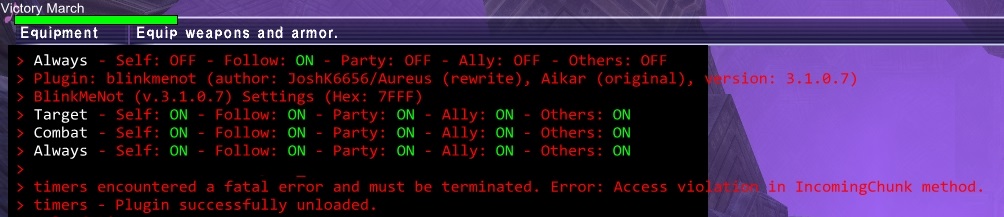
I don't have my recast/duration in the upper left at all, they are all on the far right side near my party list on the right. I control this char via logitech gkeys
-
2015-01-19 07:19 #4615Sea Torques
- Join Date
- Aug 2006
- Posts
- 514
- BG Level
- 5
Currently having an issue with TParty still. When I deleted and redownloaded the Addon, it kept giving me version 1.0.0.0, and I had to get 2.0.1.1 from a friend. It fixed the party's TP values, but the enemy's HP% number is now on the HP bar, overlapping it (it was a bit more to the left, touching the box as others have said). I've tried messing with the value in the .lua file but anytime I save it, unload/reload it gives the "lua runtime error: attempt to call a string value". I noticed in the older TParty, what I assume is the alignment for the HP% (I know jack to little about coding, so if I'm wrong, sorry) was pos x = -128, and in the new addon, it's -104.
So, my question is, is/was this being fixed and how to download it if so, since my version keeps giving me 1.0.0.0 each time, or if someone can just post their TParty.lua with the fix, that works for me as well.
-
2015-01-19 07:53 #4616CoP Dynamis
- Join Date
- Feb 2010
- Posts
- 261
- BG Level
- 4
- FFXI Server
- Carbuncle
I tried doing this last night, but gear collector wouldn't take my gear correctly. First I noticed it took awfully long time (about 3+ minutes) then I opened the console and stopped it (via (gearcollector stop") and when I tried to //gc pld again, it echoed an error message that my inventory and wardrobe were full. They were, but there was more than enough space at storage to just take off all the un needed gear from inventory. Originally Posted by Sechs
Tried few more things but ended up collecting my gear manually. Is this a known bug for gear collector, or did I do something terribly wrong?
-
2015-01-19 14:07 #4617Relic Shield
- Join Date
- Jan 2013
- Posts
- 1,868
- BG Level
- 6
Lot of times you have to save a lua type file or settings file with the plugin/addon unloaded. If you save it then unload it, alot of them seem to save on unloading which saves the old settings. Was going through this same save/unload thing last night with two plugins. Its a sort of annoying thing that has started with windower4I've tried messing with the value in the .lua file but anytime I save it, unload/reload it gives the "lua runtime error:
-
2015-01-19 16:05 #4618HABS SUCK!!!!!
Sepukku is my Hero
Therrien's Cum Dumpster
- Join Date
- Mar 2005
- Posts
- 37,884
- BG Level
- 10
- FFXI Server
- Gilgamesh

Has send worked for anyone since the patch?
-
2015-01-19 16:22 #4619Relic Shield
- Join Date
- Jan 2013
- Posts
- 1,868
- BG Level
- 6
my Send is working now and has since update.
-
2015-01-19 16:41 #4620HABS SUCK!!!!!
Sepukku is my Hero
Therrien's Cum Dumpster
- Join Date
- Mar 2005
- Posts
- 37,884
- BG Level
- 10
- FFXI Server
- Gilgamesh
I deleted and redownloaded it, and now its working. Originally Posted by Trumpy


Similar Threads
-
Service and Support
By Ribeye in forum FFXI: EverythingReplies: 8Last Post: 2009-10-17, 18:23 -
Windows vista and FFXI problem
By Takeno in forum FFXI: EverythingReplies: 1Last Post: 2007-07-26, 13:36 -
Windows Vista and Windower
By divisortheory in forum FFXI: EverythingReplies: 35Last Post: 2006-06-23, 04:19