 XI Wiki


You can probably conclude it's not on Windower then. Try doing a file check?Originally Posted by Himay

- Navigation
Results 821 to 840 of 6124
-
2013-04-12 19:45 #821
-
2013-04-12 21:20 #822Flowery Twats

- Join Date
- Jul 2008
- Posts
- 3,583
- BG Level
- 7
 Super Sampling is off Originally Posted by chichicha
Bump mapping is off
Mip mapping is set to none
UI scale is set to 1x
Gamma is set to 0
-
2013-04-12 21:52 #823Clever and witty, all together the ladies love the Nekura
- Join Date
- Jul 2007
- Posts
- 1,009
- BG Level
- 6
- FFXI Server
- Phoenix
 Someone who is actually developing with this stuff can probably give a better answer, but just looking at the documentation it seems like you do: Originally Posted by Khamsin
prim_create(some_unique_name)
prim_set_texture(some_unique_name, abs_path_to_your_texture)
From there, you're done with the path, the only thing you care about is some_unique_name for the other prim operations.
-
2013-04-12 21:59 #824a p. sweet dude
Pens win! Pens Win!!! PENS WIN!!!!!
- Join Date
- Jul 2010
- Posts
- 25,938
- BG Level
- 10
 Check the registry entries for your background resolution. The last time I turned off super sampling the registry entry didn't change and stayed at 2x my game resolution. Originally Posted by noodles355
-
2013-04-12 23:02 #825Flowery Twats
- Join Date
- Jul 2008
- Posts
- 3,583
- BG Level
- 7
Is there an idiot's guide on how to do that somewhere? Also, I just noticed this: Originally Posted by Obsidian
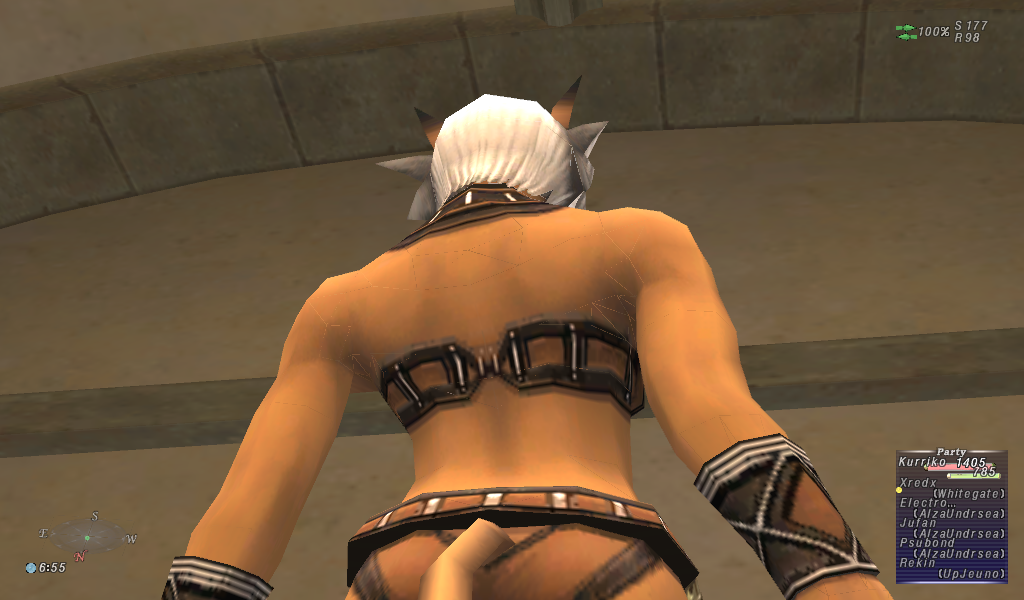
If that means anything (all the visable wireframe lines).
Edit: Those lines do not appear on other players.
-
2013-04-12 23:11 #826a p. sweet dude
Pens win! Pens Win!!! PENS WIN!!!!!
- Join Date
- Jul 2010
- Posts
- 25,938
- BG Level
- 10
This should help you get it done. Just open your Start menu, search for Regedit, navigate to the path on that page, and check the corresponding values for your background X and Y values.
-
2013-04-12 23:39 #827Sea Torques
- Join Date
- Sep 2012
- Posts
- 736
- BG Level
- 5
- FFXI Server
- Leviathan

By the way, anyone requiring absolute file paths:
So if you need the absolute path, don't manually insert it but use the lua_base_path variable instead.Code:lua_base_path = 'X:/absolute/path/to/windower/addons/<addonname>'
-
2013-04-13 00:05 #828Melee Summoner
- Join Date
- Mar 2013
- Posts
- 25
- BG Level
- 1
For some reason Windower 4 is crashing as soon as I open it before it can update plugins or take me t the profile screen, can't even get to POL.
I've tried restarting my comp and that didn't work. Gonna try re-install soon.
-
2013-04-13 00:09 #829Flowery Twats
- Join Date
- Jul 2008
- Posts
- 3,583
- BG Level
- 7
Thanks, I checked and the resolutions in the registry match my windower settings so it's not that. Originally Posted by Obsidian
I'm really thinking it's something to do with the picture I posted, all those polygon lines, something looks wrong there.
Easier to see here:
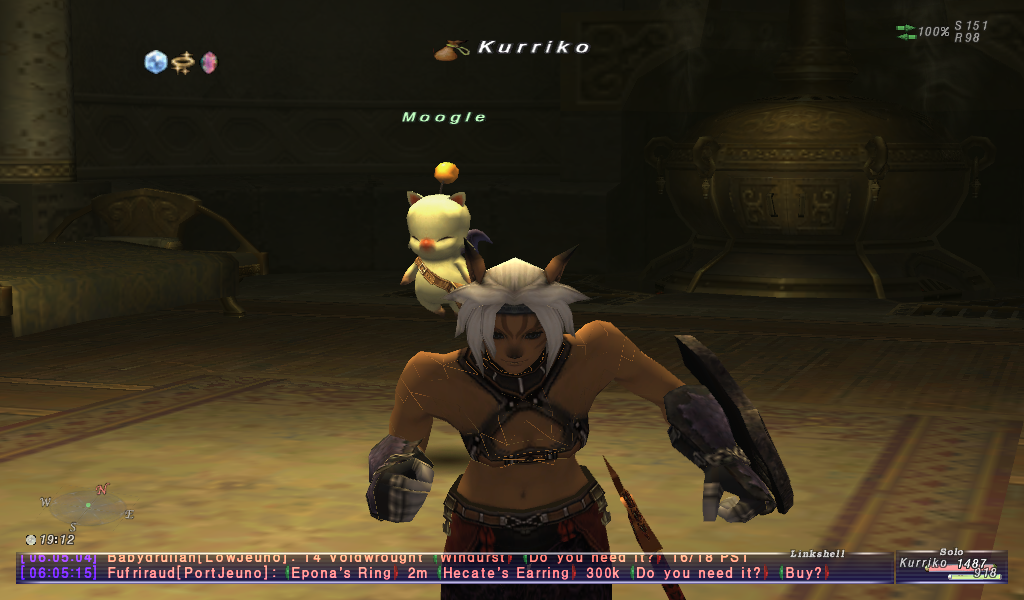
Edit: looks like I'm on the way to becoming some kind of superman Bizarro mithra...
-
2013-04-13 03:38 #830Flowery Twats
- Join Date
- Jul 2008
- Posts
- 3,583
- BG Level
- 7
To follow up, this problem of seeing the lines all over my character is not just in Windower 4, it's also in 3 and in vanilla pol.
I'm not sure what to do now.
-
2013-04-13 03:48 #831Sounds like your graphics card is kicking the bucket. Originally Posted by noodles355
Remaining list for Battlemod v2:
* Change the way AoE buffs read out so that multi-target abilities that affect/don't affect different players give two messages with the respective responses.
-
2013-04-13 05:59 #832Flowery Twats
- Join Date
- Jul 2008
- Posts
- 3,583
- BG Level
- 7
But why is it only on my character and not on others? It's since the version update. Although, it's also since my fan died. The fan has since been repaired and cleaned and is working better than before, but is there a chance my graphics card broke at the same time my fan did? (how could I test <.>?) Originally Posted by Byrthnoth
-
2013-04-13 06:03 #833Pandemonium
- Join Date
- Feb 2010
- Posts
- 7,689
- BG Level
- 8
- FFXI Server
- Sylph
You could have damaged your card with the heat before the fan got fixed, yes.
A stress test of your card would probably answer the question, but I can't direct you to the proper link/download/program because I don't know what to suggest.
-
2013-04-13 12:09 #834
Okay, I pushed it out. Let me know how many things it breaks (preferably in this thread or via PMs).
-
2013-04-13 14:42 #835Flowery Twats
- Join Date
- Jul 2008
- Posts
- 3,583
- BG Level
- 7
Unrelated to my graphics problem.
[10:46:50] Dmopn>> [BR0SALE].[C0M] sell the cheapest gil,100% safe and fast deliv/ery.1M=$8.99 [L7Lci]
[14:57:34] Dmopn>> [BR0SALE].[C0M] sell the cheapest gil,100% safe and fast deliv/ery.1M=$8.99 [ecc13]
[20:35:21] Dmopn>> [BR0SALE].[C0M] sell the cheapest gil,100% safe and fast deliv/ery.1M=$8.99 [R1ki3]
Why does this get through chatmon's filter? Why does BR0SALE get though the filter? Brosale is like what, the most infamous gilselling site? and the difference between "BROSALE" and "BR0SALE" is replacing an O for an 0? How does that possibly get through?
I wont start on how an RMT tellspam mule managed to live for about 10 hours, that's appalling (on SE's side) of it's self.
-
2013-04-13 14:45 #836Radsourceful

- Join Date
- Jul 2007
- Posts
- 1,964
- BG Level
- 6
- FFXI Server
- Bismarck
Not sure if filters issue, but I'm not getting "not enough MP to cast that spell" messages. Current Filters set to https://dl.dropboxusercontent.com/u/...on/filters.xml Originally Posted by Byrthnoth
-
2013-04-13 14:54 #837Pandemonium
- Join Date
- Feb 2010
- Posts
- 7,689
- BG Level
- 8
- FFXI Server
- Sylph
Make sure you have the SE filter on too. I used to have terrible trouble with /tell since my char name is Buffy, but haven't seen a single one since I turned the SE one on in the chat filter settings. Originally Posted by noodles355
edit: This has nothing to do with chatmon, just saying.
-
2013-04-13 15:03 #838Flowery Twats
- Join Date
- Jul 2008
- Posts
- 3,583
- BG Level
- 7
How do I go about making sure the SE filter is running >.>?
Seriously, the questions I've been asking recently, I haven't felt like such a noob since like... last week.
-
2013-04-13 15:06 #839CoP Dynamis
- Join Date
- Mar 2010
- Posts
- 252
- BG Level
- 4
I use windower 4 with UI size x2 (because I cant read the hp/mp bar with normal size) is there any way to make the chattext "clearer"? the only thing i found in the ffxi config is "font compressed: low, mid or high"?
-
2013-04-13 20:23 #840Pandemonium
- Join Date
- Feb 2010
- Posts
- 7,689
- BG Level
- 8
- FFXI Server
- Sylph
Config > Chat Filter > Tell messages deemed spam > On Originally Posted by noodles355


Similar Threads
-
Service and Support
By Ribeye in forum FFXI: EverythingReplies: 8Last Post: 2009-10-17, 18:23 -
Windows vista and FFXI problem
By Takeno in forum FFXI: EverythingReplies: 1Last Post: 2007-07-26, 13:36 -
Windows Vista and Windower
By divisortheory in forum FFXI: EverythingReplies: 35Last Post: 2006-06-23, 04:19