XI Wiki


Instead of making a new thread, direct your questions here! This should consolidate any potential problems so the forums aren't any more of a mess than they have to be during this XI-traffic-heavy time.
I'll keep this post updated with some key information as it's presented.
★Version Update Notes★
★.DAT Mining Findings★
★.DAT Mining Discussion★
Version Update Files
Seekers of Adoulin Install
- http://www.filedropper.com/finalfant...doulindownload - [NA] Kengo on FFXIAH
- http://tehkrizz.net/FFXI/client/SoA.rar - [NA] Krizz FFXIAH
- http://thepiratebay.se/torrent/8302657 [NA] Piricho Guildwork
March 27th Patch Files
- http://bgftp.bluegartr.com/bakMarch27Update.rar - Should cover most of the patch files, sorry if I missed anything. Thank you Ragns!
Extract the files to somewhere convenient, then copy and paste the folders into your FINAL FANTASY XI directory. Merge and overwrite. You sitll have to run the check through POL, but this should cover most of the file downloads.
NSFW Adventures
Register to see the NSFW content
My expansion is a different region from my install, what do I do?
This isn't necessary for Seekers of Adoulin, but if you are using the Collection to install WOTG, TOAU, etc. from a different region than your main install, you may want to consider this!
Spoiler: show
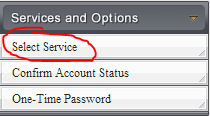
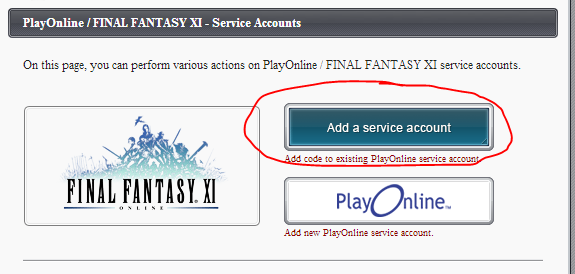
Registering the expansion key
- Login to your SEAccount
- Click FFXI
- Enter code
- Select POL ID
- All done!
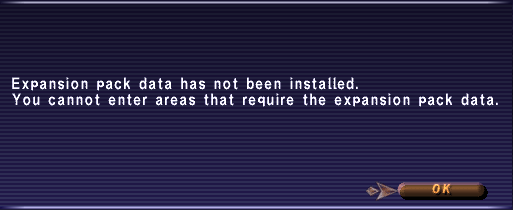
Regarding this:
- You will receive this message upon logging into any character for which you have registered SOA. This is normal. It will go away after the patch on 3/27.
General Update Advice
- Unload Sandbox before updating (If you use that)
- Windower > Plugins > Resources > Delete these files. Type //updateresources within the game.
- Windower > Plugins > Delete resources (XML file, NOT the VER file!). Redownload here: http://resources.windower.net/resources.xml
- Redownload and reinstall DATs.
- If you crash, unload plugins and load them one-by-one until you crash again.
- Do not publicly ask for bots when using these forums.
- If you've switched to Windower v4, plugins will update automatically upon launch when available.
- Ashita extensions update via SVN, so you shouldn't need to DL them.
- Check here for updates and solutions.
Update breaks and Solutions
Windower Plugins
- The guildwork yell functionality is currently broken.
- Download Windower 4.0 and plugins will fix themselves when you run the launcher
- Move XMLs etc to the W4.0 folder
Ashita Extensions
- The guildwork yell functionality is currently broken.
- Core update
Other breaks
- Navigation
Results 1 to 20 of 139
-
2013-03-26 04:09 #1The Syrup To Waffles's Waffle

- Join Date
- Jun 2007
- Posts
- 5,045
- BG Level
- 8
- FFXIV Character
- Cair Bear
- FFXIV Server
- Excalibur
- FFXI Server
- Fenrir

Seekers of Adoulin Questions & Solutions Thread
-
2013-03-26 04:17 #2Campaign
- Join Date
- Jul 2007
- Posts
- 6,633
- BG Level
- 8
 Short and painless.Unload Sandbox before updating (If you use that)
Always wondered: is this necessary only if you access the game through windower or through XI-Utils? Do you need to do it even if you launch it from the original POL inside the FFXI folder?
-
2013-03-26 04:24 #3The Syrup To Waffles's Waffle
- Join Date
- Jun 2007
- Posts
- 5,045
- BG Level
- 8
- FFXIV Character
- Cair Bear
- FFXIV Server
- Excalibur
- FFXI Server
- Fenrir
I'm fairly certain you would have to un-sandbox regardless of how you launch given the way it indexes your files interacting badly with the update.
-
2013-03-28 05:22 #4RIDE ARMOR
- Join Date
- Mar 2013
- Posts
- 20
- BG Level
- 1
- FFXI Server
- Shiva

Any ideas on this?
Spoiler: show
-
2013-03-28 06:16 #5Cerberus
- Join Date
- Jun 2007
- Posts
- 409
- BG Level
- 4
I don't often suggest patching files for those who aren't computer literate but you may have to man up and attempt it. Originally Posted by Xet

1. Find your exact FFXI folder, I recommend traversing the registry to HKEY_LOCAL_MACHINE\SOFTWARE\Wow6432Node\PlayOnline[RegionAbbreviation]\InstallFolder and Key 0001 will have a ...\PlayOnline\SquareEnix\FINAL FANTASY XI folder listed. This is your FFXI folder.
2. Download both these patches and unzip them: http://www.thec0mmission.us/FinalFan..._Of_Adoulin.7z http://thec0mmission.us/xi/XI_Patch_03-27-13_V2.7z
3. Install them respectively as such: http://thec0mmission.us/xi/how-to-copy.png
Note: You're merging the directories with the ones from the patch folders into your FFXI folder, if it isn't asking you to merge/replace you're doing something wrong.
4. Run a file check from POL
Tell me how it goes, this may help with your issue as well Maguile.
-
2013-03-28 07:53 #6Hydra
- Join Date
- Oct 2006
- Posts
- 122
- BG Level
- 3
Yeah, I am now discovering that ordering off of SE's EU site and the UK Gamesplanet with an American credit card seems to be an issue... Trading is looking like a much better option.
-
2013-03-28 07:55 #7Claustrum. Really?
- Join Date
- Nov 2007
- Posts
- 3,806
- BG Level
- 7
- FFXIV Character
- Kaith Laqueus
- FFXIV Server
- Ragnarok
- FFXI Server
- Asura
It's not just the confusion. Buying an EU code from the US can be massive ballache too. I emigrated from the UK to the US and anti-fraud measures just constantly get in the way. Originally Posted by Gokulo
SE Store wouldn't let me buy from them as I'm in the US. Gamesplanet flagged me up for verification and then cancelled the order even after I explained my circumstance. I had to get a friend to buy it for me in the end and just sent him the money back over Paypal.
It's the same with renewing accounts. I can no longer pay for my account with Paypal or my UK cards or Crysta, fortunately a US card does work. It's SE who are the issue not my bank too as I can use my card/paypal/etc with other online vendors. And my bank are aware I emigrated so know to authorize it/not flag it as fraud.
I understand why SE do it, it's just a massive pain in the ass because there's no leeway at all with them. Even if you explain and can prove it, they still refuse to take your money.
-
2013-03-28 08:04 #8Claustrum. Really?
- Join Date
- Nov 2007
- Posts
- 3,806
- BG Level
- 7
- FFXIV Character
- Kaith Laqueus
- FFXIV Server
- Ragnarok
- FFXI Server
- Asura
Devinry. Garokk on Guildwork has an EU code and wants to trade for a US one.
-
2013-03-28 08:15 #9Smells like Onions
- Join Date
- Mar 2013
- Posts
- 1
- BG Level
- 0
Please help.
I have bought and registered the addon and when i click on the small 2.10mb 'download this to get your game' link from SE i then double click on it and i get the message...
'Certificate authentication failed, please reinstall to correct the problem'
Tried over and over and keep getting same.
Also i tried to manually download the file from the link on page one of this thread and i copied/pasted that into my FFXI folder and then i click on 'setup' from within that folder (which is called SoA) and the installer starts and then stops quickly saying...
'Must have FFXI installed to install SoA' (or words to that effect.
FFXI is installed.
Please help.
-
2013-03-28 08:39 #10New Merits
- Join Date
- Jul 2007
- Posts
- 206
- BG Level
- 4
- FFXI Server
- Odin
I still have not received my registration code for SoA. I bought it from the SE website two days ago. I know the 2nd email with the registration code was delayed for some people, but, i would have thought I would have received it by the time the expansion went live.
Anyone else still not have their registration code?
Thanks.
-
2013-03-28 08:45 #11Hydra
- Join Date
- Oct 2006
- Posts
- 122
- BG Level
- 3
Jem, thanks for the heads up. Made the trade. Appreciate the help. Originally Posted by Jem
-
2013-03-28 12:15 #12RIDE ARMOR
- Join Date
- Mar 2013
- Posts
- 20
- BG Level
- 1
- FFXI Server
- Shiva
Deleted urls as i cannot post them. In my ffxi folder in the registry it does not have rom folders par se. There are numbered files unlike nothing i have seen before. (FFXI still works fine). The file types to the download look totally different to the how to copy ones. Originally Posted by Kaces
Edit: They show as a file type REG_DWORD looks like binary data?
-
2013-03-28 13:48 #13RIDE ARMOR
- Join Date
- Mar 2013
- Posts
- 20
- BG Level
- 1
- FFXI Server
- Shiva
Nvm im just downloading a US version of everything, least I'll have a spare code for someone lol
-
2013-03-28 13:58 #14Absolute Messenger of Promathia
- Join Date
- Jan 2008
- Posts
- 13,173
- BG Level
- 9
- FFXIV Character
- Blaise Destin
- FFXIV Server
- Sargatanas
- FFXI Server
- Asura
Question: Purchased the Ultimate Collection, Desktop'd the install, etc... Its going to install everything over? POL/COP/TOAU/WOTG/etcetc? Or is there a way to just install SoA with the Ultimate Collection? Registered the code and all.
(I needed Shantoto and Seekers, So figured its 10 for 1 and 30 for the other, might as well just buy the ultimate, get both, and a neat shirt/hat)
-
2013-03-28 13:59 #15Ridill
- Join Date
- Jun 2007
- Posts
- 12,722
- BG Level
- 9
- FFXIV Character
- Teisha Linne
- FFXIV Server
- Moogle
- FFXI Server
- Bahamut

You can choose what to install.
-
2013-03-28 14:03 #16Absolute Messenger of Promathia
- Join Date
- Jan 2008
- Posts
- 13,173
- BG Level
- 9
- FFXIV Character
- Blaise Destin
- FFXIV Server
- Sargatanas
- FFXI Server
- Asura
Did not give me that option, Just flat out began installing. I'll double check see if i missed a step...
Suppose i need to install the Ultimate Collection, the 5400~MB file, Then once thats installed chose which Expansion/etc to DL
-
2013-03-28 14:05 #17Requiescat in pace.
- Join Date
- Dec 2008
- Posts
- 1,341
- BG Level
- 6
- FFXI Server
- Lakshmi
You can only install seekers. Code will activate everything though. Originally Posted by Karbuncle
EDIT: meh beaten.
for me it popped up a list of checkboxes asking what i wanted to install.
-
2013-03-28 14:08 #18Absolute Messenger of Promathia
- Join Date
- Jan 2008
- Posts
- 13,173
- BG Level
- 9
- FFXIV Character
- Blaise Destin
- FFXIV Server
- Sargatanas
- FFXI Server
- Asura
If it makes any difference i ordered from the SE Official area. Got the FFXI Ultimate>blah>DownloadManager ... Double click > Install a 5400MB File (Step 1/4)... Guess i just didnt expect it to be so big lol
-
2013-03-28 14:10 #19Requiescat in pace.
- Join Date
- Dec 2008
- Posts
- 1,341
- BG Level
- 6
- FFXI Server
- Lakshmi
yeah the whole shebang is 5 gigs, Isnt there somewhere here on BG where you can download just SoA? Originally Posted by Karbuncle
-
2013-03-28 14:11 #20Absolute Messenger of Promathia
- Join Date
- Jan 2008
- Posts
- 13,173
- BG Level
- 9
- FFXIV Character
- Blaise Destin
- FFXIV Server
- Sargatanas
- FFXI Server
- Asura
Its on the front page of this thread.
Still, Knowing i"m not reinstalling everything I'm cool with letting it take the ~30 minutes to Download