 XI Wiki


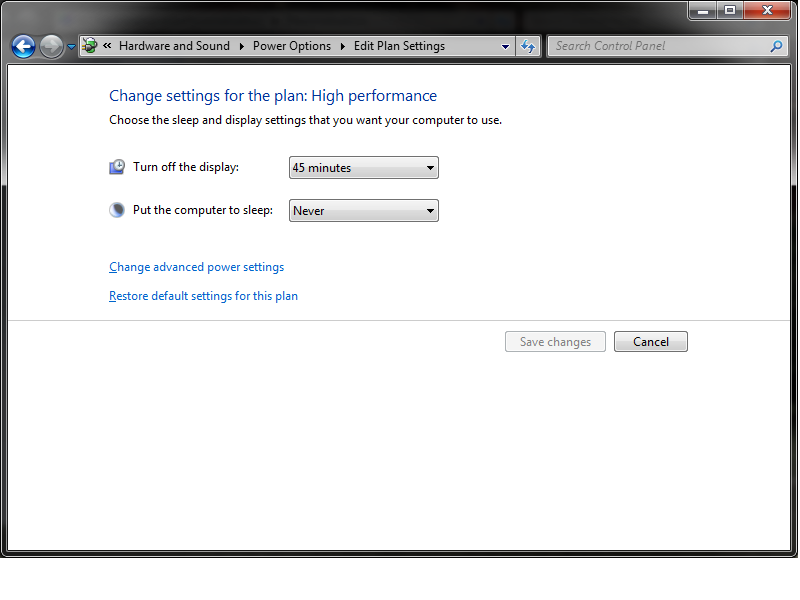
So I don't have my computer set to sleep, instead I have a blank screen saver and my displays set to shut off after 45minutes of inactivity. Windows 7.
simple plan settings:
Spoiler: show
This all works great for me, in advanced I have pretty much everything that could shut off or sleep or slow down set to off.
The only problem is that the displays still shut off with music playing, thinking it's inactive. Since my music is going through an HDMI to the sound output source, when video is lost, sound is lost.
Are there any easy workarounds to where I don't have to change my plan settings or anything like that? Even having visualizations turned on in the music player doesn't fix this. I could always set "turn off displays" to never, and manually power them off, but I have an issue with my one monitor rarely not recovering from this without pulling it from the outlet.
- Navigation
Results 1 to 8 of 8
-
2013-05-14 01:33 #1Ironing this Thread

Sweaty Dick Punching Enthusiast
- Join Date
- Feb 2006
- Posts
- 21,329
- BG Level
- 10
- FFXIV Character
- Boyiee Star
- FFXIV Server
- Gilgamesh
- WoW Realm
- Kel'Thuzad


Displays shut off with music playing.
-
2013-05-14 08:06 #2Nidhogg
- Join Date
- Feb 2008
- Posts
- 3,790
- BG Level
- 7
- FFXIV Character
- Tsugaru Mifra
- FFXIV Server
- Hyperion
- FFXI Server
- Ragnarok


Either reroute your audio through a different source than HDMI or turn off your power save settings. The system is operating as it is supposed to. Video and sound are linked when using HDMI.
-
2013-05-14 10:25 #3Ironing this Thread
Sweaty Dick Punching Enthusiast
- Join Date
- Feb 2006
- Posts
- 21,329
- BG Level
- 10
- FFXIV Character
- Boyiee Star
- FFXIV Server
- Gilgamesh
- WoW Realm
- Kel'Thuzad
I don't understand why the computer/displays/whatever thinks its inactive with music/visualizations playing. It shouldn't do that. Originally Posted by xopher

-
2013-05-14 11:14 #4Nidhogg
- Join Date
- Feb 2008
- Posts
- 3,790
- BG Level
- 7
- FFXIV Character
- Tsugaru Mifra
- FFXIV Server
- Hyperion
- FFXI Server
- Ragnarok
Because it's looking for input. If you want it to stay up, get a mouse jiggling application or turn off your power save features.
http://mousejiggler.codeplex.com/
-
2013-05-14 14:00 #5Ironing this Thread
Sweaty Dick Punching Enthusiast
- Join Date
- Feb 2006
- Posts
- 21,329
- BG Level
- 10
- FFXIV Character
- Boyiee Star
- FFXIV Server
- Gilgamesh
- WoW Realm
- Kel'Thuzad
Pretty lame. I don't understand why it's looking for input if I have visualizations open in the media player. Don't remember it ever shutting off a display during a movie. Originally Posted by xopher
-
2013-05-14 15:04 #6Nidhogg
- Join Date
- Feb 2008
- Posts
- 3,790
- BG Level
- 7
- FFXIV Character
- Tsugaru Mifra
- FFXIV Server
- Hyperion
- FFXI Server
- Ragnarok
To be honest I don't know why video is the exception. Maybe video players are aware of this and create an input stream as well.
-
2013-05-14 21:12 #7Yoshi P
- Join Date
- Aug 2006
- Posts
- 5,139
- BG Level
- 8
- FFXIV Character
- Dead Gye
- FFXIV Server
- Lamia
- FFXI Server
- Ragnarok
Personally I'm glad that displays shut off when music is the only thing playing. If I'm only playing music for hours with no video input there's no reason to waste power transporting and displaying video.
Using HDMI for audio out on a computer is the weird thing here. As it's weird I recommend the use of a mouse jiggling application, or a pool of stuffed animals to throw at your mouse from afar.
-
2013-05-15 00:32 #8Ironing this Thread
Sweaty Dick Punching Enthusiast
- Join Date
- Feb 2006
- Posts
- 21,329
- BG Level
- 10
- FFXIV Character
- Boyiee Star
- FFXIV Server
- Gilgamesh
- WoW Realm
- Kel'Thuzad
I'll just set the display time out to several hours when I'm playing music or whatever. The reason it goes through hdmi is my 60" tv is my 3rd monitor for movies and such, and had a soundbar. So I play music through it.


Similar Threads
-
Randomly shutting off.
By Aristio in forum TechReplies: 19Last Post: 2012-11-12, 14:23 -
Laptop trouble, shutting off.
By Cream Soda in forum TechReplies: 21Last Post: 2010-10-18, 22:13 -
Desktop shuts off......alot
By jmc in forum TechReplies: 11Last Post: 2010-01-29, 21:37 -
Random shutting off
By Omnipotent in forum TechReplies: 17Last Post: 2009-03-02, 10:38