 XI Wiki


Hi I recently bought a video card and it isn't working properly. Here is a link to the card I bought. http://www.newegg.com/Product/Produc...tent-_-text-_-
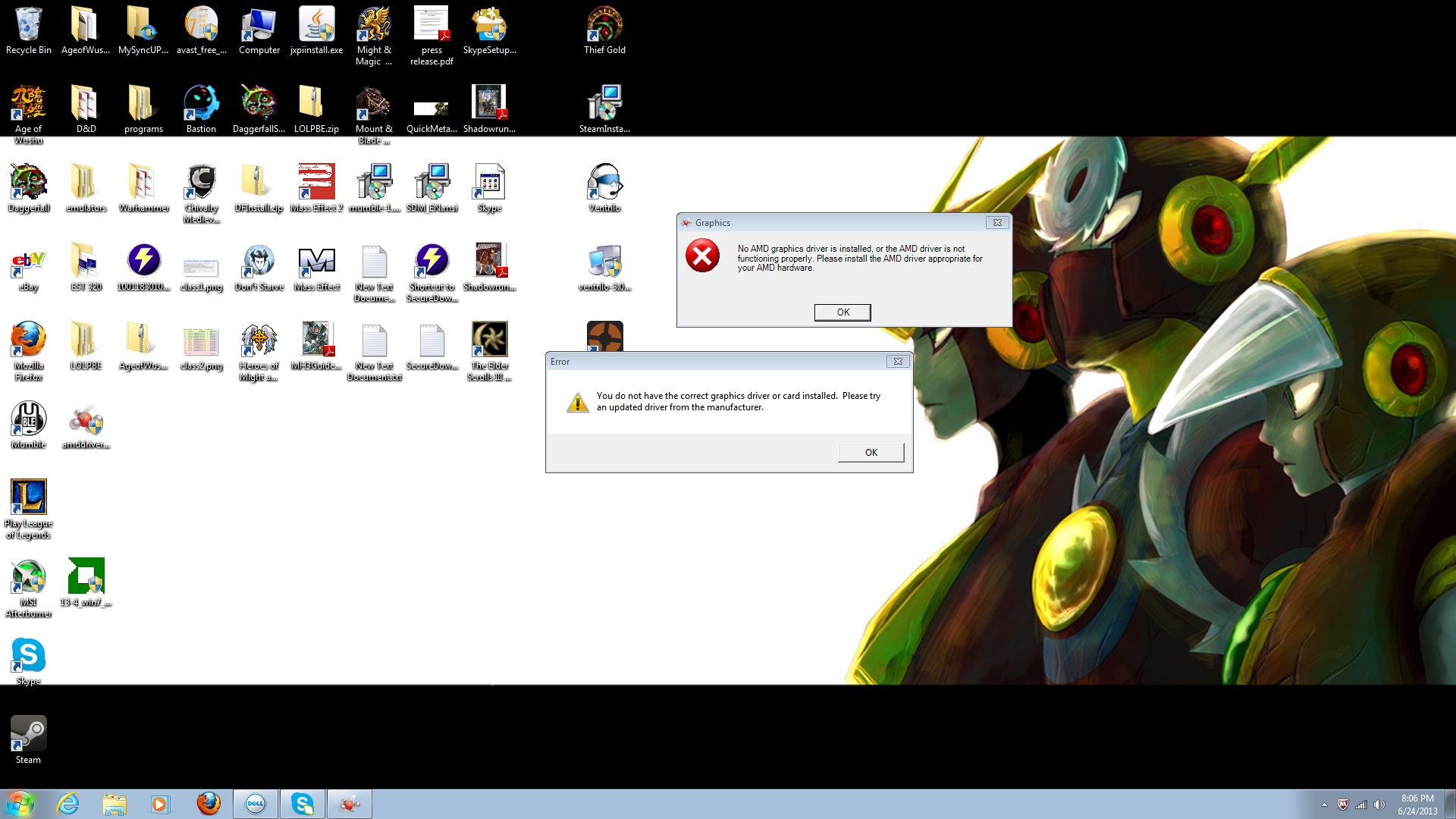
After installing the drivers and disabling the integrated card I cannot get the display to work when it is connected to the card only when the VGA cable is connected to the integrated connector. I have tried installing newer drivers from amds website and it hasn't helped. Whenever I start my computer I get the following errors
Spoiler: show
When I try to reinstall the drivers from the disc or update automaticly through device manager it tells me that my drivers are up to date. I can't seem to figure out what the problem is and any help would be appreciated.
- Navigation
Results 1 to 5 of 5
-
2013-06-24 19:49 #1RIDE ARMOR

- Join Date
- Jun 2009
- Posts
- 23
- BG Level
- 1
- FFXI Server
- Ragnarok

Video Card isn't working properly
-
2013-06-24 23:08 #2Salvage Bans
- Join Date
- Feb 2007
- Posts
- 811
- BG Level
- 5
- FFXIV Character
- Orinthia Warsong
- FFXIV Server
- Excalibur
- FFXI Server
- Bahamut

Newest catalyst drivers are here: http://support.amd.com/us/gpudownloa...w_win8-64.aspx
Are you trying to use your new vid card while still having a monitor connected only to the integrated? You mentioned a VGA connection; your new card does not have an old VGA port on it, so you'll need a convertor or another cable if your current monitor supports hdmi, dvi, or display port. Or a convertor came with the new card. Check.
The new card might not be powered up since there's no monitor connected to it (not saying this is why, but just a little intuition that it might be silly like this). Try connecting a monitor to the new card and not the integrated while the computer is off. It should find it and boot using it unless newer integrated like playing keepaway.
-
2013-06-25 09:17 #3RIDE ARMOR
- Join Date
- Jun 2009
- Posts
- 23
- BG Level
- 1
- FFXI Server
- Ragnarok
I've tried installing the newest drivers from the website but I'm still getting the same problems.
I have tried booting the computer while it is connected to the new card and not the integrated card but when I do that the screen will stay black and the light on the screen will go the same color as when it's in standby mode. Sometimes a message will come on the screen saying there is no signal coming from the computer and to press anything on the keyboard to fix it but it doesn't do anything. If i reconnect the cable to the integrated card after this happen the screen will say the current input timing is wrong and needs to be changed. If i start the computer while it's connected to the integrated card it works like normal.
I think the problem may be that the computer is trying to use integrated card even though it is disabled in device manager. I have checked the bios and there isn't an option to disable the integrated card and there doesn't seem to be a jumper on the board to disable it either.
-
2013-06-25 09:23 #4It's all dicks and airplanes
- Join Date
- Jun 2009
- Posts
- 2,292
- BG Level
- 7
- FFXIV Character
- Cia Mir
- FFXIV Server
- Balmung
Sounds like a dead card or a card not receiving enough power to function. Is your PSU sufficient? Did you make a huge jump in power requirement going from one to the other? I have my doubts since it's a single 6-pin, but.
I'd try RMAing it otherwise. Signs of a bum card are there.
Things I'd check before sending it in:
Try it in another build if you have one.
Swap the power cable to it if your PSU has the ability to do so.
Re-seat, thoroughly clean the slot with a can of air or a good blow/microfibre.
Make sure the designated slot isn't fried or something, try another component in the slot it's in.
If you have another slot you can use, try that.
Make sure the fans are spinning, that means it's getting power at least. But that won't tell you if it's sufficient. More so to cross out a faulty PSU cable.
If the above don't work, I'd send it back. Thing is, in my experience with cards, even before you install the drivers you can still get a connection with some sort of absolutely shitty resolution. Mind you my experiences are with Nvidia. If you connect it, with or without drivers there should be a display.
Beyond that though I don't feel very qualified to help. I've never had an AMD card. I could be completely wrong about a display without drivers for them.
-
2013-06-25 11:39 #5Salvage Bans
- Join Date
- Feb 2007
- Posts
- 811
- BG Level
- 5
- FFXIV Character
- Orinthia Warsong
- FFXIV Server
- Excalibur
- FFXI Server
- Bahamut
This is normal for all video cards. Windows has a default driver that at least displays something with all video cards, but of course makes no use of the card's features aside from very basic output. Originally Posted by Nep

But what you're experiencing is weird.
Everything Nep suggests is spot on. In addition to his suggestions, check to see if you plugged in its additional power source (it uses an additional 6pin power connector tucked away in the top corner opposite from the end with the monitor connections). The picture of the card shows that it comes with a 6pin adapter. Was this included in the box?
Looking at the comments on newegg, folks were using this card with power supplies between 375-400watts, so you're more than likely within that range but do check. If you're using a pre-built, they may have put in one that just barely covers the original system, meaning you may need to get a more powerful power supply if it's too weak.


Similar Threads
-
Video card not working
By Dymlos in forum TechReplies: 3Last Post: 2009-11-26, 13:50