 XI Wiki


I've got two drives with nearly 2TB of movies and music that aren't importing properly. I've tried the windows tool DiskPart and nearly every other tool Google says will work to get them loading again. The only progress I've made so far is that I know that the data is STILL THERE, but I have to back it all up to an external or something and I just don't have the resources for that at this time.
I guess what I'm looking for is one of two resolutions.
A) A way to convert the dynamic drives to basic drives without loosing what's there, or
B) a way to get the drives to import properly into Windows.
- Navigation
Results 1 to 13 of 13
-
2013-07-17 15:22 #1Relic Shield

- Join Date
- Nov 2004
- Posts
- 1,429
- BG Level
- 6
- FFXI Server
- Bahamut

Dynamic drives not importing properly.
-
2013-07-22 14:41 #2Relic Shield
- Join Date
- Nov 2004
- Posts
- 1,429
- BG Level
- 6
- FFXI Server
- Bahamut
Awww c'mon.
 I had such high hopes for BG techies.
-
2013-07-22 15:00 #3Nidhogg
- Join Date
- Feb 2008
- Posts
- 3,790
- BG Level
- 7
- FFXIV Character
- Tsugaru Mifra
- FFXIV Server
- Hyperion
- FFXI Server
- Ragnarok


What do you mean by import into Windows? Does the file system just not show up when you plug it into a Windows Box?
-
2013-07-22 16:30 #4Yoshi P
- Join Date
- Aug 2006
- Posts
- 5,139
- BG Level
- 8
- FFXIV Character
- Dead Gye
- FFXIV Server
- Lamia
- FFXI Server
- Ragnarok
Seconding the not understanding what you mean by "importing". I guess first off is, your drives are showing in the BIOS at the very least, right?
-
2013-07-23 08:16 #5Relic Shield
- Join Date
- Nov 2004
- Posts
- 1,429
- BG Level
- 6
- FFXI Server
- Bahamut
The drives show in the BIOS and the Virtual Disk Service, but in the VDS next to the disk number it says "Import Failed." If I right click the drives, the only option that isn't grayed out is to bring the drives online which doesn't work.
This is a recent installation of Windows 7 64bit. The drives worked for about a week, then just stopped.
-
2013-07-24 14:35 #6Nidhogg
- Join Date
- Feb 2008
- Posts
- 3,790
- BG Level
- 7
- FFXIV Character
- Tsugaru Mifra
- FFXIV Server
- Hyperion
- FFXI Server
- Ragnarok
Do they show up in Disk Management?
-
2013-07-24 15:34 #7Relic Shield
- Join Date
- Nov 2004
- Posts
- 1,429
- BG Level
- 6
- FFXI Server
- Bahamut
Disk Management = Virtual Disk Service, and is where I'm having all my trouble. I'll pull a screenshot tonight, maybe that will help alleviate the confusion.
-
2013-07-24 16:20 #8BG's most likeable Québécois
Pens win! Pens Win!!! PENS WIN!!!!!
- Join Date
- Sep 2007
- Posts
- 37,887
- BG Level
- 10
 Shoulve been the first thing to do
 Originally Posted by Totien

-
2013-07-24 19:58 #9Relic Shield
- Join Date
- Nov 2004
- Posts
- 1,429
- BG Level
- 6
- FFXI Server
- Bahamut
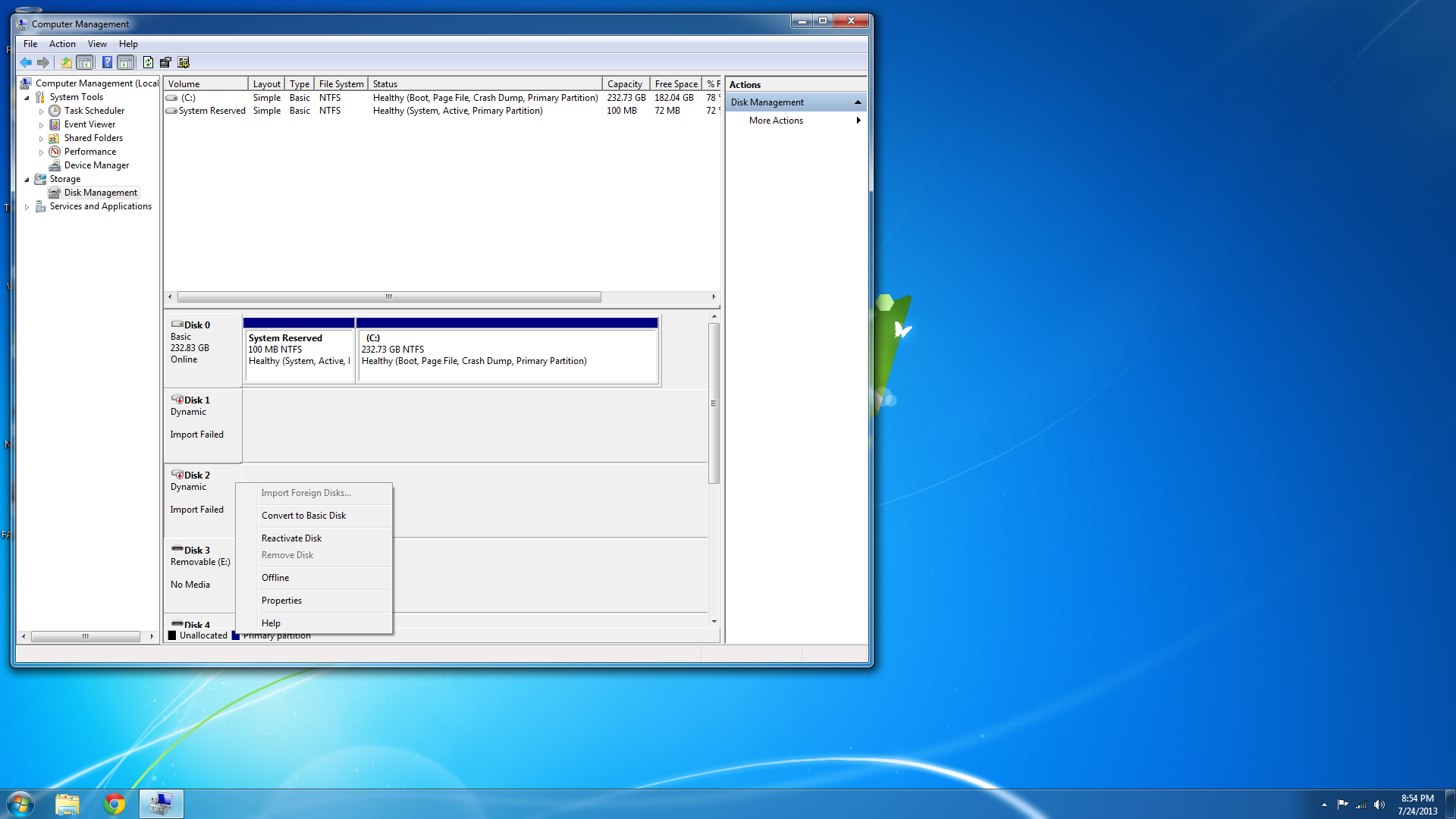
Clicking reactivate disk does nothing. Converting the disks to basic destroys my data. Halp.
-
2013-07-24 20:50 #10BG's most likeable Québécois
Pens win! Pens Win!!! PENS WIN!!!!!
- Join Date
- Sep 2007
- Posts
- 37,887
- BG Level
- 10
That an external disk?
Did you try on another PC?
-
2013-07-24 21:14 #11Nidhogg
- Join Date
- Feb 2008
- Posts
- 3,790
- BG Level
- 7
- FFXIV Character
- Tsugaru Mifra
- FFXIV Server
- Hyperion
- FFXI Server
- Ragnarok
http://www.diydatarecovery.nl/ try diskpatch
-
2013-07-25 07:08 #12Relic Shield
- Join Date
- Nov 2004
- Posts
- 1,429
- BG Level
- 6
- FFXI Server
- Bahamut
They're internal disks. I tried them in an external enclosure and they didn't show up unless I ran some data recovery software.
Thanks xopher. DiskPatch doesn't seem like it will do the trick just because there shouldn't be anything wrong with the partitions, and neither of the drives contain an MBR because they were never bootable drives. I'll give it a shot tonight tho. Why not? I've tried everything else. I even found a tool that let's me hex edit the partition table and change it from dynamic to basic and that didn't work. >.>
-
2013-07-25 11:55 #13Nidhogg
- Join Date
- Feb 2008
- Posts
- 3,790
- BG Level
- 7
- FFXIV Character
- Tsugaru Mifra
- FFXIV Server
- Hyperion
- FFXI Server
- Ragnarok
You might end up just having to run recuva and pull the files off to another disk.


Similar Threads
-
2way SLI not working properly
By SoulThief in forum TechReplies: 19Last Post: 2013-07-26, 17:52 -
Windows Explorer etc not working proper.
By Sanjurio in forum TechReplies: 6Last Post: 2011-07-08, 20:09 -
CD drive is not recognized.
By Aksannyi in forum TechReplies: 11Last Post: 2009-09-27, 13:27 -
In game sound not working proper
By Hogie in forum TechReplies: 6Last Post: 2009-08-28, 13:53 -
Hard-drive saying it is full when it's not.
By Kaguto in forum TechReplies: 2Last Post: 2009-03-13, 20:53 -
Internet not working properly?
By kuronosan in forum TechReplies: 0Last Post: 2009-02-18, 12:12 -
Team Fortress 2 (Healing rays/Ubercharge) not showing on other players properly
By Pikarya in forum TechReplies: 6Last Post: 2009-01-27, 20:59 -
Vista all of a sudden not able to recognize a disc drive?
By Chreman in forum TechReplies: 10Last Post: 2008-05-31, 04:43