 XI Wiki

Yeah I checked around the XSplit FAQs, 1.0 is the lowest bandwidth they even have settings recommendations for
- Navigation
Results 21 to 36 of 36
Thread: Help streaming/gaming


-
2013-07-24 19:17 #21

SASSAGE KING OF DA WORLD
cheap hawks gay
- Join Date
- Sep 2007
- Posts
- 26,424
- BG Level
- 10

-
2013-07-24 19:57 #22Salvage Bans
- Join Date
- Jun 2011
- Posts
- 927
- BG Level
- 5
- FFXI Server
- Sylph
Well looked at my service provider and the 50 gb down 2 up has a 300 gb cap. How much will streaming push it if I stream like 3 hours a day? And will 2 up be enough? Ill post settings in a bit we have used 152gb in 24 days
-
2013-07-25 02:00 #23Relic Horn
- Join Date
- Apr 2008
- Posts
- 3,485
- BG Level
- 7
- FFXI Server
- Shiva
- WoW Realm
- Stormrage


I currently have 10 down and 1 up and streaming any online game at any decent quality is impossible. I'd say 3 up would be the minimum for 720p just to have the extra bandwidth.
50 down and 2 up sounds like a terrible plan as well but i guess it varies based on providers. I'd want at least 5 up if I'm paying for 50 down. Or we could all move to Kansas City.
-
2013-07-25 06:46 #24BG's most likeable Québécois
Pens win! Pens Win!!! PENS WIN!!!!!
- Join Date
- Sep 2007
- Posts
- 37,887
- BG Level
- 10
 If it can help you
 Originally Posted by Aylee

I have 60down 10 up with 250gig limit per month
here is a chart of what i used
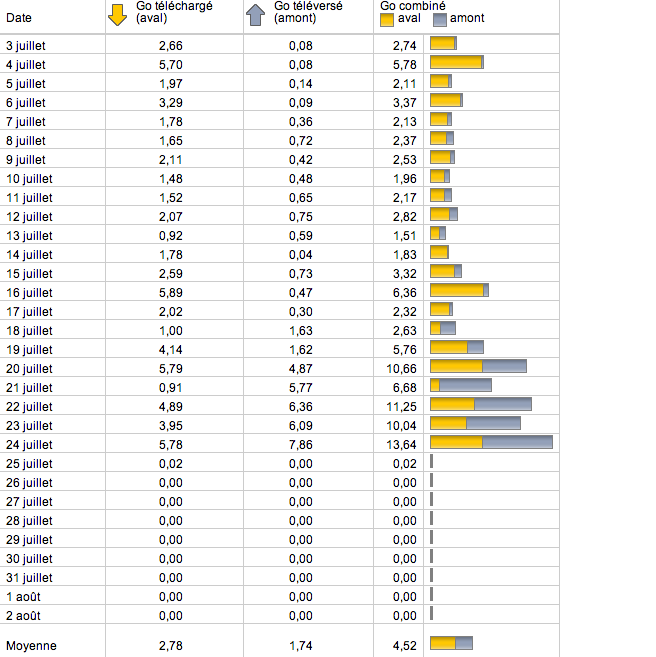
It's a french but sill easy to understand
First Column is the date Juillet means July
2nd Column is Download (Aval)
3rd is Upload (Amont)
the last one is the combined
I stream PS2 and psp emulator at around 1080P
Starting the 20th i streamed about 6h (So check my Upload (Amont column) to see how much it did
-
2013-07-25 08:21 #25Salvage Bans
- Join Date
- Jun 2011
- Posts
- 927
- BG Level
- 5
- FFXI Server
- Sylph
Sadly 2 up is the fastest they have and yhe 50 down 2 up is the same price as what im paying now. Onky other ones tjey offer is 60 down 2 up for 75 and 70 down 2 up for 100 Originally Posted by Alderaan
-
2013-07-25 08:38 #26
SASSAGE KING OF DA WORLD
cheap hawks gay
- Join Date
- Sep 2007
- Posts
- 26,424
- BG Level
- 10
Yeah 720 is really, really unlikely to fly on 2, you'd want at least 4-5(to wit I have similar bandwidth to Rata, slightly less down/up but no cap).
-
2013-07-25 10:29 #27Salvage Bans
- Join Date
- Jun 2011
- Posts
- 927
- BG Level
- 5
- FFXI Server
- Sylph
Well that sucks. Guess ill keep trying to tweek my settings and get the best quality I can and see if im satisfied witg it. Ill post the settings tonight and see if you guys can help me tweek them Originally Posted by Callisto
-
2013-07-26 15:07 #28Salvage Bans
- Join Date
- Jun 2011
- Posts
- 927
- BG Level
- 5
- FFXI Server
- Sylph
alright my current settings, Finally managed to get a green light on the bandwidth test, about to try streaming a bit and seeing how it goes. Also only residential data plans that my isp offer are:
50 down 2 up (300gb cap) for 50/month
60 down 2 up for (400gb cap) 75/month
70 down 2 up for (500gb cap) 100/month
I asked if they had anything residential with more than 2 up and they said no, the tech guy asked if they had any sort of build your own package or some bs to see if I could get anything higher and came back a no as well
Spoiler: show
-
2013-07-26 18:13 #292600klub
Sweaty Dick Punching Enthusiast
- Join Date
- Dec 2008
- Posts
- 5,467
- BG Level
- 8
- FFXI Server
- Bismarck

2 up is enough for 720p. ( if you get > ~1600kbs ).
You need to go to channel settings and change the encoder preset to slow or medium. ( this means more compression is done, so you get the same image quality @lower bitrates - but requires more cpu ).
Also, stay free USA, paying $35/month for 80down/20up.
-
2013-07-28 10:24 #30Relic Horn
- Join Date
- Apr 2008
- Posts
- 3,485
- BG Level
- 7
- FFXI Server
- Shiva
- WoW Realm
- Stormrage
It's no secret that our speeds are terrible. The max i can get is 50down/5up for $65/month. Originally Posted by Gryffes
-
2013-07-28 10:45 #31Salvage Bans
- Join Date
- Jun 2011
- Posts
- 927
- BG Level
- 5
- FFXI Server
- Sylph
Ok i have the stream going at a decent quality with no lag but what settings do i slowly tweek up/down to increase quality and see where i start to lag? also when I go full screen on the stream i have huge black bars at the top/bottom how do i fix that?
-
2013-07-28 10:48 #322600klub
Sweaty Dick Punching Enthusiast
- Join Date
- Dec 2008
- Posts
- 5,467
- BG Level
- 8
- FFXI Server
- Bismarck
The slower the encoding preset you use, the more cpu you use to get better quality at the same bandwidth, so thats the first thing. Originally Posted by Aylee
Re:Black bars.
Twitch and youtube and most other places use a 16:9 video format.
If you have a 16:10 res monitor, you need to change to a 16:9 format - in which case you will have black bars while playing but the stream will be free of them.
tldr 1920x1200 monitor=blackbars, 1920x1080=noblackbars.
-
2013-07-28 11:03 #33Salvage Bans
- Join Date
- Jun 2011
- Posts
- 927
- BG Level
- 5
- FFXI Server
- Sylph
so upping the quality from say 4-7 wont help? I was thinking changing the encoding from veryfast to fast would lag again but i'll give it a shot
-
2013-07-28 11:24 #342600klub
Sweaty Dick Punching Enthusiast
- Join Date
- Dec 2008
- Posts
- 5,467
- BG Level
- 8
- FFXI Server
- Bismarck
Upping the quality will help, but will increase the bandwidth you need.
-
2013-07-28 12:03 #35Salvage Bans
- Join Date
- Jun 2011
- Posts
- 927
- BG Level
- 5
- FFXI Server
- Sylph
alright on
Faster / quality 6 atm gonna try at fast/ 6 and see how that does
if possible please check and see how the quality is i cant really tell on this pc
www.twitch.tv/davinci515
it seems like the game is jumpy on the stream (but not in game play) what would i adjust to fix that?
-
2013-08-04 09:44 #36BG's most likeable Québécois
Pens win! Pens Win!!! PENS WIN!!!!!
- Join Date
- Sep 2007
- Posts
- 37,887
- BG Level
- 10
I'm gonna steal this thread instead of making a new one but this is really something that scares me and I know I already asked
I have a 250gig download +upload limit per month
I would like to know if there is a way to calculate how much it's gonna take me per hour to stream eithe at 720 or 1080p because I don't want to break that 250gig limit
I normally consume between 40-100gig per month just downloading and iggles on the internet
But with streaming I'm scared to actually break it (FFXIV)


Similar Threads
-
Question about streaming games
By Rulke in forum TechReplies: 2Last Post: 2011-02-22, 21:44