 XI Wiki

Is this just for the PC?Originally Posted by Siya

Because whatever way the system fucked up my PO code and spat out my PS3 code for the wrong account it doesnt start with with either of those and it is only 12 letters / digits long.
Another questions. Both accounts i have are Legacy. One is CE and the other is Standard. I bought the PS3 CE for the standard legacy account so that can upgrade to CE and i get the Pre Order goodies and CE goodies. I bought the PC collectors editions for my main account but only for the Pre Order bonuses and an additional set of the physical goodies!
I know the Pre Order Codes dont really matter to which platform they sit on but given that my main CE Legacy account now has a Pre Order code registered against it for the PS3 does that really matter? I mean because im Legacy i can still get early access on my PC right? And i can still register my product codes how i want when the game comes out next Tuesday?
- Navigation
Results 981 to 1000 of 1157
Thread: Redeeming pre-order code


-
2013-08-22 03:47 #981Road Tinnies

Sweaty Dick Punching Enthusiast
- Join Date
- Apr 2008
- Posts
- 1,714
- BG Level
- 6
- FFXI Server
- Sylph

-
2013-08-22 04:11 #982Road Tinnies
Sweaty Dick Punching Enthusiast
- Join Date
- Apr 2008
- Posts
- 1,714
- BG Level
- 6
- FFXI Server
- Sylph
Haha...WTF
Went from 7th in the que at the start ticked away over the last 45 mins down to number 3 in the que then have shot back up to 5 in the que! Someone has VIP treatment
-
2013-08-22 04:12 #983
- Join Date
- Feb 2006
- Posts
- 2,624
- BG Level
- 7
 Updating on my situation: Originally Posted by Sylvrdragon
I decided to say fuck it and try to pre-order the game again to see if it something different would happen (I guess I'm a scientist at heart!), and lo and behold, my invoice this time included "products" beyond just the game. My first purchase of the game yielded an invoice for:
ONLY THAT. That was the end of the email. No lines below that. My second attempt, however, yielded:Product SKU: 281295900
Product Name: FINAL FANTASY XIV: A Realm Reborn [PC DOWNLOAD] (Pre-Ordered)
Anticipated Released Date: August 27, 2013
Qty Ordered: 1
Amount: $29.99
Subtotal: $29.99
Shipping: $0.00
Tax: $0.00
Total: $29.99
My second order was for CE, but I doubt that has anything to do with it.Product SKU: 281318600
Product Name: FINAL FANTASY XIV: A Realm Reborn Collector's Edition [PC DOWNLOAD] (Pre-Ordered)
Anticipated Released Date: August 27, 2013
Qty Ordered: 1
Amount: $49.99
Product SKU: PC Download
Product Name: FINAL FANTASY XIV: A Realm Reborn Pre-Order Bonus Package
Qty Ordered: 1
Amount: $0.00
Serial Number/Product Code: XXXXXX-XXX-XXXXXX-XXX [My Pre-Order code was here]
Product SKU: PCDL
Product Name: FINAL FANTASY XIV: Collector’s Edition Exclusive In-game Items (Pre-Ordered)
Anticipated Released Date: August 27, 2013
Qty Ordered: 1
Amount: $0.00
Shipment Tracking Numbers:
Product SKU: DR_EDS_PRODUCT
Product Name: Extended Download Service
Qty Ordered: 1
Amount: $0.00
Shipment Tracking Numbers:
Subtotal: $49.99
Shipping: $0.00
Tax: $0.00
Total: $49.99
Discount: $39.98
Additional Product Information:
FINAL FANTASY XIV: A Realm Reborn Collector's Edition [PC DOWNLOAD] - FINAL FANTASY XIV: A Realm Reborn Installation Instructions
1) Download the FINAL FANTASY XIV: A Realm Reborn PC Digital Download file.
2) Double click the “ffxivsetup.exe” file and select the appropriate region and language settings.
a) Please note that this will also set the in-game language, but you can change this setting at any time within the FFXIV: ARR launcher program.
b) Ensure that you have at least 20 GB of free space available on your hard disk drive.
c) A User Account Control prompt may be displayed for Windows Vista® and Windows® 7 users. Select Yes to proceed with the installation.
d) Please launch the installer as a user with administrator rights. Windows Vista® and Windows® 7 users may be prompted for an administrator password.
3) Follow the on-screen instructions to install the FFXIV: ARR launcher onto your hard drive.
4) After you have successfully installed the launcher, run the program to check for any updates and proceed to register FINAL FANTASY XIV: A Realm Reborn.
5) Follow the onscreen instructions and carefully read through and accept the FFXIV: ARR Software License Agreement, Square Enix Account Agreement, and the FFXIV: ARR User Agreement.
a) Please note that a Square Enix Account is required to play FFXIV:ARR. If you do not possess a Square Enix Account, you will be asked to register one at this time. If you already have a Square Enix Account, you do not need to register a separate one and may proceed to sign in with your current Square Enix Account. To create a new Square Enix Account, you may alternatively access the following page using your internet browser. http://www.square-enix.com/na/account/
6) When requested, please enter the product registration code to complete the initial registration process.
7) To begin playing, enter your Square Enix Account username and password and select Log In.
8) After logging in, the launcher will check for the latest game data. If necessary, the latest files will be downloaded from the network, and the game will be updated to the most recent version. This process is automatic, and can take anywhere from several minutes to several hours to complete. The estimated time remaining will be displayed under the download progress bar.
9) Once the game has been updated, the Play button will be displayed. Click this button to start the game.
FINAL FANTASY XIV: A Realm Reborn Pre-Order Bonus Package - Instructions to sign up for early access to the game: <br><br> Visit http://preorder.na.finalfantasyxiv.com and register. You will be notified via email prior to the launch of the game on when you can return and redeem your preorder code to unlock Early Access to the game along with instructions on how to receive your Cait Sith Doll minion and Moogle Cap digital content. <br><br> You will need an active Square Enix account to complete this process so, if you want to set one up in advance, please go here: http://na.square-enix.com/members.
So it seems that the first confirmation email that I received was simply incomplete for some reason. I don't know why. It didn't include the products:
FINAL FANTASY XIV: A Realm Reborn Pre-Order Bonus Package
Extended Download Service
These items were completely new.
If anyone else is having the same problem as I was, then at least now you have slightly more to tell to Customer Support if you manage to get through. Or, if all else fails, you can try what I tried and just re-order it. Hell, I would link them directly to this post if you happen to get them into chat.
Good luck.
Edit: there was stuff above the product codes in my email, but it was billing junk such as my name and address and all that, and it was the same for both emails. I also managed to enter my reg code and subsequent pre-order code with no problems. Hopefully, I get in contact with SE when they respond to my initial email and possibly cancel my first order, or at the very least, get an extra pre-order code.
-
2013-08-22 06:20 #984FOR FUCKS' SAKE !!!
FOR FUCKS' SAKE !!!
FUCK FUCK FUCK
- Join Date
- Mar 2010
- Posts
- 14,680
- BG Level
- 9

Yeah, now I received a couple emails with the same early access code but it's definitely a EU code.
GG SE. Well played. Well. Played.
-
2013-08-22 06:28 #985Melee Summoner
- Join Date
- Mar 2008
- Posts
- 40
- BG Level
- 1
 Thanks Cali. Originally Posted by Calibos
To add a further step for PS3 users (as to add an extra layer of piece of mind...), there is now a new version of the launcher for both PC and PS3.
If you launch the game on PS3 after having done the above steps, you can now activate the pre-order bonuses to your Square Enix Account without waiting for Early Access: simply login and follow the steps, you can also see a confirmation that your account is flagged for the Pre-order bonuses in the final windows.
If you have bought the CE from the PS Store, you will also see all the CE digital bonuses (since the Product Code is already embedded into the digital version of the game. If you have bought a physical copy of the CE, then you will have to redeem the code manually, again from the "Redeem Codes" section of the PS Store once you got your codes from inside the CE box.)
Hope this helps further.
-
2013-08-22 06:56 #986The Fucking Voice of Actually

- Join Date
- Nov 2007
- Posts
- 11,041
- BG Level
- 9
- FFXIV Character
- Cantih Hacos
- FFXIV Server
- Gilgamesh
- FFXI Server
- Bahamut
- Blog Entries
- 6
 Confirming all this, I just did it. Originally Posted by Spartan
Fuck yeah, bought the game off the PSN on Tuesday, EA and bonuses confirmed on Thursday, and never had to deal with the code website at all.
PS3 limitations my pasty white ass.
-
2013-08-22 07:14 #987FOR FUCKS' SAKE !!!
FOR FUCKS' SAKE !!!
FUCK FUCK FUCK
- Join Date
- Mar 2010
- Posts
- 14,680
- BG Level
- 9
I knew I should've just gone the PC route, but wanted to try it and install on PS3 before I left for PAX. Sigh.
-
2013-08-22 07:50 #988E. Body
- Join Date
- Dec 2006
- Posts
- 2,332
- BG Level
- 7
Flawless process this morning setting up early access on PS3.
Awaiting my in game item code email now.
Edit: I purchased my CE through Amazon.
-
2013-08-22 07:52 #989BG's most likeable Québécois
Pens win! Pens Win!!! PENS WIN!!!!!
- Join Date
- Sep 2007
- Posts
- 37,887
- BG Level
- 10

Ebgames gave me a new code which i put on the website, gave me a new PS3 and guess what?
Doesn't work again lol
-
2013-08-22 08:01 #990I like to eat food
- Join Date
- Jun 2007
- Posts
- 9,064
- BG Level
- 8

Did my GF's this morning with no problems. Was given an NA code as she should have been.
Hopefully I can break away from her and her parents this weekend to play a bit.
-
2013-08-22 08:03 #991It's sooo veiny
Sweaty Dick Punching Enthusiast
- Join Date
- Oct 2008
- Posts
- 2,327
- BG Level
- 7
- FFXIV Character
- Arch Dizzle
- FFXIV Server
- Excalibur
Lol....who would have thought. Originally Posted by Cantih
-
2013-08-22 08:17 #992Ironing this Thread
Sweaty Dick Punching Enthusiast
- Join Date
- Feb 2006
- Posts
- 21,329
- BG Level
- 10
- FFXIV Character
- Boyiee Star
- FFXIV Server
- Gilgamesh
- WoW Realm
- Kel'Thuzad
Just got my email from SE confirming my EA code.
-
2013-08-22 08:25 #993It's sooo veiny
Sweaty Dick Punching Enthusiast
- Join Date
- Oct 2008
- Posts
- 2,327
- BG Level
- 7
- FFXIV Character
- Arch Dizzle
- FFXIV Server
- Excalibur
^ Same!
-
2013-08-22 08:28 #994Relic Weapons
- Join Date
- Nov 2007
- Posts
- 352
- BG Level
- 4
can start your download of the client if you're new, not sure if you still need it if you've participated in beta4
-
2013-08-22 08:30 #995BG's most likeable Québécois
Pens win! Pens Win!!! PENS WIN!!!!!
- Join Date
- Sep 2007
- Posts
- 37,887
- BG Level
- 10
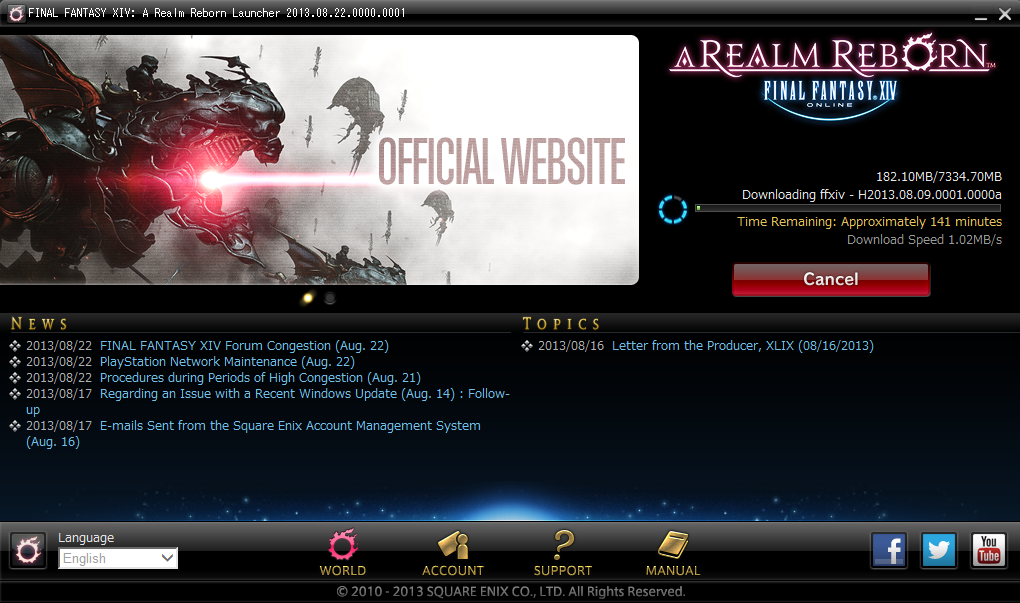
Yes you can download the client but the patch server is down so
-
2013-08-22 08:41 #996Relic Weapons
- Join Date
- Nov 2007
- Posts
- 352
- BG Level
- 4
no I just downloaded the whole 7GBs of the thing, unless that's not the patch, because before the 190mb client was showing maintenance for the most part of my day, but about 3 hours ago it got an update and I got the whole thing updated (only thing I can reference to is the XI version update).
-
2013-08-22 08:50 #997Relic Shield
- Join Date
- Mar 2009
- Posts
- 1,755
- BG Level
- 6
- FFXIV Character
- Tanaya Makers
- FFXIV Server
- Gilgamesh
- FFXI Server
- Fenrir
That's because Maintenance just ended, so everyone can update their game now. Originally Posted by Lonewind
I didn't need to update anything, so I'm going to assume the 7GB is what we got during Open Beta. They may require another patch later down the road though.
-
2013-08-22 08:50 #998BG's most likeable Québécois
Pens win! Pens Win!!! PENS WIN!!!!!
- Join Date
- Sep 2007
- Posts
- 37,887
- BG Level
- 10
Yeah that's the patch up to PIV, so that's good at least you can someone patch it
Exepting a new patch tomorrow but still that's good news for you
-
2013-08-22 08:51 #999BG's most likeable Québécois
Pens win! Pens Win!!! PENS WIN!!!!!
- Join Date
- Sep 2007
- Posts
- 37,887
- BG Level
- 10
I'm wondering to cancel my PS3 at ebgamees and buy it off the PSN instead ....
-
2013-08-22 09:17 #1000Nikkei's Hoe
- Join Date
- Dec 2006
- Posts
- 6,236
- BG Level
- 8
- FFXIV Character
- Eanae Hikari
- FFXIV Server
- Gilgamesh
- FFXI Server
- Cerberus
- WoW Realm
- Hyjal
I haven't received any emails from SE period yet. Not even one with the 20 digit code that the result page gave me. :/


