 XI Wiki

Since Windows 8.1 finally rolled out, I went ahead and installed Windows 8 on my PC, and then did the free upgrade to 8.1. PCs running better than ever. However, there is one issue I'm having that I just cant figure out. I put my PC to sleep, and leave. When I come back a few hours later its awake. I thought it may be my mouse waking it, so I disabled the mouse from waking but that didn't fix my issue.
Any Idea's?
- Navigation
Results 1 to 11 of 11
Thread: My PC has insomnia, halp!


-
2013-10-26 16:37 #1Sea Torques

- Join Date
- Dec 2010
- Posts
- 586
- BG Level
- 5
- FFXI Server
- Fenrir

My PC has insomnia, halp!
-
2013-10-26 20:23 #22600klub
Sweaty Dick Punching Enthusiast
- Join Date
- Dec 2008
- Posts
- 5,467
- BG Level
- 8
- FFXI Server
- Bismarck

Had this. you need to go to device manager > network adapter > properties > power management > untick "allow this device to wake the computer".
Fixed my issue with it, might not be the issue causing yours though.
-
2013-10-27 11:05 #3Sea Torques
- Join Date
- Dec 2010
- Posts
- 586
- BG Level
- 5
- FFXI Server
- Fenrir
Thank you, will try
-
2013-10-27 11:13 #4Banned.

- Join Date
- Oct 2013
- Posts
- 24
- BG Level
- 1
I had the same issue! I always figured it was my sensitive Naga though.
-
2013-10-27 14:04 #5alsohawks
ALL YOU YOUNG HACKEY
PLAYERS OUT THERE
- Join Date
- Jul 2009
- Posts
- 5,960
- BG Level
- 8
There's actually a really easy solution for this, Windows has a built-in function for figuring out what woke up your PC:
http://www.sevenforums.com/tutorials...e-command.html
If it wasn't the very last thing to wake your computer, check below in the link for the event viewer instructions
-
2013-10-28 14:05 #6Sea Torques
- Join Date
- Dec 2010
- Posts
- 586
- BG Level
- 5
- FFXI Server
- Fenrir
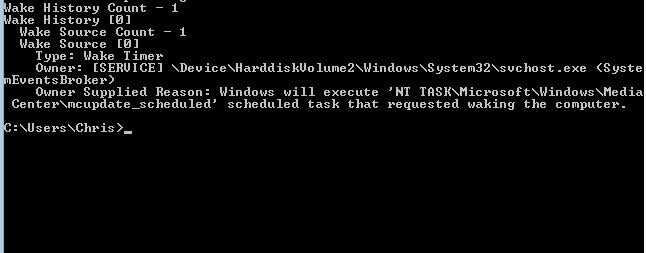
This is what I'm getting:
-
2013-10-28 14:51 #7Turtle Apprentice
- Join Date
- Aug 2008
- Posts
- 247
- BG Level
- 4
- FFXIV Character
- Kame Aoren
- FFXIV Server
- Sargatanas
- FFXI Server
- Sylph


Looks like the Antivirus is waking your computer so it can check for updates.
-
2013-10-28 15:27 #8Sea Torques
- Join Date
- Dec 2010
- Posts
- 586
- BG Level
- 5
- FFXI Server
- Fenrir
Any way to make it check for updates only when Im on the PC?
-
2013-10-28 15:52 #9alsohawks
ALL YOU YOUNG HACKEY
PLAYERS OUT THERE
- Join Date
- Jul 2009
- Posts
- 5,960
- BG Level
- 8
It actually looks like it's media center doing the update, see if this gets you anywhere: http://www.sevenforums.com/tutorials...-computer.html
-
2013-10-28 15:55 #10Turtle Apprentice
- Join Date
- Aug 2008
- Posts
- 247
- BG Level
- 4
- FFXIV Character
- Kame Aoren
- FFXIV Server
- Sargatanas
- FFXI Server
- Sylph
Press the Windows Button and write the Word "cmd" and press enter, this should open the command prompt (a Black Screen), on this program write "Taskschd.msc" and press enter, this should open the Task scheduler there you can check all the antivirus-related tasks that are active on your computer just click one by one and check the "Conditions" tab, there should be an option to disable Waking up the computer.
Edit : Yeah missed that part, thanks for the correction Caiyuo.
-
2013-10-28 16:13 #11Sea Torques
- Join Date
- Dec 2010
- Posts
- 586
- BG Level
- 5
- FFXI Server
- Fenrir
Great, thanks for the info. I'll give that a try. <3


Similar Threads
-
Windows 7 has killed my PC
By Aja in forum TechReplies: 27Last Post: 2009-11-28, 23:54 -
My playonline has disappeared, oddly enough.
By Akucaen in forum TechReplies: 2Last Post: 2008-03-15, 09:07 -
Yet another "Help me build my PC" thread
By Tecora in forum TechReplies: 7Last Post: 2007-12-21, 14:56 -
my pc is(has been) fuxxed
By Bartylby in forum TechReplies: 10Last Post: 2007-12-07, 16:49 -
Ever since the pre:WotG update my PC crashed when loading!
By LLK in forum TechReplies: 0Last Post: 2007-11-24, 12:44