 XI Wiki


Late to this topic but..
I've been reading a number of articles about this today.. this is some pretty intense malware -- executed almost admirably well. One of my coworkers here (we're expats in Africa atm) just got a call today from his wife at home, and their computer is infected. Some 90 GB of photos destroyed, and she's all hysterically crying and whatnot. They were going to pay the ransom to at least try to recover them, but I was able to convince him otherwise.. for now. =x
So many people don't backup and are susceptible to whatever guise the malicious .exe dons.. I'm curious how much has been paid in ransoms.
You guys who see this in your daily work; are cases of this still common?
- Navigation
Results 21 to 40 of 65
-
2013-11-14 09:40 #21

Sweaty Dick Punching Enthusiast
- Join Date
- May 2005
- Posts
- 9,258
- BG Level
- 8
- FFXI Server
- Fenrir

-
2013-11-14 10:37 #22Banned.


- Join Date
- Oct 2006
- Posts
- 10,115
- BG Level
- 9
 Its really hard to infect OSX and linux since nobody runs their machine on superuser mode, and OSX has a pretty solid recovery system, linux not so much, but its a more restricted OS unless you're being dumb on purpose.
 Originally Posted by Omniyoji

-
2013-11-14 12:16 #23Member since 2006 and still can't think of a title.
- Join Date
- Oct 2006
- Posts
- 28,288
- BG Level
- 10
- FFXIV Character
- Acanis Lindri
- FFXIV Server
- Midgardsormr
- FFXI Server
- Bismarck
- WoW Realm
- Kil'jaeden

Usually get a call every 3-4 weeks about this. The ones we get though seem to be easy, only infect one profile out of potentially hundreds on the computer. Deleting the profile and then a quick malwarebytes scan seems to fix it 99.9% of the time. Haven't gotten any cryptolocker ones though. Always the fbi you have child porn pay us or we will arrest you messages.
-
2013-11-14 12:17 #24listen!
- Join Date
- Apr 2011
- Posts
- 7,234
- BG Level
- 8
- FFXI Server
- Sylph
That seems like bad advice. It sucks, but if you care about the data, and don't have it backed up, you better just pay it.They were going to pay the ransom to at least try to recover them, but I was able to convince him otherwise.. for now. =x
-
2013-11-14 12:33 #25Relic Weapons
- Join Date
- Mar 2009
- Posts
- 300
- BG Level
- 4

We've been deploying CryptoPrevent (link) to all our computers. Not sure if this will fully prevent CryptoLocker or not, but we're playing the "Better Safe Than Sorry" card.
-
2013-11-14 12:35 #26Member since 2006 and still can't think of a title.
- Join Date
- Oct 2006
- Posts
- 28,288
- BG Level
- 10
- FFXIV Character
- Acanis Lindri
- FFXIV Server
- Midgardsormr
- FFXI Server
- Bismarck
- WoW Realm
- Kil'jaeden
dead link Originally Posted by Lucki
-
2013-11-14 12:38 #27Relic Weapons
- Join Date
- Mar 2009
- Posts
- 300
- BG Level
- 4
Looks like the site is being overloaded. I can upload the installer to BG if you'd like.
-
2013-11-14 12:43 #28Member since 2006 and still can't think of a title.
- Join Date
- Oct 2006
- Posts
- 28,288
- BG Level
- 10
- FFXIV Character
- Acanis Lindri
- FFXIV Server
- Midgardsormr
- FFXI Server
- Bismarck
- WoW Realm
- Kil'jaeden
Can you get me some information on it. Working law enforcement I have to be super picky on what goes on our boxes and typically have to run that shit up the chain of command.
-
2013-11-14 12:45 #29Relic Weapons
- Join Date
- Mar 2009
- Posts
- 300
- BG Level
- 4
I'm not sure what info I can get you. I don't work for the developer.
-
2013-11-14 12:50 #30Member since 2006 and still can't think of a title.
- Join Date
- Oct 2006
- Posts
- 28,288
- BG Level
- 10
- FFXIV Character
- Acanis Lindri
- FFXIV Server
- Midgardsormr
- FFXI Server
- Bismarck
- WoW Realm
- Kil'jaeden
Does the developer have like a main page describing it? Or is it just foolishit.com?
-
2013-11-14 12:51 #31Relic Weapons
- Join Date
- Mar 2009
- Posts
- 300
- BG Level
- 4
The website is still hit or miss due to traffic, but I was able to get to it. I'll post some info from the site that may be helpful:
Prevention Methodology
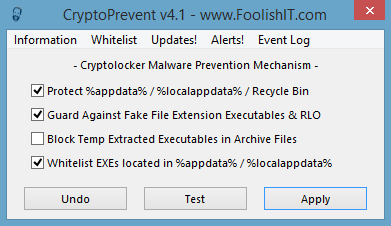
CryptoPrevent artificially implants group policy objects into the registry in order to block certain executables in certain locations from running. The number of rules created by CryptoPrevent is somewhere between 150 and 200+ rules depending on the OS and options selected, not including whitelisting! Note that because the group policy objects are artificially created, they will not display in the Group Policy Editor on a Professional version of Windows — but rest assured they are still there! Executables now protected against (starting with v2.6) are *.exe *.com *.scr and *.pif, and these executables are blocked in the paths below where * is a wildcard:
%appdata% / %localappdata% / Recycle Bin - These locations are used by Cryptolocker and other malware as launch points.
%appdata% and any first-level subdirectories in %appdata% (e.g. %appdata%\directory1, %appdata%\directory2, etc.)
%localappdata% (and on Windows XP, any first-level subdirectories in there.) NOTE beginning with v2.2, any time %localappdata% is referred to on this page, it also refers to %userprofile%\Local Settings\Application data on Windows XP, where %localappdata% is not an actual environment variable.
The All Users application data and local settings\application data paths on XP.
the %userprofile% and %programdata% paths (no nested subfolders.)
The Recycle Bin on all drives, and multiple nested subfolders.
Fake File Extension Executables: (ex. document.docx.exe)
*.x.y where:
x = pdf, doc, docx, xls, xlsx, ppt, pptx, txt, rtf, zip, rar, 7z, jpeg, jpg, png, gif, avi, mp3, wma, wmv, wav, divx, mp4
y = exe, com, scr, and pif.
with v4.1, now includes RLO (Right to Left Override) exploit protection.
Temp Extracted Executables in Archive Files:
%temp%\rar* directories
%temp%\7z* directories
%temp%\wz* directories
%temp%\*.zip directories
The final four locations above are temporary extract locations for executables when run from directly inside of a compressed archive (e.g. you open download.zip in Windows Explorer, WinRAR, WinZip, or 7zip, and execute an .EXE from directly inside the download, it is actually extracted to a temporary location and run from there – so this guards against that as well; however this option may interfere with certain program installations (e.g. Firefox.))
NOTE the variable %temp% is no longer used, and instead the actual temp file path is expanded after %userprofile%. There is an apparent bug in Microsoft’s software prevention policies that does not allow for the %temp% environment variable to be used in the rules (as it does allow %appdata% or %userprofile%)… so protection for %temp% folders is now applied by expanding the full path to the user’s temp folder (after %userprofile%) in each rule set. In prior versions, CryptoPrevent attempted to use the %temp% environment variable to protect all user accounts, but it was later discovered that methodology wasn’t working on all systems. If you applied protection with prior versions and want temp extracted exes blocked, you may want to reapply protection with v2.2 to ensure it will work for you.
Protection does not need to be applied while logged into each user account, it may be applied only once from ANY user account and it will protect all user accounts on the system.This is the UI:Q&A
You released a new version. Should I update, and how?
YES! You should periodically check for and update to the latest version using the program’s internal update function in the top menu to stay current with the latest methodology in preventing this (and other) malware. After update it is then necessary to re-apply the protection to your system. It is not necessary to undo the previous protection in place before doing this, or even to uninstall the app before updating. If you have an older version of the app before the update functionality was introduced, simply download and install the latest version, then re-apply protection.
This process is entirely automatic for users of the Premium edition (which includes automatic updating functionality.)
Will this protect against other malware?
YES! A LOT of trojan based malware out there utilizes the same infection tactics and launch point locations as Cryptolocker, therefore CryptoPrevent will protect against all malware that fits the same or similar profile and behavior. This is especially true in v2.6+ when protection was increased to include other executable types.
My legitimate software isn’t working properly after applying the protection. What do I do?
Be CERTAIN you have the latest version of the app, which is getting better all the time at not blocking legitimate applications. If you had an outdated version, after update then re-apply the protection and restart, then re-test your app. If it still isn’t working, ensure you’ve done the whitelisting first, and reboot if new entries are added to the whitelist. If it still isn’t working, then you may need to temporarily undo protection when using/installing that app. If this is the case, I would appreciate you telling me what app isn’t working for you and if you can, the details on the app’s filename and where it is running from, maybe I can help alleviate the issue with a new version.
Does my existing Anti-Virus software protect against this threat?
I cannot answer that. Your existing Anti-Virus protection is only as good as the latest definition files, and I can’t tell you which products on the market are confirmed to protect against this threat. What I can tell you is that there is NO Anti-Virus software on the market today that provides the same type of protection that CryptoPrevent provides, it works in an entirely different manner. Since the two can co-exist on the same PC peacefully, why not utilize both methods of protection?
Does CryptoPrevent work with my existing Anti-Virus software?
Yes. Because CryptoPrevent is not an active monitor, it only writes these rules for Windows to follow and that’s it, it will sit peacefully along side any Anti-Virus software without issue.
Does CryptoPrevent work on Server operating systems?
Yes it can, same as a workstation OS. Still, I would recommend unless you need all of CryptoPrevent’s features, to utilize Group Policy and create your own rule set, as CryptoPrevent may cause unintended side effects. There is also an existing prevention kit by thirdteir.net available in Group Policy format here if you prefer. But my question is: WHY would you want to install the rules on a server, unless you actually allow people to check their email from the server, and there isn’t any other reason that malicious files will be executed from the server itself, then what would be the purpose of installing the rules?
How can I tell if CryptoPrevent is running?
It isn’t. Once you run CryptoPrevent and apply the protection, it doesn’t have a need to run again as Windows itself is now the one doing the protecting by following CryptoPrevent’s rules. CryptoPrevent will only run again if you launch the program to test, check for updates, or undo/re-apply the protection. The exception to this is that with Automatic Updates enabled, it will run once daily to check for and apply updates if necessary. Also if using v4 with email alerts enabled, a monitoring service will be running constantly in order to email you when an application is blocked, though this service is not part of the protection itself, just the alert feature.
Is this guaranteed protection?
NO! While the methods utilized by this program do protect and prevent infection of current strains of Cryptolocker (and a lot of other malware for that matter,) I cannot guarantee what the future will bring. Rest assured, I will continue to study the latest variants of this and other malware in an attempt to keep this program relevant and continue to provide an excellent additional layer of protection against this and other threats.
-
2013-11-14 12:51 #32Relic Weapons
- Join Date
- Mar 2009
- Posts
- 300
- BG Level
- 4
Unfortunately, that is his main page. Originally Posted by Melena
-
2013-11-14 13:01 #33Member since 2006 and still can't think of a title.
- Join Date
- Oct 2006
- Posts
- 28,288
- BG Level
- 10
- FFXIV Character
- Acanis Lindri
- FFXIV Server
- Midgardsormr
- FFXI Server
- Bismarck
- WoW Realm
- Kil'jaeden
Ok with the screencap showing it as foolishIT it looked better. was thinking it was fooliSHIT
-
2013-11-14 13:04 #34Relic Weapons
- Join Date
- Mar 2009
- Posts
- 300
- BG Level
- 4
lol... you weren't the only one. Sorry about that.
-
2013-11-14 13:12 #35Member since 2006 and still can't think of a title.
- Join Date
- Oct 2006
- Posts
- 28,288
- BG Level
- 10
- FFXIV Character
- Acanis Lindri
- FFXIV Server
- Midgardsormr
- FFXI Server
- Bismarck
- WoW Realm
- Kil'jaeden
Thanks, I forwarded it to the rest of our IT staff to take a look. I may play with it on my computer. I'm now taking bets in my office if one of the managers tries to play this as his find and idea now like he does all the time.
-
2013-11-14 13:21 #36Relic Weapons
- Join Date
- Mar 2009
- Posts
- 300
- BG Level
- 4
No worries. I uploaded the program to BG Box. It's zipped and contains an instanced version, an installable version, and another version (CryptoPreventTestCLI, explained below)
CryptoPreventTestCLI.exe
This is a console application designed to test for the protection, designed to be scripted, and included in the latest portable download. Perfect for usage with your RMM software (maybe, see note below,) when protection tests successful, it will output to the console “Prevention Successfully Applied!” and exit with errorlevel 0. If unsuccessful, it exits with errorlevel 1 and prints to the console “Prevention Not Applied or Unsuccessful!”
NOTE: This test will always return unsuccessful when run from the local system account, as many RMM tools will do by default. It must be run from a standard user or admin account to test properly. This is because the local system account is NOT restricted by the policies set by CryptoPrevent.
-
2013-11-14 13:41 #37Ridill
- Join Date
- Jul 2008
- Posts
- 11,279
- BG Level
- 9
So anyone played around with this at all or know anyone who has? (cryptolocker, not the prevention program). I'm interested in looking through the code. I've been dicking around with the Zeus source code for the past couple days but I downloaded Cryptolocker to a VM to check it out.
-
2013-11-14 13:46 #38Relic Weapons
- Join Date
- Mar 2009
- Posts
- 300
- BG Level
- 4
(Un)Fortunately not. We (UofMD) have had very few instances of it on campus, and none (so far) in my unit.
-
2013-11-14 14:05 #39Salvage Bans
- Join Date
- Feb 2007
- Posts
- 811
- BG Level
- 5
- FFXIV Character
- Orinthia Warsong
- FFXIV Server
- Excalibur
- FFXI Server
- Bahamut
http://krebsonsecurity.com/2013/11/c...up-the-ransom/
Gets worse and worse, allowing you to pay a lot of money, and no longer actually destroying the keys (they probably never did in the first place).
You can be as altruistic as you want about this, but if your data is precious enough, you'll end up paying. A painful truth to this kind of attack since we didn't really have to worry about this kind of thing before (aside from hdd crashes or file corruption). Disconnected backup is about the only way to safeguard your stuff (make a backup and then pull the plug until the next backup or prevent the program from ever starting with windows or auto-logging in).
The virus itself seems to be passed in an email attachment to an official looking email, usually as a file.pdf.exe inside a zip file, where folks without extensions visible would never notice it was an executable instead of a pdf (you can test this, windows will give any file the pdf icon like a retard with extensions not shown). Very, very simple social engineering infection, but veracious. The video I linked earlier (if it's still up, https://www.youtube.com/watch?v=M4dN...ature=youtu.be ) shows how it infects by running it in a VM along with the cryptoprevent software from the foolishIT site (an older version).
-
2013-11-14 16:52 #40Salvage Bans
- Join Date
- Jul 2007
- Posts
- 832
- BG Level
- 5
Friends, uncle, and grandma' got hit with this in the past few weeks..It's freaking annoying! Isn't there a way to trace where the money goes when the user actually pay for the ransom? I haven't look much into it but shouldn't the police be involve in this type of scam? It's like internet bullies toward the people who not so good with the computer, like my grandma.


Similar Threads
-
Multiple issues popped up over night.
By Siya in forum TechReplies: 3Last Post: 2013-10-19, 19:36 -
How do I stop this error from popping up (Windows/Program related)
By Pikarya in forum TechReplies: 4Last Post: 2008-12-18, 22:38 -
Random pop ups with a browser up
By Insanecyclone in forum TechReplies: 4Last Post: 2007-06-11, 22:05