 XI Wiki

http://stackoverflow.com/questions/2...-sql-developer
See if you can export it into an .sql file. If you do I can maybe import it into PHPMyAdmin over wamp server to look more into the data.
- Navigation
Results 21 to 40 of 72
Thread: SQL Help


-
2014-02-06 15:56 #21Falcom is better than SE. Change my mind.

- Join Date
- Jun 2006
- Posts
- 17,291
- BG Level
- 9

-
2014-02-06 17:28 #22Salvage Bans
- Join Date
- Jun 2011
- Posts
- 927
- BG Level
- 5
- FFXI Server
- Sylph
Teacher emailed me back and he actually responded and said yes use zip from the other database.
Worked on Number 7 some now that I know that i need to join zip but im still stumped. Idk how to compare the 2 zip codes to determine the city. Also i've never used sub strings so i'm not sure how to break state and zip apart. Also is there a way to put the Street, State, Zip, and city back into one all under Address?
This is what i have using ur substring method.
SELECT empNo, fName, lName, substr(address,1,instr(address,',')-1) street, substr(address, instr(address,',')+2) statezip
FROM Employee NATURAL JOIN Zip
ORDER BY lName ASC, fName ASC
Also got a full list of the databases as im trying to work some on 4-6:
Databases:
Branch (bNo, Street, zipCode)
Client (cNo, fName, lName, phone, preftype, maxrent)
Department (deptNo, deptName, mgrempno)
Employee (empNo, lName, fName, sex, dob, address, deptno, position)
owner (Ono, fname, lname, street, zipcode, phone)
property ( pno, street, zipcode, type, room, rent, ono, sno, bno)
staff (sno, fname, lname, position, sex, dob, salary, bno)
viewing (cno, pno, viewdate, cmmt)
zip (city, stae, zipcode)
for Number 4 this is what i have... but im pretty sure my logic is completly wrong
SELECT COUNT(*) AS "Property Count", city
FROM Property NATURAL JOIN Zip
GROUP BY City
HAVING COUNT (*) >= 35
ORDER BY "Property Count"
DESC
the having count >=35 is to make it cut off at row 15 not sure how to do legit
number 5/6 i'm 100% lost lol but gonna be working on them over the weekend and try and see if i can make something happen. I know number six i need to do something like
SELECT COUNT (room) Rooms, bNo
FROM Property
group by rooms
Order by BNO
DESC
but the table formating and seperating them into rooms with 1/2/3/4/5 confuses me
-
2014-02-06 21:40 #23Relic Shield
- Join Date
- Oct 2006
- Posts
- 1,651
- BG Level
- 6
I doubt this works in Oracle ... but here's how I'd probably do #6. Hope I made no mistakes considering I did it in notepad.
Code:WITH Branch_Room (bno, room, quantity) AS ( SELECT p.bno, p.room, COUNT(p.room) FROM property p WHERE p.room < 6 GROUP BY p.bno p.room UNION SELECT 'Subtotal', p.room, COUNT(p.room) FROM property p WHERE p.room < 6 GROUP BY p.room ) SELECT br.bno, ISNULL((SELECT quantity FROM Branch_Room WHERE room = 1 AND bno = br.bno),0) AS r1, ISNULL((SELECT quantity FROM Branch_Room WHERE room = 2 AND bno = br.bno),0) AS r2, ISNULL((SELECT quantity FROM Branch_Room WHERE room = 3 AND bno = br.bno),0) AS r3, ISNULL((SELECT quantity FROM Branch_Room WHERE room = 4 AND bno = br.bno),0) AS r4, ISNULL((SELECT quantity FROM Branch_Room WHERE room = 5 AND bno = br.bno),0) AS r5, ISNULL((SELECT SUM(quantity) FROM Branch_Room WHERE bno = br.bno),0) AS subtotal FROM Branch_Room br ORDER BY br.bno
-
2014-02-06 22:06 #24Salvage Bans
- Join Date
- Jun 2011
- Posts
- 927
- BG Level
- 5
- FFXI Server
- Sylph
Output: Originally Posted by Necronus

Error starting at line 1 in command:
WITH Branch_Room (bno, room, quantity)
AS
(
	SELECT
		p.bno,
		p.room,
		COUNT(p.room)
	FROM
		property p
	WHERE
		p.room < 6
	GROUP BY
		p.bno
		p.room
	UNION
	SELECT
		'Subtotal',
		p.room,
		COUNT(p.room)
	FROM
		property p
	WHERE
		p.room < 6
	GROUP BY
		p.room
)
SELECT
	br.bno,
	ISNULL((SELECT quantity FROM Branch_Room WHERE room = 1 AND bno = br.bno),0) AS r1,
	ISNULL((SELECT quantity FROM Branch_Room WHERE room = 2 AND bno = br.bno),0) AS r2,
	ISNULL((SELECT quantity FROM Branch_Room WHERE room = 3 AND bno = br.bno),0) AS r3,
	ISNULL((SELECT quantity FROM Branch_Room WHERE room = 4 AND bno = br.bno),0) AS r4,
	ISNULL((SELECT quantity FROM Branch_Room WHERE room = 5 AND bno = br.bno),0) AS r5,
	ISNULL((SELECT SUM(quantity) FROM Branch_Room WHERE bno = br.bno),0) AS subtotal
FROM
	Branch_Room br
ORDER BY
	br.bno
Error at Command Line:14 Column:3
Error report:
SQL Error: ORA-00907: missing right parenthesis
00907. 00000 - "missing right parenthesis"
*Cause:
*Action:
With your code what does the stuff on line one do? I've never seen anything like it. I dont wanna just take anwsers and turn it in, I really want to understand it. Also i'm assuming the stuff at the very bottom with isnull is what sets up the actual tables?
-
2014-02-06 22:06 #25I don't care, make something up!
- Join Date
- Nov 2007
- Posts
- 495
- BG Level
- 4
 T-SQL: ISNULL(check_expression, replacement_value), Originally Posted by Necronus
Oracle: NVL(check_expression, replacement_value)
-
2014-02-06 22:27 #26Relic Shield
- Join Date
- Oct 2006
- Posts
- 1,651
- BG Level
- 6
The WITH statement starts a CTE or "Common Table Expression". The simplified version is that it functions like a temp table or table variable with various subtle differences ... but in the case of this query, you'd get identical results if you did something like Originally Posted by Aylee
CREATE TABLE #Branch_Room
AS
(
bno AS VARCHAR,
room AS TINYINT,
quantity AS INT
)
INSERT INTO #Branch_Room
SELECT
p.bno,
p.room,
COUNT(p.room)
FROM
property p
WHERE
p.room < 6
GROUP BY
p.bno
p.room
UNION
SELECT
'Subtotal',
p.room,
COUNT(p.room)
FROM
property p
WHERE
p.room < 6
GROUP BY
p.room
and then used the temp table in the final select. But I know jack about Oracle, I purely work with Microsoft SQL Server
http://msdn.microsoft.com/en-us/library/ms175972.aspx
-
2014-02-07 09:33 #27Ridill
- Join Date
- Feb 2006
- Posts
- 11,977
- BG Level
- 9
Here's my take on #6:
First, you should massage the data into the view you want:
You should see something like:Code:select count(*) room_count, bno, room from property group by bno, room order by bno;
Let's call the above "room_count_view", you can make your query to look like the desired result:Code:room_count bno room 2 B0001 2 4 B0001 3 3 B0001 5 2 B0002 2 5 B0003 3
Code:with room_count_view as ( select count(*) room_count, bno, room from property group by bno, room order by bno ) select p.bno, (select count(*) from room_count_view rcv where rcv.bno = p.bno and rcv.room_count = 1) bed1, (select count(*) from room_count_view rcv where rcv.bno = p.bno and rcv.room_count = 2) bed2, (select count(*) from room_count_view rcv where rcv.bno = p.bno and rcv.room_count = 3) bed3, (select count(*) from room_count_view rcv where rcv.bno = p.bno and rcv.room_count = 4) bed4, (select count(*) from room_count_view rcv where rcv.bno = p.bno and rcv.room_count = 5) bed5, (select count(*) from room_count_view rcv where rcv.bno = p.bno) bedtotal from (select distinct bno from property) p
-
2014-02-07 12:47 #28Salvage Bans
- Join Date
- Jun 2011
- Posts
- 927
- BG Level
- 5
- FFXI Server
- Sylph
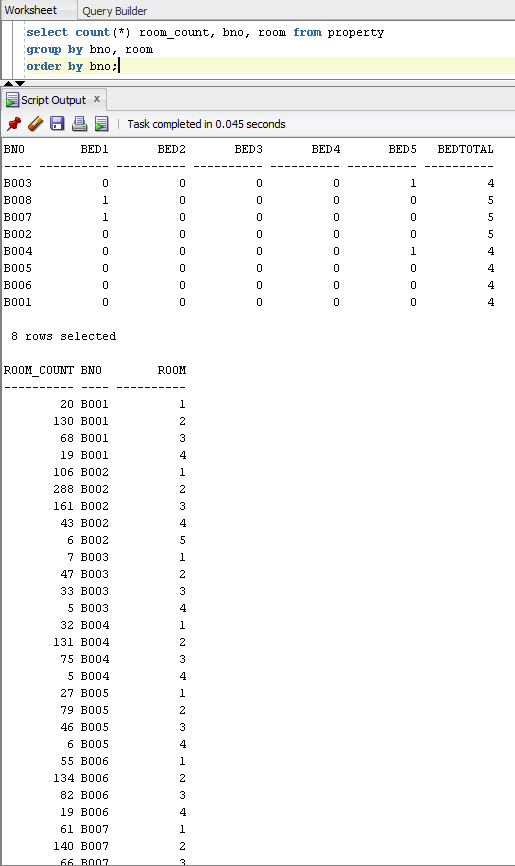
Ok I ran the first snippet and it works fine, results are what you said they would be and i understand it 100%. Although when running the second set of code it works and formats it right (excluding them being in order) But it seems to be leaving out rooms. I can read through it and understand most of it and how its working, although im kind of confused on the logic of the count method. your saying count(*) and then naming that column room_count right? How does it know to count the rooms and not everything in that table? Originally Posted by octopus
This is the results of your code. The first table is results when running the second section of code. The first is the results of the first section of code. As you can its reporting 0's in the column when there are rooms.
Spoiler: show
-
2014-02-07 12:58 #29Ridill
- Join Date
- Feb 2006
- Posts
- 11,977
- BG Level
- 9
Oh... this is why having actual data would help

Code:with room_count_view as ( select count(*) room_count, bno, room from property group by bno, room order by bno ) select p.bno, (select sum(rcv.room_count) from room_count_view rcv where rcv.bno = p.bno and rcv.room = 1) bed1, (select sum(rcv.room_count) from room_count_view rcv where rcv.bno = p.bno and rcv.room = 2) bed2, (select sum(rcv.room_count) from room_count_view rcv where rcv.bno = p.bno and rcv.room = 3) bed3, (select sum(rcv.room_count) from room_count_view rcv where rcv.bno = p.bno and rcv.room = 4) bed4, (select sum(rcv.room_count) from room_count_view rcv where rcv.bno = p.bno and rcv.room = 5) bed5, (select sum(rcv.room_count) from room_count_view rcv where rcv.bno = p.bno) bedtotal from (select distinct bno from property) p
-
2014-02-07 13:01 #30Salvage Bans
- Join Date
- Jun 2011
- Posts
- 927
- BG Level
- 5
- FFXI Server
- Sylph
That works thanks! so sum is refuring to what count(*) did? Also Why can i not organize by saying Originally Posted by octopus
ORDER BY bNo
DESC
-
2014-02-07 13:07 #31Ridill
- Join Date
- Feb 2006
- Posts
- 11,977
- BG Level
- 9
I just realize this doesn't output the subtotal row at the bottom... so you have to union a row with the result.
As for the sorting, just do it at the bottom:
Code:with room_count_view as ( select count(*) room_count, bno, room from property group by bno, room ) select p.bno, (select sum(rcv.room_count) from room_count_view rcv where rcv.bno = p.bno and rcv.room = 1) bed1, (select sum(rcv.room_count) from room_count_view rcv where rcv.bno = p.bno and rcv.room = 2) bed2, (select sum(rcv.room_count) from room_count_view rcv where rcv.bno = p.bno and rcv.room = 3) bed3, (select sum(rcv.room_count) from room_count_view rcv where rcv.bno = p.bno and rcv.room = 4) bed4, (select sum(rcv.room_count) from room_count_view rcv where rcv.bno = p.bno and rcv.room = 5) bed5, (select sum(rcv.room_count) from room_count_view rcv where rcv.bno = p.bno) bedtotal from (select distinct bno from property) p order by p.bno
-
2014-02-07 13:14 #32Ridill
- Join Date
- Feb 2006
- Posts
- 11,977
- BG Level
- 9
Try this version with subtotal row:
Code:with room_count_view as ( select count(*) room_count, bno, room from property group by bno, room ) (select p.bno, (select sum(rcv.room_count) from room_count_view rcv where rcv.bno = p.bno and rcv.room = 1) bed1, (select sum(rcv.room_count) from room_count_view rcv where rcv.bno = p.bno and rcv.room = 2) bed2, (select sum(rcv.room_count) from room_count_view rcv where rcv.bno = p.bno and rcv.room = 3) bed3, (select sum(rcv.room_count) from room_count_view rcv where rcv.bno = p.bno and rcv.room = 4) bed4, (select sum(rcv.room_count) from room_count_view rcv where rcv.bno = p.bno and rcv.room = 5) bed5, (select sum(rcv.room_count) from room_count_view rcv where rcv.bno = p.bno) bedtotal from (select distinct bno from property) p order by p.bno) union all (select 'Subtotal' bno, (select sum(rcv.room_count) from room_count_view rcv where rcv.room = 1) bed1, (select sum(rcv.room_count) from room_count_view rcv where rcv.room = 2) bed2, (select sum(rcv.room_count) from room_count_view rcv where rcv.room = 3) bed3, (select sum(rcv.room_count) from room_count_view rcv where rcv.room = 4) bed4, (select sum(rcv.room_count) from room_count_view rcv where rcv.room = 5) bed5, (select sum(rcv.room_count) from room_count_view rcv) bedtotal from dual)
-
2014-02-07 13:15 #33Salvage Bans
- Join Date
- Jun 2011
- Posts
- 927
- BG Level
- 5
- FFXI Server
- Sylph
Awesome ok i'll try that in a minute. Also can you tell me why my number 3 is wrong? I'm trying to do it the correct way instead of hard coding all the names in. When i try do it like this Originally Posted by octopus
SELECT cNo, fName, lName, phone
FROM Client
WHERE fName LIKE '%fred%'
ORDER BY fName ASC, lName ASC
It is giving me 4 names and they are like:
Alfred
Wilfred
Winifred
instead of Freddie, fredrick, ext
-
2014-02-07 13:18 #34Ridill
- Join Date
- Feb 2006
- Posts
- 11,977
- BG Level
- 9
Take out the first % and capitalize the F Originally Posted by Aylee
-
2014-02-07 13:23 #35Salvage Bans
- Join Date
- Jun 2011
- Posts
- 927
- BG Level
- 5
- FFXI Server
- Sylph
Ok lol that was easy. Originally Posted by octopus
For #6 where you say to union it am i going to union a new Line onto every select statement? Or will I just union at the very end? I'm thinking Union after every select statement since the view is doing columns instead of rows right?
Am i on the right track?
order by p.bno
UNION
select count(*)
(select sum(rvc.room_count)FROM rvc.room =1 and rvc.room =2
-
2014-02-07 13:27 #36Ridill
- Join Date
- Feb 2006
- Posts
- 11,977
- BG Level
- 9
Just add to the very end - see this post http://www.bluegartr.com/threads/119...=1#post6024824 Originally Posted by Aylee
-
2014-02-07 13:34 #37Salvage Bans
- Join Date
- Jun 2011
- Posts
- 927
- BG Level
- 5
- FFXI Server
- Sylph
I get this error: Originally Posted by octopus
Error starting at line 1 in command:
with room_count_view as
(
select count(*) room_count, bno, room from property
group by bno, room
)
(select p.bno,
(select sum(rcv.room_count) from room_count_view rcv where rcv.bno = p.bno and rcv.room = 1) bed1,
(select sum(rcv.room_count) from room_count_view rcv where rcv.bno = p.bno and rcv.room = 2) bed2,
(select sum(rcv.room_count) from room_count_view rcv where rcv.bno = p.bno and rcv.room = 3) bed3,
(select sum(rcv.room_count) from room_count_view rcv where rcv.bno = p.bno and rcv.room = 4) bed4,
(select sum(rcv.room_count) from room_count_view rcv where rcv.bno = p.bno and rcv.room = 5) bed5,
(select sum(rcv.room_count) from room_count_view rcv where rcv.bno = p.bno) bedtotal
from (select distinct bno from property) p
order by p.bno)
union all
(select 'Subtotal' bno,
(select sum(rcv.room_count) from room_count_view rcv where rcv.room = 1) bed1,
(select sum(rcv.room_count) from room_count_view rcv where rcv.room = 2) bed2,
(select sum(rcv.room_count) from room_count_view rcv where rcv.room = 3) bed3,
(select sum(rcv.room_count) from room_count_view rcv where rcv.room = 4) bed4,
(select sum(rcv.room_count) from room_count_view rcv where rcv.room = 5) bed5,
(select sum(rcv.room_count) from room_count_view rcv) bedtotal
from dual)
Error at Command Line:14 Column:1
Error report:
SQL Error: ORA-00907: missing right parenthesis
00907. 00000 - "missing right parenthesis"
*Cause:
*Action:
But going to see if i can debug it. Ty for your help!
-
2014-02-07 13:45 #38Ridill
- Join Date
- Feb 2006
- Posts
- 11,977
- BG Level
- 9
It doesn't like the "order by p.bno" just before "union all"
-
2014-02-07 13:50 #39Salvage Bans
- Join Date
- Jun 2011
- Posts
- 927
- BG Level
- 5
- FFXI Server
- Sylph
Why does sql care? Originally Posted by octopus
Also gonna start on 4,5,7 later (found out that I do use zip for number 7). I'll post what i get here and see if u can help if/when i get stuck thanks for all the help
-
2014-02-07 14:01 #40Ridill
- Join Date
- Feb 2006
- Posts
- 11,977
- BG Level
- 9
dunno, but if you take that out the query should work (with the results out of order lol)


Similar Threads
-
SQL Database - Help studying for Test
By Aylee in forum TechReplies: 3Last Post: 2013-11-06, 15:56 -
SQL Help
By Buffy in forum TechReplies: 7Last Post: 2013-10-18, 18:43 -
SQL help
By Saga in forum TechReplies: 3Last Post: 2012-11-29, 19:24 -
SQL help
By saracrow in forum TechReplies: 4Last Post: 2011-07-01, 00:22