 XI Wiki

I did not want to come to this. However, I work with Excel everyday and I've never had a problem with any formula really of any length.
I am studying Pro Forma for business deal and the original document has three very important cells that "depend" on each other. Of these three cells, all have a formula --- making excel not really like it and if you build it in the wrong order it will just say that it will always equal 0.
I hope I am explaining this in an easy way to understand. But think of it as three cells - A, B, and C.
Cell A: Formula includes cell B.
Cell B: Formula includes cell C.
Cell C: Formula includes Cell A.
Then, the creator must have hit enter, or backspace and a natural triangle of blue arrows showed up, meaning these cells had to be built in a specific order.
If you have any idea, how this works --- since I have spent hours on it --- please help! If you need a screen shot / formulas PM me.
- Navigation
Results 1 to 9 of 9
Thread: Any Excel Experts?


-
2014-02-19 09:10 #1New Spam Forum

- Join Date
- Jun 2007
- Posts
- 185
- BG Level
- 3
- FFXI Server
- Gilgamesh

Any Excel Experts?
-
2014-02-19 09:19 #2Relic Horn
- Join Date
- Sep 2009
- Posts
- 3,196
- BG Level
- 7
- FFXI Server
- Phoenix
I did well in Excel but I don't remember a lot of it. I'd like to help you but not sure exactly what you need.
-
2014-02-19 09:20 #3Ruke
- Join Date
- Nov 2005
- Posts
- 3,972
- BG Level
- 7
Probably need a screen shot/formulas to better understand it.
I'm surprised excel isn't shooting circular reference errors at you non-stop, as yeah it really doesn't like that stuff (probably why you're seeing those blue arrows).
What is the ultimate function of these three important cells, and what are they trying to accomplish overall?
-
2014-02-19 09:30 #4New Spam Forum
- Join Date
- Jun 2007
- Posts
- 185
- BG Level
- 3
- FFXI Server
- Gilgamesh
I have never seen anyone use three cells with formula's that depend on each other. So I have 0 experience.
The Pro Forma is confidential, however I can type out the cells and formulas maybe to give a better understanding.
E15: =(E10+L38)/2*L16 -------------- E10 is a =D4*D10 formula, L38 is a formula (see below) and L16 is a set number
E21: =SUM(E10-E20)
E23: =SUM(E21-E22)
L38: =MIN(F54*L24,E23*L20) -------------- F54 is a =ROUND formula, L24 is just a %, E23 is the =SUM formula above, and L20 is a %.
The blue arrows make a triangle to all 4 of these cells.
@RK
I am just trying to accomplish all three of these cells to function. Every time I complete the spreadsheet, it gets pissed off and at least 1 of the 4 cells will stop working and just equal zero no matter what.
I know it is possible to work, cause I am using another spreadsheet as a guide.
-
2014-02-19 09:30 #5
You never really want circular references in Excel because it's not designed to handle them very well. If you're trying to solve for the convergence of some formula, use the Solver.
Alternatively: http://chandoo.org/wp/2010/09/16/exc...ar-references/
-
2014-02-19 09:44 #6New Spam Forum
- Join Date
- Jun 2007
- Posts
- 185
- BG Level
- 3
- FFXI Server
- Gilgamesh
Thank you Byrth.
I now just want to know how the creator got this shit to work.
I am pretty sure turning on iterative formula's made it work. However, I wonder if it matters which cell is created first.
-
2014-02-19 10:47 #7Ruke
- Join Date
- Nov 2005
- Posts
- 3,972
- BG Level
- 7
Yeah, again and as said above, the whole circular reference thing will screw it up.
I attempted to translate what you just described into an excel sheet, except I swapped the cell locations to line them up in an 'easier to follow' format.
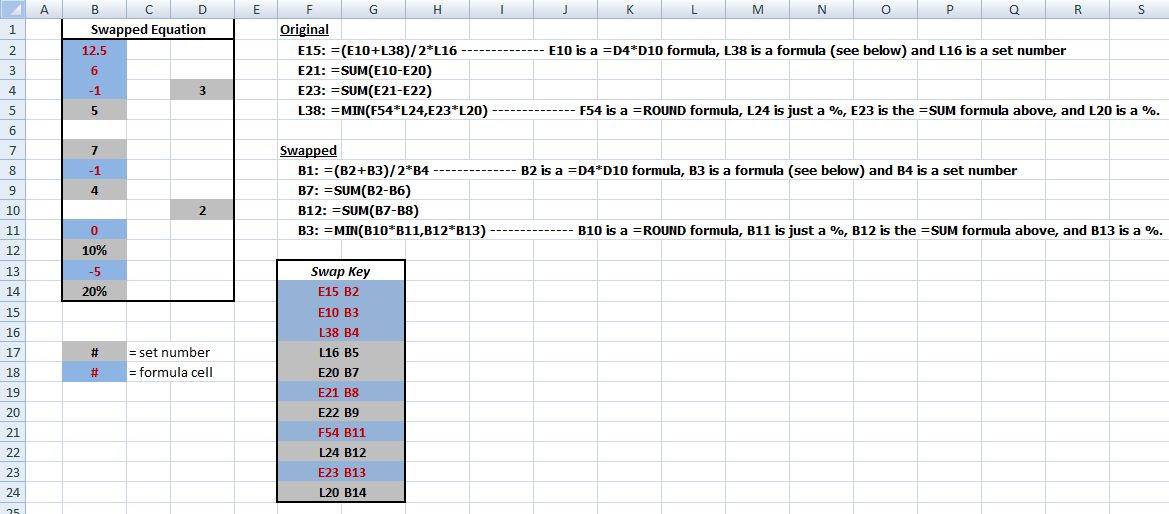
As far as I can see though, the way you described it in the last post, everything seems to look and work fine?
I put a copy in my BG box:
http://www.bluegartr.com/box/
EDIT: Looking at what you said again, I want to make sure that:
E21: =SUM(E10-E20)
E23: =SUM(E21-E22)
Is meant to be a subtraction, or a range that you're attempting to sum. If it's a range, then yeah, that'll definitely throw the error.
-
2014-02-19 11:00 #8New Spam Forum
- Join Date
- Jun 2007
- Posts
- 185
- BG Level
- 3
- FFXI Server
- Gilgamesh
It is a SUM. I just typed "-" quickly instead of a ":" between the cells. Originally Posted by RKenshin

I am not sure I follow your screenshot perfectly, maybe my brain is just mush.
After I turned on iterative formula's, I rebuilt each cell starting with L38, and got it to work. Finally.
-
2014-02-19 22:52 #9
Yea, but just as a warning . . . circular references in excel generally indicate that the creator was an idiot. It's entirely possible that you have successfully suppressed this error (perhaps as the creator did), but the number it generates still might not be correct. If this is something that's going to come back and bite you in the ass if it's wrong, you might want to fix it for real before you pass it on. If you're just a tech guy called in the suppress an error, well maybe this is good enough.


Similar Threads
-
Any military experts?
By Not Kuno in forum General DiscussionReplies: 17Last Post: 2009-12-02, 12:42 -
Any medical experts in the house?
By Cream Soda in forum General DiscussionReplies: 40Last Post: 2009-08-28, 16:54 -
For Xenosaga fans (If there even any here <lol>)
By Fruitloopsakaevalime in forum General DiscussionReplies: 3Last Post: 2005-02-22, 15:21