 XI Wiki

Edit: Bah, accidentally posted with my generic draft title. Should be something like "Grahpics Issue with AMD Card".
So I bought a new video card back around Black Friday: XFX Radeon HD 7970
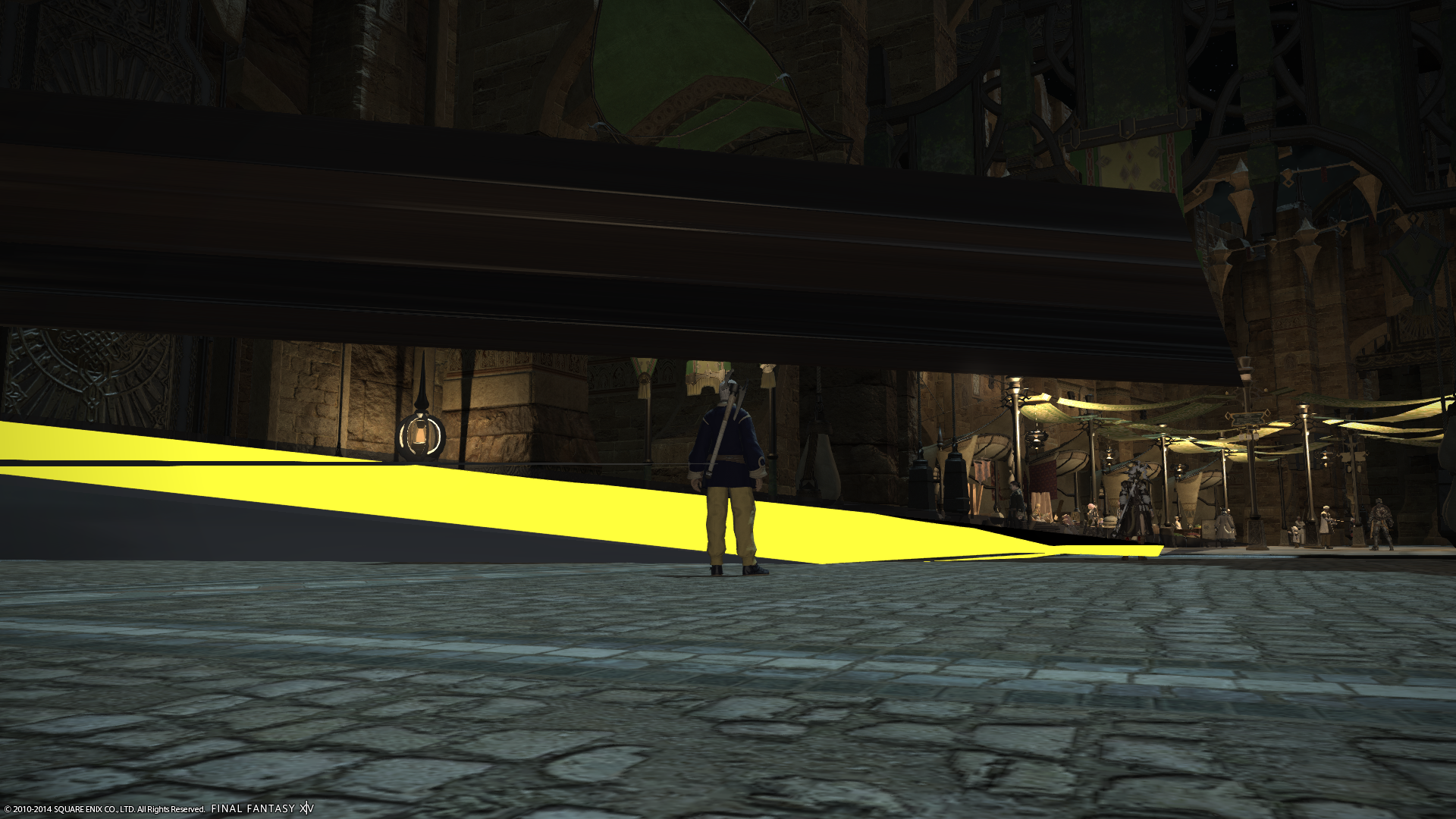
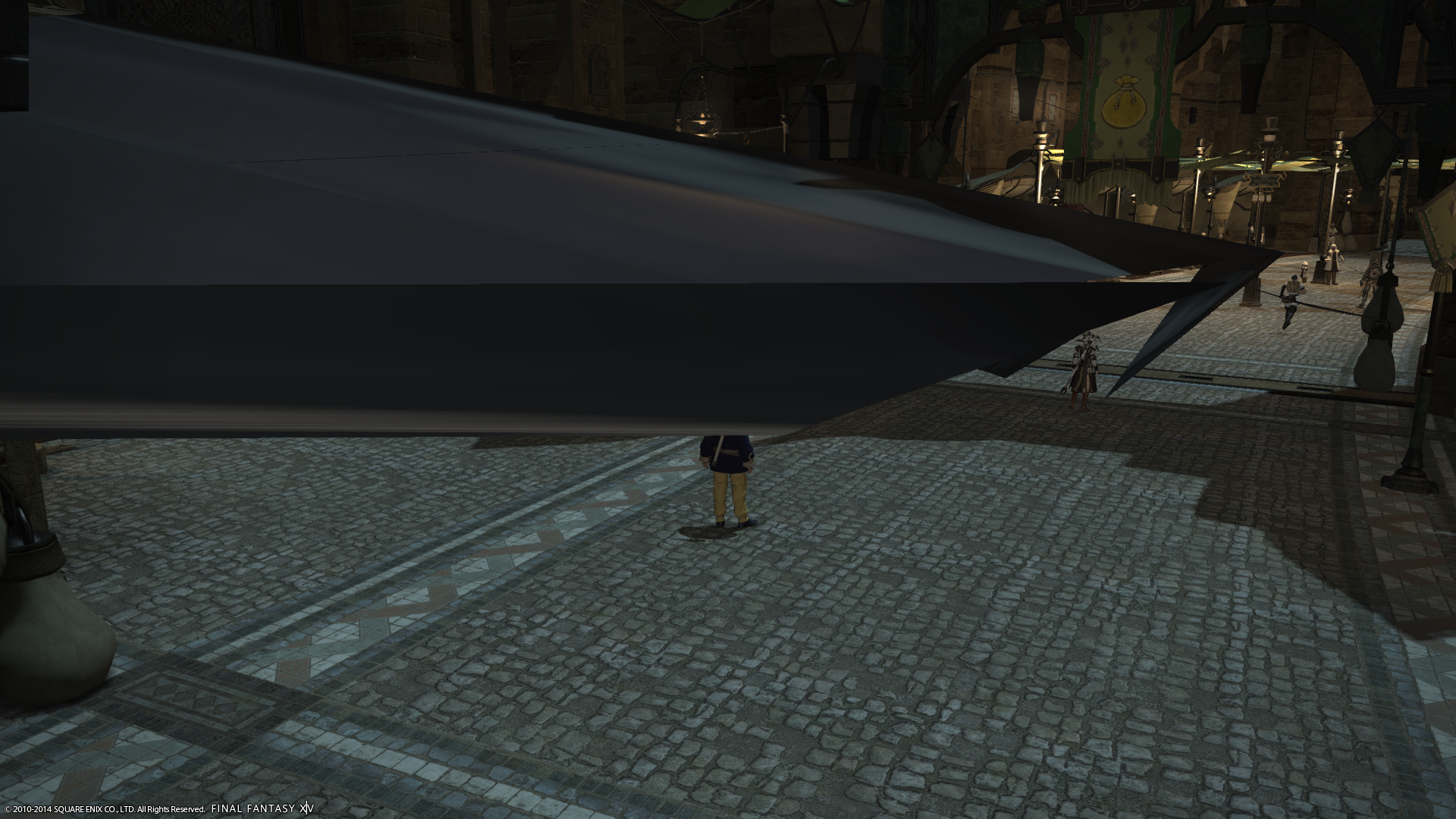
Installed it, and after a few hours of use I started having odd artifacts in game:
Normal, followed by what was flickering rapidly:
Spoiler: show
They are actual geometric shapes that appear out of nothing, sometimes either staying static or flickering.
Sometimes there would be artifacts on textures:
Spoiler: show
So, assuming I'd gotten a bad card, I RMA'd it. Got basically the exact same card, new in box, as a replacement.
...It's also doing it.
Spoiler: show
Again, they either flicker or just stand sit there. These in particular were fairly static, but affected by people running through.
I have changed every setting under the sun. Moving the camera will sometimes make them vanish, make new ones, make old ones flicker more, or have no affect. Sometimes changing from Fullscreen (Windowed) to Fullscreen or even Windowed will make them go away, but not always. Once had the entire Thanatos arena explode into a bunch of small shapes...that went away after we wiped to him (lol) and came back.
I have reinstalled drivers, gone to the most recent beta drivers, everything I could think of.
Looking at sensors, the GPU rarely goes above 60% load during these times; this is the normal amount it is at just running around or in combat
To be honest, my guess is that it is some temp issue: in game, the temperature sometimes tops out to 65 degrees C. Left idle, it will usually drop to around 45-50 degrees. But before I spring for more case fans I don't have room for (there is one venting straight out right next to it already, but I might add an expansion slot one right below it). However, I have also seen it occur at around 55 degrees.
Restarting FFXIV will fix the problems, at least temporarily.
I have had it occur in other games (Torchlight II, LoL) but much more often in FFXIV.
Thoughts?
- Navigation
Results 1 to 6 of 6
Thread: Grahpics Issue with AMD Card


-
2014-02-22 04:32 #1Remit One (1) Custom Title

- Join Date
- Sep 2007
- Posts
- 2,397
- BG Level
- 7
- FFXIV Character
- Qeomash Pandemonium
- FFXIV Server
- Cactuar
- FFXI Server
- Asura


Grahpics Issue with AMD Card
-
2014-02-22 09:59 #2Salvage Bans
- Join Date
- Feb 2007
- Posts
- 811
- BG Level
- 5
- FFXIV Character
- Orinthia Warsong
- FFXIV Server
- Excalibur
- FFXI Server
- Bahamut
It really does look like another bad card. It's not that uncommon unfortunately... Have you made sure the card is seated properly in your comp? Powersupply good enough to handle it on load? Either of those can also cause artifacts, though not near as often as a bad card.
There's also pretty high demand for those and newer amd cards at the moment, due to bitcoin mining. Because of the inflated prices everywhere for them, amd cards aren't worth buying right now. This may soon hit nvidia's cards due to litecoin mining (their newer 750 that just came out is super power efficient, and a good budget card in itself).
-
2014-02-22 11:41 #3Ironing this Thread
Sweaty Dick Punching Enthusiast
- Join Date
- Feb 2006
- Posts
- 21,329
- BG Level
- 10
- FFXIV Character
- Boyiee Star
- FFXIV Server
- Gilgamesh
- WoW Realm
- Kel'Thuzad

I changed your title for you.
Do you have enough power going to it? The card should be able to handle temps in the 80-95C range on full load, so maybe it is just another bad one, or it needs a bigger PSU.
-
2014-02-22 12:17 #4
Like Boy already said, 65° on load is just fine. Though ~50° on idle is a bit high, with decent cooling it should be around 30-40°, but that can differ between cards and towers.
You might want to try scanning for artifacts with ATITool. Yes, it's from 2006, and when you install it Windows will complain about an unsigned driver. But that doesn't matter, it would only be needed for OCing. Open it up, ignore the driver warning, and let "scan for artifacts" run for a few minutes. You should see a furry cube without any yellow pixels. If you see yellow, it probably means that you either got so unlucky that you got 2 faulty cards in a row, or that something else is wrong.
-
2014-02-22 13:13 #5Remit One (1) Custom Title
- Join Date
- Sep 2007
- Posts
- 2,397
- BG Level
- 7
- FFXIV Character
- Qeomash Pandemonium
- FFXIV Server
- Cactuar
- FFXI Server
- Asura
I paid about half the cost of the newer card on the original one.There's also pretty high demand for those and newer amd cards at the moment, due to bitcoin mining. Because of the inflated prices everywhere for them, amd cards aren't worth buying right now. This may soon hit nvidia's cards due to litecoin mining (their newer 750 that just came out is super power efficient, and a good budget card in itself).
I think it was a nVidia 700 something I was looking at before I went with this one.
I'll try the ATITool later. My power supply is a 750W, so I assume it is high enough. Unless 4 hard drives, 4 case fans, and a couple of small addon cards is too much on top of the card... I did have to use an adapter to go from an unused 6 pin power plug to a 8 pin. I have two of those adapters, from different brands, I can swap out if there's a chance that it's that. (New cards required a 6-pin and an 8-pin where my original card just needed two 6 pins.)
-
2014-02-22 14:05 #6
750W should be more than enough, though I wonder why such a high-W-PSU only has 6-pin connectors... Even my <500W PSU has 2 6+2 connectors...
So I guess you're using one of those 6-pin + 2x molex/SATA power -> 8-pin adapters? If so, the molex/SATA plugs should come from different power rails, otherwise it could happen that you overload one of the rails and your card actually doesn't get enough power. Most PSUs should have a chart on themselves or in the manual that shows what plugs/cable trees are connected to which rail.




Similar Threads
-
Issue with graphics card. ATI 6870
By Meresgi in forum TechReplies: 4Last Post: 2012-09-24, 12:54 -
MAJOR Emerging Issue with Radeon Cards
By Olo401 in forum TechReplies: 44Last Post: 2010-02-23, 09:34 -
Problem with video card on laptop with WoW
By Ikith in forum TechReplies: 5Last Post: 2007-06-15, 11:10 -
Issues with Power Supply
By Hollaback in forum TechReplies: 2Last Post: 2007-06-09, 20:56