 XI Wiki


I just checked out, and got a email confirming
- Navigation
Results 401 to 420 of 915
-
2015-02-13 10:43 #401BEAHCAT

BOSTON'S FINEST
- Join Date
- Jun 2007
- Posts
- 6,634
- BG Level
- 8
- FFXIV Character
- Mith Lothaire
- FFXIV Server
- Gilgamesh
- FFXI Server
- Phoenix
- WoW Realm
- Cenarius


-
2015-02-13 10:45 #402Ridill
- Join Date
- Jul 2006
- Posts
- 12,621
- BG Level
- 9
- FFXI Server
- Ramuh
- WoW Realm
- Kilrogg
oh they must of just added that. I got to checkout then errored out. that lasted like 3 minutes rofl
I secured the MH4 version at least (it looks like). I just hope I can add a new memory card w/o losing the MH4U since it comes pre-installed
-
2015-02-13 10:48 #403Black Belt
- Join Date
- Nov 2006
- Posts
- 5,703
- BG Level
- 8
- FFXIV Character
- Adajer Vonte
- FFXIV Server
- Gilgamesh
- FFXI Server
- Asura
- WoW Realm
- Tichondrius

fuckton of MM 3ds on ebay. I wonder how much i can sell it for >.>
maybe I should hold it until xmas season. probably wont be much in demand then.
-
2015-02-13 10:48 #404BEAHCAT
BOSTON'S FINEST
- Join Date
- Jun 2007
- Posts
- 6,634
- BG Level
- 8
- FFXIV Character
- Mith Lothaire
- FFXIV Server
- Gilgamesh
- FFXI Server
- Phoenix
- WoW Realm
- Cenarius
I'm honestly waiting for a cancellation email, this is Gamestop after all lol
-
2015-02-13 10:49 #405Ridill
- Join Date
- Jul 2006
- Posts
- 12,621
- BG Level
- 9
- FFXI Server
- Ramuh
- WoW Realm
- Kilrogg
yeah i wont believe i got the MH4 version until I am charged lol
-
2015-02-13 10:57 #406Black Belt
- Join Date
- Nov 2006
- Posts
- 5,703
- BG Level
- 8
- FFXIV Character
- Adajer Vonte
- FFXIV Server
- Gilgamesh
- FFXI Server
- Asura
- WoW Realm
- Tichondrius
i ordered from target
-
2015-02-13 11:17 #407Yoshi P
- Join Date
- Aug 2006
- Posts
- 5,176
- BG Level
- 8
Depends on a few things Katlan, but most important is NOT to add your NNID to the new one until the system transfer is done from the old one. Originally Posted by Katlan

Are you buying a new MicroSD card? Already using a MicroSD card?
This has all the info you would possibly need - Upgrading to a New 3DS: All You Need to Know
-
2015-02-13 11:29 #408Ridill
- Join Date
- Jul 2006
- Posts
- 12,621
- BG Level
- 9
- FFXI Server
- Ramuh
- WoW Realm
- Kilrogg
Thanks Doom! Its gonna be a new microSD 32gb.
Doesn't sound that bad. my laptop has a SD slot and the microSD i got has a SD adapter thing. So i just transfer it to the PC immediately > put in new card > data transfer from old system
-
2015-02-13 11:38 #409Yoshi P
- Join Date
- Aug 2006
- Posts
- 5,176
- BG Level
- 8
Yep! It is pretty damned simple. Depending on whether you get your new microSD before the console (and provided it comes with an adapter that allows you to use it as an SD card), you could even transfer the contents of your current SD card to the new micro and use that (in the adapter) in your current 3DS. That is what a few of us did, and it just streamlines the rest of the transfer stuff a bit more, but totally isn't necessary.
As I also have the MH n3DS and am using a microSD with adapter in my og3DS, that is what I will be doing later today. Again, you really just want to make sure that you don't set anything up on the n3DS other than wifi access (it has to check to see that you haven't done a system transfer in the last 7 days to that system) and then start the transfer on both consoles, LEAVING the 4GB SD card that comes with the n3DS in it until the very end when you are prompted to remove it.
Don't worry, it sounds stupidly complex, and it is obviously more complex than it would be if Nintendo had a decent account structure in place, but it is pretty simple when you get going.
-
2015-02-13 11:47 #410BG's most likeable Québécois
Pens win! Pens Win!!! PENS WIN!!!!!
- Join Date
- Sep 2007
- Posts
- 37,887
- BG Level
- 10

 Problem is redownloading game it's 2.7 gig Originally Posted by Katlan
-
2015-02-13 12:02 #411Black Belt
- Join Date
- Nov 2006
- Posts
- 5,703
- BG Level
- 8
- FFXIV Character
- Adajer Vonte
- FFXIV Server
- Gilgamesh
- FFXI Server
- Asura
- WoW Realm
- Tichondrius
I think it gets saved to your NNID when you transfer to the new 3ds. then when you switch out your stock sdcard with old 3ds info on new card, it is still saved to your nnid to redownload.
-
2015-02-13 12:04 #412Ridill
- Join Date
- Jul 2006
- Posts
- 12,621
- BG Level
- 9
- FFXI Server
- Ramuh
- WoW Realm
- Kilrogg
but if i pre-transfer everything (since you cant transfer from a N3ds to a old 3DS), it's still the same issue and you have to go through a PC in order to retain the MHU license. if the MHU wasnt pre-installed it wouldnt be an issue to begin with. I just assumed I put the microSD/adapter into my computer and set the N3DS to transfer to the PC. then when it's done I get a prompt to remove the microSD and thats when i do the switch. > then i set up a normal system transfer via the old 3ds to the N3ds. Originally Posted by Doombear
And rata - can't re-download the MH4U since its pre-installed the license is on the system. that is at least what i understand
-
2015-02-13 12:17 #413Yoshi P
- Join Date
- Aug 2006
- Posts
- 5,176
- BG Level
- 8
Ha, replies are all out of order in my brain in here. Adajer is correct, and why it is important that you do not set up your NNID before doing the system transfer. When you do, with the 4GB card still in there, you will essentially merge your NNID and system info from your og3DS with the new one. Yes MH4U is on the n3DS stock card, but it isn't tied to an NNID. When you do the transfer, it will then get linked to YOUR NNID via the transfer. Once the system transfer is complete, you will be prompted to power off your consoles and remove your microSD and place it in the n3DS. Then your content will all show up just fine, and you will go to the eShop and in your Download History will be MH4U to download again. Everything else though, since it was on your microSD, will be there.
That is assuming you 'pre transfer content' and reuse your microSD in your og3DS. Otherwise, if you just use your SD card until you are ready to transfer, you can do Transfer via PC. My understanding, and what I think that people don't realize, is that if you answer this question

with NO because you are using a MicroSD card with adapter in your n3DS ... then you won't even be prompted to choose a transfer type. You will simply carry on with the system/profile transfer part which is done via local connection between consoles and then at the end you will be pretty much told, "Rad, now power things off and swap your microSD card from old to new 3DS".
-
2015-02-13 12:19 #414Ridill
- Join Date
- Jul 2006
- Posts
- 12,621
- BG Level
- 9
- FFXI Server
- Ramuh
- WoW Realm
- Kilrogg
ahh makes sense. thanks!
-
2015-02-13 12:32 #415Relic Weapons
- Join Date
- May 2008
- Posts
- 362
- BG Level
- 4
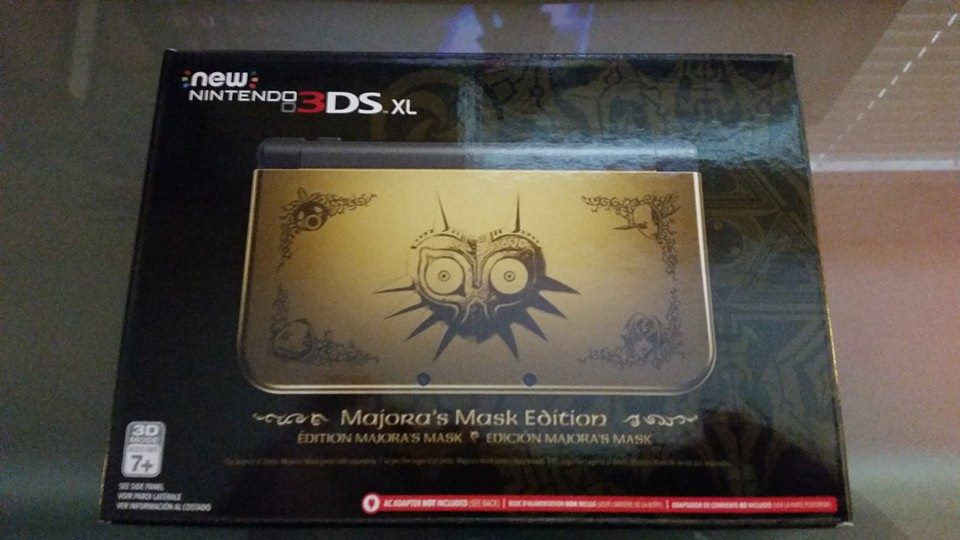
Been sitting outside Target in Washington since about 5am, managed to snag one barely. Dude showed up an hour before opening and ended up shoving 3 of us out of the way, ran to the electronics department, and snatched one.
-
2015-02-13 12:35 #416Relic Shield

- Join Date
- Sep 2008
- Posts
- 1,947
- BG Level
- 6
- FFXIV Character
- Drai Draken
- FFXIV Server
- Hyperion
- FFXI Server
- Ramuh
When I did my system transfer last night, it forced me to pre wipe all data on the New 3DS micro SD card before I could transfer, and when I was finished, it deleted all data on my old 3DS, this was over Wi-Fi btw, dunno if it works differently through other methods
-
2015-02-13 12:36 #417BG's most likeable Québécois
Pens win! Pens Win!!! PENS WIN!!!!!
- Join Date
- Sep 2007
- Posts
- 37,887
- BG Level
- 10
Transfer will always wipe your Source 3ds and the Target SD card
But it doesn't erase the Source SD card
-
2015-02-13 12:38 #418Relic Shield
- Join Date
- Sep 2008
- Posts
- 1,947
- BG Level
- 6
- FFXIV Character
- Drai Draken
- FFXIV Server
- Hyperion
- FFXI Server
- Ramuh
it 100% wiped the source SD card, I turn the old 3DS on now and it prompts me to pick my language etc lol Originally Posted by Ratatapa
-
2015-02-13 12:41 #419BG's most likeable Québécois
Pens win! Pens Win!!! PENS WIN!!!!!
- Join Date
- Sep 2007
- Posts
- 37,887
- BG Level
- 10
That's not the SD, thats the system memory Originally Posted by Drai
My old 3ds also ask me for language and all, but i removed my Micro SD from my old 3ds and put it in the N3ds and all my data is there
-
2015-02-13 12:41 #420Ridill
- Join Date
- Jul 2006
- Posts
- 12,621
- BG Level
- 9
- FFXI Server
- Ramuh
- WoW Realm
- Kilrogg
I thought about doing the same. well not pushing people out of the way but beating them to the electronics department. The target closest to me was getting 5, and I got there at 6:30, but 5 other people had camped out over night. (only 5 people there in total) But in the end I decided to not try and be a super dick Originally Posted by Chelly


Similar Threads
-
Super Smash Bros.
By Not Kuno in forum Gaming DiscussionReplies: 3362Last Post: 2016-06-07, 07:57 -
Nintendo 3DS
By BRP in forum Gaming DiscussionReplies: 2345Last Post: 2015-02-03, 10:54 -
Nintendo 3DS Friend Code List.
By xopher in forum Gaming DiscussionReplies: 82Last Post: 2014-11-30, 00:54 -
Nintendo 3DS
By Vade in forum Gaming DiscussionReplies: 107Last Post: 2011-07-05, 13:44