 XI Wiki

How do I do an unsynced dungeon?
- Navigation
Results 741 to 760 of 1545
Thread: Possibly returning - Questions


-
2018-06-25 10:06 #741Pandemonium

- Join Date
- Feb 2010
- Posts
- 7,659
- BG Level
- 8
- FFXI Server
- Sylph

-
2018-06-25 10:15 #742
At the top-left of the duty finder window, there's a little gear button. Click that, select "Undersized Party", and hit "OK" or "Save" or whatever it is. Select your duty, and queue up.
-
2018-06-30 10:54 #743Old Merits
- Join Date
- Jun 2007
- Posts
- 1,060
- BG Level
- 6
I bought the game years back from SE directly. Now I see that Steam has the expansions on sale. I bought it, got my keys but it says invalid key on Mog Station. What gives?
-
2018-06-30 10:55 #744Ridill
- Join Date
- Feb 2006
- Posts
- 11,977
- BG Level
- 9
You can't mix and match steam and non-steam.
-
2018-06-30 11:01 #745Old Merits
- Join Date
- Jun 2007
- Posts
- 1,060
- BG Level
- 6
Are you serious? This is the stupidest thing ever. Refund time then, sorry SE, no $10 from me.
-
2018-06-30 12:02 #746
- Join Date
- Feb 2009
- Posts
- 8,774
- BG Level
- 8
 Originally Posted by Egon


-
2018-06-30 12:21 #747
Sweaty Dick Punching Enthusiast
- Join Date
- Mar 2010
- Posts
- 24,123
- BG Level
- 10
- FFXI Server
- Quetzalcoatl
Originally Posted by Shenrien

-
2018-07-02 16:24 #748Claustrum. Really?
- Join Date
- Nov 2007
- Posts
- 3,806
- BG Level
- 7
- FFXIV Character
- Kaith Laqueus
- FFXIV Server
- Ragnarok
- FFXI Server
- Asura

Is the refer a friend still a thing? I found the website for it, I click the link, I log in to the page and then I can't find refer a friend anywhere on that page like it said it should be?
-
2018-07-02 17:36 #749Hyperion Cross
- Join Date
- Jan 2007
- Posts
- 8,901
- BG Level
- 8
- FFXIV Character
- Kai Bond
- FFXIV Server
- Gilgamesh
 Originally Posted by Jem
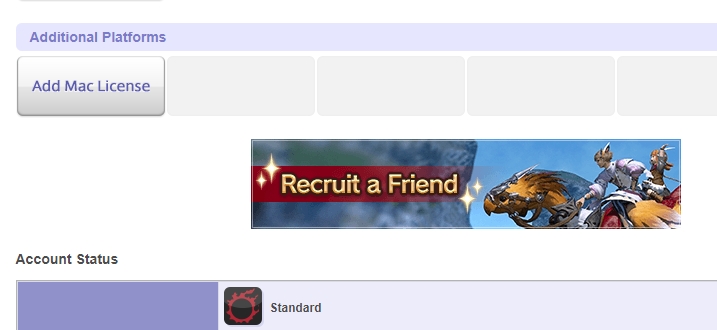
Click on Your Account
Then click on the Refer a Friend banner
-
2018-07-02 17:57 #750Claustrum. Really?
- Join Date
- Nov 2007
- Posts
- 3,806
- BG Level
- 7
- FFXIV Character
- Kaith Laqueus
- FFXIV Server
- Ragnarok
- FFXI Server
- Asura
Yeah figured it out. Apparently my credit card didn't run correctly last night so my main account wasn't actually subscribed and so it wasn't showing up for me.
Now just to try figure out how to activate this on a PS4 account
Although honestly at this point I've been navigating through Square's shitshow of a convulted account system for so long I now no longer care if I can't figure it out
-
2018-07-02 20:38 #751Ridill
- Join Date
- Aug 2008
- Posts
- 12,467
- BG Level
- 9
- FFXIV Character
- Satori Komeiji
- FFXIV Server
- Sargatanas
- FFXI Server
- Asura

I thought you just applied the code to the PSN and it made you link your PSN account to your Squeenix account?
TBH its been 4 years since I bought the physical PS4 CE.
-
2018-07-03 09:45 #752Claustrum. Really?
- Join Date
- Nov 2007
- Posts
- 3,806
- BG Level
- 7
- FFXIV Character
- Kaith Laqueus
- FFXIV Server
- Ragnarok
- FFXI Server
- Asura
The process is this
1. Insert game disk
2. Log into PSN store and register the code via store
3. Start up FFXIV
4. Create new Square Enix account
5. Login to Square Enix account on desktop/what ever
6. Hit recruitment code button
7. Enter referral code received from friend or main account
It's a simple process complicated by SEs supporting literature. The registration code in the PS4 box suggests that as soon as you enter the registration code on PSN store it binds your PSN account email to a Square Enix account when actually you create the Square Enix account (or login your existing account) further in the process and then bind it to the PSN account with a prompt. The refer a friend literature says that you can't enter the referral code after subscription and entering the registration code on PSN store gives you 30 days subscription. But what it actually means is after 1st paid subscription.
So if you actually read the material they provide it becomes confusing as what it says happens and what actually happens doesn't match up. And I made sure I read everything as I was concerned about it binding the PS4 code to my main account due to the PSN account email matching my Square enix account email
-
2018-07-07 06:34 #753Pandemonium
- Join Date
- Feb 2010
- Posts
- 7,659
- BG Level
- 8
- FFXI Server
- Sylph
What does O6S and O7S mean in this context? Is that sigmascape savage 1/2/3/4? Originally Posted by solracht
-
2018-07-07 06:36 #754Relic Shield
- Join Date
- Mar 2013
- Posts
- 1,757
- BG Level
- 6
- FFXIV Character
- Waka Bo
- FFXIV Server
- Excalibur
- FFXI Server
- Bahamut
Sigma 2 and 3 yes
-
2018-07-08 00:27 #755Chram
- Join Date
- Nov 2007
- Posts
- 2,622
- BG Level
- 7
couple questions. trying out rdm and i was wondering... did macros ever get adjusted so that you can prep another cast while the first one is finishing, or is there still the small dps hit from not being able to do this like with using actions? and if this is still the case, would it hurt my rdm's dps much if i used it for say, verthunder/verfire and veraero/verstone? basically so that it casts fire/stone if i have the proc and if not, then the other?
And the other question i have is if there's a way to disable the directional arrow keys on the numpad while leaving the normal ones intact. basically, i was wanting to hold shift while pressing other keys to have more easy to reach macros, but the problem is, shift + directional arrow keys is various targetting, so when holding shift, my movement automatically stops. (because instead of being able to move with the numpad like normal, it's now thinking im hitting directional arrow keys, as numpad shift function is the same as those four buttons. thank you, idiot keyboard designers.)
If i could disable that secondary function of numpad then i could hold shift and use macros while running and dodging, so i'm rather keen on finding a solution to this.
-
2018-07-08 04:11 #756Ridill
- Join Date
- Aug 2008
- Posts
- 12,467
- BG Level
- 9
- FFXIV Character
- Satori Komeiji
- FFXIV Server
- Sargatanas
- FFXI Server
- Asura
I would try it on a dummy first. But I'd imagine it work like this.
Jolt II/Impact
/ac Impact <t>
/ac "Jolt II" <t>
/micon "Jolt II"
Verthunder/Verfire
/ac Verfire <t>
/ac Verthunder <t>
/micon Verthunder
Veraero/Verstone
/ac Verstone <t>
/ac Veraero <t>
/micon Veraero
You might want to add an /actionerror off(Or /aerror off) if that isn't a toggle to each macro. These macro's shouldn't cause you to clip your GCDs I hope.
TO answer your second question you should be able to disable key bindings to that by right clicking everything related to the up down left right arrows. Just remember to save before you exit the window.
-
2018-07-08 06:08 #757Chram
- Join Date
- Nov 2007
- Posts
- 2,622
- BG Level
- 7
as far as the second one goes, i know that i could disable anything related to those and get shift keys back... but i use those arrows for targetting through npcs (left right) and the party member list (up down). not really keen on losing that functionality. that's why i just want to be able to disable the shift + # arrow keys on numpad...somehow, while leaving the actual arrow key buttons alone for targeting. a weird request, i know, but would make things a lot easier for me, even if i have to use a third party program for it.

-
2018-07-08 08:07 #758Relic Horn
- Join Date
- Apr 2010
- Posts
- 3,300
- BG Level
- 7
- FFXIV Character
- Kharlan Lynare
- FFXIV Server
- Excalibur
- FFXI Server
- Valefor
- WoW Realm
- Kirin Tor

answering the first question, macros still don't queue which is annoying as hell
that would definitely be my #1 QOL fix, make macros queue like regular actions... would make intervention/shirk/cover/salted earth feel so much smoother (since these are usually macro'd)
-
2018-07-11 15:43 #759Pandemonium
- Join Date
- Feb 2010
- Posts
- 7,659
- BG Level
- 8
- FFXI Server
- Sylph
4.4 will be the new hard raids right, that replaced i370 gear and i375 weapons? then 4.5 will be the new 24 man?
-
2018-07-11 19:01 #760Relic Shield
- Join Date
- Mar 2013
- Posts
- 1,757
- BG Level
- 6
- FFXIV Character
- Waka Bo
- FFXIV Server
- Excalibur
- FFXI Server
- Bahamut
Yep, whatever ilvl is the last one will be it till 5.0

