XI Wiki

had similar problems, ended up having to flash my nvidia bios to newer/modified versions, haven't had the issue since.
different card though, 660 ti. something you could try. turns out the threshold where the card would downclock/throttle itself was set incorrectly and it would refuse to pick up after without a restart. it wasn't picking up when i was making full use of it and just cutting itself down to nothing, locking me at 30 fps until i restarted.
- Navigation
Results 21 to 40 of 40
Thread: Annoying GPU usage drop.


-
2015-04-30 18:01 #21It's all dicks and airplanes

- Join Date
- Jun 2009
- Posts
- 2,303
- BG Level
- 7
- FFXIV Character
- Cia Mir
- FFXIV Server
- Balmung

-
2015-04-30 18:12 #22Salvage Bans
- Join Date
- Sep 2008
- Posts
- 955
- BG Level
- 5
- FFXI Server
- Ragnarok
She i had my 970 i updated the bios that didn't help with that.
-
2015-05-01 09:47 #23Salvage Bans
- Join Date
- Sep 2008
- Posts
- 955
- BG Level
- 5
- FFXI Server
- Ragnarok
Went ahead and ran memtest last night. I'm not familiar with it and its been running for 7 hours but so far there are 42 errors. I don't know if ram can cause issues like I'm having but yeah.
Also gonna add as far as stuttering goes i logged into wow last night and it started out a stuttery mess but after playing for a bit i don't think it happened any more. I switched over to gta5 after tge raid and didn't notice any stuttering (but its so fast paced compared to wow i might overlook it, i dunno). After gta5 i got back on wow which was stuttering immediately.
-
2015-05-01 10:37 #24Salvage Bans
- Join Date
- Sep 2008
- Posts
- 955
- BG Level
- 5
- FFXI Server
- Ragnarok
Gonna go ahead and say I don't think this is good.
Spoiler: show
-
2015-05-01 10:53 #25
RAM errors are never good... Were they all in similar areas or spread across the whole range? Could be that one of your mem sticks is faulty and screws stuff up.
Errors in a certain memory region would point to one faulty stick. Just to make sure, you might want to swap them around and/or test them one at a time with memtest to see if it's really just one of them. Worst case could be that the socket is faulty.
€dit: oh, and since I wrote that during a dungeon run and saw your photo just now: maybe use memtest86+ instead, bit fancier look, and it lists all found errors in a table.
-
2015-05-01 12:56 #26Salvage Bans
- Join Date
- Sep 2008
- Posts
- 955
- BG Level
- 5
- FFXI Server
- Ragnarok
Should i watch the test to see when errors pop up or will it break it down at the end. Last test took like 7 hours
-
2015-05-01 15:31 #27
It breaks it down during the run. see http://commons.wikimedia.org/wiki/Fi...rors-found.jpg as an example. And as you might already know, RAM tests are only useful when you let them run for several hours.
-
2015-05-01 16:26 #28RIDE ARMOR
- Join Date
- Apr 2015
- Posts
- 24
- BG Level
- 1
- FFXIV Character
- Leona Kalinamori
- FFXIV Server
- Ragnarok
- FFXI Server
- Sylph
Could be a faulty ram slot and just not producing a BSOD. Who makes you're RAM?
-
2015-05-01 17:32 #29Salvage Bans
- Join Date
- Sep 2008
- Posts
- 955
- BG Level
- 5
- FFXI Server
- Ragnarok
Well I let it run for 5 hours and no errors popped up with that test so I don't know what is up with that. http://www.newegg.com/Product/Produc...82E16820231460 is my RAM
-
2015-05-01 19:54 #30Salvage Bans
- Join Date
- Sep 2008
- Posts
- 955
- BG Level
- 5
- FFXI Server
- Ragnarok
Dickin around atm so I'm taking out sticks seeing if the stuttering disappears. I guess it's possible both could be bad but so far I've tried Stick A in slot 1 by itself which didn't help and Stick B in slot 3 by itself which didn't help. I can do actual tests on them later.
-
2015-05-01 20:18 #31Salvage Bans
- Join Date
- Sep 2008
- Posts
- 955
- BG Level
- 5
- FFXI Server
- Ragnarok
Put my GPU is slot 2, still the same thing. Recorded a little video of what the stuttering is like, maybe it'll help /shrug https://www.youtube.com/watch?v=q1Wv...ature=youtu.be
-
2015-05-01 23:12 #32Salvage Bans
- Join Date
- Sep 2008
- Posts
- 955
- BG Level
- 5
- FFXI Server
- Ragnarok
Trying something and so far it might be working... well kinda working. I don't know if the stuttering is gone completely or it just isn't acting up atm but what I think what might be the problem is my 1440p monitor or cable.
Right now I am running my 1080p monitor by itself via DVI to HDMI and haven't really noticed the stuttering, or maybe it's less apparent. It's too early to tell without playing like this for a while.
However what I think might be the issue (or making it worse) is the fact my 1440p monitor is seen as 59hz by windows, despite it being a 60hz monitor and nvidia control panel saying it's 60. I googled around and people said it doesn't make a difference, but what I found out is I got a skip/stutter/.5 second freeze EVERY 20 seconds (I timed this). I found a solution that said to make a custom resolution and do manual timing to 60.001hz and windows would see it as 60hz, which it did and the 20 second stutter stopped. However I think that is now causing the severe stuttering. Which I don't see on my 1080p monitor since it's seen as 60hz by everything.
Going to keep it like this and see how things turn out.
Just going to edit my post so I'm not spamming.
Well I went ahead decided to try my 1440p monitor solo. It still has the 20 second skip when I don't have the custom resolution, but with it it's fine. I don't really notice stuttering with either monitor by itself.
I went ahead and plugged in my second monitor again and the stuttering started right back up. Staying in game with the stuttering as soon as I unplug my second monitor it goes away.
My 2 monitors http://www.monoprice.com/Product?c_i...seq=1&format=2
http://www.samsung.com/us...rs/LS24B5HVFH/ZA-specs
-
2015-05-02 07:07 #33
Sweaty Dick Punching Enthusiast
- Join Date
- Mar 2006
- Posts
- 7,993
- BG Level
- 8
- FFXI Server
- Ragnarok
Ok. I didn't really read this thread because the first couple of replies were ridiculously facepalm, so apologies if this is inaccurate. I skimmed until I got to you running memtest and shit, but it made my head hurt so I'm just going to go by the first few screenshots.
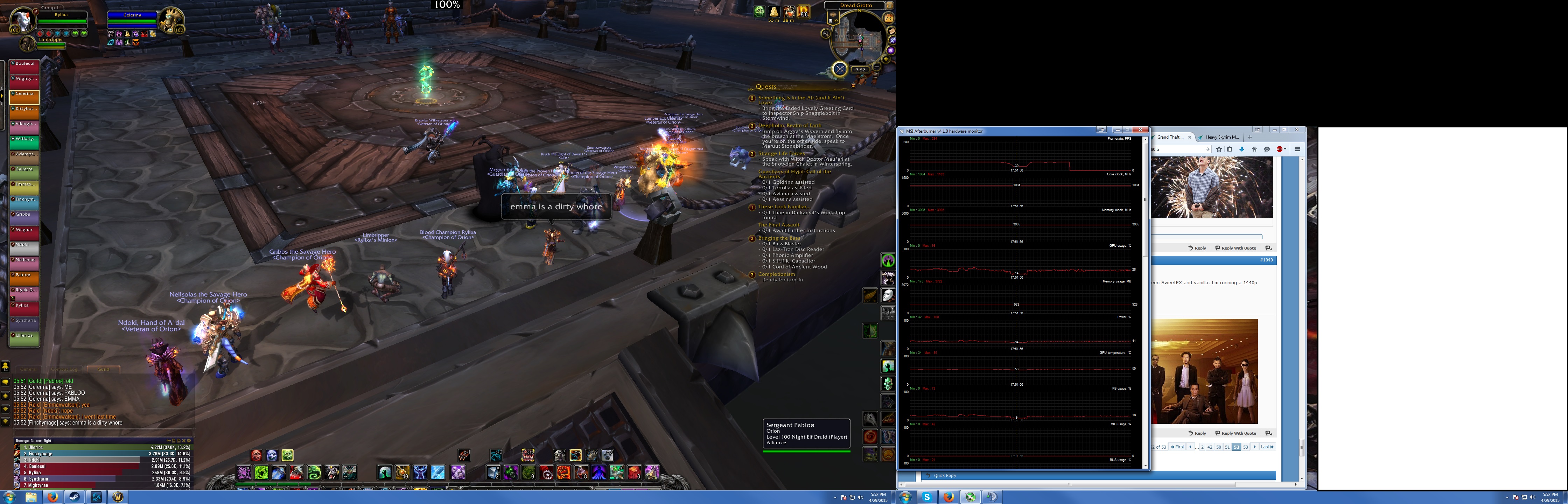
Are you not using vSync? Because to be honest it looks like you're using vSync without understanding what it does, and nothing more. If thats correct then its not a GPU usage problem, and your card definitely isn't throttling. Its your GPU usage dropping because the framerate is dropping, which is a result of vSync doing what its supposed to do.
Mumbo jumbo incoming: vSync links your framerate to your monitor's refresh rate by creating a rule that says the back buffer can't copy to the frame buffer until right after the monitor refreshes. This reduces screen tearing and effectively caps your FPS to your monitor's refresh rate, which is why your FPS is locked at 60 most of the time. It works fine in situations where your FPS is greater than 60. However if your FPS naturally drops below the refresh rate of the monitor, for whatever reason, vSync will at BEST half your frame rate. With a 60hz monitor your framerate will be 60, or it will be 30/20(one third)/15(one fourth) etc. There is no in between. If the frame is done rendering when its time for your monitor to refresh, its displayed. 1 for 1. 60 FPS. If the frame is not done rendering when its time for your monitor to refresh, its held back and finished with the next refresh. 1 for 2. 30 FPS. (That's what screen tearing is, portions of the frame being rendered and displayed in the time your monitor takes to refresh). Triple buffering is a little different with the intervals due to a third buffer but the same concept.
Mumbo jumbo over. So why is your framerate dropping below 60? It could be any number of reasons, none of which are likely related to your video card. Turn vSync off and your problem will go away. vSync sucks. You could try adaptive vSync if you really can't deal with the screen tearing (turns vSync on/off to reduce tearing and limit frame rate drops), but it has its own issues when it needs to be turned on/off too frequently. Other than that your choices are to deal with the screen tearing, getting a higher refresh rate monitor, get a monitor that supports G-SYNC(clicky), or continue troubleshooting your entire system to determine why you fall an iota underneath 60FPS (something you'll likely never get rid of entirely, shit happens). If you choose to continue troubleshooting, turn vSync off anyway. It's a lot easier to know what you're dealing with when you can see the actual numbers when they're not controlled by vSync.
-
2015-05-02 09:00 #34Salvage Bans
- Join Date
- Sep 2008
- Posts
- 955
- BG Level
- 5
- FFXI Server
- Ragnarok
First things first i think i figured out the stuttering. Windows transparency option. Loaded up wow with both monitors and transparency enabled and the stutter fest began, clicked it off and presto it stops stuttering. Keeping the game open i can toggle the transparency on/off and see the stuttering begin.
And i do use vsync. With out it not only do i get tearing but the games are never smooth. I don't know what causes me to get locked at 30 but its weird cause its not lije stuff is going on sometimes when it happens. One if the graphs was me standing in front of a boss getting ready for a pull so there should have been no reason for me to fall below 60. Maybe it had to do with the transparebcy option. I guess ill see how things go from here.
-
2015-05-02 09:31 #35Salvage Bans
- Join Date
- Sep 2008
- Posts
- 955
- BG Level
- 5
- FFXI Server
- Ragnarok
Table breaking
You can see in this one nothing is really going on but it decides to drop =/ sucks and transparency is off it looks like.
Spoiler: show
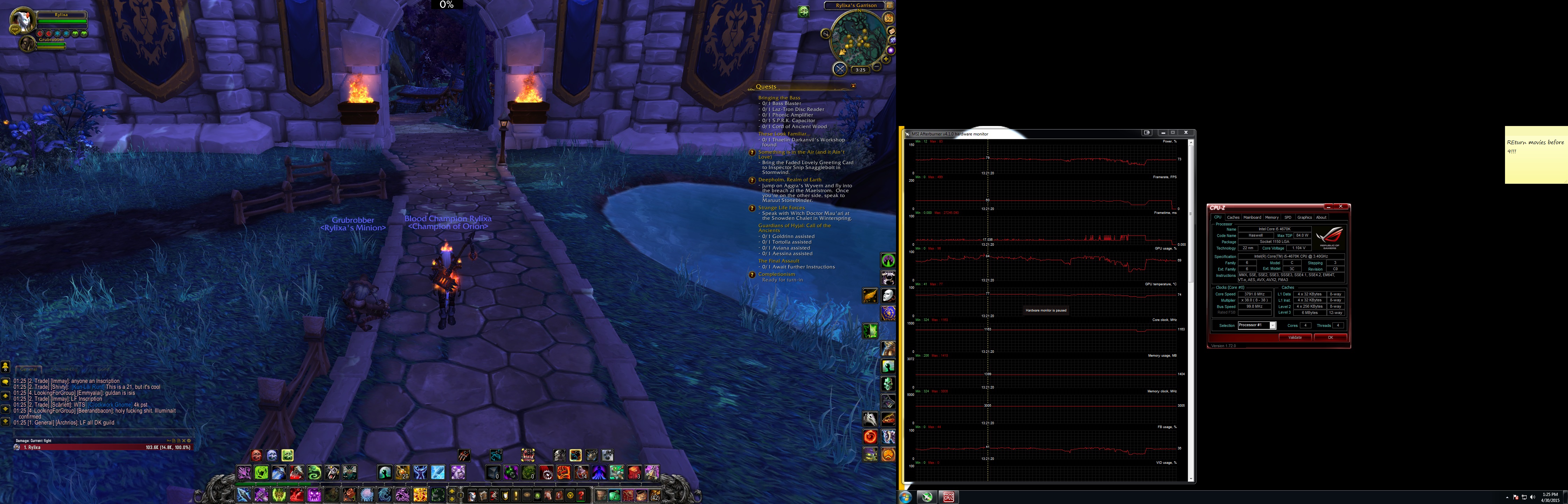
Same thing on this one, just in my garrison but it decides to drop. Unlike the other one I have frame time monitored and you can see severe spikes right before it decides to do it (not sure what that means). It's also weird they happen for around the same length of time. But considering how rare that pops up I'm wondering if it's the ram, since that doesn't always pop up in the tests and we know there is a problem there.
Spoiler: show
-
2015-05-02 10:16 #36
Sweaty Dick Punching Enthusiast
- Join Date
- Mar 2006
- Posts
- 7,993
- BG Level
- 8
- FFXI Server
- Ragnarok
Like I said, turn off vSync and show a drop.
-
2015-05-02 14:03 #37Relic Shield
- Join Date
- Mar 2007
- Posts
- 1,658
- BG Level
- 6
- FFXI Server
- Bahamut
- WoW Realm
- Cho'gall
If it is't a hardware failure, you can try using EVGA PrecisionX 16 and enabling "Kboost" instead of MSI Afterburner.
You will need to keep EVGA Precision open (minimized) for effects to persist.
-
2015-05-04 06:33 #38Salvage Bans
- Join Date
- Sep 2008
- Posts
- 955
- BG Level
- 5
- FFXI Server
- Ragnarok
As far as stuttering goes I think it's just my monitors not playing nice with each other. I read using DVI on 1 monitor and HDMI on another had issue, unfortunately my second monitor is HDMI only so I can't change that. I've tried a myriad of things to get rid of it, but all I was able to do was reduce the severity of it with my current set up. However I did find a post of someone using integrated graphics for his secondary monitor and his gpu for his main. I am currently doing that and so far I think the stuttering is fixed... for the most part. Running integrated has it's downside, I can't run 1080p video on my second monitor without wow stuttering again, not sure if that is something I can change. I'll play around like this and see how it goes.
-
2015-05-09 14:17 #39Salvage Bans
- Join Date
- Sep 2008
- Posts
- 955
- BG Level
- 5
- FFXI Server
- Ragnarok
Integrated GPU still produced stuttering. Swapped out DVI cable as well as tested my RAM stick #1 on Slot A for 9 hours, 15 passes and no errors. So I am currently running on that 1 stick and I am still getting stuttering and drops. Stuttering only really pops up after I've played for a while atm, was playing for around 3 hours before it started. Playing without vsync isn't an option as the stuttering is 10 times worse AND there is major screen tearing.
-
2015-05-10 13:14 #40
Sweaty Dick Punching Enthusiast
- Join Date
- Mar 2006
- Posts
- 7,993
- BG Level
- 8
- FFXI Server
- Ragnarok
vSync is the reason for the framerate drops in your screenshots. If you don't want to disable it and then post the numbers in order to get a proper diagnosis, you've hit the same deadend I explained a week ago.