 XI Wiki


Desktop: http://www.speedtest.net/result/4690575319.png
Laptop: http://www.speedtest.net/result/4690578522.png
Laptop is consistently better every time I run this.
Is there a driver or something I can get? The desktop was custom built. The laptop has the drivers it came with. So maybe I just picked up a bad driver for the lan for the desktop?
Edit: They're both plugged in via LAN not wireless if that matters
- Navigation
Results 1 to 10 of 10
-
2015-09-24 11:25 #1I'm more gentle than I look.

Mr. Feathers AKA Mr. Striations
All hail Lord Yamcha
- Join Date
- Aug 2007
- Posts
- 17,537
- BG Level
- 9

Getting better speeds on laptop than desktop...
-
2015-09-24 11:40 #2Member since 2006 and still can't think of a title.
- Join Date
- Oct 2006
- Posts
- 28,113
- BG Level
- 10
- FFXIV Character
- Acanis Lindri
- FFXIV Server
- Midgardsormr
- FFXI Server
- Bismarck
- WoW Realm
- Kil'jaeden

Could be firewall settings, limitations of the NIC, etc etc. Most likely not a driver issue.
-
2015-09-24 11:50 #3I'm more gentle than I look.
Mr. Feathers AKA Mr. Striations
All hail Lord Yamcha
- Join Date
- Aug 2007
- Posts
- 17,537
- BG Level
- 9
hmm well my Ethernet thing is capable of gigabit
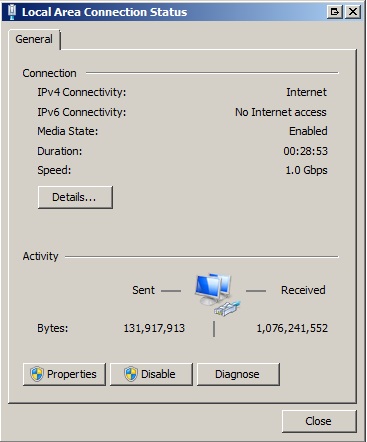
Only reason I suspsected driver is because I was only getting 65-75 at best on desktop and i downloaded a random ass driver and now I'm getting right around 90
-
2015-09-24 12:22 #4Member since 2006 and still can't think of a title.
- Join Date
- Oct 2006
- Posts
- 28,113
- BG Level
- 10
- FFXIV Character
- Acanis Lindri
- FFXIV Server
- Midgardsormr
- FFXI Server
- Bismarck
- WoW Realm
- Kil'jaeden
That's just showing total bytes received/sent since last reboot. Go into device manager, open up the network adapter driver and make sure link speed is set to 1.0gbs/full duplex.
-
2015-09-24 12:35 #5I'm more gentle than I look.
Mr. Feathers AKA Mr. Striations
All hail Lord Yamcha
- Join Date
- Aug 2007
- Posts
- 17,537
- BG Level
- 9
Well i was looking at the speed: gigabit(a little higher); not the activity; but I'll do that now
-
2015-09-24 12:37 #6I'm more gentle than I look.
Mr. Feathers AKA Mr. Striations
All hail Lord Yamcha
- Join Date
- Aug 2007
- Posts
- 17,537
- BG Level
- 9
Hmm Originally Posted by Melena


Says I have a gigabit card, but when I went to the link speed, it was set to auto, then i checked the options and the highest one is 100mbps full duplex
Edit:

My laptop is the same but has the gigabit option
-
2015-09-24 13:12 #7Member since 2006 and still can't think of a title.
- Join Date
- Oct 2006
- Posts
- 28,113
- BG Level
- 10
- FFXIV Character
- Acanis Lindri
- FFXIV Server
- Midgardsormr
- FFXI Server
- Bismarck
- WoW Realm
- Kil'jaeden
That is really weird that it's duplex is capped at 100mb. That's why the laptop is getting better speeds. I'd recommend going to killer's website, download the latest driver for your version of windows (guessing Win 7 64bit, then uninstall the current driver and re-install with the new downloaded one and see if that works.
-
2015-09-24 13:18 #8I'm more gentle than I look.
Mr. Feathers AKA Mr. Striations
All hail Lord Yamcha
- Join Date
- Aug 2007
- Posts
- 17,537
- BG Level
- 9
hmm there was some stupid network manager installed on my shit (I guess I just downloaded all the default driver programs when I had this computer put together). I got rid of that and installed the driver only for the lan card and got
http://www.speedtest.net/result/4690903450.png
That said, going into that menu and looking at the speed/duplex, 1gbit is still not an option (I have it on auto to have gotten the 108mbps)
-
2015-09-24 14:46 #9
It's completely normal that you only can force 10 or 100mbit/s HD/FD, giga has to be negotiated.
-
2015-09-24 14:54 #10BG's most likeable Québécois
Pens win! Pens Win!!! PENS WIN!!!!!
- Join Date
- Sep 2007
- Posts
- 37,887
- BG Level
- 10


Could it be that the router don't have full Gigabit ports and that the laptop is plugged into a gigabit one while the desktop is in a 100mb one? or maybe the port where the desktop is plugged can be defect?


