 XI Wiki


BG may not be the best place to ask this, but eh. I know there were a few other people once upon a time that had mass arrays like me, and the FreeNas / etc forums tend to have certain users that only want to see things done a certain way.
So, money's a harder thing to come by for me as of late and storage space is becoming a major issue. Given that we're probably still 10 years away from non-commercial purchasing of >10TB drives, I've gotta try and salvage some of my older sets of drives. Right now, my two storage arrays consist of RAIDZ2s with a 8x5TB set and a 10x3TB set. Both are >75% filled, with no backup redundancy ( ie. the files on each set are unique - in the past, one acted as a backup array of the other ).
Now, I keep everything that still works. I still have enough hard drives laying around to make 8 drive RAIDZ2 sets; it would consist of 1 set of 1.5TBs, 3 sets of 2TBs, and 1 set of 3TBs, with a few spares left over for everything but the 3s. That would be ~8+32.58+16TB of more space. That would allow me to use these 8-drive arrays as essentially a cheapo tape backup system, and offload some of the files that don't get used very often ( like disc copies ).
These sets would be a 'cold storage' set, where they don't operate unless they're being used and they would have to be cycled through one computer ( going to use the U-NAS NSC800 with Debian / ZFS; FreeBSD and Oracle derivatives don't seem to have drivers for the spare Adaptec HBAs I have laying around and I need to build this out of reused parts as much as necessary ) and keep the drives in their 'arrays' in hard drive storage boxes ( ProStorage had the cheapest system ).
So my question is... how much trouble am I really buying into here? Is this a workable strategy?
My thought process is that I could turn the computer on, and insert the drives once it's running ( dunno if the MB I have can support staggered drive spinup but I do know that case will support hot swap and Linux shouldn't auto mount the drives if I don't tell it to ) and do ZFS imports / exports as if the 8 drives in each array are just one giant USB drive that I'm docking / undocking in Windows. I think ZFS scrubs could probably be done once every 2 months? And keep bitrot from being an issue. That would also minimise the number of handlings each drive has per year.
- Navigation
Results 1 to 15 of 15
-
2015-11-23 06:46 #1Bagel

- Join Date
- Jan 2009
- Posts
- 1,412
- BG Level
- 6

That thread in which I do crazy setup stuffs...
-
2015-11-27 23:58 #2Bagel
- Join Date
- Jan 2009
- Posts
- 1,412
- BG Level
- 6
Whelp. Suppose I'll be finding out on my own. Going to have to remember how to build a ZOL from scratch, been a few months since I last tinkered. At least this setup is going to keep the process familiar in my mind haha.
For those curious, I got the UNAS in the mail today. I didn't actually expect to already have the cables on the backplanes but it does. Unfortunately they're the old kind ( SFF8087s ) and I need SFF8643s for my Adaptec cards. So probably going to just get the case ripped apart and put back together with the base hardware and maybe have enough time to do some preliminary testing tomorrow to make sure all the hardware works and leave off the ZFS / ZOL arrays until my next weekend.
-
2015-11-28 01:56 #3Sea Torques
- Join Date
- Dec 2010
- Posts
- 586
- BG Level
- 5
- FFXI Server
- Fenrir
What in the world do you have on your PC that you're needing that much storage?? I have trouble filling my 256GB SSD and a 2 TB HDD
-
2015-11-28 15:44 #4Chram
- Join Date
- Jun 2007
- Posts
- 2,625
- BG Level
- 7
- FFXI Server
- Valefor
Physical media images of every single disc you own?
-
2015-11-29 15:03 #5Bagel
- Join Date
- Jan 2009
- Posts
- 1,412
- BG Level
- 6
Yes, indeed. Most of the space is physical images. I dunno off hand how much it is in total because I had to move all the TV & Movies over and just leave one RAID for anime discs alone ( the 10x3 array is nothing but anime disc images ).
However, after getting tired of only being able to watch my media at home I decided to rip them as well. The rips of all my media combined with my music and saved YT videos ( mostly science presentation stuff ) I do know off hand, it comes out to around 16TiB. Then another 1-3TiB ( depending on how deep we are in the month ) for backups of all my computers ( 4 machines - Sophos UTM, my gaming machine, my JP VN machine, and my emulator machine - full backup at beginning of month, differentials every week ). Just under 1TiB for all my documents and images. Right now, as it stands, I have about 4TiB free on the bigger array, and somewhere between 2 and 3TiB on the smaller array. So I guess that means something near 21TiB in terms of total space allocated to disc images between the two arrays - so ripping everything saved me at least 5TiB ( actual savings is more, because the 16TiB number above includes my music / YT / etc ).
One thing that'll give me some space is going back through my discs and cleaning up all the ones I have blurays of now. I have a few series I know at least that I have both copies of DVD and BR, may as well recoup a little space by ditching the DVD copies and just keeping the BR.
Hit a slight snag on the build though. The 1U PSU I have has too short a 24 pin cable to reach the motherboard so I had to buy an extension cable. Won't have it till later 'cause of holidays. So have to wait for the next weekend to do anything after all. I think for the build what I'ma probably do is use the 8x1.5s array for backing up the backups / documents stuff, use the 8x3s array for backing up the rips, and then use the three 8x2s arrays to back up all the disc images. I dunno though, the 8x5s array is gonna stay storage / backups / ripped media for Emby so still need to figure out what the 10x3s array will be for. I don't think I'll leave the anime discs on it. It'll be a lot quicker / easier to access, so might just put the discs all on the cold storage and use the 10x3s array for backup of the rips.
-
2015-12-05 18:58 #6Bagel
- Join Date
- Jan 2009
- Posts
- 1,412
- BG Level
- 6
Well, got this built. My PSU is a little too long, it fits in the case but obstructs one of the case lid latches. I got it on there but it was a PITA.
Drive wise it seems to be working out fine. I created a Samba share to /zfscs and I'm setting up each RAIDZ2 group to mount to /zfscs. So in Samba it just shows up whichever one is currently plugged in / imported. Done two of them so far ( 1.5-A and 2.0-A ). I was starting to think that I could rip apart my old backup server and take the drives to make another 8x3, but I don't think 8x3 will be big enough. That's around 16TiB of space and /data/media on the Emby server is reporting 16.0T as space used...
Guess I'll just have to deal until I can afford another drive set. Might be worthwhile to buy a set of those 8TB archivers, but I'm still kinda hoping something else will hit market soonish.
-
2015-12-05 21:30 #7Old Merits
- Join Date
- Nov 2007
- Posts
- 1,002
- BG Level
- 6
- FFXI Server
- Asura
 I've hit 15 TB on my system, with less than 2 free, before I started having drive failures. I use my PC to replace having to dig through a cabinet of DVDs and BluRays, so everything gets ripped or downloaded to a hard drive and shared on the network to be searchable, and all the TVs have a media player device attached that can either play them natively or has PLEX. We don't have any channels in the house through broadcast or cable. I also did rips of all software discs we bought so they are easy to find, with virtual drive tools to mount them. I got tired of hunting through disc binders and shelves of a cabinet.
 Originally Posted by nayaminfenrir

I had 1 TB in 2006, when that was an unusual size. I broke 10 TB in 2010 or so.
I'd love to buid a backup system to copy data to, but I can't afford the drives faster than I fill them up, and my tower usually has all 7 SATA plugs full, plus every USB port for hard drives. I just had the controller board on a 4TB fail, which had less than 100 GB free, and I'm trying to get that replaced (with the keyed parts moved to the donor board).
FreeNAS with ZFS has been on my to do list for a while, but building a system to handle it, and especially having enough drives, has been out of the budget with health problems going on the past few years in my household.
-
2015-12-06 06:39 #8Bagel
- Join Date
- Jan 2009
- Posts
- 1,412
- BG Level
- 6
I don't have much love left for FreeNAS these days. It's a pain in the butt to keep it working, and they're very very finicky about the hardware you should be using. It's gotta be X Y Z or they don't want to hear about your issues. Ever since ZOL became stable enough to use on production, I've been running it with Debian 8 with no issues. It's a little bit more work to setup and get running ( gotta do everything by command line no webgui with ZOL ) but after that? Well lets just say I haven't had driver conflicts or failure to boot with ZOL vs FreeNAS. Originally Posted by bungiefan
As for building a system to handle it, this is what I built:
U-NAS NSC800
Supermicro Rangley C2758
Kingston 32GB ECC Memory
Riser cable ( The one in the UNAS is too long for the SM motherboard )
1u FSP PSU This guy is a wee bit too long for the case, recommend shorter if you can. Otherwise have fun getting that case put back together. Not looking forward to ever needing to take it apart...
24Pin Extension
So you can use the front USB port, adapter
These are all leftover / reuse parts from other builds:
Adaptec HBA Note - this uses a different connector ( newer ) than the SFF8087 that comes with the UNAS case
These are the 1.5s I have.... yes, they still have the Samsung labels and not the rebranded Seagate...
These are the 2.0s... they are rebranded Seagate drives
WD Reds
Toshiba 5TBs
I recommend the Reds for cost / size. I'm using the 3.0s in mine, can jump scales depending on what you can afford. Recommend not buying them all at the same time anyway, better to buy over time to get wider variety of serial numbers. The Toshibas are loud and hot - if you can deal with that though, they spin at 7200.
Note: I don't use the Rangley / Avoton board for transcoding ( although the Rangley might be fine, my experience is with the Avoton ). I didn't have much luck with it and Emby - it'll do one, maybe two streams tops. My ASUS Avoton C2550 that houses the 8x5TB setup ( I don't recommend that motherboard btw, not over the SuperMicro which is far far better and depending on sales cheaper - it's just that, I didn't know about the NSC800 case and had to use a DS380B which doesn't have room for a HBA card and thus needed a motherboard that could support 8 drives ) is connected with crossover ethernet bond to an i7-4770 ( each computer has 4 ethernet, so use two as crossover to directly talk to one another via NFS and the other two as upstream to the switch with LACP ) that I use as my web server with Emby and *it* does the transcoding / serving using the Intel Quicksync offload. No issues using the i7 for at least 5 simultaneous streams.
CPU loads get around 60-70% during ZFS scrubs with the Avoton, haven't had a chance to do any with the Rangley yet.
I replaced all the fans in the case with Noctuas. I also placed a 92MM thin Noctua fan that came off one of the low profile cpu coolers on top of the HBA to ensure enough air flow. The CPU is fine without a fan directly blowing on it; temps:
CPU temperatures Core 0: 39°C Core 1: 39°C Core 2: 40°C Core 3: 40°C Core 4: 38°C Core 5: 38°C Core 6: 38°C Core 7: 38°C
Drive temperatures sda: 34°C sdb: 31°C sdc: 31°C sdd: 32°C sde: 32°C sdf: 31°C sdg: 33°C sdh: 31°C sdi: 32°C
Ambient is 75F.
-
2015-12-06 22:00 #9Old Merits
- Join Date
- Nov 2007
- Posts
- 1,002
- BG Level
- 6
- FFXI Server
- Asura
Toshiba has burned me too many times to ever buy a drive from them again. WOrking a repair shop, the majority of dead hard drives I got were Toshiba under a year old. I've had 5 of them fail on me, all under the 18 month period. Their warranty support was rubbish, and when they gave me credit to buy new ones, it was just through their online store where all their drives had 1-2 star review averages.
They didn't even drop fully dead like other drive brands. No, they would either start going to sleep while in the middle of use (one would shut itself off after 40 minutes, when I was doing a large file copy), or they would suffer Input/Output errors to the point that they couldn't be reformatted. It would happen while I was writing data to the disk, and then when I ran a verification on the data, entire folders would be unreadable. Their warranty was to give me coupons to use on their web site, which would let you punch in multiple coupons but would only apply one of them, and had no button to remove any of the coupons (solution by them was to clear my web browser of all cookies), plus all of the drives on their site at the time had reviews of 1-2 stars out of 5, and were complaining of the same two failure rates, usually within a year of purchase.
-
2015-12-06 22:35 #10Bagel
- Join Date
- Jan 2009
- Posts
- 1,412
- BG Level
- 6
Everyone has a drive type that fits into that billet. Mine was Maxtor. Besides the usual market transitions, the floods a few years back changed a lot of the HDD market around. I'm a little shaky on trust with Seagate still but I'm starting to give them BOTD. I've only had two of the rebranded Samsung Seagate drives fail, and I have quite a few of them. I had one Toshiba fail after about 3 months, 12 months so far on the others without issue running 24/7. Western Digital became my default fallback after Samsung got out of HDDs, but I got a really good deal on a 10 pack of the Toshibas.
The Samsung branded 1.5TBs are like rocks. I've not had one fail and I bought them when they were new releases.
Although, if you have the money and the setup for the 5s, you may as well give the archival SMRs a try instead. ZFS and SMR have a lot of overlaps in how they write to benefit one another. Nexenta covers some of the bonuses / detriments; I'm still waiting a little longer ( A because I don't have the money to blow atm, and B because I want a better picture of real life MTBF rates ).
-
2015-12-14 21:56 #11Bagel
- Join Date
- Jan 2009
- Posts
- 1,412
- BG Level
- 6
So my inner computer lego playtime / tinkering desires have been repressed a while and recently kicked off again and I'm going to spend the next couple months trying to put a new network together.
Right now, my network looks like this:
Cox Business connection to Fitlet XA-10 LAN Sophos UTM Home Router to Cisco SG200-18 Switch -> Split into my network
Server Machine: Gryphon Z87 TUF | i7 4770S | 32GB | Several SSDs - 1 OS, 1 Local Backup ( so I can do it live copy except database ), 2 in RAID0 for /tmp ( Emby Transcoding )
Data Machine: Avoton C2550 | 16GB ECC | M.2 OS Disc | 8x5TB Toshiba drives
Gaming Machine: Max VII Impact | i7 4770S | 32GB | SSD + 2.5" Data Drive | nVidia 970 Stock Cooler
Emulator / hMail: Asus VIVO Celeron Package w/ 3.5" Drive
JP Machine / VN Machine: Intel NUC i5 Package w/ SSD and 2.5" Data drive
Backup Machine: Sabertooth RII MB | AMD Bulldozer 8350 | 32GB ECC | 10x3TB WD Reds on an areca ARC-1264il-16
Cold Storage Machine: Rangley C2758 | 32GB ECC | 8x Hot Swap as per earlier discussion
So, CB just upgraded my Modem and my connection to 20x100 ( up / down ) and I'm limited now by the Fitlet ( before it was more than enough, I think I was 4x20? lol ). I'm going to spend some time over the next few months buying components piecemeal to keep the money spread out, but my current thought / speculation is to do this:
First, I want to virtualize most of the computers. The only reason I have so many spread out this way is due to trying to save electric bill costs after moving to Arizona. I had to get out of my old heaterbox computers because they were costing me around 300$ a month in electricity / cooling ( just to keep ambient around 80 ). All this energy efficient stuff chopped me down to a 1/3 of that, but it's a lot of different computers that I don't really need. I'm looking specifically at Proxmox 4, and how they can now do a pretty good emulation with passthrough. Read quite a few people now being able to successfully setup gaming machines as VMs and I want a piece of that.
Right now mostly focusing on just cases and external parts. I ordered two of these (link) Silverstone KL06s.
My thought process is to use the 6 2.5" SSD bays as direct passthrough OS drives to any VMs. The 3.5" bay I'll use as the host OS / data drive for the gaming rigs. SuperMicro is coming out with some really neat V5 MATX boards (link) that'll fit nicely in the cases, and the cases will support a dual 12cm cooler for the CPU. That leaves me 1 5.25" bay for CDROM ( I've got a few opticals left hanging around, may as well put them in something even though the SM boards have IPMI ). That V5 board has 10 SATA connectors on it, and is DDR4 so it'll support ECC memory up to 64GB which will be a cheap set with more than enough room to run a few VMs / containers.
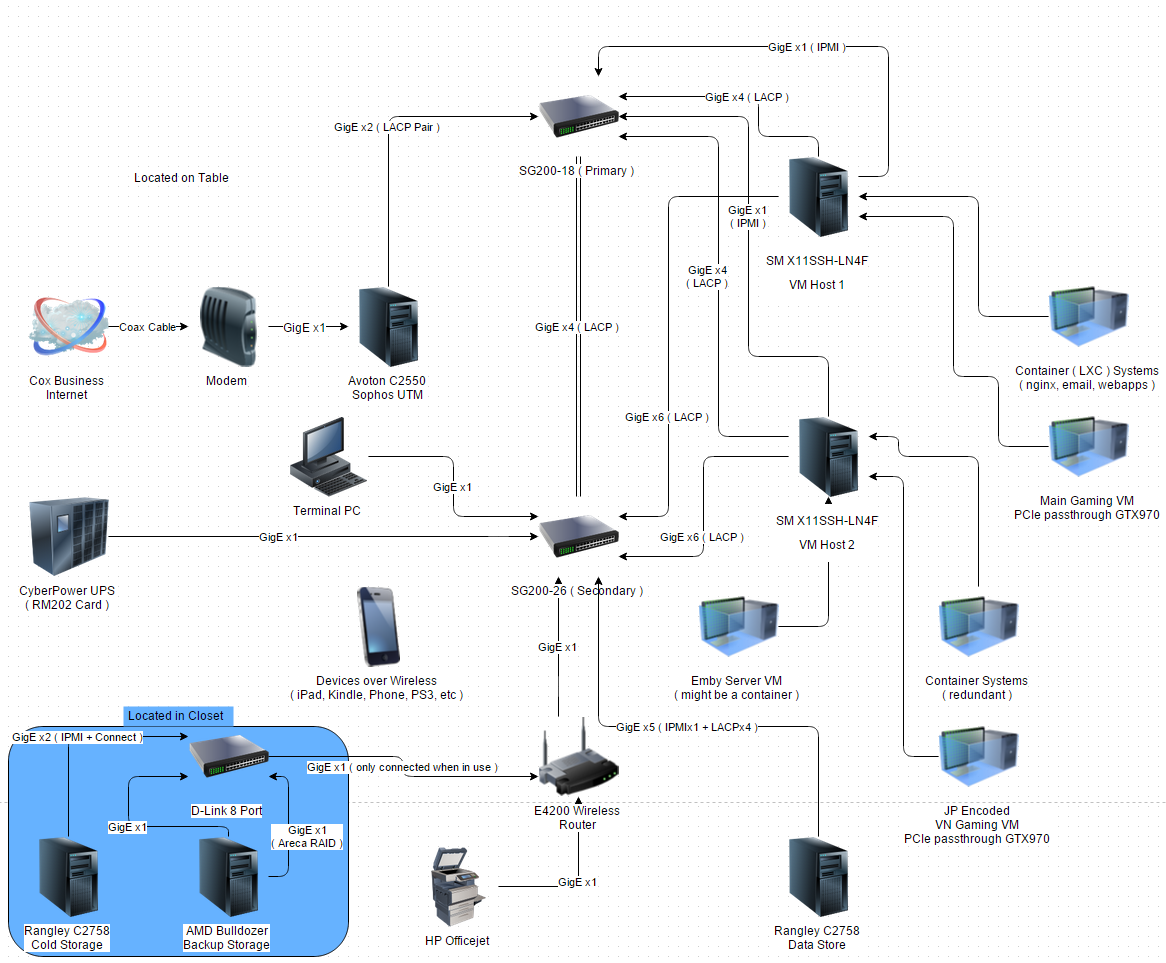
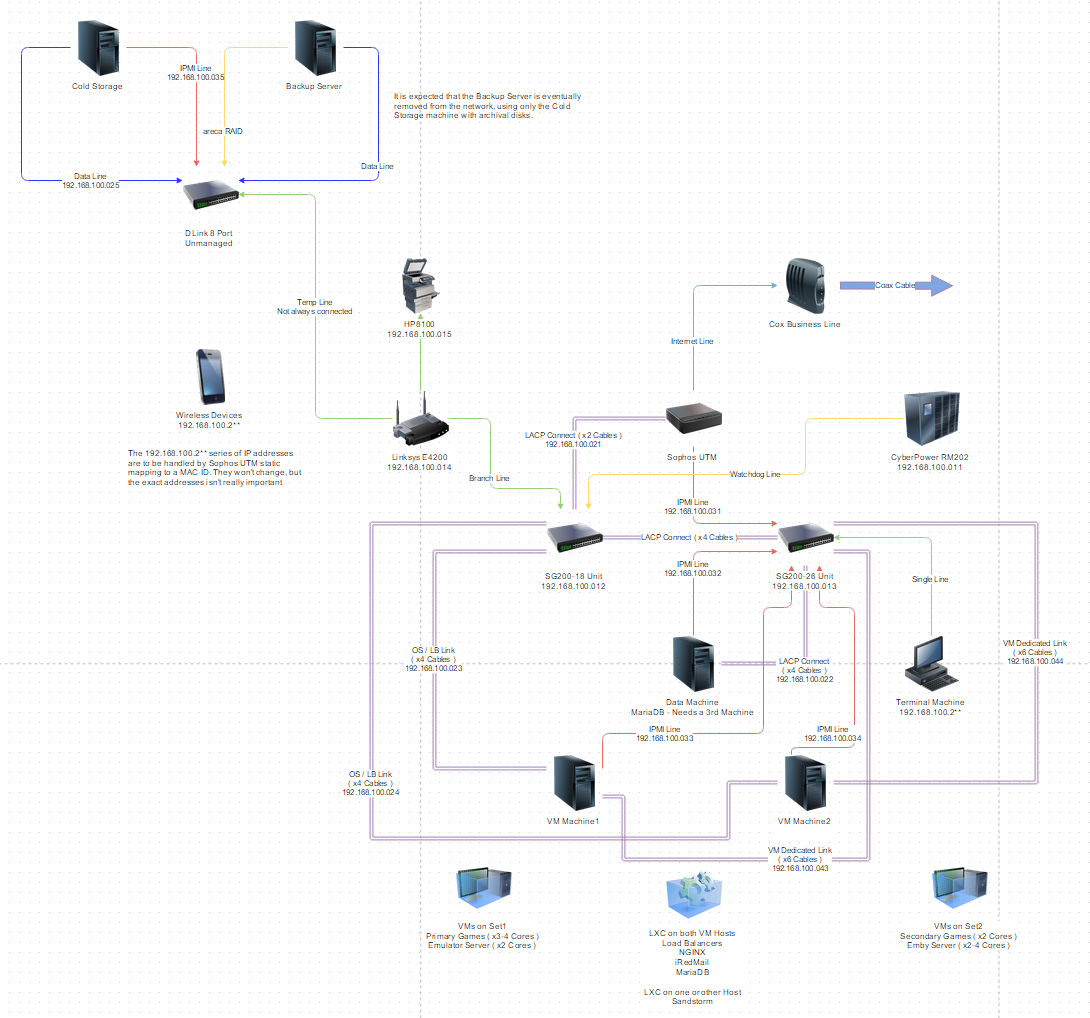
I've got a couple 6 slot GigE Intel controllers laying around that I'll use, one in each box, and then I'll reuse my nVidia GTX970 in the box for the main gaming VM and put the spare nVidia GTX770 ( what I was using before the 970 ) into the other machine. That'll give me 8 NICs on each VM host machine ( 2 on the board, 6 in the slot ) + the IPMI. My current switch only supports 4 LACP bonds, so I may need to upgrade it. I'd like to run 4 pairs of bonds from each machine - 3 bonds going to the network switch, 1 pair going directly to the Data Machine. That'll use up all the ethernet ports available on the Data Machine ( 4 on the motherboard ) but with everything in a VM anyway it would be fine. Might have to find a way to share internet connections so Data can update, if I can't push updates through the VM host servers.
Of course, right now the Data Machine is the Avoton, and so for this to work I'ma need to buy another mainboard. I've been extremely pleased with the SM version of the Rangley C2758, so I think I'll just build a carbon copy of the Cold Storage machine to be the Data Machine using the second Rangley I'm buying as the board for it. That'll free up the Avoton, which will make an excellent Sophos UTM machine I'm thinking.
I do still have some things to figure out though. First, I'm kinda hoping I can get the processors through work. I'll have to keep my eye out, I haven't seen any Skylake stuff on the employee store yet and I dunno if they'll throw Xeons on it to begin with ( they're rather picky on those ). The V5s have internal graphics ( Intel® HD Graphics P530 - link ), and part of my plan hinges on those.
The gaming VMs will be running Windows with passthrough on the discrete cards. But the other VMs / containers - while running terminal Linux - still need some sort of graphics output. I'm not sure if the SM motherboard will work with them. They have ASPEED for the IPMI onboard, but I 'unno if that's gonna be good enough to install on. I mean, the IPMI java interface should work just fine as a terminal, but it's not like Linux is gonna detect that and I don't want Linux running on the discrete cards.
The P530s should be though, assuming the VMs / containers can use it. All this stuff is so new I don't have any reviews or information to go off of ( and given how much luck I had gleaning information about Avotons / Rangleys when they first came out from work I'm not holding hope I'll get anything meaningful that way this time either ).
If not, I guess I'ma have to buy a second discrete graphics card, and I would prefer to avoid that.
I want to move away from hMail ( it's been a stop gap since I quit using SmarterMail ) and the one stop shops have gotten quite a bit more mature now after the initial PRISM breakaways. Shouldn't be too difficult to throw that in a container though.
I've read about people using Plex / Emby as a VM, but I am still a little concerned about that too. There should be enough power on these MBs / chipsets to run a game VM and a transcode server at the same time ( even though the game VMs won't be running except when I'm playing games ). Still, I'm a worrywort about this kinda stuff. Don't have a margin of error for the money that'll get laid up into this project for things not to work out.
For the game VMs themselves, my plan is to use Steam stream to actually play the games. That will let me keep the server boxes headless ( I have those fake / emulator 1080p HDMI clips if need be for Windows VM on the discrete cards ) - preferably everything is done over IPMI or an OS integrated web management ( like Proxmox has ). Use RDP or my old Multiplicity license to set things up on the VMs, then swap over to just using Steam. Make Steam autologin / autoboot and then it's just turn the computer on and play games, turn off when done. I can then use one of those little boxes ( the ASUS VIVOs ) as a Linux machine ( maybe just straight SteamOS, it's based on Jessie anyway ) for office / internet / game streaming to my monitors.
-
2015-12-16 17:31 #12Bagel
- Join Date
- Jan 2009
- Posts
- 1,412
- BG Level
- 6
Okay, so general layout planning to how it should look once I buy everything I don't have on hand ( I estimate over the next 4 or 5 months, given bonuses / tax returns etc ):
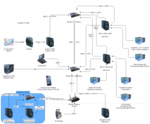
Look sane? I think I managed to put enough holes where plugs were needed. Gonna be tight on just two switches though.
Edit: Okay I think I fixed it. SG200-18 is what I currently have, was just gonna buy another one of those but it's not enough. An SG200-26 will be enough, again just barely. I think.
Edit2: Question for those that might know. I use Sophos UTM's free home use license ( 50 IP addresses ) and I'm okay there, but one huge problem I have with Sophos is that they still don't support websockets. Thus, for things like Sandstorm and, well anything modern Sophos's proxy balancer is useless. Given that they have had tickets in for years now to support websockets and still don't do so, does anyone know of a system like Sophos with a home licensing set that does support websockets? If not, I'm going to have to get inventive with how I manage my redundancy. It'd be nice for the router to handle it all, but if I had to I guess I could put haProxy on the Fitlet...
-
2015-12-16 19:09 #13
Sweaty Dick Punching Enthusiast
- Join Date
- Apr 2010
- Posts
- 922
- BG Level
- 5
- FFXI Server
- Fenrir
If they do put them up on the EPP site I wouldn't expect them to be up there until mid-end Q1'16 given that they just released, but I'd be hard pressed to shell out MSRP for them. Originally Posted by Kryssan
-
2015-12-16 19:12 #14Bagel
- Join Date
- Jan 2009
- Posts
- 1,412
- BG Level
- 6
Well, so far I've actually been pretty shocked about prices on the Skylake stuff. I've seen those MBs I intend to use with IPMI onboard for less than 300$ on Amazon. The processors are going for 200-400 a pop on NEB... EPP tends to be annoying more often than not esp. whenever they try to do 'sales by hour' and crash the site. Still, it does save one money...
-
2015-12-30 10:34 #15Bagel
- Join Date
- Jan 2009
- Posts
- 1,412
- BG Level
- 6
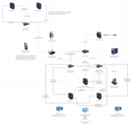
I think I managed to figure out how to do this with my current SG200-18. Saves a few hundred bucks at least. Still gonna be a while to build everything, probably have most of the parts I need by summertime.


Similar Threads
-
Uk new build ideas plz
By Deband in forum TechReplies: 13Last Post: 2009-07-28, 21:52