 XI Wiki


Gore Magala, fuck yeah
Should mean the frenzy mechanic is in
- Navigation
Results 81 to 100 of 534
-
2025-02-04 18:32 #81Mr. Bananagrabber

Sweaty Dick Punching Enthusiast
- Join Date
- Dec 2005
- Posts
- 55,718
- BG Level
- 10
- FFXI Server
- Asura


-
2025-02-04 19:51 #82Mr. Bananagrabber
Sweaty Dick Punching Enthusiast
- Join Date
- Dec 2005
- Posts
- 55,718
- BG Level
- 10
- FFXI Server
- Asura
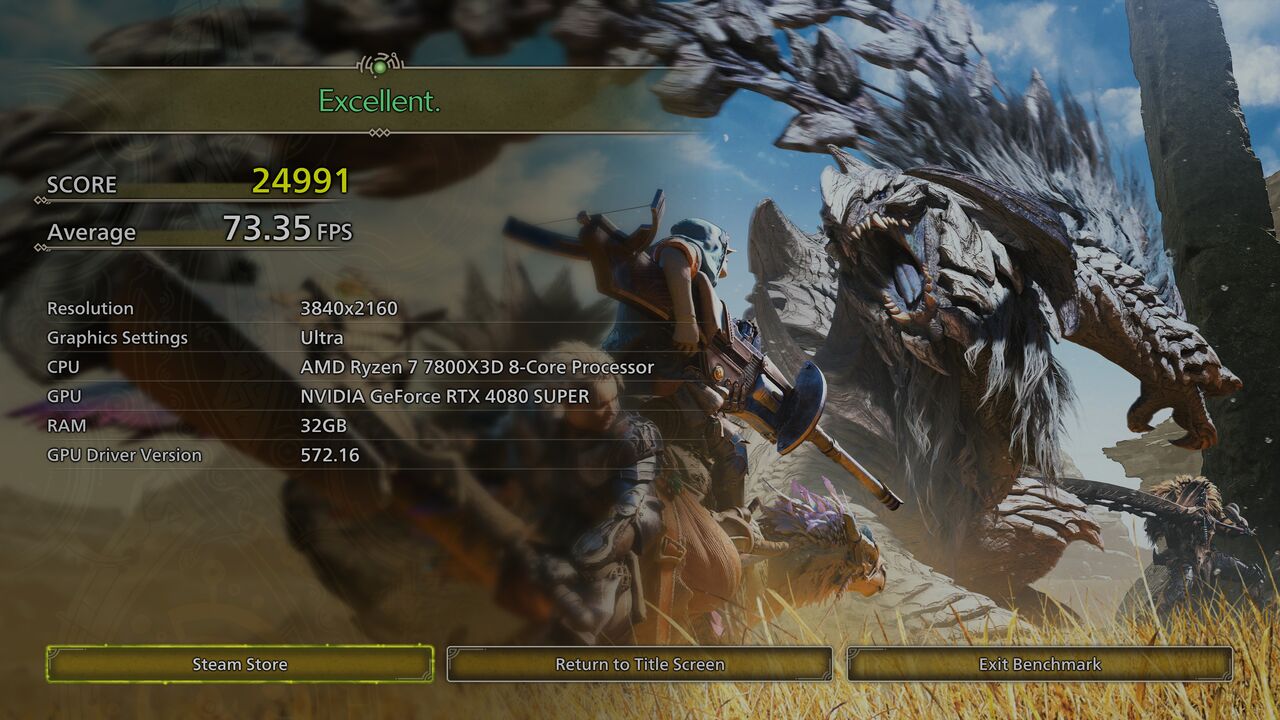
Going off the benchmark they've definitely shored up performance quite a bit
4090/i9-13900HX laptop, Ultra settings DLSS Quality/No FG averaged 85 fps @ 1440p.
The game is very CPU heavy though, even in the benchmark could see I was getting CPU limited at points.
-
2025-02-04 23:36 #83D. Ring
- Join Date
- Jul 2011
- Posts
- 4,819
- BG Level
- 7
- FFXI Server
- Lakshmi

11th Gen Intel(R) Core(TM) i7-11700k @ 3.60GHz, NVIDIA RTX 3080, with 32GB RAM gets 52.49 average FPS at Ultra settings 2560x1440. Their town area needs a lot of performance work though, as it really struggles in that section compared to everything else.
-
2025-02-05 00:32 #84Old Odin
- Join Date
- Mar 2008
- Posts
- 6,104
- BG Level
- 8
- FFXIV Character
- Cyn Dane
- FFXIV Server
- Hyperion
- FFXI Server
- Valefor
Spoiler: show
-
2025-02-05 00:46 #85Nidhogg
- Join Date
- Sep 2007
- Posts
- 3,565
- BG Level
- 7
- FFXIV Character
- Amelia Diremii
- FFXIV Server
- Gilgamesh
- FFXI Server
- Cerberus
No Gammoth tease makes me a little sad. Was fully expecting it.
-
2025-02-05 00:48 #86Old Odin
- Join Date
- Mar 2008
- Posts
- 6,104
- BG Level
- 8
- FFXIV Character
- Cyn Dane
- FFXIV Server
- Hyperion
- FFXI Server
- Valefor
I'm sure there will be a few surprises left, and title updates, and the G rank expansion... and more title updates...
Edit: I am super happy about Gore. I was scared that him being in Rise meant he might not be in this one, and I really wanted to fight him in a mainline console/pc game. Big ice beam monster looked cool too.
-
2025-02-05 01:26 #87Ridill

- Join Date
- Jun 2007
- Posts
- 12,852
- BG Level
- 9
- FFXIV Character
- Teisha Linne
- FFXIV Server
- Moogle
- FFXI Server
- Bahamut

I think they did say they're keeping a lot of surprises this time around, the previous games were kind of supposed to attract new audiences to the series, so they showcased a lot of monsters before release, but this time they didn't feel the need to do that anymore or something
-
2025-02-05 09:13 #88Mr. Bananagrabber
Sweaty Dick Punching Enthusiast
- Join Date
- Dec 2005
- Posts
- 55,718
- BG Level
- 10
- FFXI Server
- Asura
After the success of World and Rise outside of Japan the series is now a known quantity to the Western world.
They just need to say "new Monster Hunter" and the game will sell itself (performance concerns aside)
-
2025-02-05 22:48 #89Resident Moogle
- Join Date
- Mar 2007
- Posts
- 13,219
- BG Level
- 9
- FFXI Server
- Asura
Beta 2 client is up for predownloading on Steam. Unsure if it's the same build as the last beta just with crossplay on, or whatever build the benchmark is based on. Will probably know tomorrow if I get blackscreened on my setup like the first beta.
-
2025-02-05 22:50 #90Mr. Bananagrabber
Sweaty Dick Punching Enthusiast
- Join Date
- Dec 2005
- Posts
- 55,718
- BG Level
- 10
- FFXI Server
- Asura
They stated previously it's still an older build, so whatever performance improvements were seeing in the benchmark shouldn't be in the new beta.
-
2025-02-06 21:52 #91Resident Moogle
- Join Date
- Mar 2007
- Posts
- 13,219
- BG Level
- 9
- FFXI Server
- Asura
Which sucks for my old 1060gtx (not that this game on Ultra on 4090s look that much better than Worlds did). In any case the beta is up early.
-
2025-02-07 02:17 #92Old Odin
- Join Date
- Mar 2008
- Posts
- 6,104
- BG Level
- 8
- FFXIV Character
- Cyn Dane
- FFXIV Server
- Hyperion
- FFXI Server
- Valefor
Eh, the graphics have that weird made-for-console quality that World had, but the effects and lighting are way better, so the overall look is a lot more immersive, IMO. Originally Posted by Kaisha

-
2025-02-07 18:58 #93Formerly BGTemp // TERA Fan
- Join Date
- Feb 2009
- Posts
- 5,008
- BG Level
- 8
- FFXI Server
- Bismarck
So has anyone done some extensive private lobby hosting yet? It seems awkward AF. When I finally got my son into my lobby and we did a hunt, afterwards he was back in his own solo lobby. There isn't much online about this yet but its a big step backward or down from how easy it was in World.
-
2025-02-07 19:07 #94It's all dicks and airplanes
- Join Date
- Jun 2009
- Posts
- 2,311
- BG Level
- 7
- FFXIV Character
- Cia Mir
- FFXIV Server
- Balmung
It is weird/awkward, you can make a room that doesn't disband after a hunt, but I couldn't begin to tell you how because the menus are weird and didn't function how I expected.
-
2025-02-07 19:42 #95D. Ring
- Join Date
- Jul 2011
- Posts
- 4,819
- BG Level
- 7
- FFXI Server
- Lakshmi
I haven't tried it myself, but it does seem like that's how it works for quests. If you want to explore together, use Environmental Link and you can roam around in the same game world.
https://www.youtube.com/watch?v=JCEfkT1Klb0
Excerpt from video description:
Forming a Link Party: This is the first step to playing with friends. Go to the Start Menu Communication then Link Party then Invite to Link Party. You'll see lists of players in your lobby, quest members, and people you've interacted with. Invite your friend!
Stay together after quests, making it easy to do multiple hunts in a row.
Get notified when a Link Party member starts a quest, so you can join in.
Have a dedicated chat and voice chat channel just for your Link Party.
Getting into the Same World:
Being in a Link Party doesn't automatically put you in the same game world. You need to use Environment Link for that.
How to Use Environment Link:
Go to the Start Menu then Communication then Link Party then Invite All to Environment Link. This brings your Link Party members into your environment so you can explore and hunt together in the same world.
Crossplay: Monster Hunter Wilds has crossplay, so you can play with friends on different platforms (PS5, Xbox Series X/S, and PC).
Lobbies: You'll be placed in a lobby when you start the game. You can join your friends' lobbies or invite them to yours.
Hunter ID: You can use Hunter IDs to find and add friends, similar to how friend codes work on Nintendo systems.
Tips for Joining Friends:
Communicate: Use the in-game chat or voice chat to coordinate with your friends.
Check Lobby Settings: Make sure your lobby settings allow your friends to join.
Check Link Party Status: If you're having trouble inviting someone to your Link Party, make sure you're not already in one. You might need to leave your current Link Party first.
-
2025-02-07 20:33 #96Formerly BGTemp // TERA Fan
- Join Date
- Feb 2009
- Posts
- 5,008
- BG Level
- 8
- FFXI Server
- Bismarck
Thank you. I see what they want us to do now, which still seems more complex that what we had. We got it to work. I think the biggest confusion is that in order to go on expeditions together you have to link environments. Even if they are already in your lobby they all "leave" and reenter, You can't go on quests this way though.... so you have do unlink.
Having to get a lobby number and use that to join also seems backwards... anyway. aside from that we goochi. Appreciate it!
-
2025-02-08 00:47 #97Ridill
- Join Date
- Jun 2007
- Posts
- 12,852
- BG Level
- 9
- FFXIV Character
- Teisha Linne
- FFXIV Server
- Moogle
- FFXI Server
- Bahamut
Convoluted menus? Sounds very Monster Hunter-y to me
-
2025-02-08 01:52 #98Resident Moogle
- Join Date
- Mar 2007
- Posts
- 13,219
- BG Level
- 9
- FFXI Server
- Asura
It took three of us over a minute to figure out how the frick to add someone to your Hunter list so you could invite them. Still doesn't help that you have to join a lobby, then a party, then environment link, to play together. Why is that last step even there, just automate it when you join a party and slip in a warning it'll screw over whatever you're currently trying to do in your current instance. Can you even have multiple quests going on in the same link like you could MHW lobbies?
-
2025-02-08 17:48 #99
Sweaty Dick Punching Enthusiast
- Join Date
- Mar 2006
- Posts
- 7,993
- BG Level
- 8
- FFXI Server
- Ragnarok
Pouring through the menus myself and the number of keyboard-only option choices on PS5 is definitely too damn high.
I don't know what it is about modern games, but every time I get a new one it's almost guaranteed to strain my fucking eyes out of the box. I remember FF16 didn't even have the option to turn off whatever the culprit was until a post-launch patch. I think it was related to motion blur, but that's already off in Wilds so not sure what's causing it this time. Super irritating.
-
2025-02-08 17:52 #100Mr. Bananagrabber
Sweaty Dick Punching Enthusiast
- Join Date
- Dec 2005
- Posts
- 55,718
- BG Level
- 10
- FFXI Server
- Asura
It's the anti-aliasing most likely. Poorly implemented TAA looks like someone just smeared vaseline over the screen, and this game definitely has that going on if you're not playing on PC and able to use DLSS instead


Similar Threads
-
Grand Theft Auto VI (PS5/XSX) - November 19, 2026
By 6souls in forum Gaming DiscussionReplies: 113Last Post: 2026-09-19, 12:52 -
Wild Hearts (PC/PS5/XSX) - monster hunting with building elements - 16 Feb, 2023
By Gokulo in forum Gaming DiscussionReplies: 11Last Post: 2023-02-23, 07:04 -
JoJo's Bizarre Adventure | R(emaster) (PC/PS5/XSX/PS4/XB1/NSW) - 2022
By Xno Kappa in forum Gaming DiscussionReplies: 101Last Post: 2022-10-23, 12:21 -
Metro 3: Exodus (PC/PS4/XB1) | Enhanced Edition (PC/PS5/XSX) - 2021
By 6souls in forum Gaming DiscussionReplies: 21Last Post: 2022-10-06, 20:13 -
Alan Wake | Remastered (PC/PS5/XSX/PS4/XB1) | Switch Remaster - TBD
By ArchDizzle in forum Gaming DiscussionReplies: 64Last Post: 2022-05-12, 14:45 -
Gods & Monsters: Immortals Fenyx Rising (PC/PS5/XSX/PS4/XB1/NSW/STD) - December 3, 2020
By 6souls in forum Gaming DiscussionReplies: 20Last Post: 2020-12-17, 12:04 -
Monster Hunter: World (PC/PS4/XB1) | Iceborne (2019/2020)
By 6souls in forum Gaming DiscussionReplies: 3008Last Post: 2020-02-03, 10:36