XI Wiki

Here's the most recent AV list that I've seen, has a lot of the newest items
http://files.bluegartr.com/366c94784...82c2afe47b.zip
- Navigation
Results 2521 to 2540 of 3070
Thread: Show me those .dats!


-
2013-02-04 00:46 #2521Melee Summoner

- Join Date
- Jan 2013
- Posts
- 45
- BG Level
- 1
- FFXI Server
- Sylph

-
2013-02-04 00:51 #2522The Spooniest of Bards
- Join Date
- Nov 2009
- Posts
- 1,676
- BG Level
- 6
- FFXIV Character
- Lucian Esperance
- FFXIV Server
- Sargatanas
- FFXI Server
- Shiva
What location is the Elvaan M flaming G.Axe?
-
2013-02-04 00:52 #2523Melee Summoner
- Join Date
- Jan 2013
- Posts
- 45
- BG Level
- 1
- FFXI Server
- Sylph
rom\288\6
-
2013-02-04 00:54 #2524The Spooniest of Bards
- Join Date
- Nov 2009
- Posts
- 1,676
- BG Level
- 6
- FFXIV Character
- Lucian Esperance
- FFXIV Server
- Sargatanas
- FFXI Server
- Shiva
Thanks, not in Altana View, any chance for a small list of pulse weapon locations? Originally Posted by godlytarutaru

-
2013-02-04 00:58 #2525Melee Summoner
- Join Date
- Jan 2013
- Posts
- 45
- BG Level
- 1
- FFXI Server
- Sylph
The altanaview list I posted a couple posts up has all but the greataxe and the great katana, GKT for elvaan M is 288\5,
(the GAXE and GKT start at 288\1 and alternate between the 2, GKT odd GAXE even)
-
2013-02-04 01:16 #2526The Spooniest of Bards
- Join Date
- Nov 2009
- Posts
- 1,676
- BG Level
- 6
- FFXIV Character
- Lucian Esperance
- FFXIV Server
- Sargatanas
- FFXI Server
- Shiva
Adding the Flame Gaxe effect to an Afterglow Ukon should be as simple as copying the fire effect off the Flaming Axe and pasting it at the end of the Ukon dat, yeah?
-
2013-02-04 01:32 #2527Melee Summoner
- Join Date
- Jan 2013
- Posts
- 45
- BG Level
- 1
- FFXI Server
- Sylph
yes just paste what's after the first end right after the first end on ukon, you'll need to delete 1 of the 4 ends at the bottom when you're done though
-
2013-02-04 04:30 #2528Flowery Twats
- Join Date
- Jul 2008
- Posts
- 3,583
- BG Level
- 7
 That's awesome, thanks so much. Next question is how do I make it into an actual .dat? Like I mentioned earlier (as did Tamoa), we followed the guide to recoloring dats to the letter, but upon re-colouring the dat and doing that alpha jazz, clicking convert mqo to dat, nothing happened. Originally Posted by Stromgarde
Also, this is my attempt at aforementioned carnwen/excali mandau recolor, I think it's better than my last attempt, but not sure up to your standard, so kinda looking or feedback (also not sure, as mentioned) how to make it an actual .dat so I can compare both in altana viewer.

-
2013-02-04 08:05 #2529Cerberus
- Join Date
- Nov 2006
- Posts
- 443
- BG Level
- 4
- FFXI Server
- Titan

People still modding dats fuck yeah!
wich other games where as easy as ffxi for dat modding would be lots of fun doing custom stuff.
-
2013-02-04 11:04 #2530The Tower
- Join Date
- Apr 2005
- Posts
- 2,160
- BG Level
- 7
- FFXIV Character
- Stromgarde Siren
- FFXIV Server
- Gilgamesh
- FFXI Server
- Siren

I'm not sure what particular problems you might be experiencing, but the solution will vary slightly depending on what tools you have available. Are you using photoshop in conjunction with the Nvidia DDS plugin, or are you using changetex instead?
Edit: If I had to guess, I'd say you're editing only the bmp (which doesn't matter, but is easier to open) and not the dds (which is harder to open, but the only file that matters for recolors).
Spoiler: show
-
2013-02-04 11:12 #2531Insert witty title here
- Join Date
- Jun 2007
- Posts
- 1,191
- BG Level
- 6
- FFXI Server
- Phoenix
Can't wait to check out those dat's, godlytaru! Thanks a bunch!!
-
2013-02-04 15:52 #2532Flowery Twats
- Join Date
- Jul 2008
- Posts
- 3,583
- BG Level
- 7
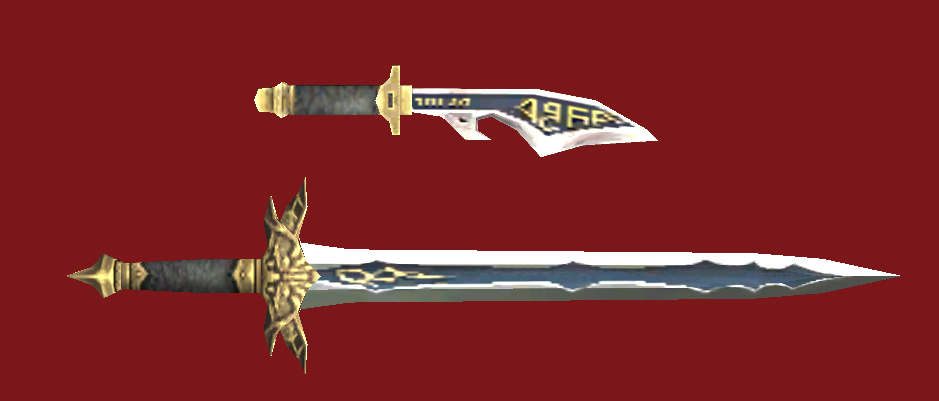
Firstly I'd just like to say that that dagger is fucking beautiful and I want it :Q
Secondly, I figured out what I did wrong. I got up to editing the .dds, making an alpha channel, applying it to the bmp, formatting it to DXT3 or something, but thought that was it saved. Wasn't saving it again after as a new .dds. Did that and now it works. Although mine still doesn't look as hot as yours lol, any chance you could upload that for me xD?
Edit: A little bit rougher around the edges than yours lol:
Spoiler: show
Next challenge to practics my photoshop skills (before 30 day trial runs out)... see if I can make those skadi/denali pieces the same color scheme as AF3 hat.
-
2013-02-04 17:15 #2533The Tower
- Join Date
- Apr 2005
- Posts
- 2,160
- BG Level
- 7
- FFXIV Character
- Stromgarde Siren
- FFXIV Server
- Gilgamesh
- FFXI Server
- Siren
A.

B. /displayhead off
Something else I would recommend is saving a copy of the original texture BMP either as a PNG or PSD file before doing any work on it at all. Repeated imports|openings/exports of any sort will degrade the file being worked on, like a third generation copy of a VHS tape. To see an example of this, open the .DDS file, change like... one pixel in the corner, then save it. Then close the editing program. Do this like 5 times, then using model viewer import the texture to the model, which should by this point be taking on a green tinge and suffering from severe artifacting.
-
2013-02-04 18:27 #2534Flowery Twats
- Join Date
- Jul 2008
- Posts
- 3,583
- BG Level
- 7
A. Awesome, ty
B. No! I like my assassin's creed hood!
C. Yeah thanks, I read about how you only wanna do that dds conversion stuff once
-
2013-02-04 19:21 #2535The Tower
- Join Date
- Apr 2005
- Posts
- 2,160
- BG Level
- 7
- FFXIV Character
- Stromgarde Siren
- FFXIV Server
- Gilgamesh
- FFXI Server
- Siren
Well, in that case I'd suggest using the Raider's Vest as your source material rather than the hat, since it allows for a two-tone pattern. The dds conversion is something that you do want to only do once, but that's only to grab the initial texture. I strongly recommend converting the .dds into a .psd file as your workspace, and using File > Save As to dds in order to create a usable file. That way the images will never degrade and you can keep the original texture intact as a layer should you need to go back to it.
-
2013-02-04 22:11 #2536RIDE ARMOR
- Join Date
- Mar 2012
- Posts
- 12
- BG Level
- 1
Godlytaru, would it be too much to ask for a similar setup to Esvediums for Mithra? I'd be likely to blow something up before I got it right. Thanks in advance :D
-
2013-02-04 22:22 #2537The Tower
- Join Date
- Apr 2005
- Posts
- 2,160
- BG Level
- 7
- FFXIV Character
- Stromgarde Siren
- FFXIV Server
- Gilgamesh
- FFXI Server
- Siren
Blowing things up is part of the process. You have all the tools you need not twenty posts up, make backups and don't be afraid to break something.
-
2013-02-04 22:52 #2538Cerberus
- Join Date
- Feb 2008
- Posts
- 463
- BG Level
- 4
- FFXI Server
- Carbuncle
Well, for the record I totally understood everything! :D Great tutorial! Originally Posted by godlytarutaru
-
2013-02-04 23:02 #2539Cerberus
- Join Date
- Jun 2010
- Posts
- 461
- BG Level
- 4
Wondering if there is a better DAT for Mithra SAM Empy body? The default looks rather manly, I thought i recalled a "sexier" version was floating around? Thanks for any replies.
-
2013-02-05 00:07 #2540Melee Summoner
- Join Date
- Jan 2013
- Posts
- 45
- BG Level
- 1
- FFXI Server
- Sylph
That's because Mooshy sees hex like tank sees the matrix. He doesn't see 1s and Fs he sees swords, staves, and mithra in red dresses Originally Posted by Mooshywooshy