 XI Wiki

1. Open a katana in VRS.
2. Take note of which skeleton the katana is using.
3. Delete the katana mesh.
4. Open and select the meshes of desired dagger.
5. Copy and paste into the katana DAT path block.
5. Select the mesh object(s) for the dagger and rotate mirror across the appropriate axis.
6. Alter skeletal weights of the dagger to match those found in step 2.
7. Export as normal via the Katana's DAT path.
- Navigation
Results 2741 to 2760 of 3070
Thread: Show me those .dats!


-
2013-05-16 22:27 #2741The Tower

- Join Date
- Apr 2005
- Posts
- 2,160
- BG Level
- 7
- FFXIV Character
- Stromgarde Siren
- FFXIV Server
- Gilgamesh
- FFXI Server
- Siren


-
2013-05-17 01:42 #2742Old Merits
- Join Date
- Jun 2008
- Posts
- 1,203
- BG Level
- 6
- FFXI Server
- Valefor

how might I change the music for Delve farming? I'm none too fond of it.
-
2013-05-17 05:20 #2743
- Join Date
- Feb 2009
- Posts
- 8,774
- BG Level
- 8
Vana'tunes, Spoony Bard(idk if this is supported by windower 4), or simply mute the game(honestly who listens to this games sound track / sound effects.) and listen to some real music to pass the time.
-
2013-05-17 18:40 #2744Old Merits
- Join Date
- Jun 2008
- Posts
- 1,203
- BG Level
- 6
- FFXI Server
- Valefor
I'm aware of these options. And some people do have the music/sfx running, namely myself at the very least. Originally Posted by Shenrien

let me rephrase, could i just rename a wav file like other soundtracks in ffxi, and if I can, which bgw file would it be.
-
2013-05-17 20:40 #2745The Tower
- Join Date
- Apr 2005
- Posts
- 2,160
- BG Level
- 7
- FFXIV Character
- Stromgarde Siren
- FFXIV Server
- Gilgamesh
- FFXI Server
- Siren
FINAL FANTASY XI\sound9\win\music\data\music057-067.bgw; it should be one of those, I can't tell you for sure though because I don't have managed directx installed on this computer.
-
2013-05-18 23:47 #2746Flowery Twats
- Join Date
- Jul 2008
- Posts
- 3,583
- BG Level
- 7

Also, is there an updated altana viewer list anywhere? Latest one I could find is missing naarkuul/delve equipment.
-
2013-05-19 12:46 #2747Cerberus
- Join Date
- Feb 2008
- Posts
- 463
- BG Level
- 4
- FFXI Server
- Carbuncle
Squeenix is lookin for an ffxi equipment artist.. Anyone anyone?
-
2013-05-19 13:07 #2748D. Ring
- Join Date
- Jul 2008
- Posts
- 4,529
- BG Level
- 7
- FFXI Server
- Phoenix
do it!
-
2013-05-19 14:25 #2749The Tower
- Join Date
- Apr 2005
- Posts
- 2,160
- BG Level
- 7
- FFXIV Character
- Stromgarde Siren
- FFXIV Server
- Gilgamesh
- FFXI Server
- Siren
As much as I'd like to make a contribution, the contest's content is unsuited to my abilities; It's a pure texture job, the shape and size is already fixed, and I've never been much of an artist.
-
2013-05-21 01:08 #2750Fake Numbers
- Join Date
- Dec 2006
- Posts
- 92
- BG Level
- 2
- FFXI Server
- Asura
Ugui is the same model as Ashura(in Model Viewer). Originally Posted by Darkmagi
Small request(I think), any chance to get these two .dats ported from Hume F to Mithra?
http://forum.neko-sentai.com/attachm...1&d=1367900517
http://forum.neko-sentai.com/attachm...0&d=1367900517
http://forum.neko-sentai.com/attachm...1&d=1368245072
http://forum.neko-sentai.com/attachm...1&d=1368245072
-
2013-05-22 03:29 #2751Blue Magic is Best Magic
- Join Date
- Jul 2007
- Posts
- 8,215
- BG Level
- 8
Anyone have a decent great sword .dat to replace ugly Bereaver? I kinda like this one:
http://ffxidats.caarrie.com/index.php?topic=3550.0
http://ffxidats.caarrie.com/index.ph...n=2176;preview
but it's Elvaan only, needs more Hume :/
Wow that is epic, great job! Originally Posted by Stromgarde
-
2013-05-22 05:04 #2752I pullout to go pee.
- Join Date
- Sep 2008
- Posts
- 3,739
- BG Level
- 7
- FFXI Server
- Carbuncle
- WoW Realm
- Winterhoof
That looks pretty sick lol, better than the plain model of Bereaver anyway
-
2013-05-22 10:02 #2753The Tower
- Join Date
- Apr 2005
- Posts
- 2,160
- BG Level
- 7
- FFXIV Character
- Stromgarde Siren
- FFXIV Server
- Gilgamesh
- FFXI Server
- Siren
lol, that thing again; I made the mesh for it but the texture actually came from somewhere else. I had contacted the guy who put out the original version a while ago but he says that he found the texture image 'somewhere' via image searching. The thing is though, if you open up the texture for it it's clear that it's a 3D model from another game, and not Soul Calibur. Anyway, I have a better mesh version with that texture around here somewhere, I'll find it later today. Meanwhile, here's the V5* edition submitted for your approval.
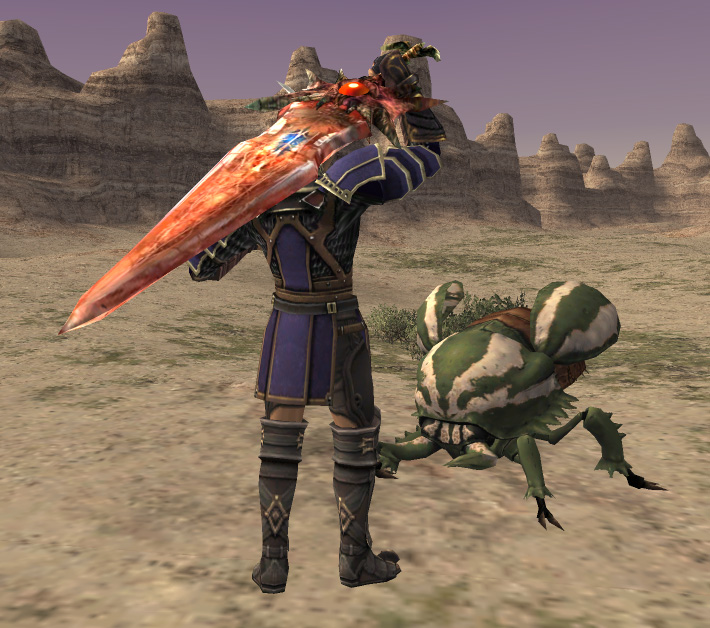
Download, all races
Spoiler: show
-
2013-05-22 10:04 #2754I pullout to go pee.
- Join Date
- Sep 2008
- Posts
- 3,739
- BG Level
- 7
- FFXI Server
- Carbuncle
- WoW Realm
- Winterhoof
Now it just needs to be made for a hume!
-
2013-05-22 10:26 #2755The Tower
- Join Date
- Apr 2005
- Posts
- 2,160
- BG Level
- 7
- FFXIV Character
- Stromgarde Siren
- FFXIV Server
- Gilgamesh
- FFXI Server
- Siren
It's in my bg box for all races, I guess I derped and forgot to link it :X
Edit: fixed
-
2013-05-22 12:02 #2756The Tower
- Join Date
- Apr 2005
- Posts
- 2,160
- BG Level
- 7
- FFXIV Character
- Stromgarde Siren
- FFXIV Server
- Gilgamesh
- FFXI Server
- Siren
Alright, found the file. Here you go, cursed sword fans.
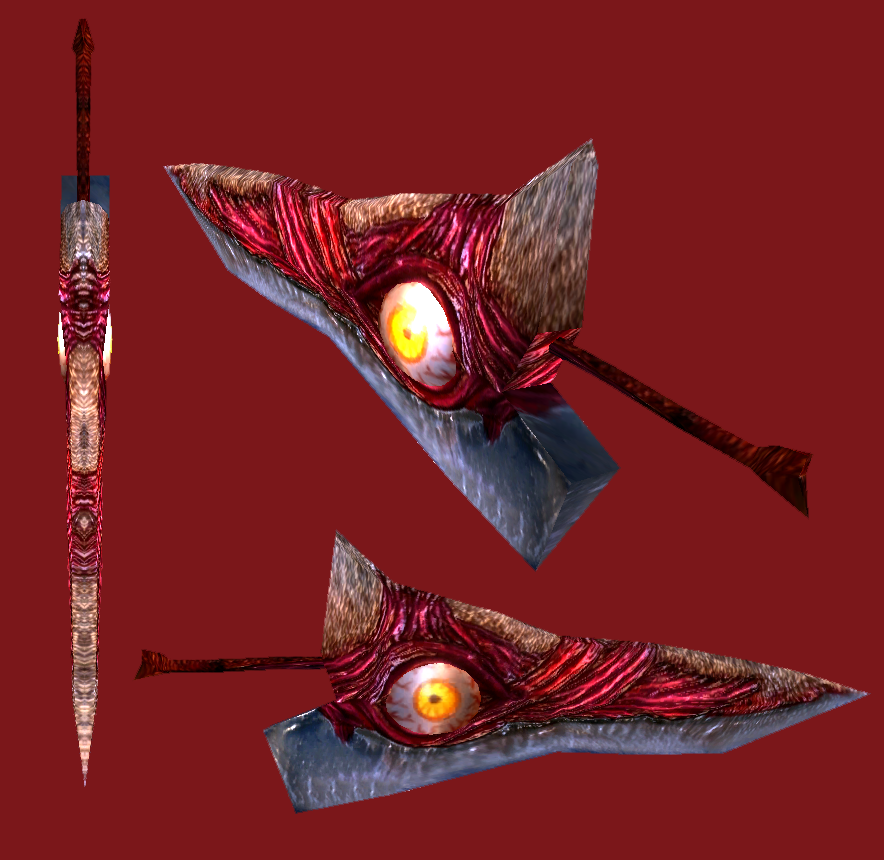
Download, all races
Please note that no races other than Elvaan M have been tested, so if you run into problems PM me and I'll get it fixed.
-
2013-05-22 15:39 #2757The Tower
- Join Date
- Apr 2005
- Posts
- 2,160
- BG Level
- 7
- FFXIV Character
- Stromgarde Siren
- FFXIV Server
- Gilgamesh
- FFXI Server
- Siren
Don't think I've uploaded this before, but here's a version of Requiem which uses the official texture that I have been using as a replacement for Bereaver on my system.

Download, all races
-
2013-05-22 15:50 #2758Fake Numbers
- Join Date
- Dec 2006
- Posts
- 92
- BG Level
- 2
- FFXI Server
- Asura
Doesn't work on Mithra(or should I say it works, but it's not where it should be lol), and on Hume F the sword is in the correct place, but the sparkle is on the ground. Easy fix Stormgarde?
-
2013-05-22 15:51 #2759Leader of the Brain Eating Space Monkeys
- Join Date
- Dec 2009
- Posts
- 425
- BG Level
- 4
- FFXI Server
- Ramuh

I love this so much

How difficult would it be to have it as a 1 handed sword?
-
2013-05-22 15:57 #2760The Tower
- Join Date
- Apr 2005
- Posts
- 2,160
- BG Level
- 7
- FFXIV Character
- Stromgarde Siren
- FFXIV Server
- Gilgamesh
- FFXI Server
- Siren
I'll start looking into it. Originally Posted by Projekt.Ein
Edit: Ok, it should be fixed, just tested it out with plasticsurgeon myself. Here's the fixed link:
Download
Originally Posted by Scizor


