XI Wiki

Thanks. Where is the most up to date version of MV and AV at? KI has a dec 2010 release..is the the most current?
- Navigation
Results 1581 to 1600 of 3070
Thread: Show me those .dats!


-
2011-05-06 19:01 #1581Salvage Bans

- Join Date
- Sep 2008
- Posts
- 972
- BG Level
- 5
- FFXI Server
- Quetzalcoatl

-
2011-05-06 19:54 #1582D. Ring
- Join Date
- Feb 2007
- Posts
- 4,736
- BG Level
- 7
- FFXI Server
- Quetzalcoatl

I have a semi decent hoard of random .dats but i have no clue what each .dat is for. there any method i can use to figure out what each .dat is without going through trial/error testing? I wish people had put a readme file when they make stuff just so that i can figure out wtf it even is.
Apparently it's nearly a gig of them too...
-
2011-05-07 03:30 #1583Blue Magic is Best Magic
- Join Date
- Jul 2007
- Posts
- 8,215
- BG Level
- 8
http://ffxidats.caarrie.org/index.php?topic=1472.0 Originally Posted by Nishida

MV Feb 2011
http://ffxidats.caarrie.org/index.php?topic=1116.0
AV dec 2010
-
2011-05-07 03:31 #1584Blue Magic is Best Magic
- Join Date
- Jul 2007
- Posts
- 8,215
- BG Level
- 8
Don't think so Originally Posted by Khajit

-
2011-05-07 06:42 #1585The Tower
- Join Date
- Apr 2005
- Posts
- 2,160
- BG Level
- 7
- FFXIV Character
- Stromgarde Siren
- FFXIV Server
- Gilgamesh
- FFXI Server
- Siren
 What you could try doing is appending a list at the end of an existing model viewer list containing the a new folder where you would drop in the files. To simplify things, you could just rename the dats numerically, 1.dat-whatever.dat, then rename them further as you go. Originally Posted by Khajit
-
2011-05-09 23:46 #1586Puppetmaster
- Join Date
- Jul 2008
- Posts
- 58
- BG Level
- 2
- FFXI Server
- Valefor
Update broke mooshy's glowing Ele +2 staves. SE must have updated the skeleton files, I'm going to try replacing the file in a bit with the one he already has, incase it's no difference.
-
2011-05-12 06:40 #1587Sea Torques
- Join Date
- Sep 2008
- Posts
- 613
- BG Level
- 5
- FFXIV Character
- Makwa Ironwill
- FFXIV Server
- Brynhildr
- FFXI Server
- Sylph

Anyone have a copy of the "Galkan Dynasty Bow" .dat that Mooshy made a while ago?
Also, what's the .dat location for Zazarg's laugh? Looking to switch it with the normal Galka laugh, if it's possible.
-
2011-05-13 09:42 #1588Salvage Bans
- Join Date
- Mar 2010
- Posts
- 769
- BG Level
- 5
- FFXI Server
- Leviathan
What are the .dats for the abyssea cons? I'm a little sick of lagging out when I 4box.
-
2011-05-25 10:37 #1589Pandemonium
- Join Date
- Jul 2008
- Posts
- 4,875
- BG Level
- 7
- FFXI Server
- Bismarck
As usual, I take out my general disdain with equipment that looks awfully washed-out by modifying it to suit my tastes:
http://img17.imageshack.us/img17/277...nemblmbody.jpg
Only the body piece has been toyed with thus far, but this conveniently provides comparison pieces in the leg, feet, and head armor.
If there is interest, I'll package it all when I'm done.
-
2011-05-25 14:36 #1590Insert witty title here
- Join Date
- Jun 2007
- Posts
- 1,191
- BG Level
- 6
- FFXI Server
- Phoenix
That BLM body looks a lot more crisp/detailed. I like it!
-
2011-05-25 16:06 #1591An exploitable mess of a card game
- Join Date
- Sep 2008
- Posts
- 13,197
- BG Level
- 9
- FFXIV Character
- Gouka Mekkyaku
- FFXIV Server
- Gilgamesh
- FFXI Server
- Diabolos

Kohan, do you have plans on sharpening AF3+2 RDM Body? That shit looks faded as hell.
-
2011-05-26 05:52 #1592Pandemonium
- Join Date
- Jul 2008
- Posts
- 4,875
- BG Level
- 7
- FFXI Server
- Bismarck
Thank you. I hope the whole set turns out as well. Originally Posted by Esvedium
Once I'm done with BLM, I could try. Originally Posted by Yugl
-
2011-05-26 07:28 #1593Salvage Bans
- Join Date
- Sep 2008
- Posts
- 972
- BG Level
- 5
- FFXI Server
- Quetzalcoatl
I think at one point I made Ramuh and Heraldic Imps more crisp..iirc it basically just entails popping a layer mode onto the original texture? If so it shouldn't be hard to touch up any textures.
-
2011-05-27 00:58 #1594Pandemonium
- Join Date
- Jul 2008
- Posts
- 4,875
- BG Level
- 7
- FFXI Server
- Bismarck
If you want your final DAT to look appealing and/or professional, simply adding a layer of color and adjusting the opacity usually won't do it. While layering is one of the tools I utilize, I often have multiple layers of different colors and/or shades, adjust color ranges very carefully (to avoid imagery that looks over-saturated and filled with compression/degradation artifacts), remove sections of the texture and adjust them as a separate image before returning them to the original, and then put on the finishing touches pixel by pixel. Depending upon the sort of texture I require, I may use outside texture sources, filters, or by-hand work, if necessary.
Coincidentally, I have been considering uploading my collection of the guides that used to be hosted on FFXI DATs to help others get into the habit, and that is now complete. The link is below.
This includes all of the instructional guides that were formerly hosted on the site, re-named more logically to be easily found. Their original authors are also explicitly credited. Furthermore, the applications sub-directory contains all of the tools anyone should need to do their own editing, minus those which they can always reliably obtain elsewhere (e.g., GIMP). The model viewers I've included are, as of today, the most up-to-date ones too, containing lists from May, 2011.
http://www.megaupload.com/?d=TTP0XZIV
-
2011-05-27 07:27 #1595Salvage Bans
- Join Date
- Sep 2008
- Posts
- 972
- BG Level
- 5
- FFXI Server
- Quetzalcoatl
My way is just the in a pinch way...your way is much better for quality. :D
-
2011-05-28 13:43 #1596Salvage Bans
- Join Date
- Jul 2008
- Posts
- 784
- BG Level
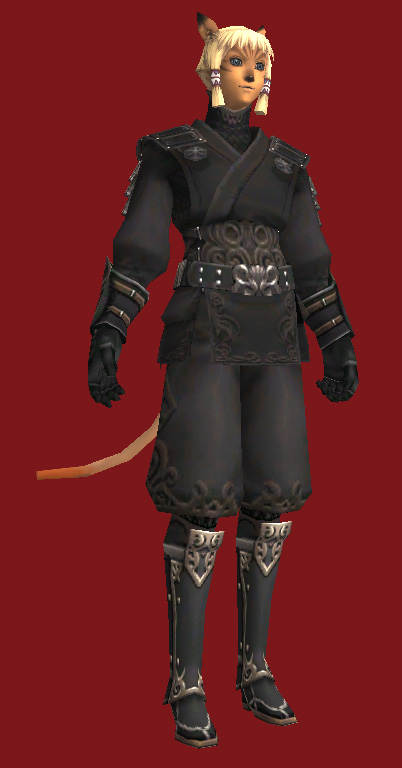
- 5
Just leveled NIN and want to replace the tights with these. Which dat do I replace (where do they goooo)? Thanks~ Originally Posted by Stromgarde
-
2011-05-28 13:51 #1597Relic Shield
- Join Date
- Jun 2007
- Posts
- 1,693
- BG Level
- 6
- FFXIV Character
- Zimt Zucker
- FFXIV Server
- Sargatanas
Race? Originally Posted by Lyn
Mithra: 253/57.dat
-
2011-05-28 14:09 #1598Salvage Bans
- Join Date
- Jul 2008
- Posts
- 784
- BG Level
- 5
Sorry, yes, Mithra. Thanks a ton!
-
2011-05-31 11:52 #1599Cerberus
- Join Date
- Feb 2010
- Posts
- 410
- BG Level
- 4
- FFXI Server
- Odin

Does anyone have a mavi body with a clean back? Without that pin thing or any adjustment to it really <.<
Or at least anybody know a viable piece to replace it with?
-
2011-06-14 13:06 #1600If you stopped to actually learn something you might not post these uninformed posts.
- Join Date
- Oct 2006
- Posts
- 1,493
- BG Level
- 6

There was a tool that could open a .DAT and show up long the dds file was in size within the DAT. Where can I find it? Any tool out there to "dissect" a DAT? (not model viewer nor FFXI TOOL)
edit: found it
http://www.grumpyrarab.ffximc.com/pa...homeframe.html