 XI Wiki


Okay, that's weird then.. because my TMPIN0/1/2 are always in like.. the low 40s-high 50s and there's no way in heck my system could really be running that high. I dunno though.
- Navigation
Results 941 to 960 of 3692
-
2010-07-01 17:00 #941Cake Mix

Sweaty Dick Punching Enthusiast
- Join Date
- Sep 2006
- Posts
- 30,320
- BG Level
- 10
- FFXIV Character
- Cakey Yama
- FFXIV Server
- Leviathan
- FFXI Server
- Unicorn


-
2010-07-01 17:01 #942
Sweaty Dick Punching Enthusiast
- Join Date
- Mar 2006
- Posts
- 7,993
- BG Level
- 8
- FFXI Server
- Ragnarok
Low 40s high 50s is quite a range, assuming you meant the opposite ;p .. if those are fine. If your board is the same as mine, TmpIn0 will be your southbridge, 1 will be your CPU and 2 will be your northbridge.
-
2010-07-01 17:04 #943Cake Mix
Sweaty Dick Punching Enthusiast
- Join Date
- Sep 2006
- Posts
- 30,320
- BG Level
- 10
- FFXIV Character
- Cakey Yama
- FFXIV Server
- Leviathan
- FFXI Server
- Unicorn
no, that's what I mean.. though currently, my three tmpins are sitting around the low 50's while my cores are sitting at around 40C (I have a game open at the moment, and it's using about uh.. 50% of each core, so like 150% out of 300% for easier to understand terms.
Still.. I'm on a GIGABYTE MA790X-UD4P with the whole 'cooling' shit, so that's what's confusing. Also, it used to stay around the high 30s C range, but all the sudden it's jumped, and it's not like my system has gotten hotter.
-
2010-07-01 17:07 #944CoP Dynamis
- Join Date
- May 2009
- Posts
- 275
- BG Level
- 4
- FFXI Server
- Gilgamesh
- WoW Realm
- Velen
You could definitely upgrade the processor cheaper than buying a new PC. You just have to make sure it's compatible with your motherboard and you're good to go. Although, since it's an older processor, I'm not sure how old your motherboard is. Originally Posted by Toth

-
2010-07-01 17:11 #945
Sweaty Dick Punching Enthusiast
- Join Date
- Mar 2006
- Posts
- 7,993
- BG Level
- 8
- FFXI Server
- Ragnarok
Ah thought you meant between 0/1/2. Yeah the temps between the cores/CPU (TmpIn1) will be big gap, that's normal. I have a Gigabyte 890FX, so our readouts should be the same. Here's mine right now chillin idle: Originally Posted by Akiyama
http://img9.imageshack.us/img9/1722/tempsr.jpg
If your temps jumped lately, that's probably just summer talkin.
-
2010-07-01 17:24 #946Cake Mix
Sweaty Dick Punching Enthusiast
- Join Date
- Sep 2006
- Posts
- 30,320
- BG Level
- 10
- FFXIV Character
- Cakey Yama
- FFXIV Server
- Leviathan
- FFXI Server
- Unicorn
Hrm.. no, not really. :/ Originally Posted by Celeras
This is right after I got out of my game:
Spoiler: show
and this is right now:
Spoiler: show
See? Tmpin0/1/2 never change at all. You'd think they would?
and that Fan RPM is crazy. Then again, these are stock Cooler Master fans that came with my RC690 so.. I really need to replace these like woah.
-
2010-07-01 17:30 #947
Sweaty Dick Punching Enthusiast
- Join Date
- Mar 2006
- Posts
- 7,993
- BG Level
- 8
- FFXI Server
- Ragnarok
Well the Max for tmp1 changed to something crazy high for a phenom o.O
Reboot into bios and check your "PC Health Status" and see if those numbers match up. There probably won't be a SB temp listed there, but you should see CPU+NB, which will be Tmp1(57'C)/2(50'C) respectively. Shoot me a PM with what it says so we stop hijackin shit.
-
2010-07-01 18:05 #948New Merits
- Join Date
- Sep 2008
- Posts
- 232
- BG Level
- 4
- FFXI Server
- Lakshmi
I tried running this program at both high and low and windows shuts it off after the black screen comes up. Anyone know how to fix this?
-
2010-07-01 19:05 #949CoP Dynamis
- Join Date
- May 2009
- Posts
- 275
- BG Level
- 4
- FFXI Server
- Gilgamesh
- WoW Realm
- Velen
Re-read back through previous posts. I think some people are getting tired of answering the same questions over-and-over again, i.e. me Originally Posted by Veikuri
-
2010-07-01 19:22 #950RIDE ARMOR
- Join Date
- Apr 2010
- Posts
- 17
- BG Level
- 1
Hello,
I just bench marked at a measly 1550 on the high settings.
I have an AMD 6400 dual (3.2ghz) Processor
Nvidia 8800 GT 1Gb
4 GB Corsair Ram
Windows 7 64 Bit
(Not sure what my MOBO is)
I've got about 800ish dollars to burn and I'm looking to be able to run the game on the highest settings at a reasonable frame rate.
Would that be achievable?
I'm thinking of replacing my CPU and GFX card with an AMD Phenom II x6 1090T as well as an ATI Radeon HD 5780 1GB.
I would prefer to run the game at 1920 x 1080
Any advice?
-
2010-07-01 22:13 #951New Merits
- Join Date
- Jan 2010
- Posts
- 227
- BG Level
- 4
- FFXI Server
- Bismarck
 get both the 1055T + 5870 or a GTX470, i would try and grab another 4gig of ram and a A/M CPU cooler (megahelems, Corsair H50, ect.) Over clock to 3.5ghz on the AMD chip and your set i am sure. Originally Posted by Kenpachii
Should be had for less then 800$ The vid card will be the majority of you loot .... maybe a GTX465 (250$) + cooler (50-80$)+4gig Ram (150$) + CPU (200$) thats about 650-700$ before tax so you got some head room. pending on your case i would really look to getting a proper case (buy my old case antec 900 in the For sale section 90$ >> http://www.bluegartr.com/forum/showthread.php?t=95330)
Everyone upgrading should take a look into the BG forsale thread you can get some good deals on parts there as alot of us are upgrading and some stuff there is still top notch.
-
2010-07-01 22:19 #952Puppetmaster
- Join Date
- Apr 2010
- Posts
- 65
- BG Level
- 2
I want to try and run this game on my macbook. Until I can get the lolps3 version. I've never felt so much loathing for myself as when typing those two sentences.
Anyway, I'm just a hair under the recommended minimum graphics card, everything is above minimum. My questions are:
Is it worth it to partition Windows or will XIV not even run at the lowest setting for the 6 months till ps3?
Windows 7 or something else? I haven't used it for years.
-
2010-07-01 22:54 #953A. Body
- Join Date
- Oct 2006
- Posts
- 4,003
- BG Level
- 7
- FFXI Server
- Cerberus
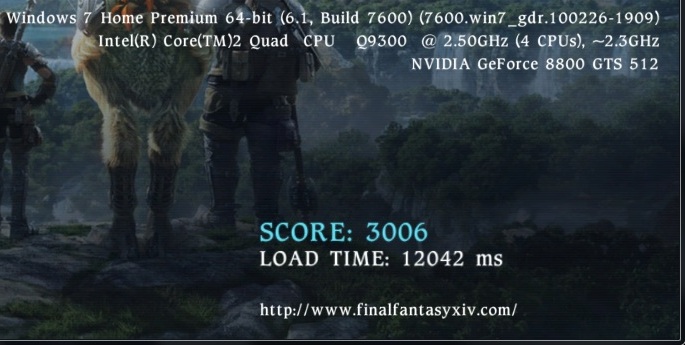
Hey everyone! So I tried the Benchmark and got a 1808 Score (Load Time: 17373 ms) under High Settings and I am not quite sure how well that is. Also, I wasn't sure how the 1920 x 1080 resolution would fit on my screen since the maximum I can change my desktop resolution is 1600 x 1200 which it currently is at.
May consider upgrading my PC in the later part of this year a little bit, any suggestions that doesn't break the bank?
Specs in pic, not sure if its missing something atm (edit: 4 gigs of corsair ram)
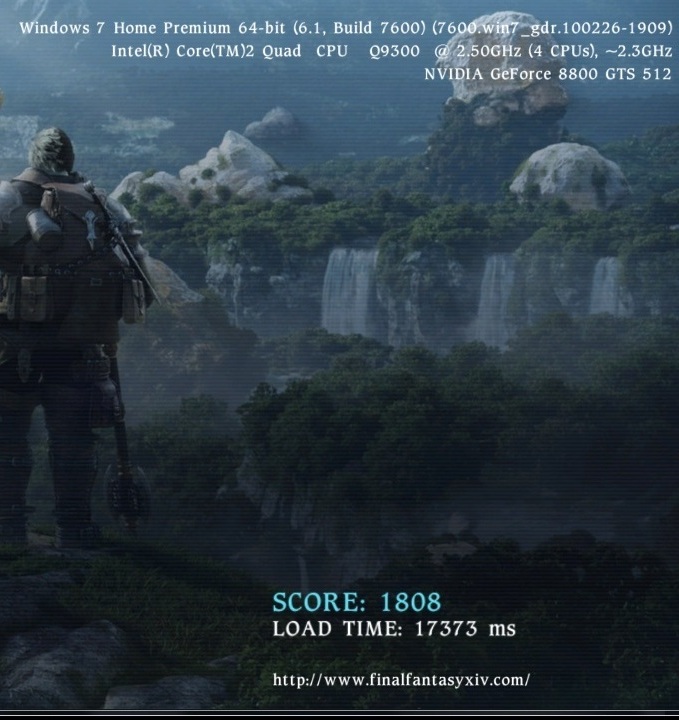
Edit: Ran it under Low Settings as well and the video felt faster, wasn't sure if to shoot for low or high setting though
-
2010-07-02 00:05 #954Puppetmaster
- Join Date
- Aug 2009
- Posts
- 72
- BG Level
- 2
do you mind me asking how much ram you have meian? i have the q9300 paired with an 8800gt and my scores for low were ~2300 on low and ~1300 on high
thanks
-
2010-07-02 00:06 #955Relic Shield
- Join Date
- Jan 2009
- Posts
- 1,646
- BG Level
- 6
- FFXI Server
- Bismarck
http://i50.tinypic.com/2ur6r10.png
Can only test 720p on my monitor since it's a 19" and doesn't support 1080p ;< Will test 1080p on my HDTV in the morning.
ATI Radeon HD5750 @ 825/1325
Phenom II X4 955 @ 3.8
Anyone know why my load time is so incredibly high compared to others'?
-
2010-07-02 00:19 #956A. Body
- Join Date
- Oct 2006
- Posts
- 4,003
- BG Level
- 7
- FFXI Server
- Cerberus
That was strange for some reason I thought it listed it but it is 4 gigs of corsair ram. Friend had similar score to yours but he has 32 bit windows vista Originally Posted by Neg939
-
2010-07-02 01:37 #957Puppetmaster
- Join Date
- Aug 2009
- Posts
- 72
- BG Level
- 2
yea im on 32 bit vista as well, im curious if the ~800mb of ram available to you and the performance improvement of the gts is giving you that edge
anyways thanks for the info
-
2010-07-02 02:18 #958Melee Summoner
- Join Date
- Apr 2010
- Posts
- 33
- BG Level
- 1
Just got a chance to run this myself finally (low)
Score: 2646
Load time: 18998 ms
Meh, nothing special but it'll run so I can always upgrade later at my own leisure and not HAVE to do it right away to play.
-
2010-07-02 04:46 #959RIDE ARMOR
- Join Date
- Jul 2010
- Posts
- 11
- BG Level
- 1
After reading Celeras' blog I decided to overclock my processor and test out my new benchmark scores,
CPU: Phenom II X6 1055t @ 4.0GHz
RAM: 4Gigs Hynix DDR3 1333 @ 1525MHz
GPU: 2x Diamond 5770 @ 930/1300 In Crossfire X (8x/8x)
I was rather pleased with the results (shortly after I tried overclocking my cards further for a 50/40 increase in scores) seeing as how the results of my system faired very well against setups in higher price ranges ($199 1055t / $250 for 2x 5770s), a testament to the price/performance of AMD.
LOW settings:
http://i366.photobucket.com/albums/o...2/FFXIVLow.jpg
HIGH settings:
http://i366.photobucket.com/albums/o...2/FFIVHigh.jpg
-
2010-07-02 05:14 #960Tamale Baby
Groundskeeper of the House of Weave
- Join Date
- Mar 2009
- Posts
- 698
- BG Level
- 5
- FFXI Server
- Bahamut
anyone know if its going to be SLI compatible by launch?
inb4 how the fuck would people know.

