 XI Wiki

Just finishing building a new computer and I'm having the following issue:
-Primary monitor: bios screen loads on it and so does windows startup logo
-2ndary monitor: the moment windows desktop loads up the Primary monitor goes black and the secondary monitor loads the desktop.
-my computer doesn't recognize the primary monitor under the control panel/nvidia options. It's set as a digital monitor or w/e, but you can drag stuff over to the black monitor (ie primary monitor) even though the primary monitor is stuck in standby mode.
I have tried extending both monitors and all that jazz... Have tried plugging them into the 2ndary sli card. Anybody have an idea what's up w/this? Thank you!!
- Navigation
Results 1 to 4 of 4
Thread: Dual Monitor Problem


-
2013-11-07 03:44 #1Ridill

- Join Date
- Jul 2006
- Posts
- 12,621
- BG Level
- 9
- FFXI Server
- Ramuh
- WoW Realm
- Kilrogg

Dual Monitor Problem
-
2013-11-07 09:07 #2Relic Shield
- Join Date
- Nov 2004
- Posts
- 1,429
- BG Level
- 6
- FFXI Server
- Bahamut
Sounds like windows thinks your secondary monitor is the main one, and the one you would like to be primary is going to standby on it's own.
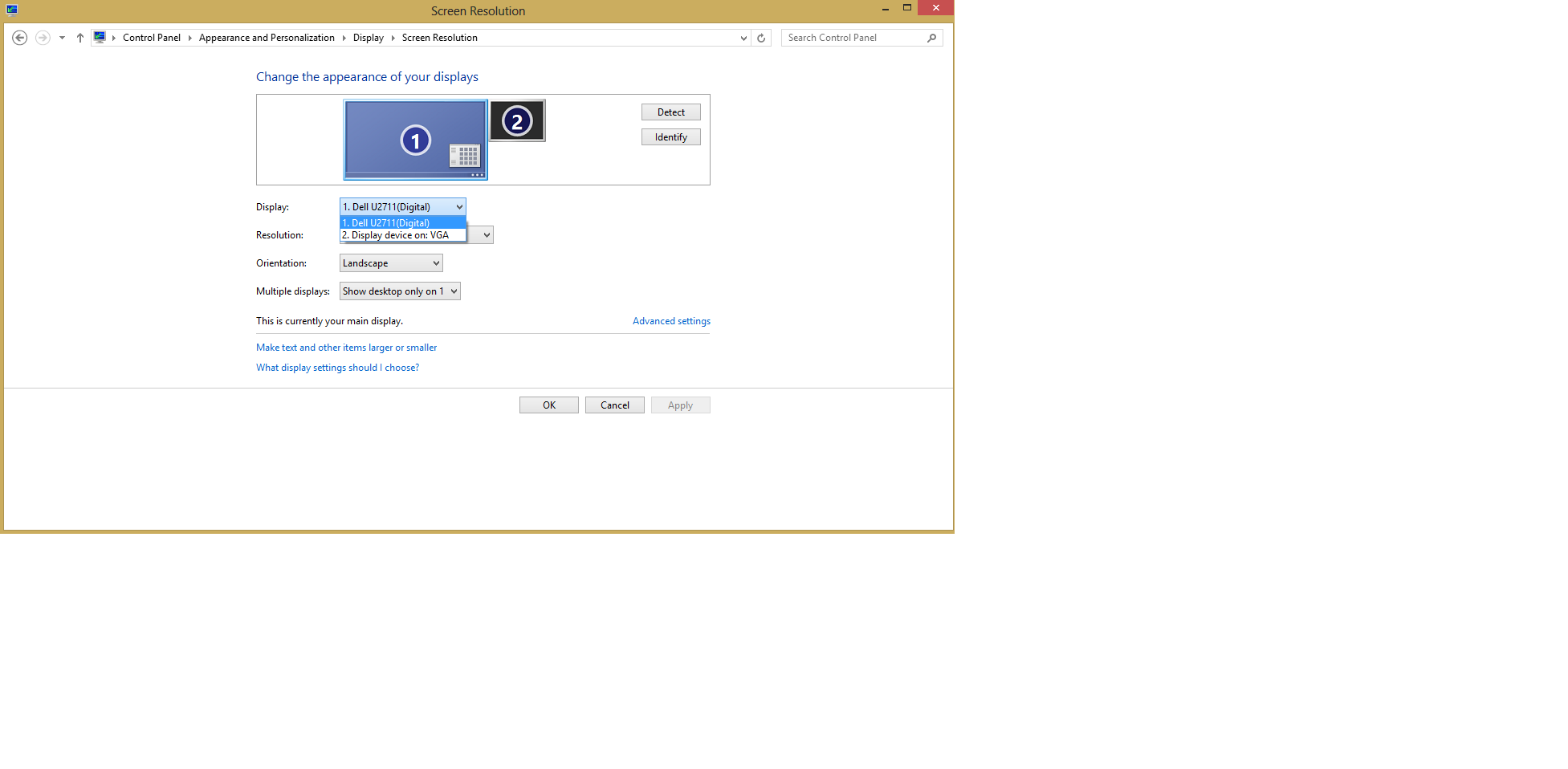
Right click desktop > screen resolution. Theres a checkbox that says 'Make this my main display' on whatever monitor isn't set to primary. Make sure windows knows which one you want to be primary.
Generally the reason BIOS and the windows logo loads on the primary monitor is because the hardware recognizes it as being primary but that changes when windows loads and it has a different understanding of which should be primary.
-
2013-11-07 12:28 #3Ridill
- Join Date
- Jul 2006
- Posts
- 12,621
- BG Level
- 9
- FFXI Server
- Ramuh
- WoW Realm
- Kilrogg
That didn't work. I have tried all of that normal stuff. Here is a picture of what I get. the "Display on VGA" was something I did, but it doesn't do anything. It's kind of like a fake display that isnt really there. Also under "multiple displays" when i choose "extend" it doesnt do anything either
Spoiler: show
edit: fixed it, had to resst the drivers since i guess they never loaded properly. Thanks for the help!
-
2013-11-07 14:08 #4Relic Shield
- Join Date
- Nov 2004
- Posts
- 1,429
- BG Level
- 6
- FFXI Server
- Bahamut
You're welcome.


Similar Threads
-
Same DUal monitor questions
By The_OG_Nelta in forum TechReplies: 2Last Post: 2008-10-23, 19:48 -
Very odd Dual Boxing problem
By Zaerus in forum TechReplies: 3Last Post: 2008-10-16, 22:23 -
Dual Monitor Questions
By The_OG_Nelta in forum TechReplies: 4Last Post: 2008-09-19, 22:29 -
Dual Monitor + Alarm
By cyanide in forum TechReplies: 7Last Post: 2008-03-14, 13:06 -
Dual Display problems.
By Girl in forum TechReplies: 1Last Post: 2007-12-31, 09:09 -
Dual monitor color matching...
By Boyiee in forum TechReplies: 3Last Post: 2007-04-04, 18:39