 XI Wiki


So, I've been having issue running games like WoW and Path of Exile. I get lag spikes or my framerate tanks when there's even a medium amount of things going on. I was getting kinda used to it, but now it's just been incredibly frustrating. I don't think I've ever played a game without framerate issues to be honest.
So my question is, what am I doing wrong and how can I go about fixing this? What do I need to learn to be able to fix this myself?
- Navigation
Results 1 to 20 of 20
-
2015-09-12 21:59 #1Ridill

- Join Date
- Dec 2006
- Posts
- 9,727
- BG Level
- 8
- FFXI Server
- Asura

PC games laggy and bad framerate.
-
2015-09-13 00:42 #2Salvage Bans
- Join Date
- Feb 2007
- Posts
- 811
- BG Level
- 5
- FFXIV Character
- Orinthia Warsong
- FFXIV Server
- Excalibur
- FFXI Server
- Bahamut

Check task manager for anything eating a ton of cpu time, see what programs you've got on startup (startup tab in win8, i forget in win7) -> disable useless/semi useless ones (do you really need update checkers/etc), download more ram (trust me, i'm a dolphin), turn off or uninstall antivirus (or try a different one, some become hogs or go to shit after a while), how old is pc, are its components meant for just running a web browser or was it actually meant for games, etc. Lots of things to check and lots of reasons it could be bad where you're just seeing the end results without knowing it.
-
2015-09-13 06:52 #32600klub
Sweaty Dick Punching Enthusiast
- Join Date
- Dec 2008
- Posts
- 5,467
- BG Level
- 8
- FFXI Server
- Bismarck

Post full specs.
Go to task manager and see whats running on startup.
Grab http://www.cpuid.com/downloads/hwmon...nitor_1.28.exe and keep an eye on cpu/gpu temps while your playing, see if they're overheating and getting throttled.
-
2015-09-14 15:02 #4Ridill
- Join Date
- Dec 2006
- Posts
- 9,727
- BG Level
- 8
- FFXI Server
- Asura
Yeah I never know what's considered important in the task manager, so I don't know what to remove. 8gb RAM AMD PhenomII x4 810 2.60ghz AMD Radeon HD 6670
-
2015-09-14 16:14 #5Remit One (1) Custom Title
- Join Date
- Sep 2007
- Posts
- 2,397
- BG Level
- 7
- FFXIV Character
- Qeomash Pandemonium
- FFXIV Server
- Cactuar
- FFXI Server
- Asura
Also just check memory useage. If I ever hit about 85% useage, some games and other programs get very laggy for me.
-
2015-09-14 16:43 #6Mithra Ero-Sensei
Sex Manthra
- Join Date
- Nov 2005
- Posts
- 10,160
- BG Level
- 9
- FFXIV Character
- Erosensei Gulkeeva
- FFXIV Server
- Gilgamesh
- FFXI Server
- Cerberus
- WoW Realm
- Magtheridon

 could post a picture of whats running, when running a game and start to see stuttering.
 Originally Posted by Tricen

I had this "stutter" once before, and it was caused from using too much Vram at the res I was playing for FFXIV, so I'd get a lot of micro stutters.
/example screenshot
http://www.neko-sentai.com/images14/memory.jpg
-
2015-09-14 18:29 #7Ridill
- Join Date
- Dec 2006
- Posts
- 9,727
- BG Level
- 8
- FFXI Server
- Asura
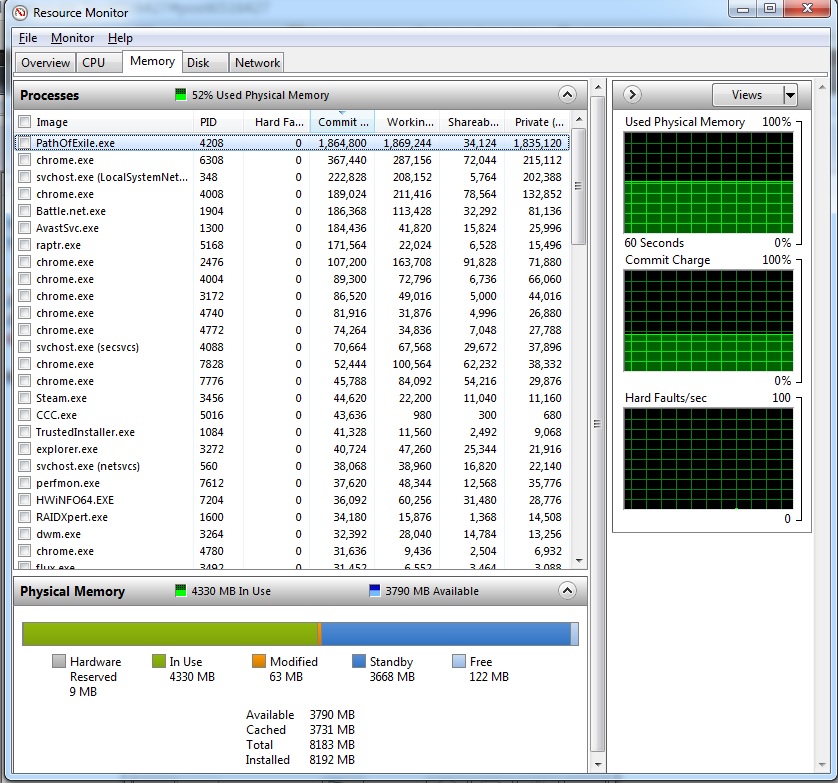
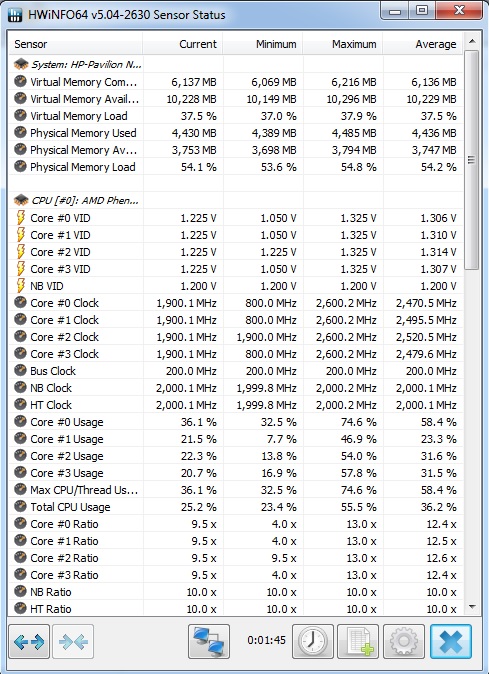
-
2015-09-14 19:27 #82600klub
Sweaty Dick Punching Enthusiast
- Join Date
- Dec 2008
- Posts
- 5,467
- BG Level
- 8
- FFXI Server
- Bismarck
Did you put avast into silent/gaming mode?
-
2015-09-14 20:11 #9Ridill
- Join Date
- Dec 2006
- Posts
- 9,727
- BG Level
- 8
- FFXI Server
- Asura
I thought I had it checked, but thanks for reminding me
-
2015-09-14 22:07 #10Mithra Ero-Sensei
Sex Manthra
- Join Date
- Nov 2005
- Posts
- 10,160
- BG Level
- 9
- FFXIV Character
- Erosensei Gulkeeva
- FFXIV Server
- Gilgamesh
- FFXI Server
- Cerberus
- WoW Realm
- Magtheridon
Ya forgot to add your video card in that hwinfo window...! Originally Posted by Tricen
looks like your running windows 7, you may want to periodically shutdown through resourcemonitor the
svchost.exe
For whatever reason, over time it gets really large and uses an obscene amount of ram. Don't worry, it doesn't seem to affect anything, and will restart itself but be much smaller. It tends to run around 20-30MB. but I've seen it bloat into the multi GB range over time.
Anyway if you can, post a pic of hwinfo with the video card information after running a game or 2 until your PC starts stuttering and also resource monitor
-
2015-09-14 22:24 #11Ridill
- Join Date
- Dec 2006
- Posts
- 9,727
- BG Level
- 8
- FFXI Server
- Asura
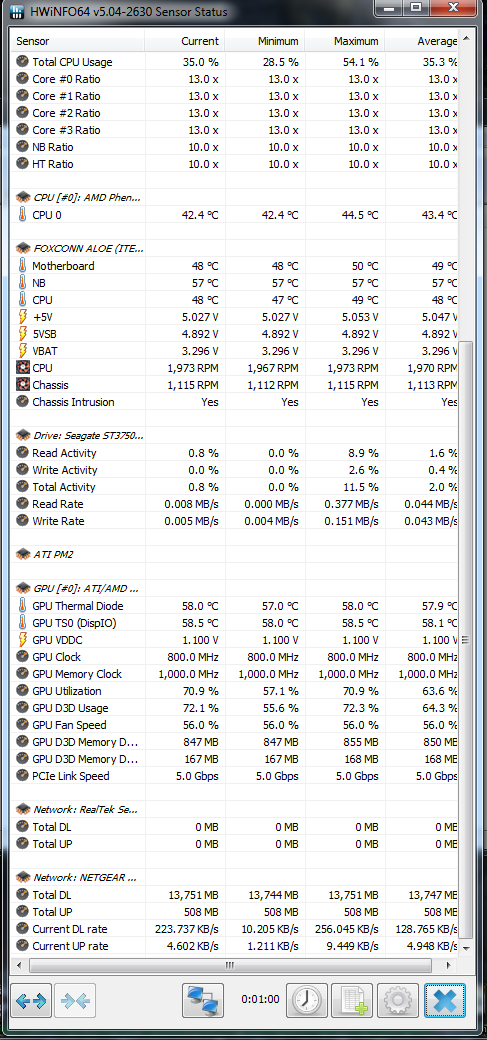
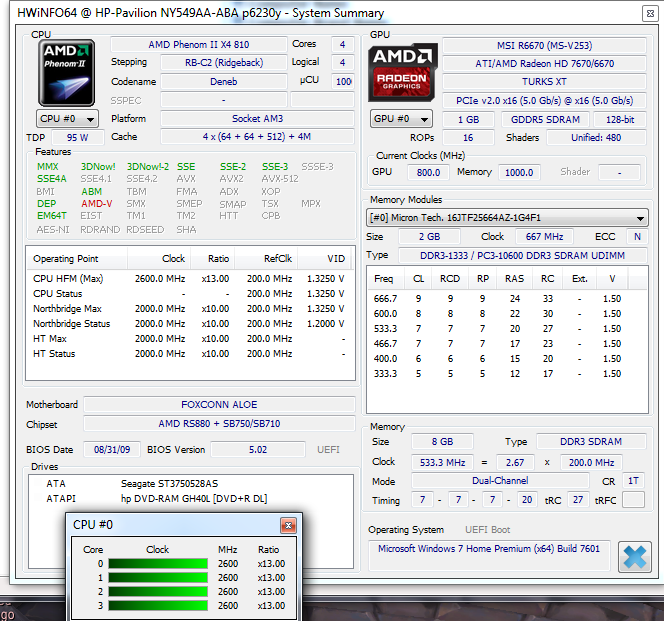
Are these what you mean?
-
2015-09-14 23:07 #12Mithra Ero-Sensei
Sex Manthra
- Join Date
- Nov 2005
- Posts
- 10,160
- BG Level
- 9
- FFXIV Character
- Erosensei Gulkeeva
- FFXIV Server
- Gilgamesh
- FFXI Server
- Cerberus
- WoW Realm
- Magtheridon
yup, and all of that seems normal, if that is the hwinfo & resoursemanager reading WHILE your game is stuttering
Few random questions
1. Do you recall possibly installing something before the stutters happened?
2.Have you tried completely turning off any AND ALL virus scanners/spyware/malware/trojan/internet/e-mail/anything scanners/monitor programs (not sleep/dorman, 100% shut down and no longer shown running at all anywhere)
3.By chance does this stutter happen anywhere else? Such as viewing videos, file transferring large files (erratic transfer speed for 1 large file)
4. Do you run fraps? any sort of streaming software? video recording software.
5.When is the last time you updated video drivers?
6. How old is the hardrive by chance? Have you tried defrag?
Possibly use
http://crystalmark.info/software/Cry...o/index-e.html
and see what condition the hardrive is in. (There is good/warning/bad/yourrapingadeadcorpse)
IF, by chance most of the above is recent/not bad condition, THEN do the below and people can look over it to see if possibly you have a virus/trojan/malware.
If you can, use this program (with log)
http://sourceforge.net/projects/hjt/
and post the log of what it finds here (Don't actually do anything in the program besides copy and pasting the log of its scan here)
-
2015-09-14 23:52 #13Salvage Bans
- Join Date
- Feb 2007
- Posts
- 811
- BG Level
- 5
- FFXIV Character
- Orinthia Warsong
- FFXIV Server
- Excalibur
- FFXI Server
- Bahamut
Hmm, your machine isn't that far ahead of my old laptop in terms of general power, so I hope you're not dealing with high settings unless you're on a low res, like 720p, since that's mostly budget stuff from quite a long time ago. Try reduced settings and see about getting into those similar situations. Originally Posted by Tricen
Other than that, close down chrome and other programs before you start playing unless you need them for reference while playing. Sometimes having many browsers/tabs/etc open can lead to slowdowns just due to there not being enough available ram and it using much slower virtual memory too often.
-
2015-09-15 14:37 #14Ridill
- Join Date
- Dec 2006
- Posts
- 9,727
- BG Level
- 8
- FFXI Server
- Asura
I was playing WoW last night and it ran much smoother than normal for some reason. Still not super clean, but a lot better than usual. I haven't play the other game yet, which is the one that suffers the most. If there's too much clutter going on then it stutters and gets super choppy. I didn't think my PC was that bad, I mean it has a decent graphics card and the other stats are ok. I cut back on some of the qualities and stuff too. Originally Posted by Gulkeeva
I don't run fraps, no. As for drivers, I could check, but I think there's random programs that do it. I have some thing called raptr and the catalyst control center thing... Also the HP thing auto detects things I guess? It randomly pops up and is kind of annoying. Maybe I'm just bad at cleaning things out.
-
2015-09-15 14:52 #15Special at 11:30 or w/e
Sweaty Dick Punching Enthusiast
- Join Date
- Feb 2012
- Posts
- 10,263
- BG Level
- 9
- FFXIV Character
- Kalmado Espiritu
- FFXIV Server
- Gilgamesh
- FFXI Server
- Sylph
- Blog Entries
- 4
 I'm not familiar with WoW or Path Of Exile so I'm not sure how much vram they use, but 1gb vram is low. Also, ram speed is a little low and the processor could be a little stronger. With those things factored in, and any extras running in the background, I'd imagine that's the cause of things running slower at times. You definitely do not need Raptr as it's an extra from AMD. Also, new drivers were released a few weeks ago and so far for myself they run fine. http://support.amd.com/en-us/downloa...Windows+7+-+64 Originally Posted by Tricen
I would think it wouldn't be a bad idea to start putting money aside for a new machine. You could build a newer machine for sub $500 that would be a massive upgrade to what you currently have.
-
2015-09-15 15:49 #16Ridill
- Join Date
- Dec 2006
- Posts
- 9,727
- BG Level
- 8
- FFXI Server
- Asura
Yeah true, I guess I should just invest into a newer PC. Thanks for all the info guys

-
2015-09-15 16:31 #17Banned.

- Join Date
- Sep 2015
- Posts
- 5
- BG Level
- 0
You sound like you are either running too many things at once, or you have a virus. Also, your graphics card isn't that great, it's not even in the top 10 graphics cards on the market.
You might also have too much stuff on your computer. If you are playing a game like FFXIV you want to have very few things open at one time because you need to allow the game to take up about 4GB of space on your ram while its open.
-
2015-09-15 17:24 #18Special at 11:30 or w/e
Sweaty Dick Punching Enthusiast
- Join Date
- Feb 2012
- Posts
- 10,263
- BG Level
- 9
- FFXIV Character
- Kalmado Espiritu
- FFXIV Server
- Gilgamesh
- FFXI Server
- Sylph
- Blog Entries
- 4
Too bad you're not by me. I have a pretty decent build I need to unload that I'd let go to the right person for $400. Shipping would be a whopper.

-
2015-09-15 18:50 #19Mithra Ero-Sensei
Sex Manthra
- Join Date
- Nov 2005
- Posts
- 10,160
- BG Level
- 9
- FFXIV Character
- Erosensei Gulkeeva
- FFXIV Server
- Gilgamesh
- FFXI Server
- Cerberus
- WoW Realm
- Magtheridon
invest in a newer video card first if anything Originally Posted by Tricen

the screenshot you posted was of a game pretty much capping you out on Vram. As I mentioned earlier post, depending on the game resolution it can cause stutters (especially as more things appear on the screen). Google chrome/firefox etc run "GPU" mode also, and using that while gaming could eat up all that is available causing stutters. 1GB video card is optimial for probably max settings 800x640 gaming, and high/medium 1920x1080/1240 gaming, max 1600/1680x1200/1050 gaming.
Speaking of which, I was looking to sell off a video card soon *cough cough* a Nvidia 670 with 2GB Vram, that can play games decently at 2560x1440p >.>
-
2015-09-15 19:11 #20Ridill
- Join Date
- Dec 2006
- Posts
- 9,727
- BG Level
- 8
- FFXI Server
- Asura
I'd just end up buying new tbh, but thanks :O


Similar Threads
-
Best headsets for PC gaming and ventrilo ?
By Neogearzx in forum TechReplies: 24Last Post: 2010-09-14, 07:41 -
PC gaming lockups and crashes
By Annihilator in forum TechReplies: 8Last Post: 2009-12-14, 16:26