 XI Wiki


My PC has a strange problem, that is basic but I don't know where to fix it.
My PC just goes to sleep after along period of inactivity (w/e i'm logged in with the session locked) of if the PC is at the Logon screen.
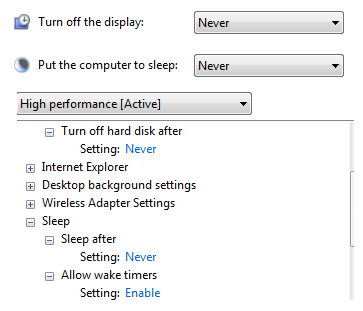
I went and made sure that in the powermanagement, eveywhere it said sleep i put it to Disable (or never) and it still goes to sleep
it's annoying because i'm trying to get some backups at like 4AM, and my PC just starts sleeping and I can't back up
- Navigation
Results 1 to 9 of 9
-
2014-12-02 09:15 #1BG's most likeable Québécois

Pens win! Pens Win!!! PENS WIN!!!!!
- Join Date
- Sep 2007
- Posts
- 37,887
- BG Level
- 10


Dumb sleep problem with Windows 7
-
2014-12-02 10:02 #2D. Ring
- Join Date
- Jul 2006
- Posts
- 4,945
- BG Level
- 7
- FFXIV Character
- Grey Jorildyn
- FFXIV Server
- Hyperion


Windows 7 has some weird sleep issues. I had/have a similar issue that no matter what, even with sleep disabled, my PC just hangs/freezes if I turn it on, use it for a bit, then let it idle for 30m. I have never figured out how to stop it despite all the googlefu.
-
2014-12-02 10:35 #3Relic Shield
- Join Date
- Nov 2004
- Posts
- 1,429
- BG Level
- 6
- FFXI Server
- Bahamut
^
Windows 7 has always had all kinds of stupid random sleep issues that no one can really figure out.
Just reformat.
-
2014-12-02 11:11 #4BG's most likeable Québécois
Pens win! Pens Win!!! PENS WIN!!!!!
- Join Date
- Sep 2007
- Posts
- 37,887
- BG Level
- 10
If it could be a windows 7 random problem, it might not be fixed wit hreformating.
So I wont spend 5+h to format something that is not 100% sure to work
-
2014-12-02 11:46 #5I Am, Who I Am.
- Join Date
- Nov 2005
- Posts
- 15,657
- BG Level
- 9
- FFXIV Character
- Trixi Sephyuyx
- FFXIV Server
- Excalibur
- FFXI Server
- Ragnarok
Windows in general has always had sleep issues.
I have always used it as a good indicator that it's time for a format when it stops working properly.
-
2014-12-02 13:14 #6A. Body
- Join Date
- Aug 2008
- Posts
- 4,264
- BG Level
- 7
Just write an AutoHotkey script to click your mouse for you after certain amount of minutes of inactivity. Set it to run on Startup and hide it from your task icons. (Set it and forget it)
I currently have one that keeps my Numlock turned on.
Here's one I found that Locks your computer after set amount of Inactivity. You can probably chop this up to remove the lockout and replace it with a mouse click.
Code:#Persistent #InstallKeybdHook ;Hooks required to get A_TimeIdlePhysical #InstallMouseHook ;Period of Inactivity in minutes after which to display the message InactivityPeriod_mins=5 ;Time in seconds to display the prompt after which the display is locked PromptPeriod_secs=5 ; Do not change anything else if you are not sure If !InactivityPeriod_mins < 5 { MsgBox,64,Error in settings,Inactivity period is set below 5 mins! Exiting...,5 ExitApp } If PromptPeriod_secs < 5 { MsgBox,64,Error in settings,Time to display prompt is set below 5 secs! Exiting...,5 ExitApp } SetTimer,CheckPeriod,1000 Return CheckPeriod: If (A_TimeIdlePhysical >= InactivityPeriod_mins*60*1000) { SetTimer,LockPC,% PromptPeriod_secs*1000 SetTimer,OKtoCancel,100 MsgBox,16,%InactivityPeriod_mins% minutes of inactivity, This computer will lock in %PromptPeriod_secs% seconds... } Return LockPC: SetTimer,LockPC,off IfWinExist,%InactivityPeriod_mins% minutes of inactivity { WinActivate Sleep 100 Run,%A_WinDir%\System32\Rundll32.exe User32.dll`,LockWorkStation Sleep 1000 WinWaitActive WinClose } Return
-
2014-12-02 22:32 #7Salvage Bans
- Join Date
- Feb 2007
- Posts
- 811
- BG Level
- 5
- FFXIV Character
- Orinthia Warsong
- FFXIV Server
- Excalibur
- FFXI Server
- Bahamut

Back when I had win7 on my laptop, I set it to only turn off the screen after 30 minutes, but also had a clock widget that would play a sound every hour (was great for study times, or keeping a tab on gaming hours). That widget sound would actually wake the screen too, so maybe you could just get that widget. I would leave my laptop on at home all day and it'd always stay running (would remote into it occasionally). You could set its alarm for any time interval too (like every 20 minutes). Just have it alarm with a silent wave file and see if it still screen wakes. I no longer have a win7 install, so I can't try that out (should work but idk for sure).
Here: http://addgadgets.com/digital_clock/ , download the zip near the middle of the page.
-
2014-12-03 02:56 #8Yoshi P
- Join Date
- Aug 2006
- Posts
- 5,139
- BG Level
- 8
- FFXIV Character
- Dead Gye
- FFXIV Server
- Lamia
- FFXI Server
- Ragnarok
Interesting. I've never ever had a problem with windows 7 sleep. My desktop has been on for months at a time with no issues. Laptop as well. I never lock my computer though. Perhaps being in the lock screen or whatever is changing your power plan to something else? Try disabling sleep on every power plan, and then if that doesn't work try not locking your computer?
-
2014-12-04 10:47 #9A. Body
- Join Date
- Aug 2008
- Posts
- 4,264
- BG Level
- 7
It's funny this thread popped up, because just recently my PC started going to sleep mode after inactivity. This, I found odd, seeing as I had completely deleted hibernation mode, and had supposedly deactivated all sleep functions via Power Management. Went back in and it had seem to been reset. Windows Update maybe? :shrug:


Similar Threads
-
Problems with windows 7 Taskbar
By Rehont in forum TechReplies: 0Last Post: 2011-10-15, 19:34 -
Problem with crashing windows (not the OS)
By Jer in forum TechReplies: 4Last Post: 2009-06-28, 22:48