1. You are currently viewing a section that predates the release of FFXIV:ARR and the information you see here is most likely outdated and/or useless.
  1. FFXIV Reset Timers
    Last daily reset was 1 hours, 38 minutes ago / Next daily reset is in 22 hours, 21 minutes
    Last weekly reset was 18 hours, 38 minutes ago / Next weekly reset is in 5 days, 15 hours, 21 minutes
Results 1 to 3 of 3

Thread: Stuck at Login screen     submit to reddit submit to twitter

  1. #1
    Salvage Bans
    Join Date
    Jun 2007
    Posts
    931
    BG Level
    5

    Stuck at Login screen

    I asked this already in another thread but slowly it's starting to piss me off...so I figured I'd just make a new thread...

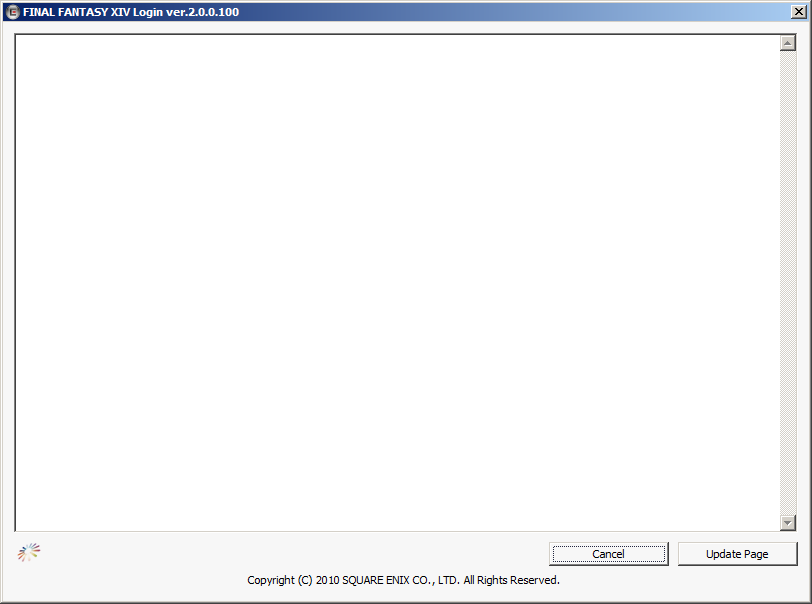
    Ok so here's the deal: I installed the game just fine, updated without any problems but when I try to launch the game I get stuck at this screen...


    Now the rainbow wheel thingy is spinning for maybe 1-2 seconds and then just stops. Clicking "Update page" does nothing and re-opening the window several times doesn't help either. Tried re-installing aswell. nVidia drivers and DirectX are up-to-date and I ran the closed beta just fine...

    My specs are:
    Spoiler: show

    -=-=-=-=-=-=- System Information -=-=-=-=-=-=-

    Operating System Microsoft Windows 7 64bit (build 7600)
    Processor Intel(R) Core(TM) i5 CPU 750 @ 2.67GHz
    Number of Processors Logical Core Count 4 Physical Core Count 4
    BIOS Award Modular BIOS v6.00PG
    Language English (Regional Setting: English)
    Physical Memory 4091.484MB
    Virtual Memory 2047.875MB
    Page File 8181.117MB
    Storage C:\ Hard Disk Drive Total Disk Space 326.042GB Free Disk Space 243.182GB
    Storage D:\ Hard Disk Drive Total Disk Space 302.734GB Free Disk Space 151.253GB
    Storage E:\ Hard Disk Drive Total Disk Space 302.733GB Free Disk Space 211.401GB
    DirectX Version DirectX 11
    Graphic Device(s) NVIDIA GeForce GTX 260
    +Device \\.\DISPLAY1
    +Chip GeForce GTX 260
    +Maker NVIDIA
    +Video Memory 877.375 MB
    +Shared Video Memory 1789.742 MB
    +DAC Type Integrated RAMDAC
    +Display Mode 1440 x 900 (32 bit) (60Hz)
    +Driver nvd3dumx.dll,nvwgf2umx.dll,nvwgf2umx.dll,nvd3dum,n vwgf2um,nvwgf2um
    +Driver Version 8.17.0012.5896
    +Driver Date 10/07/2010 00:38:00
    +Driver Language English
    +Vertex Shader 3.0
    +Pixel Shader 3.0
    +Vertex Texture Supported
    Sound Device(s) Lautsprecher (Realtek High Definition Audio)
    +Device ID {628B0F33-FB4E-4AA7-86E2-8865B1B75DC7}
    +Device Name RTKVHD64.sys
    +Driver Version 6.00.0001.5983
    +Driver Language English
    +Driver Date 24/11/2009 14:03:21
    Sound Device(s) Realtek Digital Output (Realtek High Definition Audio)
    +Device ID {E185D93F-2F2F-49B4-87C1-85175DEB3299}
    +Device Name RTKVHD64.sys
    +Driver Version 6.00.0001.5983
    +Driver Language English
    +Driver Date 24/11/2009 14:03:21
    Input Device(s) {6F1D2B60-D5A0-11CF-BFC7444553540000}
    +Name Mouse
    +Notes Axis 3 Button 8 Field of View 0
    Input Device(s) {6F1D2B61-D5A0-11CF-BFC7444553540000}
    +Name Keyboard
    +Notes Axis 0 Button 128 Field of View 0
    Input Device(s) {418FB390-0B9A-11DF-8001444553540000}
    +Name USB Receiver
    +Notes Axis 0 Button 652 Field of View 0
    Input Device(s) {41A2C660-0B9A-11DF-8002444553540000}
    +Name USB Receiver
    +Notes Axis 0 Button 0 Field of View 0
    Input Device(s) {41A2C660-0B9A-11DF-8003444553540000}
    +Name USB Receiver
    +Notes Axis 0 Button 0 Field of View 0


    Any help at all would be very welcome!

    (PS: a Random Tech Question thread for XIV would be cool...since there seem to be enough question)

  2. #2
    Smells like Onions
    Join Date
    Oct 2010
    Posts
    1
    BG Level
    0
    FFXI Server
    Carbuncle

    I am actually having this same issue. looks to be a problem with ie? anyone know of a fix for this?

  3. #3
    Chram
    Join Date
    Aug 2007
    Posts
    2,699
    BG Level
    7
    FFXIV Character
    Nours Sruon
    FFXIV Server
    Moogle
    FFXI Server
    Fenrir

    Check your Internet Explorer settings -> Security and Confidentiality tab
Similar Threads

  1. Running at 55-60fps but if you looked at my screen you'd guess 10-15. Anyone else?
    By YukonWildAss in forum FFXIV: Archive of the Ancients
    Replies: 28
    Last Post: 2010-12-15, 10:14
  2. Stuck at "Now Loading..." after char selection.
    By Synched in forum FFXIV: Archive of the Ancients
    Replies: 1
    Last Post: 2010-10-04, 10:07