 XI Wiki

No, computer did not blow up. Though it's also not turning on. Symptoms would be that the computer "was" on, but after smelling some burning from the general area of my computer room, I turned off my computer. Didn't notice anything apparently burning from my computer but when I tried to turn it back on, the power light blinked for a split second then turned off again. No fans or noises or anything else that could be used to diagnose the problem. I did try plugging the computer into another power plug just to check but doesn't seem to be that.
Not sure if this is a PSU problem, a power switch problem, or something else.

- Navigation
Results 1 to 20 of 20
Thread: Computer blew up?


-
2015-08-17 09:34 #1
Computer blew up?
-
2015-08-17 10:12 #2Pandemonium

- Join Date
- Feb 2010
- Posts
- 7,698
- BG Level
- 8
- FFXI Server
- Sylph

Your most likely culprit is your PSU, yah.
-
2015-08-17 12:34 #3She Shoots For The Stars
- Join Date
- Aug 2009
- Posts
- 1,663
- BG Level
- 6
- FFXIV Character
- Elizara Paksenarrion
- FFXIV Server
- Excalibur
- FFXI Server
- Quetzalcoatl


It prolly is the psu from my experience with my first pc (I had THREE powersupplies fry on that thing. Three.)
Just be aware you may want to check everything once you rep the PSU and can turn it on again. PSU blowing can fry other things in a PC, which is proly why that pc acted wonky (and I couldn't even run Firefox on it back then ugh) after I finally got it back up. I never tested it but I blame the fried psus on it.
-
2015-08-17 13:02 #4
Yeah, asked a few other people and all seemed to agree that it's most likely the PSU. Now the issue is just whether I want to deal with warranty with Corsair and be out my main computer for 10-30 days or just buy a new PSU.
-
2015-08-17 14:11 #5The Tower
- Join Date
- Apr 2005
- Posts
- 2,160
- BG Level
- 7
- FFXIV Character
- Stromgarde Siren
- FFXIV Server
- Gilgamesh
- FFXI Server
- Siren

Order a new one, RMA the existing one, and eBay the replacement when it arrives.
-
2015-08-17 15:30 #6Nidhogg
- Join Date
- Jul 2006
- Posts
- 3,999
- BG Level
- 7
Corsair warranty is pretty painless. I think they even offer a service where they'll send you the replacement before you send in yours as well for a fee?
Figured I'd add this to the discussion but in the past I had something similar happen and assumed it was my PSU as well. Tested the voltage and even RMA'd it. Turned out it was the motherboard that was faulty, it wasn't regulating the power properly and ended up frying itself. Not saying that's the case here, but it's something to be aware of
-
2015-08-17 16:08 #7
Kind of hoping it is just the PSU. Anything more and I don't have enough technical knowledge to troubleshoot. I'm just going to go buy another PSU and start the RMA process. I don't have the original receipt so hoping that won't be an issue.
-
2015-08-17 19:03 #8
Bought a another psu, still not turning on. Diagnostic lights not turning on either so probably dead motherboard

-
2015-08-17 19:10 #9Member since 2006 and still can't think of a title.
- Join Date
- Oct 2006
- Posts
- 28,697
- BG Level
- 10
- FFXIV Character
- Acanis Lindri
- FFXIV Server
- Midgardsormr
- FFXI Server
- Bismarck
- WoW Realm
- Kil'jaeden
Yeah, i've seen that happen more times then I care to admit. Is your motherboard under warranty as well?
-
2015-08-17 20:27 #10
- Join Date
- Feb 2009
- Posts
- 8,781
- BG Level
- 8
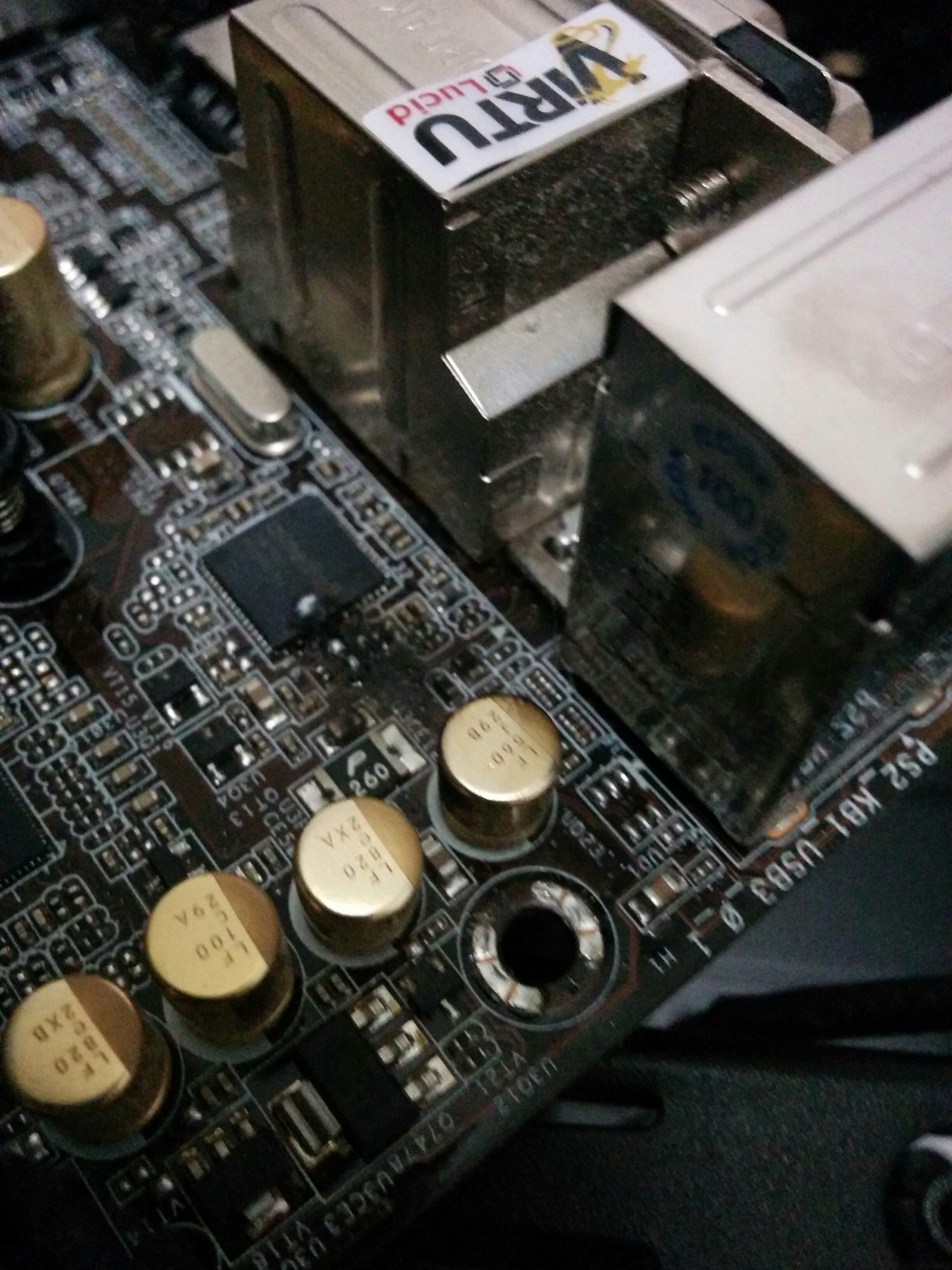
check around the 24 pin and 8pin CPU on the board, look for any browning or darkish areas on the board or connector. If you have an extra build on hand I suggest taking your RAM, CPU (if socket allows), GPU, HDD and make sure everything in that nature still functions and isn't damaged. If the board is dead there is a moderately high chance that anything in the general area of the plug you may find any browning or darkish areas. If its from the 24 pin connector then there is a very high chance that everything on the board is shot because that's where the main distribution of power is handled for the board to function.
-
2015-08-17 21:44 #11
-
2015-08-17 21:46 #12
So yea, checked and a chip near the 8 pin is burned out. Even now the motherboard I had is still over $200 it seems so replacing it is going to be a pain.
It's the ASRock z77 extreme4 lga1155 and it's off warranty. Seems they only have 1yr on it.
-
2015-08-17 22:03 #13
Also I apologize, can't resize image from Tapatalk. I'd it worth it to buy the same mb back or just upgraded that along with the CPU? I'm not even sure if the CPU cooler would fit on newer boards.
-
2015-08-17 22:46 #14
- Join Date
- Feb 2009
- Posts
- 8,781
- BG Level
- 8
That looks like a rom chip, could be mistaken but that could be either your bios or master boot rom which is what is leading to your pc being able to boot let alone get to post.
What CPU cooler did you have seated in your pc before? Most after market coolers will fit most if not all boards as they're built around the form factors of the CPU sockets rather just the board itself.
-
2015-08-17 23:21 #15
Can't find the model but its a cooler master. One of the large copper and aluminum blocks. It should fit the new one that I'm trying to buy which is the asrock z75
-
2015-08-18 05:42 #16Pandemonium
- Join Date
- Feb 2010
- Posts
- 7,698
- BG Level
- 8
- FFXI Server
- Sylph
That's a good catch Kirby, on the mobo.
I'd recommend replacing the PSU still. Something caused your mobo to have a thermal event and feedback from your PSU could be the culprit.
And yes, your cooler should fit the new mobo with no problems.
-
2015-08-18 08:18 #17
yeah, I've been told to RMA the old PSU regardless since mobos don't usually spontaneously burn out. =( I'm dreading the process of porting windows over to a new board though, it's also running Win10 so I need to get a recovery USB setup for that.
-
2015-08-18 19:04 #18
I'm actually somewhat confused and not sure if I'm lucky, if Win10 has some new features? Or if it's buggy and I just don't know it. I installed the new mobo and started it up and Windows 10 loaded up fairly smoothly. It had to reinstall some of the drivers but otherwise everything seems? to be working fine.
Also, Bios isn't even recognizing the Windows 10 Recovery USB as a bootup device, not sure if it's because it's connected to the USB header as opposed to the USB ports in the back. I mean, it recognizes it fine inside windows, just not during startup.
-
2015-08-18 20:22 #19
- Join Date
- Feb 2009
- Posts
- 8,781
- BG Level
- 8
You probably have to go into the BIOS and set the boot priority to the USB over the HDD.
-
2015-08-18 21:51 #20
yeah, bios doesn't recognize the usb drive


Similar Threads
-
Computer Locking Up
By Darkdreamer in forum TechReplies: 19Last Post: 2013-11-24, 19:35 -
Computer boot up issues
By pohibaba in forum TechReplies: 6Last Post: 2011-08-24, 06:39 -
Help!! Computer start up problems.
By Metta in forum TechReplies: 1Last Post: 2011-04-17, 12:32 -
Computer locks up for no reason
By Syntex in forum TechReplies: 5Last Post: 2010-09-05, 20:31 -
Computer lock up
By Gokauka in forum TechReplies: 6Last Post: 2010-04-26, 08:29 -
Thinking of picking up a new computer (No OS Systems)
By Zanz L. Barre The 3rd in forum TechReplies: 5Last Post: 2007-11-09, 11:54 -
Problem when computer starts up
By Taera in forum TechReplies: 5Last Post: 2007-08-13, 17:21