 XI Wiki


Spoiler: show
preface: i'm not the best with computers
problem 1: about the time i've done a clean install and new hardware and stuff (around early june?) there would be periodical slowdowns where most of my cpu and memory would be hogged and shit would run choppy and music would play a little slowed down. after shrugging it off for a while, i got fed up when it happened during ffxiv and found that the svchost thing was running with like 600,000. i tried googling a solution but aside from tips on how to find the culprit, i'm seeing stars amidst jargon. anyone know what's going on?
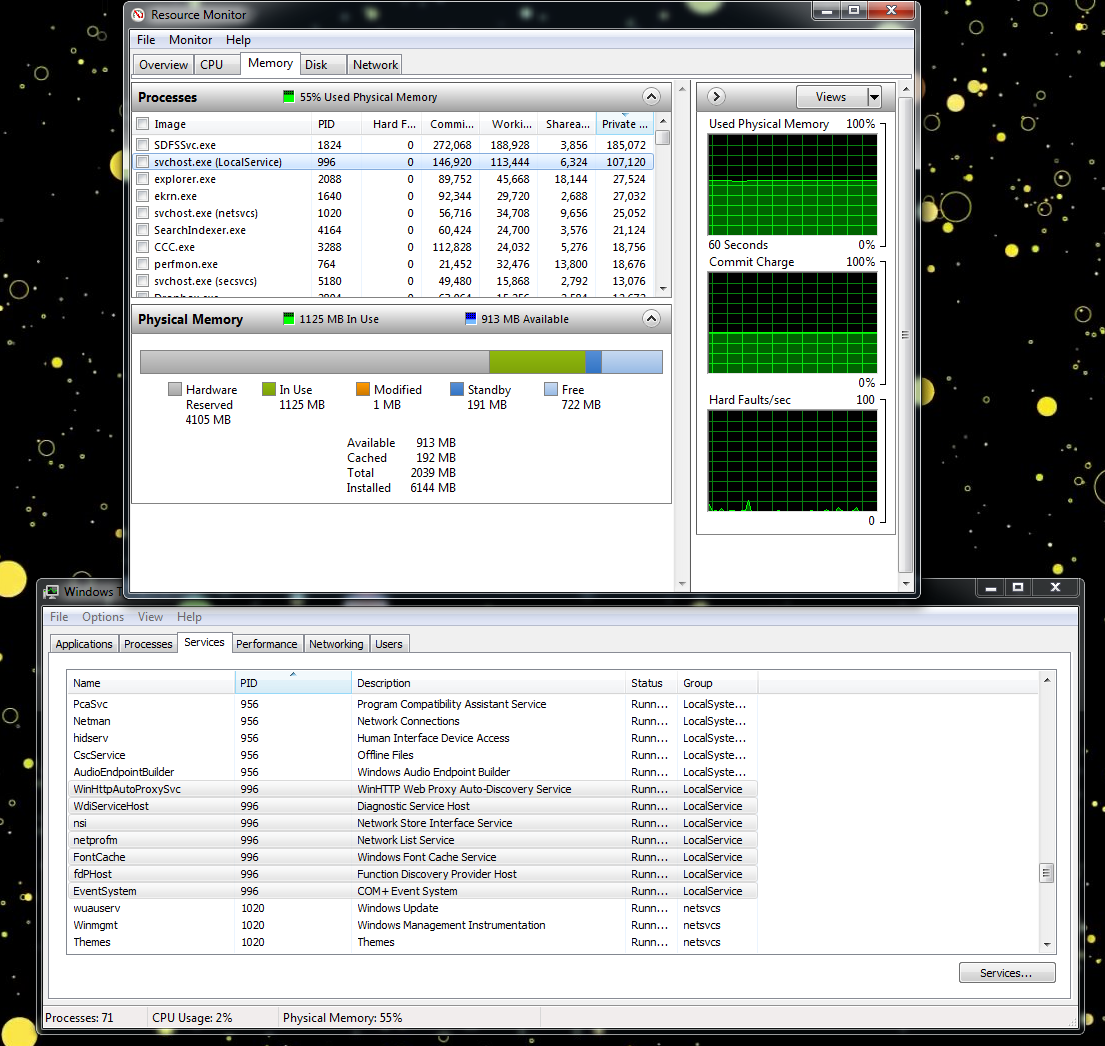
problem 2: this is somewhat independent of #1 but for the longest time, my computer says 4gb is hardware reserved and i could only use 2gb of the total 6gb ram. i tried solving this issue time after time but the best that would happened would me doing some major fuckup, forcefully restarting my computer only to see all 6gb working. however, when i restart it seems to go back to the 4gb/2gb issue. tried clicking on various options, reseating the ram, updating motherboard bios but nothing works: i am certain the sticks of ram are good since it did work momentarily. any clue?
- Navigation
Results 1 to 10 of 10
-
2013-08-19 18:38 #1E. Body

- Join Date
- Oct 2007
- Posts
- 2,001
- BG Level
- 7

two issues: svchost and disappearing ram
-
2013-08-20 02:51 #2Hyperion Cross
- Join Date
- Jan 2007
- Posts
- 8,889
- BG Level
- 8
- FFXIV Character
- Kai Bond
- FFXIV Server
- Gilgamesh


Need your:
OS (I think it's 7) -- 32bit/64? (actually i'm not sure if there's a 32 win7 lol)
CPU/GPU
The 4gb reserve could be for your video card (which sounds like it's onboard?). However, if you were playing ffxiv, it must have some sort of dedicated gpu, especially it sounds like a desktop.
Peek in your BIOS, it might have some setting about tweaking the reserve memory for the GPU.
Your first screenshot doesn't indicate the memory usage, so whatever was sucking up the RAM probably stopped at the time of the screenshot. At the same time, are you sure it's that exact same process? It looks fairly innocent.
It feels like an AMD CPU ... I don't think Intel CPUs reserve any memory for their onboard GPU these days ...
-
2013-08-20 08:40 #3E. Body
- Join Date
- Oct 2007
- Posts
- 2,001
- BG Level
- 7
sorry, should have mentioned its a desktop
using win 7 64x
mb: evga x58 sli 3x
i7-930
radeon saph hd 6870
yeah, i'm certain that PID is responsible for the leak, i just didnt think of taking a photo in time (not even sure if i could open the windows in time too, computer runs sooooo slow)
i played a bit with bios to no avail. in fact,
problem 3: i remember trying to set my ram to 9-9-9-24 cuz i saw it all over the mb and ram packaging and my comp wouldnt boot the os. had to reset a bunch of settings (overclocking stuff, gawd that shit is problem 4). whyyy
-
2013-08-20 10:25 #4Nidhogg
- Join Date
- Feb 2008
- Posts
- 3,790
- BG Level
- 7
- FFXIV Character
- Tsugaru Mifra
- FFXIV Server
- Hyperion
- FFXI Server
- Ragnarok


I had the same problem with my x58 as far as the memory disappearing. Some memory does not overlock well and when you start to shoot up your clocks, you lose memory. If you lower your clocks back to stock you`ll see your 6GB every time.
Also svchost is Service Host. Necessary service and likely a red herring.
When you`re experiencing the slowdown and choppiness what all are you doing on your computer other than FFXIV? Are you running videos or watching youtube? Streaming anything at all?
-
2013-08-20 10:48 #5E. Body
- Join Date
- Oct 2007
- Posts
- 2,001
- BG Level
- 7
everything's currently at stock though still no 6gb agggghhhhh
usually slowdowns happen just generally web browsing & playing music. i think a few times while watching movies. i usually have a bunch of torrents seeding also but i doubt that's an issue since it wasnt an issue before the hardware upgrade (just a new hdd and ssd). at first i thought it was some bs with putting os + programs on ssd while having media on the hdds but after seeing the 600,000 svchost used, i'm weary. they're also fairly infrequent; i'd say once every 1-3 weeks?
-
2013-08-20 11:36 #6Hyperion Cross
- Join Date
- Jan 2007
- Posts
- 8,889
- BG Level
- 8
- FFXIV Character
- Kai Bond
- FFXIV Server
- Gilgamesh
Not entirely familiar/knowledgable about overclocking, so I can't comment there.
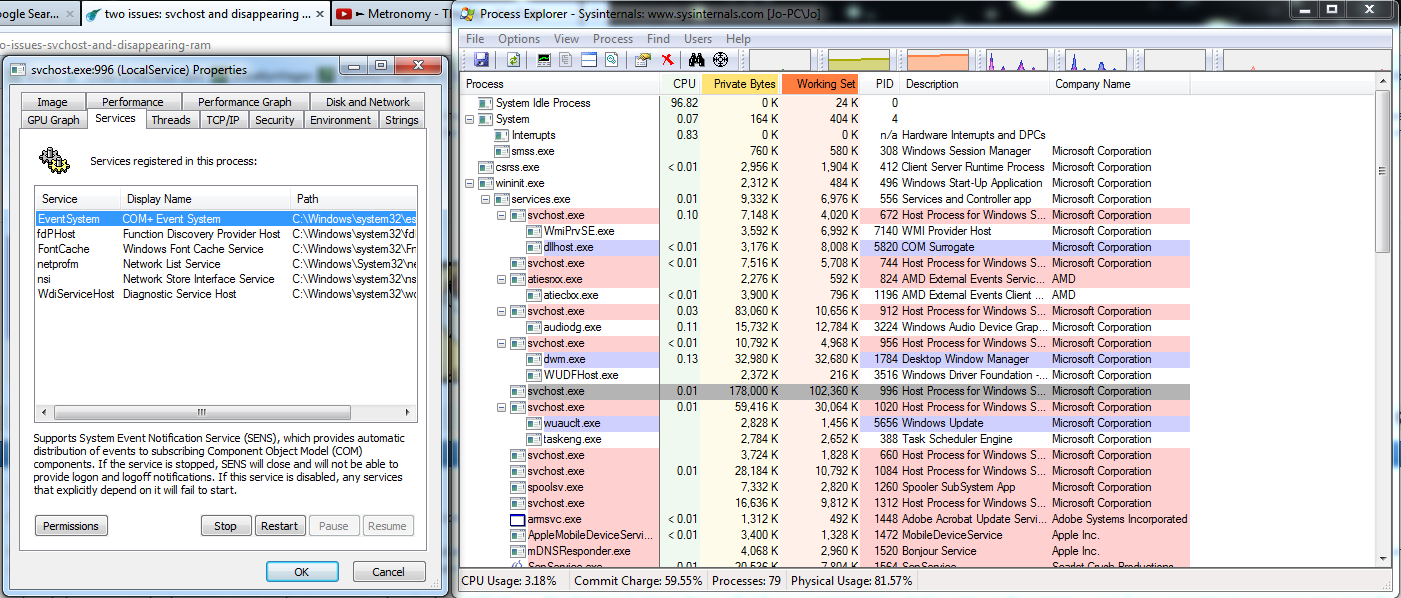
But, if it happens once every 1-3 weeks ... I bet it's Windows Update. Similar thread 2 pages in where I suggested it and it fixed someone's issue (was an off chance). Still, it's quite plausible. You're not the one person i've come across with svchost gobbling up memory like mad and slowing down the whole computer periodically and the culprit was Windows Update.
When it happens again do try to capture it. I suggest using SysinternalSuite ... the Process Explorer there will tell you approximately what's using up the memory, and if you can get into services.msc (not the panel you screenshotted) try and disable bits and bobs to see if anything goes down.
-
2013-08-20 12:44 #7Nidhogg
- Join Date
- Feb 2008
- Posts
- 3,790
- BG Level
- 7
- FFXIV Character
- Tsugaru Mifra
- FFXIV Server
- Hyperion
- FFXI Server
- Ragnarok
When you're watching anything that uses flash, right click the flash video, go to settings, click the first tab and uncheck "enable hardware acceleration" Originally Posted by Kais

-
2013-08-21 16:34 #8E. Body
- Join Date
- Oct 2007
- Posts
- 2,001
- BG Level
- 7
happened again
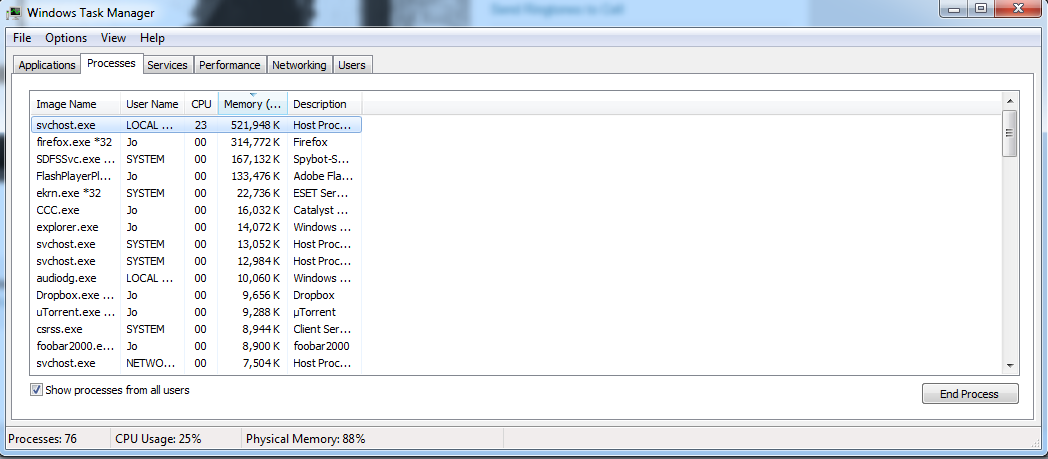
my windows update is set to check but lemme decide to download
unfortunately when i dl'd sysinternal and did all that stuff the memory died back down
also wasnt watching a video but i'll go uncheck the hardware acceleration anyways
-
2013-08-22 12:57 #9Bagel
- Join Date
- Oct 2007
- Posts
- 1,182
- BG Level
- 6
- FFXI Server
- Quetzalcoatl
Don't really have an answer for you but my old comouter used to have this problem (XP home) and for me it would have multiple times a day. I never found a solution either other than opening task manager and terminating the process. It will prevent it from hogging he memory but the process will eventually just start up again. I have a deep seeded hatred for svchost because of this issue. Seemingly there was nothing using it to cause it to eat up all my rescources, it would just happen randomly. In the days of ffxi it would bring my fps down to about 2fps.
Its possible my old computers problem was windows update but I don't think it was, too late to find out now. I'd like to see some answers to this problem though incase I ever encounter it again.
-
2013-08-23 08:45 #10Nidhogg
- Join Date
- Feb 2008
- Posts
- 3,790
- BG Level
- 7
- FFXIV Character
- Tsugaru Mifra
- FFXIV Server
- Hyperion
- FFXI Server
- Ragnarok
If you're blaming svchost specifically you obviously have no idea how Windows actually works. Svchost is what processes DLL files. There is a DLL on your system that is causing a memory leak and enlarging svchost. You need to find out what DLL that is and replace it. Fastest way will be to wipe your system honestly.
Also, deep-seated. Not deep-seeded.


Similar Threads
-
FFXI and two issues
By frodnonnag in forum TechReplies: 1Last Post: 2010-03-16, 23:54 -
Issue w/ sharing files between XP and Vista.
By pirahna1 in forum TechReplies: 5Last Post: 2007-08-29, 23:27 -
Ram and Processor
By altwight in forum TechReplies: 1Last Post: 2007-08-02, 10:02 -
Ram and Motherboard quick question
By altwight in forum TechReplies: 2Last Post: 2007-07-30, 20:06 -
Ram and motherboards
By altwight in forum TechReplies: 8Last Post: 2007-06-25, 09:21 -
RAM and Windows XP Installation
By Hollaback in forum TechReplies: 3Last Post: 2007-06-10, 11:18 -
Crashing upon toggling the status bar and other issues
By ach in forum TechReplies: 6Last Post: 2007-05-03, 22:41